How to setup homeway with Starlink

RoyY

Cadet 1st Year
Registriert
Aug. 2025
Beiträge
8
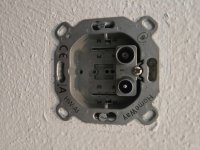
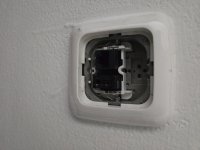
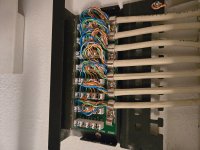
Ich bin gerade in ein Haus gezogen und habe ein "Heimsystem" (Bild 1/2), das Internet- und Fernsehsignale in meinem Keller verteilen soll, sowie andere Dinge, die ich nicht erkenne (Bild 3). Ich habe keine Netzwerkerfahrung, aber ich möchte es gerne mit meinem Starlink nutzen können, da das Signal nicht gut durch das Haus wandert.

Es gibt Ports in allen Schlafzimmern mit 2 Anschlüssen (Bild 4), aber sie haben keine weiblichen Ethernet-Stecker. Das Wohnzimmer und der Flur verfügen jedoch über Steckdosen mit 4 Anschlüssen (Bild 5).
Ich könnte etwas Hilfe gebrauchen, um dies zu verstehen und vielleicht eine Lösung dafür, wie ich dies nutzen kann, um Internet durch das Haus zu bekommen.

Ich bin kein deutscher Muttersprachler, dies wurde aus dem Englischen übersetzt.
1000004736.jpg
1000004737.jpg
1000004738.jpg
1000004739.jpg
20250822_170406.jpg
 
Ist dir englisch lieber / would you prefer English?
 
Yes, but either way chrome can translate for me if not
 
Auf Bild 3 handelt es sich um einen Verteiler für Telefonsignale. Wo kommt denn das dicke (10-paarige Kabel) her? So schaut es aus als ob nur eine Anschlussdose gleich daneben angeschlossen wäre.

Image 3 shows a distributor for telephone signals. Where does the thick cable (10 pairs) come from? It looks as if only one junction box is connected right next to it.
 
1: Patchpanel: Network cables to the rooms
2. Cable TV + INTERNET! --> you realy should use this instead of starlink.
3. Cable TV /Radio connector -->to TV
4. LAN Port in the rooms.
5. "APL" -> PSTN Connector Box from the Provider. Keep xour hands of this! Below the Box is the Connector to an DSL Router. -> You can also get Internet from a provider via DSL.

You can either use an DSL or Cable Internet contract. Put the router in this room, and use the patch cables and the patchpanel to distribute the internet through the house.

I think that would be easier, than trying to get the starlink cable into the house, Patch it in one room to the LAN Port and re-distrbute it from that room in the Pictures.


1755939093888.png


1755939310213.png

1755939340030.png
 
  • Gefällt mir
Reaktionen: ksk23
DevD2016 schrieb:
1: Patch panel: Network cables to the rooms
2. Cable TV + INTERNET! --> you really should use this instead of starlink.
3. Cable TV/Radio connector -->to TV
4. LAN port in the rooms.
5. "APL" -> PSTN Connector Box from the Provider. Keep xour hands of this! Below the box is the connector to a DSL router. -> You can also get Internet from a provider via DSL.

You can either use a DSL or Cable Internet contract. Put the router in this room, and use the patch cables and the patch panel to distribute the internet through the house.

I think that would be easier than trying to get the starlink cable into the house, patch it in one room to the LAN port and re-distrbute it from that room in the pictures.


Anhang anzeigen 1650213

Anhang anzeigen 1650221
Anhang anzeigen 1650222
I agree that it would be easier to get an internet contract from someone, but I already have the Starlink. I'm wondering if I can connect the Starlink router to this patch panel and use MOCA adapters to get internet in the rooms that don't have a LAN port? I'm just not sure how to get the signal from the router to distribute to the patch panel.
 
Ich würde mal die Dosen aus Bild 4 öffnen. Ich vermute dass das LAN-Kabel verlegt aber nur einfache Fernsehdosen in diesen Zimmern gesetzt wurden. Vom Patchpanel aus gehen jedenfalls LAN-Kabel in alle Räume. Dann sind auch keine MOCA-Adapter notwendig sondern eventuell nur ein Switch im Verteilerschrank neben dem Patchpanel um das Internet vom Starlinkrouter zu verteilen.

I would open the wall sockets shown in image 4. I suspect that the LAN cable has been laid, but only simple TV sockets have been installed in these rooms. In any case, LAN cables run from the patch panel to all rooms. This means that no MOCA adapters are necessary, but possibly only a switch in the distribution cabinet next to the patch panel to distribute the Internet from the Starlink router.
 
  • Gefällt mir
Reaktionen: DevD2016
If there is only coax in the "incoming starlink room" -> you can use MOCA.
Starlink router --> MOCA -> COAX -> Switch in the supply room -> Patchpanel > Rooms with LAN Ports -> WiFi Accesspoint. (f.e.)

If you use MOCA you have to disconnect the the coax from the distributor.
In no way the MOCA Adapter should be connected to the amplifier / outside coax!
 
Merlin352 schrieb:
I'd try opening the sockets shown in Figure 4. I suspect that the LAN cable has been laid, but only simple TV sockets have been installed in these rooms. In any case, LAN cables run from the patch panel to all rooms. Then no MOCA adapters are necessary, but perhaps only a switch in the distribution cabinet next to the patch panel to distribute the internet from the Starlink router.

I would open the wall sockets shown in image 4. I suspect that the LAN cable has been laid, but only simple TV sockets have been installed in these rooms. In any case, LAN cables run from the patch panel to all rooms. This means that no MOCA adapters are necessary, but possibly only a switch in the distribution cabinet next to the patch panel to distribute the Internet from the Starlink router.

Each of the covers have a proprietary homeway box where you can swap different plugs and ports. The ones with connections for tv look like this. You can add homeway LAN ports. I'm curious if the top connectors are able to broadcast internet if I hook up the router to the patch panel and use MOCA adapters or I could also purchase the LAN connectors that plug into the homeway socket.
 

Anhänge

  • 17559507640572796079891761074401.jpg
    17559507640572796079891761074401.jpg
    1,4 MB · Aufrufe: 60
DevD2016 schrieb:
If there is only coax in the "incoming starlink room" -> you can use MOCA.
Starlink router --> MOCA -> COAX -> Switch in the supply room -> Patch panel > Rooms with LAN Ports -> WiFi access point. (fe)

If you use MOCA you have to disconnect the the coax from the distributor.
In no way the MOCA Adapter should be connected to the amplifier / outside coax!
If I can swap out these plugs in the house to all have ethernet ports I should be able to broadcast from the basement with a switch connected to the black box with ethernet ports right?
 

Anhänge

  • 20250823_142434.jpg
    20250823_142434.jpg
    1,3 MB · Aufrufe: 52
If they are, correctly, connected -> yes. Plug in the single 1Gbit/s Module and you are good to go.
As far as i know the homeway stuff. ;-)

The module looks like the 100Mbit/s module. (not shielded. hmm yes must be 100Mbit/s, because the other wires where used for telephone)
)
My bet is that maybe somebody in the past allready changed stuff in the system.

make a picture of the patchpanel, so the connectors with the wires are good visible.
 
DevD2016 schrieb:
If they are, correctly, connected -> yes. Plug in the single 1Gbit/s module and you are good to go.
As far as I know the homeway stuff. ;-)

The module looks like the 100Mbit/s module. (not shielded. hmm yes must be 100Mbit/s, because the other wires where used for telephone)
)
My bet is that maybe somebody in the past allready changed stuff in the system.

take a picture of the patch panel, so the connectors with the wires are good visible.
Here is a better picture of the patch panel. Can I swap the existing homeway plugs for a different plug that would be faster than 100Mbit/s?
 

Anhänge

  • 1755972979766678714826685668702.jpg
    1755972979766678714826685668702.jpg
    1,4 MB · Aufrufe: 67
picture: looks ok-ish. Could have been done better/cleaner.

modules: as far as i know, you can change the modules. Maybe the base is different (modelchange)? look for the part numerb of the base and choose the module accordingly.

Don't put the module in with 2 LAN Ports. They provide only 100Mbit/s and you have to use the special patch cable.
The single one is 1Gbit/s. AFAIK. :-)
 
@DevD2016 I've wired the router output to each of the ethernet inputs on the patch panel and had a laptop connected to the LAN port in the hallway but it never receives any signal. I need to pick up a tester, but do you have any ideas based off the wiring and pictures I've posted as to why it wouldn't work?
 
I searched for it and find finaly something here in the Forum: :-)

Homeway Pinbelegung

The module which is installed now needs the y-cable do to the layout.

I would buy the Gbit module an test it. Should work. I think. ;-)
 
DevD2016 schrieb:
I searched for it and finally found something here in the forum: :-)

Homeway pinout

The module which is installed now needs the y-cable do to the layout.

I would buy the Gbit module to test it. Should work. I think. ;-)
Hmm I'll have to try that. Hopefully that's the issue
 
Zurück
Oben