PHP Beim resize wird das Thumbnail gedreht?

Blackbenji

Lieutenant
Registriert
Nov. 2009
Beiträge
565
Hallo,

ich habe mit dem iPhone ein Bild gemacht, es wurde hochkant aufgenommen.

Mittels folgendem Script lasse ich ein Thumbnail erstellen:

PHP:
//Your Image
$imgSrc = "img_2576.jpg";

//getting the image dimensions
list($width, $height) = getimagesize($imgSrc);

//saving the image into memory (for manipulation with GD Library)
$myImage = imagecreatefromjpeg($imgSrc);

// calculating the part of the image to use for thumbnail
if ($width > $height) {
    $y = 0;
    $x = ($width - $height) / 2;
    $smallestSide = $height;
} else {
    $x = 0;
    $y = ($height - $width) / 2;
    $smallestSide = $width;
}

// copying the part into thumbnail
$thumbSize = 100;
$thumb = imagecreatetruecolor($thumbSize, $thumbSize);
imagecopyresampled($thumb, $myImage, 0, 0, $x, $y, $thumbSize, $thumbSize,        $smallestSide, $smallestSide);

//final output
header('Content-type: image/jpeg');
imagejpeg($thumb);

Das Problem ist nun, dass das Thumbnail nach Links gekippt ist.
Das Originalbild aber normal hochkant zu sehen ist.

Ich kann mir leider nicht erklären woher das kommt?

Hat jemand eine Idee für mich?

Anbei die Infos zu meinem Bild:
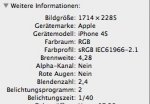
Bildschirmfoto 2013-04-19 um 07.53.12.jpg
 
Mahlzeit,

Aus der Doku zu imagecopyresampled:
If the source and destination coordinates and width and heights differ, appropriate stretching or shrinking of the image fragment will be performed. The coordinates refer to the upper left corner. This function can be used to copy regions within the same image (if dst_image is the same as src_image) but if the regions overlap the results will be unpredictable.

Ich denke im Aufruf von imagecopyresampled liegt der Fehler (Parameter).

Gruß
 
iPhone, hm? Über den Mist bin ich kürzlich erst gestolpert...
Das Ding bettet eine Menge unnützer Exif-Daten ein, unter anderem auch über die Lage (quer/hochkant). Manche Browser interpretieren diese Lage-Informationen, andere nicht.

Entsorge den Exif-Scheiß (spart außerdem gute 10-20kByte) und du bist das Problem wohl los.
 
okay,

zum prüfen:

PHP:
$exif = exif_read_data($imgSrc, 'IFD0');
echo $exif===false ? "Keine Headerdaten gefunden.<br />\n" : "Bild beinhaltet Header<br />\n";

zum entfernen:
PHP:
$res = imagecreatefromjpeg($imgSrc);
imagejpeg ($res, $imgSrc, '100');

nur ist dann das neue bild welches keinen exif header mehr hat auch gedreht oO


Die Lösung mittels GD:

PHP:
$exif = exif_read_data($imgSrc);
if (!empty($exif['Orientation'])) {

    $res = imagecreatefromjpeg($imgSrc);

    switch ($exif['Orientation']) {
        case 3:
            $res = imagerotate($res, 180, 0);
            break;
        case 6:
            $res = imagerotate($res, -90, 0);
            break;

        case 8:
            $res = imagerotate($res, 90, 0);
            break;
    }

    imagejpeg ($res, $imgSrc, '100');
}

Nur kleiner ist das Bild nicht geworden. Von 2,3 auf 4,6 MB.
 
Zuletzt bearbeitet:
Das wirst du auf die harte Tour rausfinden müssen.
Exif-Daten sind ein Feind der Menschheit! Wenn ich z.B. so sehe, was Photoshop bei "für Web exportieren" noch an Exif-Schrott drin lässt. Ich darf die Grafiken jedes Mal noch im Gimp nachputzen. Sonst hat n 15KB großes Icon gern mal ein effektives Gewicht von 25+.
 

Ähnliche Themen

E
Antworten
3
Aufrufe
1.250
E
Zurück
Oben