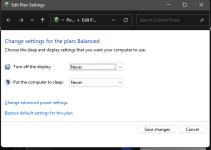
schalte einfach die entsprechenden energiesparfunktionen im windows energiesparplan ab und gut ist
hast du eine amd gpu? da kommt das manchmal vor (ulps, timeouts, signalqualität, etc.), eventuell bräuchtest du bessere kabel zwischen gpu + monitor
dieses tool kann sowas manchmal auch fixen, einfach mal ulps + alle anderen fixes im tool aktivieren, neustart
https://github.com/RedDot-3ND7355/MPO-GPU-FIX/wiki/ULPS
ULPS (Ultra-low power state) is a feature AMD has on it's drivers controlling the GPU power states.
It is known for causing issues on laptops running amd gpus and lost/instability of fps in games.
Disabling ULPS may or may not help your system run games better. It varies on the builds.
https://github.com/RedDot-3ND7355/MPO-GPU-FIX
Anhang anzeigen 1704629
https://github.com/RedDot-3ND7355/MPO-GPU-FIX/wiki/TDRLevel
Setting TDRLevel to "Def" (Default) will trigger your TDR to fix the crashes caused by gpu drivers and other errors on NVIDIA(mostly) & AMD GPUs.
Note: If your TdrLevel is set to "(None)", it's completely normal. Do not panic, you can leave it as it is or change it if needed.
oder wechsle auf den energiesparplan höchstleistung
evtl musst du manuell bildschirm und pc energiesparen noch extra deaktivieren
Anhang anzeigen 1704577
deaktiviere hybriden standby modus
Anhang anzeigen 1704582
hdd / sdd power save deaktivieren
Anhang anzeigen 1704625
eventuell auch mal saubere deinstallation und neuinstallation des gpu-treibers, mit ddu und rss / clean / minimal-install / driver-only
https://www.guru3d.com/download/display-driver-uninstaller-download/
https://github.com/GSDragoon/RadeonSoftwareSlimmer
Anhang anzeigen 1704630