

Tuempelkoenig
Cadet 4th Year
- Registriert
- Nov. 2012
- Beiträge
- 100
Hallo zusammen,
Bei der Umsetzung eines Onlineshops (Magento Basis) haben meine Produkte einige Konfigurationsmöglichkeiten (Produktoptionen/Attribute). Diese werden zur Zeit in Dropdowns untereinander mit voller Breite angezeigt. Ich würde diese der Übersichtlichekit halber aber gerne in mehreren Spalten darstellen.
Siehe dazu :
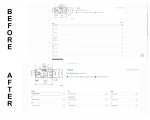
Ich habe rausgefunden, dass dies in der styles.css zu ändern sein müsste, diese enthält diesbezüglich folgenden Code:
Jetzt kenne ich mich aber nicht mit CSS aus und beim rumprobieren erscheinen die Dropdowns versetzt oder ähnliches. Daher meine Frage: Welche Änderungen muss ich vornehmen?
Danke im Voraus!
Bei der Umsetzung eines Onlineshops (Magento Basis) haben meine Produkte einige Konfigurationsmöglichkeiten (Produktoptionen/Attribute). Diese werden zur Zeit in Dropdowns untereinander mit voller Breite angezeigt. Ich würde diese der Übersichtlichekit halber aber gerne in mehreren Spalten darstellen.
Siehe dazu :
Ich habe rausgefunden, dass dies in der styles.css zu ändern sein müsste, diese enthält diesbezüglich folgenden Code:
Code:
/* Product options
%%%%%%%%%%%%%%%%%%%%%%%%%%%%%%%%%%%%%%%%%%%%%%%%%%%%%%%%%%%%%%%%%
*/
.product-options { position:relative; }
.product-options dt { font-weight:normal; }
.product-options dt label { display:inline-block; font-weight:bold; }
.product-options dt label.required em { float:right; margin-left:3px; }
.product-options dd .qty-holder { display:block; padding:5px 0 0; }
.product-options dd .qty-holder label { vertical-align:middle; }
.product-options dt .qty-disabled { background:none; border:0; padding:3px; }
.product-options dd { margin:3px 0 10px; }
.product-options dl.last dd.last { border-bottom:0; }
.product-options dd input.input-text { width:98%; }
.product-options dd input.datetime-picker { width:150px; }
.product-options dd .time-picker { display:-moz-inline-box; display:inline-block; padding:2px 0; vertical-align:middle; }
.product-options dd textarea { width:98%; height:8em; }
.product-options dd select { width:100%; }
.product-options dd .multiselect option { border-bottom:1px dotted #d9e5ee; padding:2px 4px; }
.product-options ul.options-list { margin-right:5px; }
.product-options ul.options-list li { line-height:1.5; padding:2px 0; }
.product-options ul.options-list input.radio { float:left; }
.product-options ul.options-list input.checkbox { float:left; }
.product-options ul.options-list .label { display:block; margin-left:18px; }
.product-options ul.options-list label { font-weight:normal; }
.product-options ul.validation-failed { padding:0 7px; }
.product-options p.note { margin:0; font-size:11px; }
.product-options p.required { position:absolute; right:0; top:-15px; }
Jetzt kenne ich mich aber nicht mit CSS aus und beim rumprobieren erscheinen die Dropdowns versetzt oder ähnliches. Daher meine Frage: Welche Änderungen muss ich vornehmen?
Danke im Voraus!

