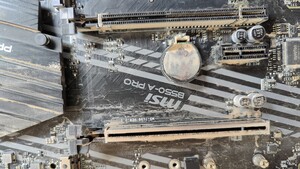
Den RAM hab ich mit Memtest86 und Prime95 schon getestet und keine Fehler gefunden. Ausgetauscht hab ich die CMOS-Batterie noch nicht, aber laut CPU-Z lagen da auch tatsächlich plötzlich 1,7 V an.
Bei den Abstürzen, werden nicht jedesmal dmp-Dateien erstellt, aber bei den letzten wird im Analyse-Programm whocrashed dies angegeben:
On Wed 15.10.2014 06:58:00 GMT your computer crashed
crash dump file: D:\Minidump\101514-8845-01.dmp
This was probably caused by the following module: hal.dll (hal+0x1D870)
Bugcheck code: 0xA (0x1, 0xD, 0x1, 0xFFFFF80002C33870)
Error: IRQL_NOT_LESS_OR_EQUAL
file path: C:\Windows\system32\hal.dll
product: Microsoft® Windows® Operating System
company: Microsoft Corporation
description: Hardware Abstraction Layer DLL
Bug check description: This indicates that Microsoft Windows or a kernel-mode driver accessed paged memory at DISPATCH_LEVEL or above.
This appears to be a typical software driver bug and is not likely to be caused by a hardware problem.
The crash took place in a standard Microsoft module. Your system configuration may be incorrect. Possibly this problem is caused by another driver on your system that cannot be identified at this time.
On Wed 15.10.2014 06:52:31 GMT your computer crashed
crash dump file: D:\Minidump\101514-8860-01.dmp
This was probably caused by the following module: ntoskrnl.exe (nt+0x75BC0)
Bugcheck code: 0xA (0x2B, 0x2, 0x0, 0xFFFFF80002C93733)
Error: IRQL_NOT_LESS_OR_EQUAL
file path: C:\Windows\system32\ntoskrnl.exe
product: Microsoft® Windows® Operating System
company: Microsoft Corporation
description: NT Kernel & System
Bug check description: This indicates that Microsoft Windows or a kernel-mode driver accessed paged memory at DISPATCH_LEVEL or above.
This appears to be a typical software driver bug and is not likely to be caused by a hardware problem.
The crash took place in the Windows kernel. Possibly this problem is caused by another driver that cannot be identified at this time.
On Wed 15.10.2014 06:49:25 GMT your computer crashed
crash dump file: D:\Minidump\101514-9484-01.dmp
This was probably caused by the following module: ntoskrnl.exe (nt+0x75BC0)
Bugcheck code: 0x1A (0x5003, 0xFFFFF70001080000, 0xC951, 0xC94F000190A2)
Error: MEMORY_MANAGEMENT
file path: C:\Windows\system32\ntoskrnl.exe
product: Microsoft® Windows® Operating System
company: Microsoft Corporation
description: NT Kernel & System
Bug check description: This indicates that a severe memory management error occurred.
This might be a case of memory corruption. More often memory corruption happens because of software errors in buggy drivers, not because of faulty RAM modules.
The crash took place in the Windows kernel. Possibly this problem is caused by another driver that cannot be identified at this time.
On Tue 14.10.2014 14:54:37 GMT your computer crashed
crash dump file: D:\Minidump\101414-10920-01.dmp
This was probably caused by the following module: ntoskrnl.exe (nt+0x75BC0)
Bugcheck code: 0x18 (0x0, 0xFFFFFA8008D1D0F0, 0x2, 0xFFFFF98006EFFFFF)
Error: REFERENCE_BY_POINTER
file path: C:\Windows\system32\ntoskrnl.exe
product: Microsoft® Windows® Operating System
company: Microsoft Corporation
description: NT Kernel & System
Bug check description: This indicates that the reference count of an object is illegal for the current state of the object.
This appears to be a typical software driver bug and is not likely to be caused by a hardware problem. This might be a case of memory corruption. More often memory corruption happens because of software errors in buggy drivers, not because of faulty RAM modules.
The crash took place in the Windows kernel. Possibly this problem is caused by another driver that cannot be identified at this time.
On Tue 14.10.2014 12:18:55 GMT your computer crashed
crash dump file: D:\Minidump\101414-9625-01.dmp
This was probably caused by the following module: ntoskrnl.exe (nt+0x75BC0)
Bugcheck code: 0xA (0x2A30, 0x2, 0x1, 0xFFFFF80002C6F6BD)
Error: IRQL_NOT_LESS_OR_EQUAL
file path: C:\Windows\system32\ntoskrnl.exe
product: Microsoft® Windows® Operating System
company: Microsoft Corporation
description: NT Kernel & System
Bug check description: This indicates that Microsoft Windows or a kernel-mode driver accessed paged memory at DISPATCH_LEVEL or above.
This appears to be a typical software driver bug and is not likely to be caused by a hardware problem.
The crash took place in the Windows kernel. Possibly this problem is caused by another driver that cannot be identified at this time.
On Tue 14.10.2014 07:16:18 GMT your computer crashed
crash dump file: D:\Minidump\101414-9110-01.dmp
This was probably caused by the following module: ntoskrnl.exe (nt+0x75BC0)
Bugcheck code: 0xA (0x0, 0x2, 0x0, 0xFFFFF80002C81437)
Error: IRQL_NOT_LESS_OR_EQUAL
file path: C:\Windows\system32\ntoskrnl.exe
product: Microsoft® Windows® Operating System
company: Microsoft Corporation
description: NT Kernel & System
Bug check description: This indicates that Microsoft Windows or a kernel-mode driver accessed paged memory at DISPATCH_LEVEL or above.
This appears to be a typical software driver bug and is not likely to be caused by a hardware problem.
The crash took place in the Windows kernel. Possibly this problem is caused by another driver that cannot be identified at this time.
On Tue 14.10.2014 07:11:25 GMT your computer crashed
crash dump file: D:\Minidump\101414-8892-01.dmp
This was probably caused by the following module: ntoskrnl.exe (nt+0x75BC0)
Bugcheck code: 0x18 (0x0, 0xFFFFFA8008F70550, 0x2, 0xFFFFFA8008F1554F)
Error: REFERENCE_BY_POINTER
file path: C:\Windows\system32\ntoskrnl.exe
product: Microsoft® Windows® Operating System
company: Microsoft Corporation
description: NT Kernel & System
Bug check description: This indicates that the reference count of an object is illegal for the current state of the object.
This appears to be a typical software driver bug and is not likely to be caused by a hardware problem. This might be a case of memory corruption. More often memory corruption happens because of software errors in buggy drivers, not because of faulty RAM modules.
The crash took place in the Windows kernel. Possibly this problem is caused by another driver that cannot be identified at this time.
On Mon 13.10.2014 15:08:18 GMT your computer crashed
crash dump file: D:\Minidump\101314-13774-01.dmp
This was probably caused by the following module: ntoskrnl.exe (nt+0x75BC0)
Bugcheck code: 0x1A (0x5003, 0xFFFFF70001080000, 0x549, 0x54B00000892)
Error: MEMORY_MANAGEMENT
file path: C:\Windows\system32\ntoskrnl.exe
product: Microsoft® Windows® Operating System
company: Microsoft Corporation
description: NT Kernel & System
Bug check description: This indicates that a severe memory management error occurred.
This might be a case of memory corruption. More often memory corruption happens because of software errors in buggy drivers, not because of faulty RAM modules.
The crash took place in the Windows kernel. Possibly this problem is caused by another driver that cannot be identified at this time.
On Mon 13.10.2014 14:57:16 GMT your computer crashed
crash dump file: D:\Minidump\101314-9001-01.dmp
This was probably caused by the following module: ntoskrnl.exe (nt+0x75BC0)
Bugcheck code: 0x1A (0x5003, 0xFFFFF70001080000, 0x10F42, 0x10F4000021C84)
Error: MEMORY_MANAGEMENT
file path: C:\Windows\system32\ntoskrnl.exe
product: Microsoft® Windows® Operating System
company: Microsoft Corporation
description: NT Kernel & System
Bug check description: This indicates that a severe memory management error occurred.
This might be a case of memory corruption. More often memory corruption happens because of software errors in buggy drivers, not because of faulty RAM modules.
The crash took place in the Windows kernel. Possibly this problem is caused by another driver that cannot be identified at this time.
On Sat 11.10.2014 16:31:27 GMT your computer crashed
crash dump file: D:\Minidump\101114-9531-01.dmp
This was probably caused by the following module: ntoskrnl.exe (nt+0x75BC0)
Bugcheck code: 0xA (0xFFFFF80000000000, 0x2, 0x1, 0xFFFFF80002CC16BD)
Error: IRQL_NOT_LESS_OR_EQUAL
file path: C:\Windows\system32\ntoskrnl.exe
product: Microsoft® Windows® Operating System
company: Microsoft Corporation
description: NT Kernel & System
Bug check description: This indicates that Microsoft Windows or a kernel-mode driver accessed paged memory at DISPATCH_LEVEL or above.
This appears to be a typical software driver bug and is not likely to be caused by a hardware problem.
The crash took place in the Windows kernel. Possibly this problem is caused by another driver that cannot be identified at this time.

![Boum [GER]](https://pics.computerbase.de/forum/avatars/m/453/453582.jpg?1530883177)