Temperaturen unter Linux (Ubuntu) mit aktueller Hardware abfragen

linuxnutzer

Captain
Registriert
Dez. 2011
Beiträge
3.282
Es geht um ein MSI MAG B850 TOMAHAWK MAX WIFI UEFI. Kernel ist 6.14.0-29-generic unter Ubuntu LTS 24.04

Leider scheitere ich da mit mehreren Tools. und noch mehr seit dem letzten UEFI-Update.

Kennt wir weitere Möglichkeiten?

Code:
~# dmidecode -t bios | grep Version
Version: 2.A46

Das ist also das aktuelle UEFI. Die A44-Variante war etwas gesprächiger.

Code:
$ sudo xsensors
No supported sensors found!

Das dürfte der entscheidende Punkt sein.

Code:
~# sensors-detect
...
Sorry, no sensors were detected.
...

Code:
~# inxi -s
Sensors:
  System Temperatures: cpu: 40.5 C mobo: N/A gpu: amdgpu temp: 36.0 C
  Fan Speeds (rpm): N/A


Seit dem letzten UEFI-Update wird keine Mobo-Temp mehr angezeigt.

Ich glaube, wenn die Konsole nichts hergibt, brauche ich grafische Dinge gar nicht probieren. Ich verwende XFCE bzw Xubuntu.
 
Kann sein, dass bei deinem Board der Nuvoton NCT6687-R-Chip eingebaut ist, der braucht das Kernel-Modul nct6687d-dkms-git

(Ist aber nur ne Vermutung!)
 
  • Gefällt mir
Reaktionen: linuxnutzer und Tanzmusikus
Moin, ja was graphisches brauchst du da nicht testen. Vielleicht mal bei MSI anfragen.

HWE kernel hast du auch schon ... da bleibt wahrscheinlich nur abwarten
 
  • Gefällt mir
Reaktionen: linuxnutzer
Zuletzt bearbeitet:
Zuletzt bearbeitet:
  • Gefällt mir
Reaktionen: linuxnutzer
Tanzmusikus schrieb:
Es gibt bereits das UEFI/BIOS-Update vA48
Habe ich schon probiert und wieder gelöscht. Ich bin jetzt bei A44 zurück. Da sehe ich noch am meisten.

Interessant ist, dass Inx mit A44i die Mobo-Temperatur eher zufällig zeigt, meistens nicht, manchmal schon. Mit A46 und A48 habe ich noch nie eine Mobo-Temp gesehen.

Tanzmusikus schrieb:
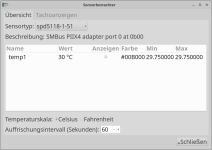
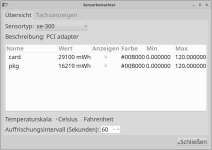
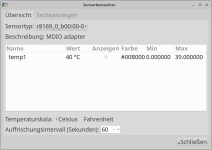
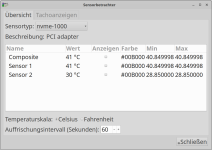
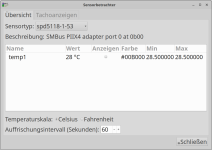
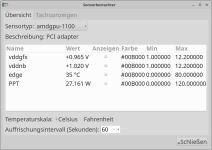
Was ist mit xfce4-sensors-plugin?

Danke für den Hinweis. Ich blicke nur nicht durch, was da was anzeigt.Bei NVME kann man ja noch raten, bei 3 NVME weiß man trotzdem nicht, welche es ist.

Kann man das spezielles konfigurieren? Wofür ist die Farbeinstellung?

Screenshot_2025-09-11_18-03-57.pngScreenshot_2025-09-11_18-03-50.pngScreenshot_2025-09-11_18-03-43.pngScreenshot_2025-09-11_18-03-39.pngScreenshot_2025-09-11_18-03-32.pngScreenshot_2025-09-11_18-03-27.pngScreenshot_2025-09-11_18-03-21.png

  • xe-300
  • spd5118
  • k10temp
  • nmve
  • r8169

k10temp würde ich der CPU zuordnen, aber sonst? Manches gibt es mehrfach.

Ergänzung ()

sedot schrieb:
Bei älteren UEFI Versionen konnte der Sensor ausgelesen werden wie es scheint.
https://linux-hardware.org/?id=board:micro-star-mag-b850-tomahawk-max-wifi-ms-7e62-2-0

Könntest ja mal ein Downgrade testen.

Mit A44 funktioniert zwar lmsensors nicht, aber inxi zeigt ein wenig was an, wenn es dazu Lust hat. Beim Bios darf man ja nicht vergessen, dass es da einige gemeldete Brutzeleffekte gibt. Ich bin da also vorsichtig zu weit zurück zu gehen.

Der_Dicke82 schrieb:
Moin, ja was graphisches brauchst du da nicht testen

Ich hatte auch das xfce-Plugin dazu gezählt. Das zeigt aber was, wo mir noch nicht klar ist, was.
 
Zuletzt bearbeitet:
  • Gefällt mir
Reaktionen: Tanzmusikus
Vielleicht fehlen ein paar wichtige grundlegende Pakete?
Hast du es mal mit anderen Distributionen (PC Linux, EndeavourOS, SuSE, Fedora, Linux Mint) probiert?
Das kann man ja oftmals schon von der ISO aus probieren. Updates im gewissen Rahmen (DRAM) möglich.
 
  • Gefällt mir
Reaktionen: linuxnutzer
Tanzmusikus schrieb:
Vielleicht fehlen ein paar wichtige grundlegende Pakete?

Schwierig zu sagen, aber ich schreibe seit Jahren alle Pakete auf, die ich irgendwann brauche und installiere die dann mit einem neuen PC.

Hast du das xfce4-sensors-plugin installiert? Zeigt es dir die Mobo-Temp irgendwie? Bei ACPI ist die Anzeige vollkommen leer.

In ein paar Wochen kommt (X)Ubuntu 24.10. Damit wollte ich schauen, wie sich die Live-Variante verhält. Mit anderen Distris kenne ich mich nicht so sehr mehr aus, wie man was macht.
 
Na schau mal:

Code:
sensors-detect
,,,
Sorry, no sensors were detected.

Aber:

Code:
$ sensors

xe-pci-0300
Adapter: PCI adapter
card:             N/A  (max =   0.00 W)
pkg:              N/A  (max =   0.00 W, crit = 400.00 W)
card:         36.66 kJ
pkg:          19.18 kJ

spd5118-i2c-1-53
Adapter: SMBus PIIX4 adapter port 0 at 0b00
temp1:        +29.8°C  (low  =  +0.0°C, high = +55.0°C)
                       (crit low =  +0.0°C, crit = +85.0°C)

k10temp-pci-00c3
Adapter: PCI adapter
Tctl:         +40.9°C
Tccd1:        +32.6°C
Tccd2:        +32.1°C

nvme-pci-0d00
Adapter: PCI adapter
Composite:    +28.9°C  (low  = -273.1°C, high = +89.8°C)
                       (crit = +94.8°C)
Sensor 1:     +29.9°C  (low  = -273.1°C, high = +65261.8°C)
Sensor 2:     +28.9°C  (low  = -273.1°C, high = +65261.8°C)

r8169_0_b00:00-mdio-0
Adapter: MDIO adapter
temp1:        +40.5°C  (high = +120.0°C)

amdgpu-pci-1100
Adapter: PCI adapter
vddgfx:      950.00 mV
vddnb:         1.02 V
edge:         +36.0°C
PPT:          22.16 W

spd5118-i2c-1-51
Adapter: SMBus PIIX4 adapter port 0 at 0b00
temp1:        +31.0°C  (low  =  +0.0°C, high = +55.0°C)
                       (crit low =  +0.0°C, crit = +85.0°C)

nvme-pci-1000
Adapter: PCI adapter
Composite:    +40.9°C  (low  = -273.1°C, high = +89.8°C)
                       (crit = +94.8°C)
Sensor 1:     +40.9°C  (low  = -273.1°C, high = +65261.8°C)
Sensor 2:     +29.9°C  (low  = -273.1°C, high = +65261.8°C)

nvme-pci-0500
Adapter: PCI adapter
Composite:    +36.9°C  (low  = -273.1°C, high = +89.8°C)
                       (crit = +94.8°C)
Sensor 1:     +41.9°C  (low  = -273.1°C, high = +65261.8°C)
Sensor 2:     +36.9°C  (low  = -273.1°C, high = +65261.8°C)

Nur was kann ich damit anfangen? Bestenfalls ist k10temp-pci-00c3 für die CPU interessant. Bei manchem weiß ich nicht, was das ist.
 
Zuletzt bearbeitet:
Installiere mal CoolerControl!
Bin gespannt, was er zu bieten hat in deinem Fall.
 
  • Gefällt mir
Reaktionen: linuxnutzer
Tanzmusikus schrieb:

Habe es befürchtet.

This environment is externally managed
...
~# apt install python3-liquidctl

Habe es mal so probiert:
python3 -m venv myenv

Hat geklappt.

Ich sehe aber die Intel Grafikkarte nicht, kenne mich aber noch viel zu wenig aus.

Screenshot_2025-09-11_23-03-18.png


Screenshot_2025-09-11_23-03-55.png
 
  • Gefällt mir
Reaktionen: Tanzmusikus
  1. xe-pci-0300 --> ggf. Xe Intel GPU (PCIe-Verbindung) ... Xe Passthrough (VM) ... oder Audio-Gerät(?)
  2. spd5118-i2c-1-53 --> Renesas DDR5 mit serieller Busanbindung (i2c)
  3. k10temp-pci-00c3 --> AMD Prozessor (PCIe-Verbindung)
  4. nvme-pci-0d00 --> NVMe-SSD (PCIe-Verbindung)
  5. r8169_0_b00:00-mdio-0 --> Realtek Netzwerk-Adapter (PCIe-Verbindung)
  6. amdgpu-pci-1100 --> AMD Grafikkarte (PCIe-Verbindung)
Gib auch mal lspci -mnn in die Konsole ein.
Damit solltest du noch mehr Infos zu den verbauten Teilen erhalten.

https://askubuntu.com/questions/1448463/how-to-make-sense-of-the-sensors-output
https://wiki.archlinux.org/title/Lm_sensors#Configuration


Bildschirmfoto_2025-09-11_23-18-54.png


linuxnutzer schrieb:
Ich sehe aber die Intel Grafikkarte nicht, kenne mich aber noch viel zu wenig aus.
Du hast eine AMD & eine Intel Grafikkarte verbaut (also 2 dGPUs)?
 
Zuletzt bearbeitet:
  • Gefällt mir
Reaktionen: Alexander2 und linuxnutzer
Tanzmusikus schrieb:
Gib auch mal lspci -mnn in die Konsole ein.

Code:
~# lspci -mnn
00:00.0 "Host bridge [0600]" "Advanced Micro Devices, Inc. [AMD] [1022]" "Device [14d8]" -p00 "Micro-Star International Co., Ltd. [MSI] [1462]" "Device [7e62]"
00:00.2 "IOMMU [0806]" "Advanced Micro Devices, Inc. [AMD] [1022]" "Device [14d9]" -p00 "Micro-Star International Co., Ltd. [MSI] [1462]" "Device [7e62]"
00:01.0 "Host bridge [0600]" "Advanced Micro Devices, Inc. [AMD] [1022]" "Device [14da]" -p00 "" ""
00:01.1 "PCI bridge [0604]" "Advanced Micro Devices, Inc. [AMD] [1022]" "Device [14db]" -p00 "Micro-Star International Co., Ltd. [MSI] [1462]" "Device [7e62]"
00:01.2 "PCI bridge [0604]" "Advanced Micro Devices, Inc. [AMD] [1022]" "Device [14db]" -p00 "Micro-Star International Co., Ltd. [MSI] [1462]" "Device [7e62]"
00:02.0 "Host bridge [0600]" "Advanced Micro Devices, Inc. [AMD] [1022]" "Device [14da]" -p00 "" ""
00:02.1 "PCI bridge [0604]" "Advanced Micro Devices, Inc. [AMD] [1022]" "Device [14db]" -p00 "Micro-Star International Co., Ltd. [MSI] [1462]" "Device [7e62]"
00:02.2 "PCI bridge [0604]" "Advanced Micro Devices, Inc. [AMD] [1022]" "Device [14db]" -p00 "Micro-Star International Co., Ltd. [MSI] [1462]" "Device [7e62]"
00:03.0 "Host bridge [0600]" "Advanced Micro Devices, Inc. [AMD] [1022]" "Device [14da]" -p00 "" ""
00:04.0 "Host bridge [0600]" "Advanced Micro Devices, Inc. [AMD] [1022]" "Device [14da]" -p00 "" ""
00:08.0 "Host bridge [0600]" "Advanced Micro Devices, Inc. [AMD] [1022]" "Device [14da]" -p00 "" ""
00:08.1 "PCI bridge [0604]" "Advanced Micro Devices, Inc. [AMD] [1022]" "Device [14dd]" -p00 "Unknown vendor [7e62]" "Device [1462]"
00:08.3 "PCI bridge [0604]" "Advanced Micro Devices, Inc. [AMD] [1022]" "Device [14dd]" -p00 "Unknown vendor [7e62]" "Device [1462]"
00:14.0 "SMBus [0c05]" "Advanced Micro Devices, Inc. [AMD] [1022]" "FCH SMBus Controller [790b]" -r71 -p00 "Micro-Star International Co., Ltd. [MSI] [1462]" "FCH SMBus Controller [7e62]"
00:14.3 "ISA bridge [0601]" "Advanced Micro Devices, Inc. [AMD] [1022]" "FCH LPC Bridge [790e]" -r51 -p00 "Micro-Star International Co., Ltd. [MSI] [1462]" "FCH LPC Bridge [7e62]"
00:18.0 "Host bridge [0600]" "Advanced Micro Devices, Inc. [AMD] [1022]" "Device [14e0]" -p00 "" ""
00:18.1 "Host bridge [0600]" "Advanced Micro Devices, Inc. [AMD] [1022]" "Device [14e1]" -p00 "" ""
00:18.2 "Host bridge [0600]" "Advanced Micro Devices, Inc. [AMD] [1022]" "Device [14e2]" -p00 "" ""
00:18.3 "Host bridge [0600]" "Advanced Micro Devices, Inc. [AMD] [1022]" "Device [14e3]" -p00 "" ""
00:18.4 "Host bridge [0600]" "Advanced Micro Devices, Inc. [AMD] [1022]" "Device [14e4]" -p00 "" ""
00:18.5 "Host bridge [0600]" "Advanced Micro Devices, Inc. [AMD] [1022]" "Device [14e5]" -p00 "" ""
00:18.6 "Host bridge [0600]" "Advanced Micro Devices, Inc. [AMD] [1022]" "Device [14e6]" -p00 "" ""
00:18.7 "Host bridge [0600]" "Advanced Micro Devices, Inc. [AMD] [1022]" "Device [14e7]" -p00 "" ""
01:00.0 "PCI bridge [0604]" "Intel Corporation [8086]" "Device [e2ff]" -r01 -p00 "" ""
02:01.0 "PCI bridge [0604]" "Intel Corporation [8086]" "Device [e2f0]" -p00 "Intel Corporation [8086]" "Device [0000]"
02:02.0 "PCI bridge [0604]" "Intel Corporation [8086]" "Device [e2f1]" -p00 "Intel Corporation [8086]" "Device [0000]"
03:00.0 "VGA compatible controller [0300]" "Intel Corporation [8086]" "Device [e20b]" -p00 "Unknown vendor [172f]" "Device [4215]"
04:00.0 "Audio device [0403]" "Intel Corporation [8086]" "Device [e2f7]" -p00 "Unknown vendor [172f]" "Device [4215]"
05:00.0 "Non-Volatile memory controller [0108]" "Shenzhen Longsys Electronics Co., Ltd. [1d97]" "Lexar NM790 NVME SSD (DRAM-less) [1602]" -r01 -p02 "Shenzhen Longsys Electronics Co., Ltd. [1d97]" "Lexar NM790 NVME SSD (DRAM-less) [1602]"
06:00.0 "PCI bridge [0604]" "Advanced Micro Devices, Inc. [AMD] [1022]" "600 Series Chipset PCIe Switch Upstream Port [43f4]" -r01 -p00 "ASMedia Technology Inc. [1b21]" "Device [3328]"
07:00.0 "PCI bridge [0604]" "Advanced Micro Devices, Inc. [AMD] [1022]" "600 Series Chipset PCIe Switch Downstream Port [43f5]" -r01 -p00 "ASMedia Technology Inc. [1b21]" "Device [3328]"
07:04.0 "PCI bridge [0604]" "Advanced Micro Devices, Inc. [AMD] [1022]" "600 Series Chipset PCIe Switch Downstream Port [43f5]" -r01 -p00 "ASMedia Technology Inc. [1b21]" "Device [3328]"
07:05.0 "PCI bridge [0604]" "Advanced Micro Devices, Inc. [AMD] [1022]" "600 Series Chipset PCIe Switch Downstream Port [43f5]" -r01 -p00 "ASMedia Technology Inc. [1b21]" "Device [3328]"
07:06.0 "PCI bridge [0604]" "Advanced Micro Devices, Inc. [AMD] [1022]" "600 Series Chipset PCIe Switch Downstream Port [43f5]" -r01 -p00 "ASMedia Technology Inc. [1b21]" "Device [3328]"
07:07.0 "PCI bridge [0604]" "Advanced Micro Devices, Inc. [AMD] [1022]" "600 Series Chipset PCIe Switch Downstream Port [43f5]" -r01 -p00 "ASMedia Technology Inc. [1b21]" "Device [3328]"
07:08.0 "PCI bridge [0604]" "Advanced Micro Devices, Inc. [AMD] [1022]" "600 Series Chipset PCIe Switch Downstream Port [43f5]" -r01 -p00 "ASMedia Technology Inc. [1b21]" "Device [3328]"
07:0c.0 "PCI bridge [0604]" "Advanced Micro Devices, Inc. [AMD] [1022]" "600 Series Chipset PCIe Switch Downstream Port [43f5]" -r01 -p00 "ASMedia Technology Inc. [1b21]" "Device [3328]"
07:0d.0 "PCI bridge [0604]" "Advanced Micro Devices, Inc. [AMD] [1022]" "600 Series Chipset PCIe Switch Downstream Port [43f5]" -r01 -p00 "ASMedia Technology Inc. [1b21]" "Device [3328]"
0a:00.0 "Network controller [0280]" "Qualcomm Technologies, Inc [17cb]" "WCN785x Wi-Fi 7(802.11be) 320MHz 2x2 [FastConnect 7800] [1107]" -r01 -p00 "Foxconn International, Inc. [105b]" "High Band Simultaneous Wireless Network Adapter [e0f7]"
0b:00.0 "Ethernet controller [0200]" "Realtek Semiconductor Co., Ltd. [10ec]" "Device [8126]" -r01 -p00 "Micro-Star International Co., Ltd. [MSI] [1462]" "Device [7e62]"
0c:00.0 "SATA controller [0106]" "ASMedia Technology Inc. [1b21]" "ASM1064 Serial ATA Controller [1064]" -r02 -p01 "ASMedia Technology Inc. [1b21]" "Device [2116]"
0d:00.0 "Non-Volatile memory controller [0108]" "Shenzhen Longsys Electronics Co., Ltd. [1d97]" "Lexar NM790 NVME SSD (DRAM-less) [1602]" -r01 -p02 "Shenzhen Longsys Electronics Co., Ltd. [1d97]" "Lexar NM790 NVME SSD (DRAM-less) [1602]"
0e:00.0 "USB controller [0c03]" "Advanced Micro Devices, Inc. [AMD] [1022]" "Device [43fc]" -r01 -p30 "ASMedia Technology Inc. [1b21]" "Device [1142]"
0f:00.0 "SATA controller [0106]" "Advanced Micro Devices, Inc. [AMD] [1022]" "600 Series Chipset SATA Controller [43f6]" -r01 -p01 "ASMedia Technology Inc. [1b21]" "Device [1062]"
10:00.0 "Non-Volatile memory controller [0108]" "Shenzhen Longsys Electronics Co., Ltd. [1d97]" "Lexar NM790 NVME SSD (DRAM-less) [1602]" -r01 -p02 "Shenzhen Longsys Electronics Co., Ltd. [1d97]" "Lexar NM790 NVME SSD (DRAM-less) [1602]"
11:00.0 "VGA compatible controller [0300]" "Advanced Micro Devices, Inc. [AMD/ATI] [1002]" "Raphael [164e]" -rc4 -p00 "Micro-Star International Co., Ltd. [MSI] [1462]" "Raphael [7e62]"
11:00.1 "Audio device [0403]" "Advanced Micro Devices, Inc. [AMD/ATI] [1002]" "Rembrandt Radeon High Definition Audio Controller [1640]" -p00 "Micro-Star International Co., Ltd. [MSI] [1462]" "Rembrandt Radeon High Definition Audio Controller [7e62]"
11:00.2 "Encryption controller [1080]" "Advanced Micro Devices, Inc. [AMD] [1022]" "Family 19h PSP/CCP [1649]" -p00 "Micro-Star International Co., Ltd. [MSI] [1462]" "Family 19h PSP/CCP [7e62]"
11:00.3 "USB controller [0c03]" "Advanced Micro Devices, Inc. [AMD] [1022]" "Device [15b6]" -p30 "Micro-Star International Co., Ltd. [MSI] [1462]" "Device [7e62]"
11:00.4 "USB controller [0c03]" "Advanced Micro Devices, Inc. [AMD] [1022]" "Device [15b7]" -p30 "Micro-Star International Co., Ltd. [MSI] [1462]" "Device [7e62]"
11:00.6 "Audio device [0403]" "Advanced Micro Devices, Inc. [AMD] [1022]" "Family 17h/19h HD Audio Controller [15e3]" -p00 "Micro-Star International Co., Ltd. [MSI] [1462]" "Family 17h/19h HD Audio Controller [ee51]"
12:00.0 "USB controller [0c03]" "Advanced Micro Devices, Inc. [AMD] [1022]" "Device [15b8]" -p30 "Micro-Star International Co., Ltd. [MSI] [1462]" "Device [7e62]"

Tanzmusikus schrieb:
Du hast eine AMD & eine Intel Grafikkarte verbaut (also 2 dGPUs)?

Ja, die AMD-GPU ist Teil der Ryzen 9 7900-CPU, hat schon mal funktioniert, als die Intel noch nicht verbaut war, ist im UEFI auf Auto, aber an der Intel hängt der Monitor.

Also keine 2 _d_GPUs, nur 1 Intel.

Edit. Einiges gelöscht, gehört nicht hierher.
 
Zuletzt bearbeitet:
  • Gefällt mir
Reaktionen: Tanzmusikus
Das Ergebnis von sudo xsensors sieht bei mir so aus:
Bildschirmfoto_2025-09-11_23-34-38.png

Wird bei dir auch der Sensor-Chip mit allen Werten angezeigt?


sudo sensors-detect sieht bei mir so aus (alles mit "yes" beantwortet):
Code:
sudo sensors-detect
[sudo] Passwort:
# sensors-detect version 3.6.2
# Board: ASRock X470 Taichi
# Kernel: 6.16.6-zen1-1-zen x86_64
# Processor: AMD Ryzen 7 5800X3D 8-Core Processor (25/33/2)

This program will help you determine which kernel modules you need
to load to use lm_sensors most effectively. It is generally safe
and recommended to accept the default answers to all questions,
unless you know what you're doing.

Some south bridges, CPUs or memory controllers contain embedded sensors.
Do you want to scan for them? This is totally safe. (YES/no):
Silicon Integrated Systems SIS5595...                       No
VIA VT82C686 Integrated Sensors...                          No
VIA VT8231 Integrated Sensors...                            No
AMD K8 thermal sensors...                                   No
AMD Family 10h thermal sensors...                           No
AMD Family 11h thermal sensors...                           No
AMD Family 12h and 14h thermal sensors...                   No
AMD Family 15h thermal sensors...                           No
AMD Family 16h thermal sensors...                           No
AMD Family 17h thermal sensors...                           Success!
    (driver `k10temp')
AMD Family 15h power sensors...                             No
AMD Family 16h power sensors...                             No
Hygon Family 18h thermal sensors...                         No
AMD Family 19h thermal sensors...                           No
Intel digital thermal sensor...                             No
Intel AMB FB-DIMM thermal sensor...                         No
Intel 5500/5520/X58 thermal sensor...                       No
VIA C7 thermal sensor...                                    No
VIA Nano thermal sensor...                                  No

Some Super I/O chips contain embedded sensors. We have to write to
standard I/O ports to probe them. This is usually safe.
Do you want to scan for Super I/O sensors? (YES/no):
Probing for Super-I/O at 0x2e/0x2f
Trying family `National Semiconductor/ITE'...               No
Trying family `SMSC'...                                     No
Trying family `VIA/Winbond/Nuvoton/Fintek'...               Yes
Found `Nuvoton NCT5532D/NCT6779D Super IO Sensors'          Success!
    (address 0x290, driver `nct6775')
Probing for Super-I/O at 0x4e/0x4f
Trying family `National Semiconductor/ITE'...               No
Trying family `SMSC'...                                     No
Trying family `VIA/Winbond/Nuvoton/Fintek'...               No
Trying family `ITE'...                                      No

Some systems (mainly servers) implement IPMI, a set of common interfaces
through which system health data may be retrieved, amongst other things.
We first try to get the information from SMBIOS. If we don't find it
there, we have to read from arbitrary I/O ports to probe for such
interfaces. This is normally safe. Do you want to scan for IPMI
interfaces? (YES/no):
Probing for `IPMI BMC KCS' at 0xca0...                      No
Probing for `IPMI BMC SMIC' at 0xca8...                     No

Some hardware monitoring chips are accessible through the ISA I/O ports.
We have to write to arbitrary I/O ports to probe them. This is usually
safe though. Yes, you do have ISA I/O ports even if you do not have any
ISA slots! Do you want to scan the ISA I/O ports? (yes/NO): yes
Probing for `National Semiconductor LM78' at 0x290...       No
Probing for `National Semiconductor LM79' at 0x290...       No
Probing for `Winbond W83781D' at 0x290...                   No
Probing for `Winbond W83782D' at 0x290...                   No

Lastly, we can probe the I2C/SMBus adapters for connected hardware
monitoring devices. This is the most risky part, and while it works
reasonably well on most systems, it has been reported to cause trouble
on some systems.
Do you want to probe the I2C/SMBus adapters now? (YES/no):  
Using driver `i2c-piix4' for device 0000:00:14.0: AMD KERNCZ SMBus

Next adapter: AMDGPU SMU 0 (i2c-0)
Do you want to scan it? (yes/NO/selectively): yes

Next adapter: AMDGPU SMU 1 (i2c-1)
Do you want to scan it? (yes/NO/selectively): yes

Next adapter: AMDGPU DM i2c hw bus 0 (i2c-2)
Do you want to scan it? (yes/NO/selectively): yes

Next adapter: AMDGPU DM i2c hw bus 1 (i2c-3)
Do you want to scan it? (yes/NO/selectively): yes

Next adapter: AMDGPU DM i2c hw bus 2 (i2c-4)
Do you want to scan it? (yes/NO/selectively): yes

Next adapter: AMDGPU DM i2c hw bus 3 (i2c-5)
Do you want to scan it? (yes/NO/selectively): yes

Next adapter: AMDGPU DM aux hw bus 0 (i2c-6)
Do you want to scan it? (yes/NO/selectively): yes

Next adapter: AMDGPU DM aux hw bus 1 (i2c-7)
Do you want to scan it? (yes/NO/selectively): yes

Next adapter: AMDGPU DM aux hw bus 2 (i2c-8)
Do you want to scan it? (yes/NO/selectively): yes

Next adapter: SMBus PIIX4 adapter port 0 at 0b00 (i2c-9)
Do you want to scan it? (yes/NO/selectively): yes
Client found at address 0x18
Probing for `Analog Devices ADM1021'...                     No
Probing for `Analog Devices ADM1021A/ADM1023'...            No
Probing for `Maxim MAX1617'...                              No
Probing for `Maxim MAX1617A'...                             No
Probing for `Maxim MAX1668'...                              No
Probing for `Maxim MAX1805'...                              No
Probing for `Maxim MAX1989'...                              No
Probing for `Maxim MAX6655/MAX6656'...                      No
Probing for `TI THMC10'...                                  No
Probing for `National Semiconductor LM84'...                No
Probing for `Genesys Logic GL523SM'...                      No
Probing for `Onsemi MC1066'...                              No
Probing for `Maxim MAX1618'...                              No
Probing for `Maxim MAX1619'...                              No
Probing for `National Semiconductor LM82/LM83'...           No
Probing for `Maxim MAX6654'...                              No
Probing for `Maxim MAX6690'...                              No
Probing for `Maxim MAX6680/MAX6681'...                      No
Probing for `Maxim MAX6695/MAX6696'...                      No
Probing for `Texas Instruments TMP400'...                   No
Probing for `Texas Instruments AMC6821'...                  No
Probing for `National Semiconductor LM95233'...             No
Probing for `National Semiconductor LM95234'...             No
Probing for `National Semiconductor LM95235'...             No
Probing for `National Semiconductor LM95245'...             No
Probing for `National Semiconductor LM64'...                No
Probing for `SMSC EMC1047'...                               No
Probing for `SMSC EMC1402'...                               No
Probing for `SMSC EMC1403'...                               No
Probing for `SMSC EMC1404'...                               No
Probing for `ST STTS424'...                                 No
Probing for `ST STTS424E'...                                No
Probing for `ST STTS2002'...                                No
Probing for `ST STTS3000'...                                No
Probing for `NXP SE97/SE97B'...                             No
Probing for `NXP SE98'...                                   No
Probing for `Analog Devices ADT7408'...                     No
Probing for `IDT TS3000/TSE2002'...                         No
Probing for `IDT TSE2004'...                                No
Probing for `IDT TS3001'...                                 No
Probing for `Maxim MAX6604'...                              No
Probing for `Microchip MCP9804'...                          No
Probing for `Microchip MCP9808'...                          No
Probing for `Microchip MCP98242'...                         No
Probing for `Microchip MCP98243'...                         No
Probing for `Microchip MCP98244'...                         No
Probing for `Microchip MCP9843'...                          No
Probing for `ON CAT6095/CAT34TS02'...                       No
Probing for `ON CAT34TS02C'...                              No
Probing for `ON CAT34TS04'...                               No
Probing for `Atmel AT30TS00'...                             No
Probing for `Giantec GT30TS00'...                           No
Client found at address 0x19
Probing for `Analog Devices ADM1021'...                     No
Probing for `Analog Devices ADM1021A/ADM1023'...            No
Probing for `Maxim MAX1617'...                              No
Probing for `Maxim MAX1617A'...                             No
Probing for `Maxim MAX1668'...                              No
Probing for `Maxim MAX1805'...                              No
Probing for `Maxim MAX1989'...                              No
Probing for `Maxim MAX6655/MAX6656'...                      No
Probing for `TI THMC10'...                                  No
Probing for `National Semiconductor LM84'...                No
Probing for `Genesys Logic GL523SM'...                      No
Probing for `Onsemi MC1066'...                              No
Probing for `Maxim MAX1618'...                              No
Probing for `Maxim MAX1619'...                              No
Probing for `National Semiconductor LM82/LM83'...           No
Probing for `Maxim MAX6654'...                              No
Probing for `Maxim MAX6690'...                              No
Probing for `Maxim MAX6680/MAX6681'...                      No
Probing for `Maxim MAX6695/MAX6696'...                      No
Probing for `Texas Instruments TMP400'...                   No
Probing for `Texas Instruments AMC6821'...                  No
Probing for `National Semiconductor LM95231'...             No
Probing for `National Semiconductor LM95241'...             No
Probing for `National Semiconductor LM95245'...             No
Probing for `ST STTS424'...                                 No
Probing for `ST STTS424E'...                                No
Probing for `ST STTS2002'...                                No
Probing for `ST STTS3000'...                                No
Probing for `NXP SE97/SE97B'...                             No
Probing for `NXP SE98'...                                   No
Probing for `Analog Devices ADT7408'...                     No
Probing for `IDT TS3000/TSE2002'...                         No
Probing for `IDT TSE2004'...                                No
Probing for `IDT TS3001'...                                 No
Probing for `Maxim MAX6604'...                              No
Probing for `Microchip MCP9804'...                          No
Probing for `Microchip MCP9808'...                          No
Probing for `Microchip MCP98242'...                         No
Probing for `Microchip MCP98243'...                         No
Probing for `Microchip MCP98244'...                         No
Probing for `Microchip MCP9843'...                          No
Probing for `ON CAT6095/CAT34TS02'...                       No
Probing for `ON CAT34TS02C'...                              No
Probing for `ON CAT34TS04'...                               No
Probing for `Atmel AT30TS00'...                             No
Probing for `Giantec GT30TS00'...                           No
Client found at address 0x1a
Probing for `Analog Devices ADM1021'...                     No
Probing for `Analog Devices ADM1021A/ADM1023'...            No
Probing for `Maxim MAX1617'...                              No
Probing for `Maxim MAX1617A'...                             No
Probing for `Maxim MAX1668'...                              No
Probing for `Maxim MAX1805'...                              No
Probing for `Maxim MAX1989'...                              No
Probing for `Maxim MAX6655/MAX6656'...                      No
Probing for `TI THMC10'...                                  No
Probing for `National Semiconductor LM84'...                No
Probing for `Genesys Logic GL523SM'...                      No
Probing for `Onsemi MC1066'...                              No
Probing for `Maxim MAX1618'...                              No
Probing for `Maxim MAX1619'...                              No
Probing for `National Semiconductor LM82/LM83'...           No
Probing for `Maxim MAX6654'...                              No
Probing for `Maxim MAX6690'...                              No
Probing for `Maxim MAX6680/MAX6681'...                      No
Probing for `Maxim MAX6695/MAX6696'...                      No
Probing for `Texas Instruments TMP400'...                   No
Probing for `Texas Instruments AMC6821'...                  No
Probing for `ST STTS424'...                                 No
Probing for `ST STTS424E'...                                No
Probing for `ST STTS2002'...                                No
Probing for `ST STTS3000'...                                No
Probing for `NXP SE97/SE97B'...                             No
Probing for `NXP SE98'...                                   No
Probing for `Analog Devices ADT7408'...                     No
Probing for `IDT TS3000/TSE2002'...                         No
Probing for `IDT TSE2004'...                                No
Probing for `IDT TS3001'...                                 No
Probing for `Maxim MAX6604'...                              No
Probing for `Microchip MCP9804'...                          No
Probing for `Microchip MCP9808'...                          No
Probing for `Microchip MCP98242'...                         No
Probing for `Microchip MCP98243'...                         No
Probing for `Microchip MCP98244'...                         No
Probing for `Microchip MCP9843'...                          No
Probing for `ON CAT6095/CAT34TS02'...                       No
Probing for `ON CAT34TS02C'...                              No
Probing for `ON CAT34TS04'...                               No
Probing for `Atmel AT30TS00'...                             No
Probing for `Giantec GT30TS00'...                           No
Client found at address 0x1b
Probing for `ST STTS424'...                                 No
Probing for `ST STTS424E'...                                No
Probing for `ST STTS2002'...                                No
Probing for `ST STTS3000'...                                No
Probing for `NXP SE97/SE97B'...                             No
Probing for `NXP SE98'...                                   No
Probing for `Analog Devices ADT7408'...                     No
Probing for `IDT TS3000/TSE2002'...                         No
Probing for `IDT TSE2004'...                                No
Probing for `IDT TS3001'...                                 No
Probing for `Maxim MAX6604'...                              No
Probing for `Microchip MCP9804'...                          No
Probing for `Microchip MCP9808'...                          No
Probing for `Microchip MCP98242'...                         No
Probing for `Microchip MCP98243'...                         No
Probing for `Microchip MCP98244'...                         No
Probing for `Microchip MCP9843'...                          No
Probing for `ON CAT6095/CAT34TS02'...                       No
Probing for `ON CAT34TS02C'...                              No
Probing for `ON CAT34TS04'...                               No
Probing for `Atmel AT30TS00'...                             No
Probing for `Giantec GT30TS00'...                           No
Client found at address 0x50
Handled by driver `ee1004' (already loaded), chip type `ee1004'
    (note: this is probably NOT a sensor chip!)
Client found at address 0x51
Handled by driver `ee1004' (already loaded), chip type `ee1004'
    (note: this is probably NOT a sensor chip!)
Client found at address 0x52
Handled by driver `ee1004' (already loaded), chip type `ee1004'
    (note: this is probably NOT a sensor chip!)
Client found at address 0x53
Handled by driver `ee1004' (already loaded), chip type `ee1004'
    (note: this is probably NOT a sensor chip!)

Next adapter: SMBus PIIX4 adapter port 2 at 0b00 (i2c-10)
Do you want to scan it? (yes/NO/selectively): yes

Next adapter: SMBus PIIX4 adapter port 1 at 0b20 (i2c-11)
Do you want to scan it? (yes/NO/selectively): yes
Code:
Now follows a summary of the probes I have just done.
Just press ENTER to continue:

Driver `nct6775':
  * ISA bus, address 0x290
    Chip `Nuvoton NCT5532D/NCT6779D Super IO Sensors' (confidence: 9)

Driver `k10temp' (autoloaded):
  * Chip `AMD Family 17h thermal sensors' (confidence: 9)

Do you want to overwrite /etc/conf.d/lm_sensors? (YES/no):


https://michaelstinkerings.org/passthrough-intel-dedicated-gpu-while-using-igpu-sriov/
 
Zuletzt bearbeitet:
  • Gefällt mir
Reaktionen: linuxnutzer
$ sudo xsensors
No supported sensors found!

Sorry, no sensors were detected.
Either your system has no sensors, or they are not supported, or
they are connected to an I2C or SMBus adapter that is not
supported. If you find out what chips are on your board, check
https://hwmon.wiki.kernel.org/device_support_status for driver status.

Der Link ist kaputt.

Kann dieses Cooler Control theoretisch auch die rpm des Lüfters anzeigen?

Ein bisschen hilft das schon:

Screenshot_2025-09-12_00-03-42.png


Tanzmusikus schrieb:

Ist das ein allgemeiner Hinweis oder soll ich was ausprobieren. Ich denke lm-sensors kann ich mit diesem PC vergessen, ich kenne das von anderen PCs wo es funktioniert.

Der askubuntu-Link bringt mich auch nicht viel weiter.

Ich hätte gerne Infos zur Intel-Graka und zu den Lüfter-rpm.

Code:
~# i2cdetect -l
i2c-0    i2c           Synopsys DesignWare I2C adapter     I2C adapter
i2c-1    smbus         SMBus PIIX4 adapter port 0 at 0b00    SMBus adapter
i2c-2    smbus         SMBus PIIX4 adapter port 2 at 0b00    SMBus adapter
i2c-3    smbus         SMBus PIIX4 adapter port 1 at 0b20    SMBus adapter
i2c-4    i2c           i915 gmbus dpa                      I2C adapter
i2c-5    i2c           i915 gmbus dpb                      I2C adapter
i2c-6    i2c           i915 gmbus dpc                      I2C adapter
i2c-7    i2c           i915 gmbus dpd                      I2C adapter
i2c-8    i2c           i915 gmbus dpe                      I2C adapter
i2c-9    i2c           i915 gmbus tc1                      I2C adapter
i2c-10    i2c           i915 gmbus tc2                      I2C adapter
i2c-11    i2c           i915 gmbus tc3                      I2C adapter
i2c-12    i2c           i915 gmbus tc4                      I2C adapter
i2c-13    i2c           AMDGPU DM i2c hw bus 0              I2C adapter
i2c-14    i2c           AMDGPU DM i2c hw bus 1              I2C adapter
i2c-15    i2c           AMDGPU DM i2c hw bus 2              I2C adapter
i2c-16    i2c           AMDGPU DM i2c hw bus 3              I2C adapter
i2c-17    i2c           AMDGPU DM aux hw bus 1              I2C adapter
i2c-18    i2c           AMDGPU DM aux hw bus 2              I2C adapter
i2c-19    i2c           AMDGPU DM aux hw bus 3              I2C adapter
i2c-20    i2c           AUX USBC1/DDI TC1/PHY F             I2C adapter
i2c-21    i2c           AUX USBC2/DDI TC2/PHY G             I2C adapter
i2c-22    i2c           AUX USBC4/DDI TC4/PHY I             I2C adapter


Code:
~# decode-dimms
No EEPROM found, the kernel probably does not support your hardware.
 
Zuletzt bearbeitet:
linuxnutzer schrieb:
Teste den Befehl doch mal mit einem Linux deiner Wahl vom USB-Stick (ohne Installation auf dem PC).
Meine Empfehlung dabei ist: Neuerer Kernel als 6.14.x ... und aktuellste Firmware aus dem Repository der Distribution.

P.S.
Wende dich auch mal an den Hersteller, damit er seine UEFI/BIOS-Firmware auf Fehler untersucht.
 
linuxnutzer schrieb:
Kann dieses Cooler Control theoretisch auch die rpm des Lüfters anzeigen?
Na klar. Das macht es auf deinem Screenshot auch bereits.
Du kannst rechts oben im CoolerControl die Ansichten umstellen. 👀
 
Tanzmusikus schrieb:
Du kannst rechts oben im CoolerControl die Ansichten umstellen

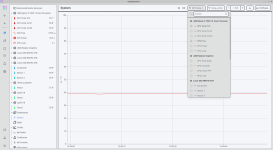
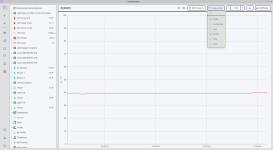
Habe es noch nicht kapiert, wie ich mir die CPU herausfiltere. Siehe Screenshots.

Screenshot_2025-09-12_12-45-58.png
Screenshot_2025-09-12_12-46-03.png

Ich möchte mir die CPU anzeigen lassen und zwar Temp und rpm, sehe aber nur 1 rote Linie.

Tanzmusikus schrieb:
Teste den Befehl doch mal mit einem Linux deiner Wahl

Ich bin dabei einen PC zu migrieren. Da gibt es viele verschiedene Dinge zu tun. 1 Aufgabe ist die Voraussetzungen zu schaffen um die Lüfterkurve zu optimieren. In ein paar Wochen kommt Ubuntu 25.10 und das hat Kernel 6.17. Ich habe sowieso eine freie Testpartition zum Installieren reserviert. Also ich muss nur ein wenig geduldig sein. Der Weg ist ja jetzt klar.

Tanzmusikus schrieb:
Kernel: 6.16.6-zen1-1-zen x86_64

Mit 6.17 habe ich dann deinen mindestens erreicht.

Tanzmusikus schrieb:
Found `Nuvoton NCT5532D/NCT6779D Super IO Sensors'

Das könnte die entscheidende Sache sein.

Tanzmusikus schrieb:
Wende dich auch mal an den Hersteller

Haha, die haben bei einem anderen Board 2 Jahre gebraucht um es zu lösen. Aber ich kann denen ja schreiben. Ich denke die sind zur Zeit mit https://www.golem.de/news/defekte-r...er-bei-mainboard-herstellern-2508-199522.html beschäftigt. Die letzten 2 UEFI-Updates bewirken, dass ich Temperaturen nicht mehr auslesen kann.

Improved compatibility of the Ryzen 8000 series CPU (klingt nach verbrannter CPU).
Improve memory compatibility (klingt nach EXPO)

Tanzmusikus schrieb:
Ich habe gerade gesucht, es gibt in den Ubuntu repos ein netdata, für coolercontrol muss man das eingene Repo installieren.

Aber wie ich jetzt netdata starte ist mir nicht klar.

Code:
dpkg -l | grep netdata
ii  netdata                                        1.43.2-1build2                             all          real-time performance monitoring (metapackage)
...

Jedemfalls finde ich nichts bei der Programmsuche.

$ which netdatacli
/usr/sbin/netdatacli

which netdata
/usr/sbin/netdata

Aber was ist netdata-claim.sh

Code:
$ netdata
2025-09-12 13:23:21: netdata INFO  : MAIN : CONFIG: cannot load cloud config '/var/lib/netdata/cloud.d/cloud.conf'. Running with internal defaults.
2025-09-12 13:23:21: netdata FATAL : netdata : Cannot change directory to '/var/log/netdata' # : Permission denied
 
  • Gefällt mir
Reaktionen: Tanzmusikus
linuxnutzer schrieb:
Habe es noch nicht kapiert, wie ich mir die CPU herausfiltere. Siehe Screenshots.
Du kannst rechts oben im CoolerControl die Ansichten umstellen.

Bildschirmfoto_2025-09-12_13-39-11.png
Bildschirmfoto_2025-09-12_13-39-46.png


linuxnutzer schrieb:
Ich habe gerade gesucht, es gibt in den Ubuntu repos ein netdata, für coolercontrol muss man das eigene Repo installieren.

Here's a complete example of installing Netdata on Ubuntu 22.04 using native packages:
Code:
# Step 1: Download the repository configuration package
wget https://repository.netdata.cloud/repos/repoconfig/ubuntu/jammy/netdata-repo_latest.jammy_all.deb

# Step 2: Install the repository configuration
sudo apt install ./netdata-repo_latest.jammy_all.deb

# Step 3: Update package lists
sudo apt update

# Step 4: Install Netdata
sudo apt install netdata

# Step 5: Start and enable Netdata service
sudo systemctl enable --now netdata

# Step 6: Verify installation
curl localhost:19999/api/v1/info

... siehe Schritt 5 & 6.

Quelle: https://learn.netdata.cloud/docs/ne...ibution-packages#manual-setup-of-deb-packages

P.S.
CoolerControl konnte auch ich in den Repos von Linux Mint nicht finden.
Bleibt dann im Moment die manuelle Installation:
https://docs.coolercontrol.org/installation/debian.html (für Ubuntu, Debian, Pop!_OS, Linux Mint)

... oder als AppImage (portable App):
https://docs.coolercontrol.org/installation/appimage.html

... oder von Git zum Kompilieren:
https://docs.coolercontrol.org/installation/source.html

... oder per Cloudsmith:
https://docs.coolercontrol.org/installation/cloudsmith.html

... sowie weitere Tipps (Kernel Modules):
https://docs.coolercontrol.org/hardware-support.html#load-all-applicable-kernel-modules
https://github.com/lm-sensors/lm-sensors/issues
Ergänzung ()

linuxnutzer schrieb:
Aber wie ich jetzt netdata starte ist mir nicht klar.
Entweder per systemctl enable/start, sodass es im Hintergrund läuft ... oder per sudo /usr/sbin/netdata.
 
Zuletzt bearbeitet:
Zurück
Oben