rene76
Lt. Commander
- Registriert
- Mai 2005
- Beiträge
- 1.336
Hi,
ich habe eine Excel Tabelle wo ich Bestände führe. Wenm jedoch ein Mindestbestand erreicht ist soll beim Speichern der Tabelle eine email versendet werden. Jedoch scheitert bisher alles was ich versucht habe über VBA Scripte.
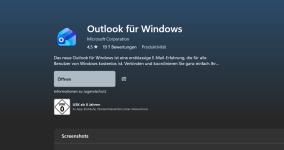
Ich benutze das hauseigene Outlook von Windows 11.
Auf der Arbeit nutze ich das gleiche Outlook Programm und da geht es nur mit dem Unterschied das dort eine Firmen email Adresse genutzt wird.
jetzt wollte ich das hier zu hause nachbauen und über einen gmx oder gmail smtp server zu senden
Sub SendeMail(text As String)
Dim objMail As Object
Set objMail = CreateObject("CDO.Message")
Dim objConf As Object
Set objConf = CreateObject("CDO.Configuration")
With objConf.Fields
.Item("http://schemas.microsoft.com/cdo/configuration/sendusing") = 2
.Item("http://schemas.microsoft.com/cdo/configuration/smtpserver") = "mail.gmx.net"
.Item("http://schemas.microsoft.com/cdo/configuration/smtpserverport") = 587
.Item("http://schemas.microsoft.com/cdo/configuration/smtpauthenticate") = 1
.Item("http://schemas.microsoft.com/cdo/configuration/sendusername") = "deine@gmx.de"
.Item("http://schemas.microsoft.com/cdo/configuration/sendpassword") = "DEIN_PASSWORT"
.Item("http://schemas.microsoft.com/cdo/configuration/smtpusessl") = True
.Update
End With
With objMail
Set .Configuration = objConf
.From = "deine@gmx.de"
.To = "empfaenger@email.de"
.Subject = "Mindestbestand unterschritten!"
.TextBody = "Folgende Artikel sind unter Mindestbestand:" & vbCrLf & vbCrLf & text
.Send
End With
Set objMail = Nothing
Set objConf = Nothing
End Sub
da Outlook hier zu hause nicht funktioniert, warum auch immer das auf der Arbeit klappt mit diesem Script
Sub SendeMail(text As String)
Dim outlookApp As Object
Dim outlookMail As Object
On Error Resume Next
Set outlookApp = CreateObject("Outlook.Application")
Set outlookMail = outlookApp.CreateItem(0)
With outlookMail
.To = "deine@email.de"
.Subject = "Mindestbestand unterschritten!"
.Body = "Folgende Artikel sind unter Mindestbestand:" & vbCrLf & vbCrLf & text
.Send
End With
Set outlookMail = Nothing
Set outlookApp = Nothing
End Sub
Hat jemand eine Idee wie ich das umsetzen kann?
ich habe eine Excel Tabelle wo ich Bestände führe. Wenm jedoch ein Mindestbestand erreicht ist soll beim Speichern der Tabelle eine email versendet werden. Jedoch scheitert bisher alles was ich versucht habe über VBA Scripte.
Ich benutze das hauseigene Outlook von Windows 11.
Auf der Arbeit nutze ich das gleiche Outlook Programm und da geht es nur mit dem Unterschied das dort eine Firmen email Adresse genutzt wird.
jetzt wollte ich das hier zu hause nachbauen und über einen gmx oder gmail smtp server zu senden
Sub SendeMail(text As String)
Dim objMail As Object
Set objMail = CreateObject("CDO.Message")
Dim objConf As Object
Set objConf = CreateObject("CDO.Configuration")
With objConf.Fields
.Item("http://schemas.microsoft.com/cdo/configuration/sendusing") = 2
.Item("http://schemas.microsoft.com/cdo/configuration/smtpserver") = "mail.gmx.net"
.Item("http://schemas.microsoft.com/cdo/configuration/smtpserverport") = 587
.Item("http://schemas.microsoft.com/cdo/configuration/smtpauthenticate") = 1
.Item("http://schemas.microsoft.com/cdo/configuration/sendusername") = "deine@gmx.de"
.Item("http://schemas.microsoft.com/cdo/configuration/sendpassword") = "DEIN_PASSWORT"
.Item("http://schemas.microsoft.com/cdo/configuration/smtpusessl") = True
.Update
End With
With objMail
Set .Configuration = objConf
.From = "deine@gmx.de"
.To = "empfaenger@email.de"
.Subject = "Mindestbestand unterschritten!"
.TextBody = "Folgende Artikel sind unter Mindestbestand:" & vbCrLf & vbCrLf & text
.Send
End With
Set objMail = Nothing
Set objConf = Nothing
End Sub
da Outlook hier zu hause nicht funktioniert, warum auch immer das auf der Arbeit klappt mit diesem Script
Sub SendeMail(text As String)
Dim outlookApp As Object
Dim outlookMail As Object
On Error Resume Next
Set outlookApp = CreateObject("Outlook.Application")
Set outlookMail = outlookApp.CreateItem(0)
With outlookMail
.To = "deine@email.de"
.Subject = "Mindestbestand unterschritten!"
.Body = "Folgende Artikel sind unter Mindestbestand:" & vbCrLf & vbCrLf & text
.Send
End With
Set outlookMail = Nothing
Set outlookApp = Nothing
End Sub
Hat jemand eine Idee wie ich das umsetzen kann?