• Mitspieler gesucht? Du willst dich locker mit der Community austauschen? Schau gerne auf unserem ComputerBase Discord vorbei!

ArmA II OA Server

dom6770

Captain
Registriert
Sep. 2011
Beiträge
3.561
Hey,

Hab mir gerade einen ArmA II Dedicated Server bei professional-gameserver.com, sprich gamed.de, bestellt mit 4 Slots für mich und einen Kollegen. Darauf wollen wir Wasteland spielen, nur bin ich jetzt doch ein bisschen überfordert :D
Hat hier jemand Erfahrung mit den ArmA II Servern und könnte mir das erklären? Wäre echt froh. Finde irgendwie nur TuTs, wie man einen Server auf seinem eigenen PC laufen lässt. Die Files habe ich von 404Games und sind schon in MPMissions auf dem FTP, aber wie kann ich jetzt die Mission starten, bzw wie sehe ich meinen Server dann im Spiel?

lg
 
Also, ich habs mittlerweile geschafft, dass der Server erreichbar ist, nur ist die Mission noch nicht geladen.

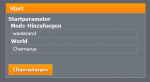
Kann hier die Paramtere einstellen, weiß allerdings nicht, wie ich das jetzt machen sollte:

armaiioa.PNG
 
Neben dem oben genannten Bild, gibt's natürlich auch noch die server.cfg (FTP-Zugang hab ich natürlich)

server.cfg

/*
Example ArmA2 server configuration file
by [KH]Jman, 3rd July 2009. http://www.kellys-heroes.eu
*/

// Password for private servers. Uncomment this if you wish to run a private server
// password = "serverpw";

/*
Password to protect admin access
type: #login mypassword
in ingame client chatbox to login as admin
type: #missions
in ingame client chatbox to display the mission list
*/
passwordAdmin = "***";

// The name of the server that shall be displayed in the public server list
hostname="Wasteland by AbGedreht";

/*
Message of the day. It can be several lines, separated by comma
empty messages "" will not be displayed at all but are only for increasing the interval
*/
motd[]= {
"Welcome to my Server",
};


// Time interval (in seconds) between each message of the day
motdInterval=3000;

/*
25% or more players need to vote for mission to become effective
set to 1.5 to turn off missions voting
*/
voteThreshold=1.25;


/*
Maximum amount of server slots
server will always display 64 slots if maxPlayers is >64 and server is empty
*/
maxPlayers=4;


/*
Gamespy reporting url for public server list inclusion
use 127.0.0.1 for LAN server
*/
reportingIP="arma2oapc.master.gamespy.com";


/*
If specified player connects/disconnects and player id are written to file.
log file is persistant and appends data on server restart.
*/
logfile="myserver.log";


/*
Specifies the mission rotation and related difficulty settings.
leave blank i.e class Missions {};
to enable player's selection from mission list & difficulty settings
(voted on if no admin logged in)
*/
class Missions
{
class Wasteland
{
template="Wasteland_United_Utes.utes";
difficulty="Regular";
};
};


// If class missions is blank start voting when 1 players connect.
voteMissionPlayers=1;

// Do not allow players with duplicate ids to connect
kickduplicate=0;

// If set to 1 players must use exactly the same -mod= startup parameter as the server.
equalModRequired=0;

// If set to 1, Voice over Net will not be available
disableVoN=0;

/*
Quality from 1 to 10
refer to:
http://community.bistudio.com/wiki/ArmA:_Multiplayer#VOIP_support
for codec info. 7 is the best.
*/
vonCodecQuality=7;


/*
Set the timestamp format used on each report line in server-side RPT file.
possible values are:
none (default), short & full
*/
timeStampFormat=full;

/*
Enables persistent battlefield
dependent on the mission specifiying persistence, otherwise has no effect.
missions must contain either instant respawn or base respawn options located in the missions description.ext file
*/
persistent=1;

/*
Enables signature verification for addons
this will prevent pbo hacks by only allowing pbos that pass servers public key checks
*/
verifySignatures=1;

// Signature timeout fix
regularcheck="{}";

// some ArmA specific stuff - signature verification
onUnsignedData = "kick (_this select 0)"; // unsigned data detected
onHackedData ="kick (_this select 0)"; // tampering of the signature detected
onDifferentData = ""; // data with a valid signature, but different version than the one present on server detected
BattlEye = 0; //Server to use BattlEye system

// See ArmA Biki for additional signature commands

// EOF

arma2.cfg

language="German";
adapter=-1;
3D_Performance=-4194304;
Resolution_Bpp=32;
Windowed=0;

Im FTP ist unter MP-Mission die Utes-Wasteland.pbo (mit richtigen Namen ^^).

Hab ihn gestern auch mal neuinstalliert, mit dem Ergebnis, dass ich jetzt immer aus dem Game gekickt werde.
 
Die server.cfg sieht auf dem ersten Blick in Ordnung aus.

Aber die arma2.cfg enthält Sachen, die zu einer arma2.cfg auf einem Client passen und nicht für einen Server.

Hier nochmal die Configs von dem Link, den ich vorher gepostet habe:

arma2.cfg (für Server-Performance Einstellungen)
/*
Example ArmA2 configuration file
by [KH]Jman, 8th September 2011. http://www.kellys-heroes.eu
These example numbers are for a 2.5 - 3Ghz Quad Core Xeon on a 100mBit connection.
*/


/*
Bandwidth the server is guaranteed to have (in bps).
This value helps server to estimate bandwidth available.
Increasing it to too optimistic values can increase lag and CPU load
as too many messages will be sent but discarded. Default: 131072
*/
MinBandwidth=10000000;

/*
Bandwidth the server is guaranteed to never have.
This value helps the server to estimate bandwidth available.
*/
MaxBandwidth=2147483647;

/*
Maximum number of messages that can be sent in one simulation cycle.
Increasing this value can decrease lag on high upload bandwidth servers. Default: 128
*/
MaxMsgSend = 1024;

/*
Maximum size of guaranteed packet in bytes (without headers).
Small messages are packed to larger frames.
Guaranteed messages are used for non-repetitive events like shooting. Default: 512
*/
MaxSizeGuaranteed = 1024;

/*
Maximum size of non-guaranteed packet in bytes (without headers).
Non-guaranteed messages are used for repetitive updates like soldier or vehicle position.
Increasing this value may improve bandwidth requirement, but it may increase lag. Default: 256
*/
MaxSizeNonguaranteed = 64;


/*
Minimal error to send updates across network.
Using a smaller value can make units observed by binoculars or sniper rifle to move smoother.
Default: 0.01
*/
MinErrorToSend = 0.0040000002;

/*
Users with custom faces or custom sounds larger than this size are kicked when trying to connect.
Use this wisely as it can be the cause of alot of Join in Progress lag.
1600000 = 160k
*/
MaxCustomFileSize=0;

// EOF

default.arma2profile (für Server-Einstellungen, wie z.B. Schwierigkeitsgrade, 3rd Person etc.)
/*
Example ArmA2Profile configuration file
by [KH]Jman, 1st July 2009. http://www.kellys-heroes.eu
*/

class Difficulties
{
class Recruit
{
class Flags
{

Armor=1; // Gives you improved body armor, tank armor etc
FriendlyTag=1; // Displays information on friendly units. ONLY WORKS WITH 'Weaponcursor=0', eg crosshair on.
EnemyTag=1; // Displays information on enemy units
HUD=1; // Shows you leaders location and your position in formation
HUDPerm=1; // Shows HUD permanently
HUDWp=1; // Shows Waypoints right after they're ordered to you
HUDWpPerm=1; // Shows Waypoints permanently
WeaponCursor=1; // Shows the crosshair for your weapon
AutoAim=1; // Enables auto aim when you're not looking through your weapon's scope. Also works with crosshair off
AutoGuideAT=1; // AT missiles will be automatically guided to their target. If 0, player has to lock onto the target.
3rdPersonView=1; // This turns 3rd(third) person view and group leader view on or off. Please never talk of this as "3D view" - ArmA is not an arcade game !
ClockIndicator=1; // Displays the clock indicator on the left of your screen when giving/receiving orders like "At 11 o'clock, enemy man at 200 meters"
Map=1; // Shows symbols for all objects known to your gruop on the map. This will NOT disable the map itself !
Tracers=1; // Displays tracers even of small arms that in real life would not have tracers
AutoSpot=1; // If you're close enough to an enemy, you'll report it without right-clicking
UltraAI=0; // Enables super AI, hear and see more and increased tactics. This is for both friendly and enemy sides.
DeathMessages=1; // Displays death messages i.e. playerA kill playerB
NetStats=1; // Displays score board
VonID=1; // Displays VON player name in window


};
// These are the skills. Value may range from 0.000000 to 1.000000
skillFriendly=0.34999999;
skillEnemy=0.34999999;
precisionFriendly=0.20;
precisionEnemy=0.20;
};

class Regular
{
class Flags
{
Armor=1;
FriendlyTag=1;
EnemyTag=0;
HUD=1;
HUDPerm=0;
HUDWp=1;
HUDWpPerm=1;
WeaponCursor=1;
AutoAim=0;
AutoGuideAT=0;
3rdPersonView=1;
ClockIndicator=1;
Map=1;
Tracers=1;
AutoSpot=0;
UltraAI=0;
DeathMessages=1;
NetStats=1;
VonID=1;
};
skillFriendly=0.44999999;
skillEnemy=0.44999999;
precisionFriendly=0.35;
precisionEnemy=0.35;
};
class Veteran
{
class Flags
{
Armor=0;
FriendlyTag=0;
EnemyTag=0;
HUD=1;
HUDPerm=0;
HUDWp=1;
HUDWpPerm=1;
WeaponCursor=0;
AutoAim=0;
AutoGuideAT=0;
3rdPersonView=0;
ClockIndicator=1;
Map=0;
Tracers=1;
AutoSpot=0;
UltraAI=0;
DeathMessages=0;
NetStats=0;
VonID=1;
};
skillFriendly=0.74999999;
skillEnemy=0.74999999;
precisionFriendly=0.75;
precisionEnemy=0.75;
};
class Expert
{
class Flags
{
Armor=0;
FriendlyTag=0;
EnemyTag=0;
HUD=1;
HUDPerm=0;
HUDWp=1;
HUDWpPerm=1;
WeaponCursor=0;
AutoAim=0;
AutoGuideAT=0;
3rdPersonView=0;
ClockIndicator=1;
Map=0;
Tracers=1;
AutoSpot=0;
UltraAI=0;
DeathMessages=0;
NetStats=0;
VonID=0;
};
skillFriendly=0.94999999;
skillEnemy=0.94999999;
precisionFriendly=0.95;
precisionEnemy=0.95;
};
};


// Sets the server default view distance.
// Render distance is 3/4 of view distance - for 2000 metres, objects will be render up to 1500 metres
// This maybe overidden by the mission
viewDistance=2000;

// Sets the server default terrain quality. Very High:10, Low:50
// This maybe overidden by the mission
terrainGrid=25;

// EOF

Diese Dateien dann per Startparameter zuweisen:
Code:
... -config=server.cfg -cfg=Arma2.cfg -profiles=default

PS: Nimm mal die Anführungszeichen in deiner server.cfg an folgender Stelle weg:
template="Wasteland_United_Utes.utes";
 
Zuletzt bearbeitet:
Achja, die default.arma2profile Datei :D Irgendwie finde ich die nicht. Bei mir gibts nur ne SYSTEM.ArmA2OAProfile.

In welchem Verzeichnis sollte die sein?
 
Das Profil/die Datei musst du entweder erstellen oder du nimmst das bereits vorhandene SYSTEM-Profil, was du aber ggf. vorher noch anpassen solltest.
 
Zuletzt bearbeitet:
Irgendwie listet sich jetzt der Server gar nicht mehr auf :S

Melde mich gleich mal wieder ^^

ed1t:

Jetzt ist er wieder da. Die Anführungszeichen sind jetzt weg, aber wegen dem Profil. Bei mir heißt die Datei SYSTEM.ArmA2OAProfile, nicht SYSTEM.ArmA2Profile. Wird schon passen oder?
 
Zuletzt bearbeitet:
Ja, das passt, da SYSTEM.ArmA2Profile ein Profil für Arma2 ohne das Addon "Operation Arrowhead" wäre. :)
 
Also, SYSTEM.ArmA2OAProfile ist wie beim Link, ArmA2.cfg auch, server.cfg sollte ja auch passen.

Startparameter

|Mods-Hinzuefügen
-config=server.cfg -cfg=Arma2.cfg -profiles=SYSTEM
|World
Utes


-> Server ist nicht aufgelistet.
 
Gut möglich. Was aber auch sein kein: Die Startparameter müssen evtl. in anderer Form angegeben werden.
Am besten wäre die Meinung von Jemandem, der bei diesem Hostinganbieter auch ein Arma2OA-Server betreibt.
 
Im CP steht aber auch arma2.cfg, bzw der Server wird nur gelistet wenn die originale arma2.cfg verwendet wird.

PS: Im FTP steht auch arma2.cfg
 
Bin ich wohl mehr oder weniger gezwungen.

Wenn's dann immer noch nicht klappt, muss ich mir halt ein neuer Hoster suchen. Die 6€ werde ich jetzt schon noch verkraften :D

bzw. vielen Dank für eure Hilfe ;)
 
Zuletzt bearbeitet:
Zurück
Oben