Du verwendest einen veralteten Browser. Es ist möglich, dass diese oder andere Websites nicht korrekt angezeigt werden. Du solltest ein Upgrade durchführen oder einen alternativen Browser verwenden.
Help! - Kernel-Panic beim Booten - 2. Anlauf klappt noch - trotzdem: nur noch ein lauffähiger Kernel vorhanden
Kernel lassen sich nicht installieren, weil das Modul nicht gebaut werden kann.
Ich meide snap nach Möglichkeit, aber soweit ich weiß ist v4l2 nichts was snap generell braucht.
Programme die virtuelle webcams brauchen, wie DaVinci und chromium können aber schon davon anhängen.
Das der komplette snap stack von einem dkms Modul
abhängig ist möchte ich nicht glauben
Ich würde erst mal schauen, dass sich kernel wieder installierenund deinstallieren lassen. Dann kann man wieder extra Module dagegen bauen
Da ist aber auch eine Bootpartition (und die ist gemountet). Sicher, dass die nicht fälschlich benutzt wird? Bzw. noch schlimmer, etwa so, dass Grub<>Ubuntu jeweils die andere benutzen.
Nein, das ist die Bootpartition von einem schon älteren Linux-MX. Die läuft auch. Ich kann jeweils eines der Laufwerke (SSDs) entfernen, und beide Linux-Systeme booten weiterhin. Da ist so weit alles in Ordnung.
frank@ASUS-NOTEBOOK:~$ cat /etc/fstab
# /etc/fstab: static file system information.
#
# Use 'blkid' to print the universally unique identifier for a
# device; this may be used with UUID= as a more robust way to name devices
# that works even if disks are added and removed. See fstab(5).
#
# <file system> <mount point> <type> <options> <dump> <pass>
/dev/mapper/sda2_crypt / ext4 errors=remount-ro 0 1
# /boot was on /dev/sda1 during installation
UUID=e6309246-da1a-410c-95ce-fd1fa5a8d986 /boot ext4 defaults 0 2
/swapfile none swap sw 0 0
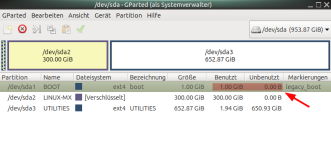
Aber bitte auf den (aus meiner Sicht) logischen Fehler der Boot-Partition konzentrieren. Dass nur 0 Bytes freier Speicher angezeigt werden, ist in meinen Augen das Hauptproblem.
Durch welchen Befehl bekomme ich den konkret weg? Wie wird nochmal eine Partition ähnlich wie "Checkdsk" bei Windows überprüft?
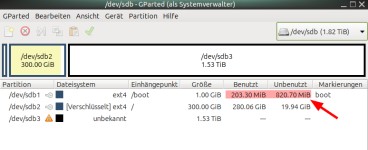
Zum Vergleich die Boot-Partition des MX-Systems:
Und die meines fehlerhaften Ubuntu Mate:
Was bedeutet da "legacy_boot"? - Früher stand da wie beim MX-System soweit ich weiß nur "boot".
Ich könnte auch vom anderen System (MX-Linux) aus booten, und dann die Boot-Partition von Ubuntu Mate, die dann stillliegt, versuchen zu reparieren. - Wie schon gefragt: Mit welcher Befehlszeile konkret den log. Fehler beseitigen?
Dann guck doch drauf, auf die 0-Byte Partition, was da zuletzt geschrieben wurde, warum die voll ist.
Das, was Du gemacht hast (2 Platten, 2 Bootloader), ist ein potenziell sehr fehleranfälliges Konstrukt. Oftmals wird geraten, die Platten beim installieren physisch abzuklemmen, damit die "Autodetektionen" der Systeme/Bootloader nicht verwirrt werden können, was bei gewissen Systemen offenbar keine Seltenheit ist. Ansonsten kann es passieren, dass die Systeme die Partitionen fälschlich "vermischen/vertauschen".
Das ist auf jedenfall der nächste Schritt den ich versuchen würde.
Und dann prüfen welche Partition wirklich als "boot" gemountet ist, bei dir sollte da /dev/sda1 stehen, wenn nicht weist du warum sich der freie speicher nicht ändert.
$ mount |grep /boot /dev/nvme0n1p1 on /boot/efi type vfat (rw,no ...