Joypad
Lieutenant
- Registriert
- Juli 2002
- Beiträge
- 650
Hallo zusammen,
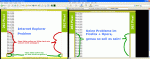
Ich möchte eine wie folgt geartete Layout-Tabelle erstellen:

Also 3 Spalten und 4 Reihen, soweit so gut.
Nun möchte ich in "links1" und "rechts1" jeweils ein 262px hohes (breite 73px) Bild setzen UND in "links2" und "rechts2" jeweils eine Hintergrundgrafik über die Länge des "inhalt" mitlaufen lassen.
Genau das funktioniert im Internet Explorer nicht. Der geht hin und verlängert die Tabellenzellen "links1"/"rechts1" anstatt die mit den Hintergrundbildern versehen Zellen "links2"/"rechts2". Die Zellen "links1"/"rechts1" sollen aber 262px hoch bleiben. Im Firefox und Opera sieht alles wie gewünscht aus.
Bitte Helfen !
!
Illustration des Problems im Anhang als problem.gif ausserdem noch ne Zip-Datei mit 'ner fertigen Beispiel Tabelle und gifs zum Ausprobieren.
Der Code:
Ich möchte eine wie folgt geartete Layout-Tabelle erstellen:
Also 3 Spalten und 4 Reihen, soweit so gut.
Nun möchte ich in "links1" und "rechts1" jeweils ein 262px hohes (breite 73px) Bild setzen UND in "links2" und "rechts2" jeweils eine Hintergrundgrafik über die Länge des "inhalt" mitlaufen lassen.
Genau das funktioniert im Internet Explorer nicht. Der geht hin und verlängert die Tabellenzellen "links1"/"rechts1" anstatt die mit den Hintergrundbildern versehen Zellen "links2"/"rechts2". Die Zellen "links1"/"rechts1" sollen aber 262px hoch bleiben. Im Firefox und Opera sieht alles wie gewünscht aus.
Bitte Helfen
!Illustration des Problems im Anhang als problem.gif ausserdem noch ne Zip-Datei mit 'ner fertigen Beispiel Tabelle und gifs zum Ausprobieren.
Der Code:
Code:
<!DOCTYPE HTML PUBLIC "-//W3C//DTD HTML 4.01 Transitional//EN"
"http://www.w3.org/TR/html4/loose.dtd">
<html>
<head>
<title>Tabellen Problem</title>
<meta http-equiv="Content-Type" content="text/html; charset=iso-8859-1">
</head>
<body bgcolor="#000000">
<table width="830" border="1" cellspacing="0" cellpadding="0" bgcolor="#FFFFFF">
<tr>
<td colspan="3"><img src="kopf.gif" border="0" alt="kopf"></td>
</tr>
<tr>
<td style="width: 73px; height: 262px; vertical-align: top;"><img src="262px.gif" border="0" alt="kopf"></td>
<td rowspan="2" style="width: 694px;">
ganz viel Inhalt<br>ganz viel Inhalt<br>ganz viel Inhalt<br>ganz viel Inhalt<br>ganz viel Inhalt<br>ganz viel Inhalt<br>ganz viel Inhalt<br>ganz viel Inhalt<br>ganz viel Inhalt<br>ganz viel Inhalt<br>ganz viel Inhalt<br>ganz viel Inhalt<br>ganz viel Inhalt<br>ganz viel Inhalt<br>ganz viel Inhalt<br>
ganz viel Inhalt<br>ganz viel Inhalt<br>ganz viel Inhalt<br>ganz viel Inhalt<br>ganz viel Inhalt<br>ganz viel Inhalt<br>ganz viel Inhalt<br>ganz viel Inhalt<br>ganz viel Inhalt<br>ganz viel Inhalt<br>ganz viel Inhalt<br>ganz viel Inhalt<br>ganz viel Inhalt<br>ganz viel Inhalt<br>ganz viel Inhalt<br>
</td>
<td style="width: 73px; height: 262px; vertical-align: top;"><img src="262px.gif" border="0" alt="kopf"></td>
</tr>
<tr>
<td style="background-image: url(bg.gif); background-position: right; background-repeat: repeat-y;"> </td>
<td style="background-image: url(bg.gif); background-position: left; background-repeat: repeat-y;"> </td>
</tr>
<tr>
<td colspan="3"><img src="unten.gif" border="0" alt="kopf"></td>
</tr>
</table>
</body>
</html>