Nach Anmeldung Bluescreen

jsk8055

Newbie
Registriert
März 2013
Beiträge
5
Hallo liebe Community,
weiß nicht mehr weiter und konnte mein Problem auch nicht mit Hilfe von Google lösen. Wäre sehr dankbar wenn mir jemand weiterhelfen könnte. Kann nicht einmal sagen ob es ein Software oder Hardwareproblem ist.

Zu meinem Problem:
der PC fährt ganz normal hoch, bis zum Anmeldefenster, jedoch nach ca. 10 sekunden erscheint ein Bluescreen (siehe Bildanhang). Danach fährt der PC runter und versucht dann wieder zu starten, doch dieses mal gelingt nicht einmal der Startvorgang. Komme nur noch im abgesicherten Modus auf meine Daten.
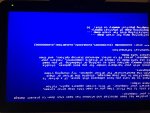
Foto.jpg

Vielen Dank für eure Tipps ;-D

 
Windows 7 32 Bit. Auf meinem Rechner ist das Foto noch nicht auf dem Kopf, komischerweise ist es erst hier gedreht.
 
Zuletzt bearbeitet:
hi,

scheint ein fehlerhafter Treiber zu sein! Schwierig zu sagen.. ich würde erstmal folgendermaßen vorgehen:

Wenn neue Hardware eingebaut, oder neue Treiber installiert worden.. schauen ob es daran liegt!

Sofern überhaupt möglich, in den Abgesicherten Modus und mal einen Blick ins Ereignisprotokoll werfen. Vielleicht findet sich hier schon ein Hinweis welcher Treiber davon betroffen ist. Falls irgendetwas darauf hindeutet - Treiber deinstallieren! System neustarten und Treiber wieder installieren! Tritt der Fehler wieder auf, ist das ein Hinweis auf ein defektes Gerät bzw. Hardware.

Vielleicht noch ein Hilfreicher Link: http://support.microsoft.com/kb/244617/de

Viel Erfolg
 
Vielen dank erstmal. Wenn ich das System komplett neu aufsetzte, wird dann auch das Treiberproblem beseitigt?
 
aswSP.SYS ist die Ursache. Das sollte Avast sein. aktualisiere es mal auf Version 8 oder hau es runter:

Code:
*******************************************************************************
*                                                                             *
*                        Bugcheck Analysis                                    *
*                                                                             *
*******************************************************************************

KERNEL_MODE_EXCEPTION_NOT_HANDLED_M (1000008e)
This is a very common bugcheck.  Usually the exception address pinpoints
the driver/function that caused the problem.  Always note this address
as well as the link date of the driver/image that contains this address.
Some common problems are exception code 0x80000003.  This means a hard
coded breakpoint or assertion was hit, but this system was booted
/NODEBUG.  This is not supposed to happen as developers should never have
hardcoded breakpoints in retail code, but ...
If this happens, make sure a debugger gets connected, and the
system is booted /DEBUG.  This will let us see why this breakpoint is
happening.
Arguments:
Arg1: c0000005, The exception code that was not handled
Arg2: 0044005c, The address that the exception occurred at
Arg3: a40af69c, Trap Frame
Arg4: 00000000

Debugging Details:
------------------


EXCEPTION_CODE: (NTSTATUS) 0xc0000005 - Die Anweisung in 0x%08lx verweist auf Speicher 0x%08lx. Der Vorgang %s konnte nicht im Speicher durchgef hrt werden.

FAULTING_IP: 
+0
0044005c ??              ???

TRAP_FRAME:  a40af69c -- (.trap 0xffffffffa40af69c)
ErrCode = 00000010
eax=0044005c ebx=00000000 ecx=85dc0300 edx=00000000 esi=a3f889c0 edi=82ca87d6
eip=0044005c esp=a40af710 ebp=a40af808 iopl=0         nv up ei pl nz na pe nc
cs=0008  ss=0010  ds=0023  es=0023  fs=0030  gs=0000             efl=00010206
0044005c ??              ???
Resetting default scope

CUSTOMER_CRASH_COUNT:  1

DEFAULT_BUCKET_ID:  WIN7_DRIVER_FAULT

BUGCHECK_STR:  0x8E

PROCESS_NAME:  cmd.exe

CURRENT_IRQL:  0

LAST_CONTROL_TRANSFER:  from 90cdc816 to 0044005c

STACK_TEXT:  
0x0
aswSP
aswSP
aswSP
aswSP
aswSP
nt!PsCallImageNotifyRoutines
nt!DbgkCreateThread
nt!PspUserThreadStartup
nt!KiThreadStartup


IMAGE_NAME:  aswSP.SYS

BUCKET_ID:  0x8E_aswSP+3b816


    Image path: \SystemRoot\System32\Drivers\aswSP.SYS
    Image name: aswSP.SYS
    Timestamp:        Tue Aug 21 11:05:32 2012
 
habe avast entfernt und siehe da, der Rechner startet ohne Probleme. Vielen Dank für die kompetente und schnelle Hilfe. Hätte das Problem nie alleine lösen können!
 
Zurück
Oben

