berlyn
Cadet 3rd Year
- Registriert
- Feb. 2017
- Beiträge
- 41
hallo Leute,
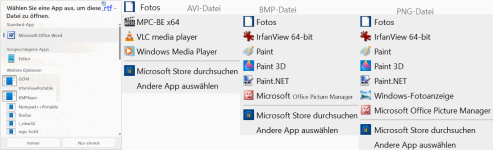
ich möchte bei *avi/ *BMP /*png.... Datei'en unnötige Programme
im [öffnen mit] Dialog entfernen.
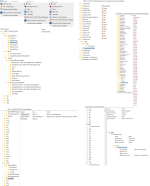
Dazu habe ich schon im Regedit[admin:]
• Windows Media Player
• Paint / Paint 3D
• Microsoft Office Picture Viewer 2003 =ois.exe
• Windows-Fotoanzeige
• Microsoft: Fotos

....systematisch durch-gekämpft habe ich foldende Regedit-Einträge:
öffnen mit \FileExts
• HKEY_CURRENT_USER\SOFTWARE\Microsoft\Windows\CurrentVersion\Explorer\FileExts
• HKEY_CLASSES_ROOT\SystemFileAssociations
• HKEY_CLASSES_ROOT\Local Settings\Software\Microsoft\Windows\Shell\MuiCache
• {{{HKEY_CURRENT_USER\SOFTWARE\Classes\ \.bmp\OpenWithProgids
• {{{HKEY_USERS\S-1-5-21-620219833-2352187852-3305292438-1000\SOFTWARE\Classes\
• {{HKEY_USERS\S-1-5-21-620219833-2352187852-3305292438-1000_Classes
• {{{HKEY_CURRENT_USER\SOFTWARE\Microsoft\Windows\CurrentVersion\Explorer\ComDlg32\OpenSavePidlMRU\
Folgende Programme wollte ich auslöschen:
ehshell.exe
IrfanViewPortable.exe
firefox.exe
iexplore.exe
MSPaint.exe Microsoft.MSPaint_8wekyb3d8bbwe!Microsoft.MSPaint
MSPVIEW.EXE Microsoft Office Document Imaging
ois.exe Microsoft Office Picture Manager
Paint.NET.1
Paint.Picture
Fotos: PhotoViewer.dll //Microsoft.Windows.Photos_8wekyb3d8bbwe!App
PickerHost.exe
picpick.exe
QuickTime.avi
snapview.exe
wordpad
WMP11.AssocFile.AVI mplayer.exe
HKEY_CURRENT_USER\SOFTWARE\Microsoft\Windows\CurrentVersion\ApplicationAssociationToasts
Applications\ehshell.exe_.avi
IE.AssocFile.HTM_.htm
Applications\ois.exe_.bmp
AppX2jm25qtmp2qxstv333wv5mne3k5bf4bm_.bmp
AppX43hnxtbyyps62jhe9sqpdzxn1790zetc_.bmp
AppX6eg8h5sxqq90pv53845wmnbewywdqq5h_.avi
AppXcdh38jxzbcberv50vxg2tg4k84kfnewn_.bmp
AppXk0g4vb8gvt7b93tg50ybcy892pge6jmt_.avi
Besonders die: MS-Paint / Fotos / Internet-Explorer & Media-Player
sind sehr hartnäckig❗‼❕
Das öffnen mit ist bei Windows 10 und auch nach einem inplace-Update auf Windows11 noch vorhanden❗‼❕
Ich benutze nur die Windows-internen Programme. Also keinen Ccleaner oder andere Tuning-Tools.
Kann ich ohne Deinstallation der eingebetteten Programme diese Einträge entfernen❔ Und wie sollte ich vorgehen❔
....g,o,o,g,l,e---s*c*h*l*a*u habe ich schon abgefragt....
danke für Tipps und Hinweise'n🧾📑
ich möchte bei *avi/ *BMP /*png.... Datei'en unnötige Programme
im [öffnen mit] Dialog entfernen.
Dazu habe ich schon im Regedit[admin:]
sehr viele Einträge gelöscht. Trotzdem erscheinen
die Standard-Programme:• Windows Media Player
• Paint / Paint 3D
• Microsoft Office Picture Viewer 2003 =ois.exe
• Windows-Fotoanzeige
• Microsoft: Fotos
....systematisch durch-gekämpft habe ich foldende Regedit-Einträge:
öffnen mit \FileExts
• HKEY_CURRENT_USER\SOFTWARE\Microsoft\Windows\CurrentVersion\Explorer\FileExts
• HKEY_CLASSES_ROOT\SystemFileAssociations
• HKEY_CLASSES_ROOT\Local Settings\Software\Microsoft\Windows\Shell\MuiCache
• {{{HKEY_CURRENT_USER\SOFTWARE\Classes\ \.bmp\OpenWithProgids
• {{{HKEY_USERS\S-1-5-21-620219833-2352187852-3305292438-1000\SOFTWARE\Classes\
• {{HKEY_USERS\S-1-5-21-620219833-2352187852-3305292438-1000_Classes
• {{{HKEY_CURRENT_USER\SOFTWARE\Microsoft\Windows\CurrentVersion\Explorer\ComDlg32\OpenSavePidlMRU\
Folgende Programme wollte ich auslöschen:
ehshell.exe
IrfanViewPortable.exe
firefox.exe
iexplore.exe
MSPaint.exe Microsoft.MSPaint_8wekyb3d8bbwe!Microsoft.MSPaint
MSPVIEW.EXE Microsoft Office Document Imaging
ois.exe Microsoft Office Picture Manager
Paint.NET.1
Paint.Picture
Fotos: PhotoViewer.dll //Microsoft.Windows.Photos_8wekyb3d8bbwe!App
PickerHost.exe
picpick.exe
QuickTime.avi
snapview.exe
wordpad
WMP11.AssocFile.AVI mplayer.exe
HKEY_CURRENT_USER\SOFTWARE\Microsoft\Windows\CurrentVersion\ApplicationAssociationToasts
Applications\ehshell.exe_.avi
IE.AssocFile.HTM_.htm
Applications\ois.exe_.bmp
AppX2jm25qtmp2qxstv333wv5mne3k5bf4bm_.bmp
AppX43hnxtbyyps62jhe9sqpdzxn1790zetc_.bmp
AppX6eg8h5sxqq90pv53845wmnbewywdqq5h_.avi
AppXcdh38jxzbcberv50vxg2tg4k84kfnewn_.bmp
AppXk0g4vb8gvt7b93tg50ybcy892pge6jmt_.avi
Besonders die: MS-Paint / Fotos / Internet-Explorer & Media-Player
sind sehr hartnäckig❗‼❕
Das öffnen mit ist bei Windows 10 und auch nach einem inplace-Update auf Windows11 noch vorhanden❗‼❕
Ich benutze nur die Windows-internen Programme. Also keinen Ccleaner oder andere Tuning-Tools.
Kann ich ohne Deinstallation der eingebetteten Programme diese Einträge entfernen❔ Und wie sollte ich vorgehen❔
....g,o,o,g,l,e---s*c*h*l*a*u habe ich schon abgefragt....
danke für Tipps und Hinweise'n🧾📑
Anhänge
Zuletzt bearbeitet: