the_nobs
Commander
- Registriert
- März 2009
- Beiträge
- 2.479
Hallo
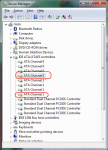
Der Device Manager zeigt mir einige Probleme mit ATA Controller an (siehe screenshot)

Vermutlich aus diesem Grund funktioniert bei mir Hibernation nicht.
Das problem habe ich aber eigentlich erst, seit ich eine SSD eingebaut habe. Vermute mal das ich was verstellt habe, die Frage ist jetzt WAS?
Meine Hardware:
------------------------------------------------------------------------------------------
Operating System: Windows 7 Ultimate Professional Media Center 6.01.7601 Service Pack 1
Report Date: Freitag 08 Juli 2011at 09:40
<<< System Summary >>>
> Mainboard : Asus P5K
> Chipset : Intel P31/P35
> Processor : Intel Pentium E6500 @ 2933MHz
> Physical Memory : 4096MB (4 x 1024 DDR2-SDRAM )
> Video Card : ATI Radeon HD 4800 Series
> Hard Disk : INTEL SSDSA2CW120G3 ATA Device (120GB)
> Hard Disk : SAMSUNG HD400LD ATA Device (400GB)
> Hard Disk : SAMSUNG HD501LJ ATA Device (500GB)
> DVD-Rom Drive : HL-DT-ST DVDRAM GSA-H62N
> DVD-Rom Drive : ELBY CLONEDRIVE
> Network Card : Attansic (Now owned by Atheros) L1 Gigabit Ethernet 10/100/1000Base-T Controller
> Network Card : Realtek Semiconductor RTL8169/8110 Gigabit Ethernet Adapter
> Operating System : Windows 7 Ultimate Professional Media Center 6.01.7601 Service Pack 1 (64-bit)
> DirectX : Version 11.00
> Windows Performance Index : 6.4 on 7.9
Devices deinstallieren und neu booten habe ich bereits probiert, hat nix geholfen.
Der Device Manager zeigt mir einige Probleme mit ATA Controller an (siehe screenshot)
Vermutlich aus diesem Grund funktioniert bei mir Hibernation nicht.
Das problem habe ich aber eigentlich erst, seit ich eine SSD eingebaut habe. Vermute mal das ich was verstellt habe, die Frage ist jetzt WAS?
Meine Hardware:
------------------------------------------------------------------------------------------
Operating System: Windows 7 Ultimate Professional Media Center 6.01.7601 Service Pack 1
Report Date: Freitag 08 Juli 2011at 09:40
<<< System Summary >>>
> Mainboard : Asus P5K
> Chipset : Intel P31/P35
> Processor : Intel Pentium E6500 @ 2933MHz
> Physical Memory : 4096MB (4 x 1024 DDR2-SDRAM )
> Video Card : ATI Radeon HD 4800 Series
> Hard Disk : INTEL SSDSA2CW120G3 ATA Device (120GB)
> Hard Disk : SAMSUNG HD400LD ATA Device (400GB)
> Hard Disk : SAMSUNG HD501LJ ATA Device (500GB)
> DVD-Rom Drive : HL-DT-ST DVDRAM GSA-H62N
> DVD-Rom Drive : ELBY CLONEDRIVE
> Network Card : Attansic (Now owned by Atheros) L1 Gigabit Ethernet 10/100/1000Base-T Controller
> Network Card : Realtek Semiconductor RTL8169/8110 Gigabit Ethernet Adapter
> Operating System : Windows 7 Ultimate Professional Media Center 6.01.7601 Service Pack 1 (64-bit)
> DirectX : Version 11.00
> Windows Performance Index : 6.4 on 7.9
Devices deinstallieren und neu booten habe ich bereits probiert, hat nix geholfen.