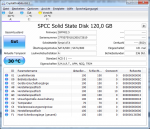
Hey Leute, ich habe folgendes Problem:
Ich habe mir einen neuen Pc mit einer Silicon Power S60 SSD gekauft. http://www.amazon.de/Silicon-E-Zyklu...rds=sp+ssd+s60
Wenn ich diese nun über das auf der Herstellerwebsite vorhandene Tool die neue Firmware runterladen will, kommt folgender Error: "No device, please plug in the device".
Kann mir jemand helfen wie ich das behebe?
OS: Windows 7
Im FAQ steht:
Problem
The computer cannot recognize the SSD.
Please refer to the possible reason and soultion below:
1. If this SSD is as OS drive, please double confirm if you install this SSD properly and if this SSD is compatible with your computer.
2.If this SSD is as Data drive, In Win XP/Vista/7/8/8.1/10 operating systems, go to Disk Management to confirm that the SSD is installed.
Es trifft auf ersteres zu, aber was ist damit gemeint?
Ich habe mir einen neuen Pc mit einer Silicon Power S60 SSD gekauft. http://www.amazon.de/Silicon-E-Zyklu...rds=sp+ssd+s60
Wenn ich diese nun über das auf der Herstellerwebsite vorhandene Tool die neue Firmware runterladen will, kommt folgender Error: "No device, please plug in the device".
Kann mir jemand helfen wie ich das behebe?
OS: Windows 7
Im FAQ steht:
Problem
The computer cannot recognize the SSD.
Please refer to the possible reason and soultion below:
1. If this SSD is as OS drive, please double confirm if you install this SSD properly and if this SSD is compatible with your computer.
2.If this SSD is as Data drive, In Win XP/Vista/7/8/8.1/10 operating systems, go to Disk Management to confirm that the SSD is installed.
Es trifft auf ersteres zu, aber was ist damit gemeint?