Du verwendest einen veralteten Browser. Es ist möglich, dass diese oder andere Websites nicht korrekt angezeigt werden. Du solltest ein Upgrade durchführen oder einen alternativen Browser verwenden.
So Yesterday my Internet was very slow and clunky suddenly for Like 10 minutes. After that only specific Sites(Most Google Sites/Netflix/Wikipedia/some Others) would Work in Browser and no Programms or Apps that require Internet would work. Internet ist schön aus connected. I also did multiple male- and addware Scans which dient Work. Other Computers are working perfectly in the Same Network.
OS? Properly reboot your system, might as well have been an upgrade.
If it is not, and its also not a router or a DNS issue (you can try setting google DNS in Windows network adapter options, 8.8.8.8), then it may be malware. Could have been just not detected.
Try these 3 first. Afterwards, come back with more details please. We dont know anything, like ISP, kind of connection (cable? Dsl? 4G?), hardware, operating system...
After that only specific Sites(Most Google Sites/Netflix/Wikipedia/some Others) would Work in Browser and no Programms or Apps that require Internet would work.
If Facebook, Computerbase, Wikipedia, and YouTube are accessable but other sites are not, it’s a dead giveaway of your connection being limited to IPv6 and lacking IPv4. What does this site say about your IPv4 and IPv6 status?
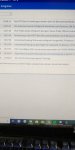
What’s your ISP and your plan? Last 50 lines of your router’s log? Which router do you use?
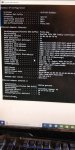
Also, please share the output of ipconfig /all typed into a Windows shell.
Habe den Router neu gestartet und Internet ging für wenige Minuten und dann sind wieder alle Programme/Seiten abgestürzt die geladen waren. Probiere den Rest später und gebe nochmal rückmeldung.
bart0rn schrieb:
Sorry für die Offtopic-Frage:
Zwischenzeitlich deutsch verlernt?
Isp: Telekom
Router: frotzbox
Bin momentan mit meinem Handy auf Computerbase da nach dem router Neustart selbst die vorher funktionierenden Seiten nicht mehr laden. Kann also nicht die Seite die den ipv6 und ipv4 Status prüfen soll öffnen.
Foto von ipconfig/all ist im anhang.
router Log auch im anhang.