

XHotSniperX
Lt. Junior Grade
- Registriert
- Jan. 2008
- Beiträge
- 474
Hallo
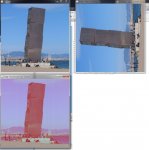
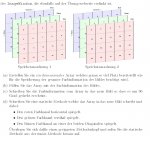
hab hier eine Aufgabe: Anhang (die ganze Aufgabe 1 ist im Anhang in zwei Bildern, Teil d der Aufgabe 1 habe ich eben noch nicht geschafft)
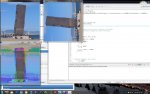
Teil a, b, c habe ich bereits gemacht, wie man auf dem Resultat Bildschrim sieht (Anhang Bild) mit dem folgenden Code (immer bei den TODOs muss man code schreiben)
Bei Teil d muss man einfach die Farbinformationen aus dem bereits erstellten Array "farbinf" mit einer Methode so auf das dritte Fenster laden, dass die rotwerte horizontal gespiegelt, die grünwerte vertikal und die blauwerte diagonal gespiegelt werden.
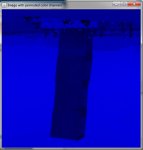
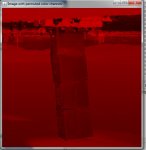
bei meinem dritten fenster habe ich jetzt nur die rote farbe versucht zu spiegeln. das bild sieht bisschen komisch aus (anhang resultat, drttes fenster).
wie kann ich mit einer statischen methode, wie in der aufgabe beschrieben, die farbwerte spiegeln, ohne da massig code zu schreiben?
vielen dank!
hab hier eine Aufgabe: Anhang (die ganze Aufgabe 1 ist im Anhang in zwei Bildern, Teil d der Aufgabe 1 habe ich eben noch nicht geschafft)
Teil a, b, c habe ich bereits gemacht, wie man auf dem Resultat Bildschrim sieht (Anhang Bild) mit dem folgenden Code (immer bei den TODOs muss man code schreiben)
Bei Teil d muss man einfach die Farbinformationen aus dem bereits erstellten Array "farbinf" mit einer Methode so auf das dritte Fenster laden, dass die rotwerte horizontal gespiegelt, die grünwerte vertikal und die blauwerte diagonal gespiegelt werden.
bei meinem dritten fenster habe ich jetzt nur die rote farbe versucht zu spiegeln. das bild sieht bisschen komisch aus (anhang resultat, drttes fenster).
wie kann ich mit einer statischen methode, wie in der aufgabe beschrieben, die farbwerte spiegeln, ohne da massig code zu schreiben?
Code:
package Praxis;
import Praxis.ch.unibas.informatik.cs101.ImageWindow;
//import java.util.Random;

public class ImageArrays {

	public static void main(String[] args) {
		//create & open the first window (to display the source image)
		ImageWindow sourceWindow = new ImageWindow(500,500);
		sourceWindow.openWindow("source",0,0);
		//load the image
		sourceWindow.loadImage("horn.jpg");
		//redraw to see the image
		sourceWindow.redraw();
		/*  TODO: create an array that is large enough to hold
		 *       the complete image information
		 */
		int[] farbinf = new int[750000];


		/*  TODO: store the complete image information in the
		 *        array you have created.
		 *  HINT: int red=sourceWindow.getPixelRed(xPosition, yPosition);
		 *        int green=sourceWindow.getPixelGreen(xPosition, yPosition);
		 *        int blue=sourceWindow.getPixelBlue(xPosition, yPosition);
	 	 */
		int k = 0;
		for (int y = 0; y < 500; y++){
			for (int x = 0; x < 500; x++){
				int red = sourceWindow.getPixelRed(x, y);
				int green = sourceWindow.getPixelGreen(x, y);
				int blue = sourceWindow.getPixelBlue(x, y);
				farbinf[k] = red;
				farbinf[k+250000] = green;
				farbinf[k+500000] = blue;
				k++;
			}
		}


		//create & open the second window (to draw your copy into)
		ImageWindow destinationWindow = new ImageWindow(500,500);
		destinationWindow.openWindow("Image rotated by 90 degree",550,0);
		/*  TODO: write back your array data into the destinationWindow so that
		 *        it appears to be rotated 90 degrees.
		 *  HINT: destinationWindow.setPixel(xPos,yPos,red,green,blue);
		 */
		int l = 0;
		for (int y = 0; y < 500; y++){
			for (int x = 0; x < 500; x++){
				destinationWindow.setPixel(y,499-x,farbinf[l],farbinf[l+250000],farbinf[l+500000]);
				l++;
			}
		}


		// redraw to see the changed image
		destinationWindow.redraw();
		// Create another output window
		ImageWindow destinationWindow2= new ImageWindow(500,500);
		destinationWindow2.openWindow("Image with permuted color channels",0,550);
		/*  TODO: call here your function which permutes the color channels
		 */
		int m = 0;
		for (int y = 0; y < 500; y++){
			for (int x = 0; x < 500; x++){
				destinationWindow2.setPixel(x,y,farbinf[rotate(x, y, m)],farbinf[rotate(x, y, m+250000)],farbinf[rotate(x, y, m+500000)]);
				m++;
			}
		}


		// redraw to see the changed image
		destinationWindow2.redraw();

	}


        /*  TODO: implement here the function to rotate the color channels.
         *  HINT: think about the arguments you need for the function.
         */
hier hab ich keine ahnung ob das noch stimmen könnte mit dem Rotwert: siehe Anhang Resultat, drittes Fenster.
	static int rotate(int x, int y, int m){
		if (m < 250000){
			if (y<250)
				m = m + (499-y)*500;
			else
				m = m - (y-499)*500;
			}
//das habe ich mal auskommentiert, weil das Bild einfach schlecht aussieht und es //wahrscheinlich falsch ist.
/*		else if (m >= 250000 && m < 500000){
*			if (x<250)
*				m = m + (499-x);
*			else
*				m = m - (x-1);
*			}
*		else if (m >= 500000){
*			if (x>y)
*				m = m + ((x-y*501)*499);
*			else if (x<y)
*				m = m - ((y*501-x)*499);
*			}*/

		return m;
	}


}
vielen dank!





 hast mir jetzt schon zum 4. mal oder so geholfen echt super!