Hallo liebes ComputerBase Forum,
Ich brauche dringend eure hilfe bei mein Computer ist jetzt schon zum 2.-mal durch Bluescreen abgestürzt.
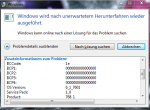
Mein Computer startet sich automatisch nach dem Bluescreen absturz neu, wenn ich dann wieder beim Desktop bin kommt ein Fenster mit Diagnose Problemen oder so und mit der Möglichkeit eine Lösung im internet zu suchen da hab ich mal draufgeklickt aber dadurch verschwindet leider das Fenster und eine Lösung hab ich auch nicht bekommen.
Daruafhin hab ich mich mal in Google und auf Youtube umgeguckt und bin auf dieses Video gestoßen :
http://www.youtube.com/watch?v=knJoE6PNO3w
Ich habe alles so gemacht wie er im Video und habe am Ende diesen Bericht:
Der Junge im Video hatte ja gesagt, dass das Wichtigste dieses am Ende ist : Probably caused by: Unknown_Image ( ANALYSIS_INCONCLUSIVE )
Wann kam der Bluescreen?
Der erste kam beim DayZ zocken als ich grade eine Heli auffüllte.
Der zweite kam, als ich heute CoD MW3 spielte.
Ich werde auch noch eine Text Datei anhängen,die ich mal für ein Starcraft 2 problem gebraucht habe. In der Datei steht viel über mein Computer also System und und und. Ich hoffe das kann euch helfen und falls nicht dann halt nicht. Ich kann leider eine weitere nicht hochladen weil diese zu groß ist.
Ich werde mich über jede Hilfe freuen
MfG Phil
Ich brauche dringend eure hilfe bei mein Computer ist jetzt schon zum 2.-mal durch Bluescreen abgestürzt.
Mein Computer startet sich automatisch nach dem Bluescreen absturz neu, wenn ich dann wieder beim Desktop bin kommt ein Fenster mit Diagnose Problemen oder so und mit der Möglichkeit eine Lösung im internet zu suchen da hab ich mal draufgeklickt aber dadurch verschwindet leider das Fenster und eine Lösung hab ich auch nicht bekommen.
Daruafhin hab ich mich mal in Google und auf Youtube umgeguckt und bin auf dieses Video gestoßen :
http://www.youtube.com/watch?v=knJoE6PNO3w
Ich habe alles so gemacht wie er im Video und habe am Ende diesen Bericht:
Microsoft (R) Windows Debugger Version 6.10.0003.233 X86
Copyright (c) Microsoft Corporation. All rights reserved.
Loading Dump File [C:\Users\Phil\Documents\MEMORY.DMP]
Kernel Summary Dump File: Only kernel address space is available
Symbol search path is: *** Invalid ***
****************************************************************************
* Symbol loading may be unreliable without a symbol search path. *
* Use .symfix to have the debugger choose a symbol path. *
* After setting your symbol path, use .reload to refresh symbol locations. *
****************************************************************************
Executable search path is:
*********************************************************************
* Symbols can not be loaded because symbol path is not initialized. *
* *
* The Symbol Path can be set by: *
* using the _NT_SYMBOL_PATH environment variable. *
* using the -y <symbol_path> argument when starting the debugger. *
* using .sympath and .sympath+ *
*********************************************************************
*** ERROR: Symbol file could not be found. Defaulted to export symbols for ntkrnlmp.exe -
Windows 7 Kernel Version 7601 (Service Pack 1) MP (4 procs) Free x64
Product: WinNt, suite: TerminalServer SingleUserTS Personal
Built by: 7601.18113.amd64fre.win7sp1_gdr.130318-1533
Machine Name:
Kernel base = 0xfffff800`03664000 PsLoadedModuleList = 0xfffff800`038a7670
Debug session time: Wed Jun 12 13:41:59.041 2013 (GMT+2)
System Uptime: 0 days 0:34:41.305
*********************************************************************
* Symbols can not be loaded because symbol path is not initialized. *
* *
* The Symbol Path can be set by: *
* using the _NT_SYMBOL_PATH environment variable. *
* using the -y <symbol_path> argument when starting the debugger. *
* using .sympath and .sympath+ *
*********************************************************************
*** ERROR: Symbol file could not be found. Defaulted to export symbols for ntkrnlmp.exe -
Loading Kernel Symbols
...............................................................
................................................................
..................................
Loading User Symbols
Loading unloaded module list
.....
The context is partially valid. Only x86 user-mode context is available.
The wow64exts extension must be loaded to access 32-bit state.
.load wow64exts will do this if you haven't loaded it already.
*******************************************************************************
* *
* Bugcheck Analysis *
* *
*******************************************************************************
Use !analyze -v to get detailed debugging information.
BugCheck D1, {fffff8800659ae0c, 2, 8, fffff8800659ae0c}
***** Kernel symbols are WRONG. Please fix symbols to do analysis.
*************************************************************************
*** ***
*** ***
*** Your debugger is not using the correct symbols ***
*** ***
*** In order for this command to work properly, your symbol path ***
*** must point to .pdb files that have full type information. ***
*** ***
*** Certain .pdb files (such as the public OS symbols) do not ***
*** contain the required information. Contact the group that ***
*** provided you with these symbols if you need this command to ***
*** work. ***
*** ***
*** Type referenced: nt!_KPRCB ***
*** ***
*************************************************************************
*************************************************************************
*** ***
*** ***
*** Your debugger is not using the correct symbols ***
*** ***
*** In order for this command to work properly, your symbol path ***
*** must point to .pdb files that have full type information. ***
*** ***
*** Certain .pdb files (such as the public OS symbols) do not ***
*** contain the required information. Contact the group that ***
*** provided you with these symbols if you need this command to ***
*** work. ***
*** ***
*** Type referenced: nt!KPRCB ***
*** ***
*************************************************************************
*************************************************************************
*** ***
*** ***
*** Your debugger is not using the correct symbols ***
*** ***
*** In order for this command to work properly, your symbol path ***
*** must point to .pdb files that have full type information. ***
*** ***
*** Certain .pdb files (such as the public OS symbols) do not ***
*** contain the required information. Contact the group that ***
*** provided you with these symbols if you need this command to ***
*** work. ***
*** ***
*** Type referenced: nt!_KPRCB ***
*** ***
*************************************************************************
*************************************************************************
*** ***
*** ***
*** Your debugger is not using the correct symbols ***
*** ***
*** In order for this command to work properly, your symbol path ***
*** must point to .pdb files that have full type information. ***
*** ***
*** Certain .pdb files (such as the public OS symbols) do not ***
*** contain the required information. Contact the group that ***
*** provided you with these symbols if you need this command to ***
*** work. ***
*** ***
*** Type referenced: nt!KPRCB ***
*** ***
*************************************************************************
*************************************************************************
*** ***
*** ***
*** Your debugger is not using the correct symbols ***
*** ***
*** In order for this command to work properly, your symbol path ***
*** must point to .pdb files that have full type information. ***
*** ***
*** Certain .pdb files (such as the public OS symbols) do not ***
*** contain the required information. Contact the group that ***
*** provided you with these symbols if you need this command to ***
*** work. ***
*** ***
*** Type referenced: nt!_KPRCB ***
*** ***
*************************************************************************
*************************************************************************
*** ***
*** ***
*** Your debugger is not using the correct symbols ***
*** ***
*** In order for this command to work properly, your symbol path ***
*** must point to .pdb files that have full type information. ***
*** ***
*** Certain .pdb files (such as the public OS symbols) do not ***
*** contain the required information. Contact the group that ***
*** provided you with these symbols if you need this command to ***
*** work. ***
*** ***
*** Type referenced: nt!_KPRCB ***
*** ***
*************************************************************************
*************************************************************************
*** ***
*** ***
*** Your debugger is not using the correct symbols ***
*** ***
*** In order for this command to work properly, your symbol path ***
*** must point to .pdb files that have full type information. ***
*** ***
*** Certain .pdb files (such as the public OS symbols) do not ***
*** contain the required information. Contact the group that ***
*** provided you with these symbols if you need this command to ***
*** work. ***
*** ***
*** Type referenced: nt!_KPRCB ***
*** ***
*************************************************************************
*************************************************************************
*** ***
*** ***
*** Your debugger is not using the correct symbols ***
*** ***
*** In order for this command to work properly, your symbol path ***
*** must point to .pdb files that have full type information. ***
*** ***
*** Certain .pdb files (such as the public OS symbols) do not ***
*** contain the required information. Contact the group that ***
*** provided you with these symbols if you need this command to ***
*** work. ***
*** ***
*** Type referenced: nt!_KPRCB ***
*** ***
*************************************************************************
*********************************************************************
* Symbols can not be loaded because symbol path is not initialized. *
* *
* The Symbol Path can be set by: *
* using the _NT_SYMBOL_PATH environment variable. *
* using the -y <symbol_path> argument when starting the debugger. *
* using .sympath and .sympath+ *
*********************************************************************
*********************************************************************
* Symbols can not be loaded because symbol path is not initialized. *
* *
* The Symbol Path can be set by: *
* using the _NT_SYMBOL_PATH environment variable. *
* using the -y <symbol_path> argument when starting the debugger. *
* using .sympath and .sympath+ *
*********************************************************************
Probably caused by : Unknown_Image ( ANALYSIS_INCONCLUSIVE )
Followup: MachineOwner
---------
Copyright (c) Microsoft Corporation. All rights reserved.
Loading Dump File [C:\Users\Phil\Documents\MEMORY.DMP]
Kernel Summary Dump File: Only kernel address space is available
Symbol search path is: *** Invalid ***
****************************************************************************
* Symbol loading may be unreliable without a symbol search path. *
* Use .symfix to have the debugger choose a symbol path. *
* After setting your symbol path, use .reload to refresh symbol locations. *
****************************************************************************
Executable search path is:
*********************************************************************
* Symbols can not be loaded because symbol path is not initialized. *
* *
* The Symbol Path can be set by: *
* using the _NT_SYMBOL_PATH environment variable. *
* using the -y <symbol_path> argument when starting the debugger. *
* using .sympath and .sympath+ *
*********************************************************************
*** ERROR: Symbol file could not be found. Defaulted to export symbols for ntkrnlmp.exe -
Windows 7 Kernel Version 7601 (Service Pack 1) MP (4 procs) Free x64
Product: WinNt, suite: TerminalServer SingleUserTS Personal
Built by: 7601.18113.amd64fre.win7sp1_gdr.130318-1533
Machine Name:
Kernel base = 0xfffff800`03664000 PsLoadedModuleList = 0xfffff800`038a7670
Debug session time: Wed Jun 12 13:41:59.041 2013 (GMT+2)
System Uptime: 0 days 0:34:41.305
*********************************************************************
* Symbols can not be loaded because symbol path is not initialized. *
* *
* The Symbol Path can be set by: *
* using the _NT_SYMBOL_PATH environment variable. *
* using the -y <symbol_path> argument when starting the debugger. *
* using .sympath and .sympath+ *
*********************************************************************
*** ERROR: Symbol file could not be found. Defaulted to export symbols for ntkrnlmp.exe -
Loading Kernel Symbols
...............................................................
................................................................
..................................
Loading User Symbols
Loading unloaded module list
.....
The context is partially valid. Only x86 user-mode context is available.
The wow64exts extension must be loaded to access 32-bit state.
.load wow64exts will do this if you haven't loaded it already.
*******************************************************************************
* *
* Bugcheck Analysis *
* *
*******************************************************************************
Use !analyze -v to get detailed debugging information.
BugCheck D1, {fffff8800659ae0c, 2, 8, fffff8800659ae0c}
***** Kernel symbols are WRONG. Please fix symbols to do analysis.
*************************************************************************
*** ***
*** ***
*** Your debugger is not using the correct symbols ***
*** ***
*** In order for this command to work properly, your symbol path ***
*** must point to .pdb files that have full type information. ***
*** ***
*** Certain .pdb files (such as the public OS symbols) do not ***
*** contain the required information. Contact the group that ***
*** provided you with these symbols if you need this command to ***
*** work. ***
*** ***
*** Type referenced: nt!_KPRCB ***
*** ***
*************************************************************************
*************************************************************************
*** ***
*** ***
*** Your debugger is not using the correct symbols ***
*** ***
*** In order for this command to work properly, your symbol path ***
*** must point to .pdb files that have full type information. ***
*** ***
*** Certain .pdb files (such as the public OS symbols) do not ***
*** contain the required information. Contact the group that ***
*** provided you with these symbols if you need this command to ***
*** work. ***
*** ***
*** Type referenced: nt!KPRCB ***
*** ***
*************************************************************************
*************************************************************************
*** ***
*** ***
*** Your debugger is not using the correct symbols ***
*** ***
*** In order for this command to work properly, your symbol path ***
*** must point to .pdb files that have full type information. ***
*** ***
*** Certain .pdb files (such as the public OS symbols) do not ***
*** contain the required information. Contact the group that ***
*** provided you with these symbols if you need this command to ***
*** work. ***
*** ***
*** Type referenced: nt!_KPRCB ***
*** ***
*************************************************************************
*************************************************************************
*** ***
*** ***
*** Your debugger is not using the correct symbols ***
*** ***
*** In order for this command to work properly, your symbol path ***
*** must point to .pdb files that have full type information. ***
*** ***
*** Certain .pdb files (such as the public OS symbols) do not ***
*** contain the required information. Contact the group that ***
*** provided you with these symbols if you need this command to ***
*** work. ***
*** ***
*** Type referenced: nt!KPRCB ***
*** ***
*************************************************************************
*************************************************************************
*** ***
*** ***
*** Your debugger is not using the correct symbols ***
*** ***
*** In order for this command to work properly, your symbol path ***
*** must point to .pdb files that have full type information. ***
*** ***
*** Certain .pdb files (such as the public OS symbols) do not ***
*** contain the required information. Contact the group that ***
*** provided you with these symbols if you need this command to ***
*** work. ***
*** ***
*** Type referenced: nt!_KPRCB ***
*** ***
*************************************************************************
*************************************************************************
*** ***
*** ***
*** Your debugger is not using the correct symbols ***
*** ***
*** In order for this command to work properly, your symbol path ***
*** must point to .pdb files that have full type information. ***
*** ***
*** Certain .pdb files (such as the public OS symbols) do not ***
*** contain the required information. Contact the group that ***
*** provided you with these symbols if you need this command to ***
*** work. ***
*** ***
*** Type referenced: nt!_KPRCB ***
*** ***
*************************************************************************
*************************************************************************
*** ***
*** ***
*** Your debugger is not using the correct symbols ***
*** ***
*** In order for this command to work properly, your symbol path ***
*** must point to .pdb files that have full type information. ***
*** ***
*** Certain .pdb files (such as the public OS symbols) do not ***
*** contain the required information. Contact the group that ***
*** provided you with these symbols if you need this command to ***
*** work. ***
*** ***
*** Type referenced: nt!_KPRCB ***
*** ***
*************************************************************************
*************************************************************************
*** ***
*** ***
*** Your debugger is not using the correct symbols ***
*** ***
*** In order for this command to work properly, your symbol path ***
*** must point to .pdb files that have full type information. ***
*** ***
*** Certain .pdb files (such as the public OS symbols) do not ***
*** contain the required information. Contact the group that ***
*** provided you with these symbols if you need this command to ***
*** work. ***
*** ***
*** Type referenced: nt!_KPRCB ***
*** ***
*************************************************************************
*********************************************************************
* Symbols can not be loaded because symbol path is not initialized. *
* *
* The Symbol Path can be set by: *
* using the _NT_SYMBOL_PATH environment variable. *
* using the -y <symbol_path> argument when starting the debugger. *
* using .sympath and .sympath+ *
*********************************************************************
*********************************************************************
* Symbols can not be loaded because symbol path is not initialized. *
* *
* The Symbol Path can be set by: *
* using the _NT_SYMBOL_PATH environment variable. *
* using the -y <symbol_path> argument when starting the debugger. *
* using .sympath and .sympath+ *
*********************************************************************
Probably caused by : Unknown_Image ( ANALYSIS_INCONCLUSIVE )
Followup: MachineOwner
---------
Der Junge im Video hatte ja gesagt, dass das Wichtigste dieses am Ende ist : Probably caused by: Unknown_Image ( ANALYSIS_INCONCLUSIVE )
Wann kam der Bluescreen?
Der erste kam beim DayZ zocken als ich grade eine Heli auffüllte.
Der zweite kam, als ich heute CoD MW3 spielte.
Ich werde auch noch eine Text Datei anhängen,die ich mal für ein Starcraft 2 problem gebraucht habe. In der Datei steht viel über mein Computer also System und und und. Ich hoffe das kann euch helfen und falls nicht dann halt nicht. Ich kann leider eine weitere nicht hochladen weil diese zu groß ist.
Ich werde mich über jede Hilfe freuen
MfG Phil
Anhänge
Zuletzt bearbeitet: