Office2016 - Nur Word, Excel und PP installieren?

airmax123

Cadet 4th Year
Registriert
Nov. 2012
Beiträge
90
Hallo,

es gibt ja genug Anleitungen dazu per Deployment Tool, funktioniert aber alles nicht(mehr)?
Desweiteren ist auch immer nur von Office 356 die Rede, 2016 steht nirgendsmehr bei dem Deployment Tool.

Gibt es da eine Lösung / Anleitung dazu?

Danke
 
Doch, funktioniert auch noch mit Office 2016 per Deployment Tool.
Lad dir von MS das neueste und nimm diese Beispielkonfiguration:

<Configuration>
<Add OfficeClientEdition="64">
<Product ID="ProPlusRetail">
<Language ID="de-de" />
<ExcludeApp ID="Access" />
<ExcludeApp ID="Groove" />
<ExcludeApp ID="Lync" />
<ExcludeApp ID="OneNote" />
<ExcludeApp ID="Outlook" />
<ExcludeApp ID="Publisher" />
</Product>
</Add>
</Configuration>

Musst nur die Product ID anpassen und evtl. die auszuschließenden Programme.
Ergänzung ()

Bei Office 2019 siehts dann so aus:

<Configuration>
<Add OfficeClientEdition="64">
<Product ID="ProPlus2019Retail" PIDKEY="xxxxx-xxxxx-xxxxx-xxxxx-xxxxx">
<Language ID="de-de" />
<ExcludeApp ID="Access" />
<ExcludeApp ID="Groove" />
<ExcludeApp ID="Lync" />
<ExcludeApp ID="OneDrive" />
<ExcludeApp ID="OneNote" />
<ExcludeApp ID="Outlook" />
<ExcludeApp ID="Publisher" />
</Product>
</Add>
<RemoveMSI All="TRUE" />
<Display AcceptEULA="TRUE" />
<Property Name="AUTOACTIVATE" Value="1" />
</Configuration>
 
  • Gefällt mir
Reaktionen: Rego und Scoty
Office 2016 Professional Plus

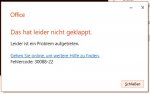
Hab es jetzt mit dem letzt genannten code probiert mit <Product ID="ProPlus2016Retail" und <Product ID="ProPlus2016" probiert, immer kommt eine Fehlermeldung...

Mit den anderen Anleitung die ich so ergoogelt habe war dann immer ein Downloadfehler...
 

Anhänge

  • ff.jpg
    ff.jpg
    30,2 KB · Aufrufe: 231
@airmax123
Du musst für Office 2016 defintiv als Product ID folgendes verwenden:
<Product ID="ProPlusRetail">
 
  • Gefällt mir
Reaktionen: airmax123
Zurück
Oben