


toxic189
Lieutenant
- Registriert
- Jan. 2012
- Beiträge
- 778
Hey Leute 
Ich habe ein Problem bei dem ich einfach nicht weiter komme.
Und zwar das problem sieht wie folgender maßen auß.
Ich bin momentan daran eine normale Internet Seite in Contao zu reproduzieren, was mir sehr gut gelungen ist und bis auf die Navigation alles auch stimmt, wie es sein sollte.
Und zwar möchte ich meine Navigation 1 zu 1 übernehmen, wie es momentan auf der Homepage (Siehe Bild 1) zu sehen ist.

So aber ich bekomme es nur soweit hin wie es auf dem folgenden Bild zu sehen ist.
Als Basis hat das Music Accademy und sind auch somit alle Selektoren und IDs und Classen von diesem Template übernommen worden, diese sind hier einsehbar. (http://de.contaowiki.org/Css_ABC_in_Contao)
Meine Momentane Navigation in contao sieht wie folgt aus.
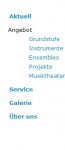
Und meine CSS habe ich gesäubert (Da sie doch recht unsauber aussah durch meine ganze versuche).
Ich bedanke mich schonmal sehr für eure Hilfe und bemühungen.
MFG
Dominic
Ich habe ein Problem bei dem ich einfach nicht weiter komme.
Und zwar das problem sieht wie folgender maßen auß.
Ich bin momentan daran eine normale Internet Seite in Contao zu reproduzieren, was mir sehr gut gelungen ist und bis auf die Navigation alles auch stimmt, wie es sein sollte.
Und zwar möchte ich meine Navigation 1 zu 1 übernehmen, wie es momentan auf der Homepage (Siehe Bild 1) zu sehen ist.
So aber ich bekomme es nur soweit hin wie es auf dem folgenden Bild zu sehen ist.
Als Basis hat das Music Accademy und sind auch somit alle Selektoren und IDs und Classen von diesem Template übernommen worden, diese sind hier einsehbar. (http://de.contaowiki.org/Css_ABC_in_Contao)
Meine Momentane Navigation in contao sieht wie folgt aus.
Und meine CSS habe ich gesäubert (Da sie doch recht unsauber aussah durch meine ganze versuche).
Code:
.mod_navigation ul.level_1 {
    left:-20px;
    top:27px;
    position:absolute;
    list-style-type: none;
}

.mod_navigation ul.level_1 li {
    margin-bottom: 15px;
}

.mod_navigation ul.level_1 a {
    padding: 3px;
    font-size: 1em;
    font-weight: bold;
    color: #0099cc;
    text-decoration: none;
}

.mod_navigation ul.level_1 a:hover {
    color: #ffffff;
    background-color: #0099cc;
    text-decoration: none;
}

.mod_navigation ul.level_1 a.active {
    background-color:#f00;
}

/* Untermenüs */
.mod_navigation ul.level_2, ul.level_3 {
    list-style-type: none;
    margin: 5px 5px 15px 5px;
}

.mod_navigation ul.level_3 {
    margin-top: 5px;
    margin-left: 15px;
}

.mod_navigation ul.level_2 li {
    margin-bottom: 5px;
}
.mod_navigation ul.level_3 li {
    margin-bottom: 5px;
}
.mod_navigation ul.level_2 a, ul.level_3 a {
    font-size: 12px;
    font-weight: normal;
    color: #09c;
    background-color: none;
    text-decoration: none;
}
.mod_navigation ul.level_2 a:hover, ul.level_3 a:hover {
    font-size: 12px;
    font-weight: normal;
    color: #09c;
    background-color: #ffffff;
    text-decoration: none;
}
.mod_navigation ul.level_2 a.active {
    font-size: 12px;
    font-weight: bold;
    color: #09c;
    background-color: #ffffff;
    text-decoration: none;
}
Ich bedanke mich schonmal sehr für eure Hilfe und bemühungen.
MFG
Dominic


