Vista Absturz mit Office 2007

Goldberg1

Lieutenant
Registriert
Aug. 2003
Beiträge
575
Hi

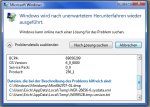
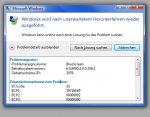
bei meinem Dad stürzt nach einiger Zeit beim Arbeiten, der PC ab und beim Hochfahren kommt dann folgendes Fenster.

Arbeiten tut er dabei mit Word und das Outlook und der Windows Explorer sind offen.
Sein System
ASUS A8N-E
2x1024MB Value Corsair RAM
Saphire X800GTO2
AMD X2 3800+
Samsung Festplatte

Bitte um Hilfe

Danke im Voraus
 

Anhänge

  • neu-2.JPG
    neu-2.JPG
    90,7 KB · Aufrufe: 292
  • neu-4.JPG
    neu-4.JPG
    94,1 KB · Aufrufe: 246
Warum hat er Vista drauf.
Macht überhaupt keinen Sinn und bei diesem Sys erst recht nicht.

Es wurde ein "Crashdump" erstellt. mit WinDbg kann man den auslesen. Darin sollten hilfreiche infos zur Problemlösung stehen.
 
Tja ... irgendwas wird's schon sein.
Beide Programme sind sehr neu und noch nicht richtig "getestet" worden, deswegen kann man wohl kaum dabei helfen.

Welche Sicherheitssuite ist denn installiert?
Und welche "Tuning"-Programme haben möglicherweise die Installation ruiniert?
 
Schon mal probiert den PC einfach nur ne Weile laufen zu lassen? Evtl. hängt es ja gar nicht mit den genutzten Programmen zusammen.

Und falls es tatsächlich nur beim Arbeiten auftritt, sind PlugIns für Office oder Outlook installiert?

@VertAlex: Wieso macht Vista hier keinen Sinn? Schnell genug ist der PC doch, der Rest ist Geschmackssache ob man Vista halt will oder nicht.
 
@VertAlex

Wenn man keine Ahnung hat.....Du weißt schon......Klappe halten.

1. Ist das System schnell genug.
2. Wird er Gründe haben, warum Vista drauf ist.
3. Läuft Vista bereits nahezu einwandfrei.

Ich verstehe diese sinnfreien Kommentare von Leuten die nicht mal selber Vista auf Ihren Rechnern laufen haben. Es interessiert in diesem Thread niemanden, was Du von Vista hälst, OK.
BtT:

Ich persönlich glaube nicht, dass es an Office liegt, auch glaube ich nicht, dass es an Vista liegt.

Wie bereits gesagt wurde, lass den Rechner mal ne Weile laufen. Stresse das System mal, z.b. mit einem 3dMark oder Prime. Stürzt er da auch ab, könnte er zu heiß werden oder der Speicher ist eventuell zu "heiß" eingestellt.

Ist es ein Fertigsystem oder hast Du es zusammengebaut?
 
Zuletzt bearbeitet:
Hi

Danke für die vielen schnellen Antwortent

Dass dabei gleich eine heiße Diskussion um Vista entbrennt, habe ich sicher nicht erwartet und sicher auch nicht provozieren wollen.

1. Mein Vater wollte (hat es sich eingebildet) halt das neueste Betriebssystem, deswegen hat er auch seinen PC aufrüsten lassen von mir, von A64 3200+ auf A64 X2 3800+ und von 2x512MB auf 2x1024MB

2. Mit diesem System läuft Vista einwandfrei! also keine Performanceprobleme

3. Ich habe auch den Eindruck dass es einfach besser aussieht und schneller läuft.
Ich selber verwende noch Win XP. Auch z.B.: das Hochfahrren

4. werde das mit länger laufen lassen und den debugger mal testen, komme aber erst morgen dazu
neueste Treiber habe ich oben, bis auf den Audio Treiber des Asus A8N-E, da weiß ich nicht wo man einen neueren herbekommt, jemand eine Idee?

Achja und Tuningtools und Sicherheitssoftwareist keine oben und windows wurde auch normal installiert

Danke erstmal
 
Also vornweg, es ist immer recht schwierig Softwarefehler einzugrenzen, einen Bluescrreen zähle ich dazu.

Wenn der PC immer nach einer bestimmten Zeitspanne nach dem Booten crasht, würde ich auch auf ein Hitzeproblem schließen. Insofern ist die Idee von Leon eigentlich gut. Ich würde noch einen Schritt weiter gehen und ihn nach dem booten einfach mal alleine lassen, ohne Office aufzumachen. Stell aber vorher den Energiesparmodus um, sonst fährt er allein runter. Wenn er wieder crasht, liegts definitiv nicht am Office. Günstig wäre dann noch, wenn du dir ungefähr die Zeit merken kannst bis zum Crash, um zu ermitteln, ob er wirklich zu heiß wird.

Wenn du dem Hitzeproblem vorbeugen möchtest, könntest du vorher im Bios auch die Default-Werte laden und es nochmal versuchen. Dann sind die Timings etc. alles wieder auf Standard zurückgestellt.

Meld dich, wenn du mehr weißt!

@edit: ich benutz auch Vista mit Office2007, keine Probleme - und mein PC ist noch etwas leistungsschwächer.
 
Zuletzt bearbeitet:
Weder die Frage "warum hat er Vista drauf" noch die folgenden Antworten dazu sind hilfreich.
Daher wird das versenkt.

Er hat Vista und sein Problem beschrieben, Punkt!
Versucht bei diesem Problem zu helfen unter den gegebenen Voraussetztungen, ansonsten haltet die Finger still.
 
Also hier das dmp-File:

Microsoft (R) Windows Debugger Version 6.7.0005.0
Copyright (c) Microsoft Corporation. All rights reserved.


Loading Dump File [C:\Windows\Minidump\Mini062707-01.dmp]
Mini Kernel Dump File: Only registers and stack trace are available

Symbol search path is: *** Invalid ***
****************************************************************************
* Symbol loading may be unreliable without a symbol search path. *
* Use .symfix to have the debugger choose a symbol path. *
* After setting your symbol path, use .reload to refresh symbol locations. *
****************************************************************************
Executable search path is:
*********************************************************************
* Symbols can not be loaded because symbol path is not initialized. *
* *
* The Symbol Path can be set by: *
* using the _NT_SYMBOL_PATH environment variable. *
* using the -y <symbol_path> argument when starting the debugger. *
* using .sympath and .sympath+ *
*********************************************************************
Unable to load image \SystemRoot\system32\ntkrnlpa.exe, Win32 error 0n2
*** WARNING: Unable to verify timestamp for ntkrnlpa.exe
*** ERROR: Module load completed but symbols could not be loaded for ntkrnlpa.exe
Windows Vista Kernel Version 6000 MP (2 procs) Free x86 compatible
Product: WinNt, suite: TerminalServer SingleUserTS
Kernel base = 0x81c00000 PsLoadedModuleList = 0x81d11db0
Debug session time: Wed Jun 27 16:57:56.574 2007 (GMT+2)
System Uptime: 0 days 0:42:28.532
*********************************************************************
* Symbols can not be loaded because symbol path is not initialized. *
* *
* The Symbol Path can be set by: *
* using the _NT_SYMBOL_PATH environment variable. *
* using the -y <symbol_path> argument when starting the debugger. *
* using .sympath and .sympath+ *
*********************************************************************
Unable to load image \SystemRoot\system32\ntkrnlpa.exe, Win32 error 0n2
*** WARNING: Unable to verify timestamp for ntkrnlpa.exe
*** ERROR: Module load completed but symbols could not be loaded for ntkrnlpa.exe
Loading Kernel Symbols
........................................................................................................................................................
Loading User Symbols
Loading unloaded module list
.......
Unable to load image \SystemRoot\system32\DRIVERS\A3ABv.sys, Win32 error 0n2
*** WARNING: Unable to verify timestamp for A3ABv.sys
*** ERROR: Module load completed but symbols could not be loaded for A3ABv.sys
*******************************************************************************
* *
* Bugcheck Analysis *
* *
*******************************************************************************

Use !analyze -v to get detailed debugging information.

BugCheck D1, {30716e49, 2, 0, 8b056299}

*** WARNING: Unable to verify timestamp for USBPORT.SYS
*** ERROR: Module load completed but symbols could not be loaded for USBPORT.SYS
*** WARNING: Unable to verify timestamp for usbhub.sys
*** ERROR: Module load completed but symbols could not be loaded for usbhub.sys
*** WARNING: Unable to verify timestamp for usbccgp.sys
*** ERROR: Module load completed but symbols could not be loaded for usbccgp.sys
*** WARNING: Unable to verify timestamp for hidusb.sys
*** ERROR: Module load completed but symbols could not be loaded for hidusb.sys
*** WARNING: Unable to verify timestamp for HIDCLASS.SYS
*** ERROR: Module load completed but symbols could not be loaded for HIDCLASS.SYS
***** Kernel symbols are WRONG. Please fix symbols to do analysis.

*************************************************************************
*** ***
*** ***
*** Your debugger is not using the correct symbols ***
*** ***
*** In order for this command to work properly, your symbol path ***
*** must point to .pdb files that have full type information. ***
*** ***
*** Certain .pdb files (such as the public OS symbols) do not ***
*** contain the required information. Contact the group that ***
*** provided you with these symbols if you need this command to ***
*** work. ***
*** ***
*** Type referenced: nt!_KPRCB ***
*** ***
*************************************************************************
Probably caused by : A3ABv.sys ( A3ABv+32299 )

Followup: MachineOwner
---------


Und habe 4 Stunden Word, Explorer, Outlook offen gehabt und dabei Prime Dualcoremäßig laufen lassen.
Kein Absturz.

Sagt das dmp-File jemanden was
 
Wenn ich mich nicht irre dient die HIDCLASS.SYS der Verwaltung der Eingabegeräte (Human Interface Device). USBPORT.SYS eben der Verwaltung des USB-Ports.

Vielleicht liegt es an einem Defekt des USB-Ports bzw. eines angeschlossenen Eingabegerätes wie Maus oder Tastatur. Kann natürlich auch ein Treiberproblem eines dieser Geräte sein.

Evtl. eine neue Maus oder eine neue Tastatur dran bzw. für eines von beiden einen neuen Treiber installiert?
 
Letztens wieder ein Absturz ohne das man beim PC war

Folgendes dmp-File:


Microsoft (R) Windows Debugger Version 6.7.0005.0
Copyright (c) Microsoft Corporation. All rights reserved.


Loading Dump File [C:\Windows\Minidump\Mini071207-01.dmp]
Mini Kernel Dump File: Only registers and stack trace are available

Symbol search path is: *** Invalid ***
****************************************************************************
* Symbol loading may be unreliable without a symbol search path. *
* Use .symfix to have the debugger choose a symbol path. *
* After setting your symbol path, use .reload to refresh symbol locations. *
****************************************************************************
Executable search path is:
*********************************************************************
* Symbols can not be loaded because symbol path is not initialized. *
* *
* The Symbol Path can be set by: *
* using the _NT_SYMBOL_PATH environment variable. *
* using the -y <symbol_path> argument when starting the debugger. *
* using .sympath and .sympath+ *
*********************************************************************
Unable to load image \SystemRoot\system32\ntkrnlpa.exe, Win32 error 0n2
*** WARNING: Unable to verify timestamp for ntkrnlpa.exe
*** ERROR: Module load completed but symbols could not be loaded for ntkrnlpa.exe
Windows Vista Kernel Version 6000 MP (2 procs) Free x86 compatible
Product: WinNt, suite: TerminalServer SingleUserTS
Kernel base = 0x81c00000 PsLoadedModuleList = 0x81d11db0
Debug session time: Thu Jul 12 15:01:46.048 2007 (GMT+2)
System Uptime: 0 days 0:15:20.902
*********************************************************************
* Symbols can not be loaded because symbol path is not initialized. *
* *
* The Symbol Path can be set by: *
* using the _NT_SYMBOL_PATH environment variable. *
* using the -y <symbol_path> argument when starting the debugger. *
* using .sympath and .sympath+ *
*********************************************************************
Unable to load image \SystemRoot\system32\ntkrnlpa.exe, Win32 error 0n2
*** WARNING: Unable to verify timestamp for ntkrnlpa.exe
*** ERROR: Module load completed but symbols could not be loaded for ntkrnlpa.exe
Loading Kernel Symbols
................................................................................................................................................
Loading User Symbols
Loading unloaded module list
.......
Unable to load image \SystemRoot\System32\drivers\dxgkrnl.sys, Win32 error 0n2
*** WARNING: Unable to verify timestamp for dxgkrnl.sys
*** ERROR: Module load completed but symbols could not be loaded for dxgkrnl.sys
*******************************************************************************
* *
* Bugcheck Analysis *
* *
*******************************************************************************

Use !analyze -v to get detailed debugging information.

BugCheck D1, {408b3048, 2, 1, 8be6b77d}

***** Kernel symbols are WRONG. Please fix symbols to do analysis.

*************************************************************************
*** ***
*** ***
*** Your debugger is not using the correct symbols ***
*** ***
*** In order for this command to work properly, your symbol path ***
*** must point to .pdb files that have full type information. ***
*** ***
*** Certain .pdb files (such as the public OS symbols) do not ***
*** contain the required information. Contact the group that ***
*** provided you with these symbols if you need this command to ***
*** work. ***
*** ***
*** Type referenced: nt!_KPRCB ***
*** ***
*************************************************************************
Probably caused by : dxgkrnl.sys ( dxgkrnl+277d )

Followup: MachineOwner
 
So wie ich das sehe gehört A3ABv.sys zu einer D-Link PCI Karte , bei Bluescreens liegt das oftmals an Hardwareproblemen und hier liegt der Schluss nahe das es ein typisches Interrupt problem bei Einsteckkarten ist.
Mit Office hat das nichts zu tun.

Meine Lösung wäre , steck mal die PCI Karte in ein anderen Slot.

Wegen dem zweiten Crashdump , mal hier lesen
http://www.google.de/search?hl=de&q=dxgkrnl.sys&btnG=Google-Suche&meta=
 
Hyho,

was für ein Netzteil hat das System?
Manchmal ist der Fehler einfach darin zu finden das ein Mainboard nicht genügend
Saft ( Strom ) bekommt.
Im gegensatz zum alten System wird die neue CPU und die Erweiterung der Ram
mehr Leistung vom Netzteil ziehen.
Eine andere möglichkeit ist das einer der Ram eine "Macke" hat, diesen kann man
häufig damit umgehen das man die Ramriegel einfach mal von vorne nach hinten Tauscht,
sollte das Problem damit behoben oder zumindest seltener Auftreten ist dies ein weiterer
Indiz für einen defekten Ramriegel.

Bei den Netzteil Daten wenn möglich auch die Angabe der max Strom Ausgabe
[ z. B. DC Output 32 A bei 3,3 V ] mit angeben so wie natürlich die Leistung [ Watt ]

Gruß
Cadrim
 
Zurück
Oben