Du verwendest einen veralteten Browser. Es ist möglich, dass diese oder andere Websites nicht korrekt angezeigt werden.
Du solltest ein Upgrade durchführen oder einen alternativen Browser verwenden.
Du solltest ein Upgrade durchführen oder einen alternativen Browser verwenden.
Sammelthread Big Navi RX 6700XT/6800(XT)/6900XT Overclocking/Undervolting
- Ersteller Facy
- Erstellt am
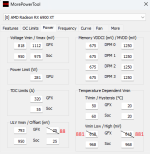
LD4 at 2.615 and LD5 at 2.860? I don't use TDV, I just copied the settings you sent a while back; should I use it?GerryB schrieb:LD4 only 2.615MHz
LD4 = 2.625 passed this time; maybe the ambient temperature was too hot the last time I tried it.
Zuletzt bearbeitet:

GerryB
Rear Admiral
- Registriert
- Sep. 2016
- Beiträge
- 5.442
I think that´s enough, stay with this values, ... hope, it works also in BO6 with some watt lesscra3khead schrieb:LD4 = 2.625 passed this time; maybe the ambient temperature was too hot the last time I tried it.
try more UVen together with minClock 1475MHz and TDV
MCT 987mV -->975mV like Fas7
btw.
after that runs stable
as additional question 1
What happens, if you go lower with MCT- GPU-Power 112%-->110% ?
You are so much tempthrottel related, may be nearly the same score.
additional 2
may be TDC needs less Ampere because of the Power 112...110% (MCT)
Zuletzt bearbeitet:
GerryB schrieb:try more UVen together with minClock 1475MHz and TDV
MCT 987mV -->975mV like Fas7
Anhang anzeigen 1623081
I'm getting higher clocks in games now, but the voltage jumps up to 1.084V. Previously, when I maxed out at 2633MHz, the voltage would stay around 1.071V or 1.072V.
GerryB
Rear Admiral
- Registriert
- Sep. 2016
- Beiträge
- 5.442
some games are differentcra3khead schrieb:This was at 2685Mhz, but in games I can't go past 2660 without inevitably crashing.
use less UV in MCT
What is your MCT-Setting in this TS run?
and, ... MPT = 1112mV?
GerryB schrieb:What is your MCT-Setting in this TS run?
and, ... MPT = 1112mV?
I tried going down to 968mv in MCT, but it hard crashed. I think it's completely tapped out. Thanks for all the help

GerryB schrieb:just for fun, try some final finetuning
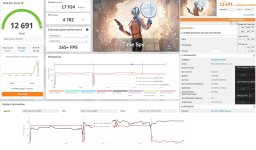
I don't know why it dropped my score around 100 points.
How do I check that? I'm using release preview channel windows. Should I switch to Windows 11 by Ghost Spectre? I stopped using the HAGS driver; I only use it if something like Oblivion Remastered comes out like for unoptimized heavy Unreal Engine 5 games at launch, just to squeeze out as much fps as possible.GerryB schrieb:GPU-Utilization in GT2 not 99% constant?
GerryB
Rear Admiral
- Registriert
- Sep. 2016
- Beiträge
- 5.442
UL shows you all Infos: I have this problem with my little old CPU often.cra3khead schrieb:How do I check that?
Anhänge
GerryB
Rear Admiral
- Registriert
- Sep. 2016
- Beiträge
- 5.442
try a little bit more Volt in MCT
sometimes the same UVing works not in every game
or
How is the eff.Clock in 33 ?
may be too high, then 5...10MHz less in MCT
or
both
btw.
crash after a hour can also mean, CPU+Ram are not stable enough/too hot, produce some failure
set CPU+Ram to defaults and try a second hour
sometimes the same UVing works not in every game
or
How is the eff.Clock in 33 ?
may be too high, then 5...10MHz less in MCT
or
both
btw.
crash after a hour can also mean, CPU+Ram are not stable enough/too hot, produce some failure
set CPU+Ram to defaults and try a second hour
For some reason E33 needs 1012mv in MCT; but, if I try that in TimeSpy it crashes. TimeSpy passes with 975mv. That doesn't make any sense to me.GerryB schrieb:try a little bit more Volt in MCT
I'm still using these settings
GerryB
Rear Admiral
- Registriert
- Sep. 2016
- Beiträge
- 5.442
Is the same behaviour like RDNA4.
Synthetics are not Gaming
(in Dune Awakening it´s required for me, to set the maxClock 10...20MHz lower, may be in 33 the same)
this is moore Boost then usually@stock:

so it´s no surprise, that not every game can run stable with this boost-overshot
edit:
der 25.6.2 läuft auch ganz gut
Synthetics are not Gaming
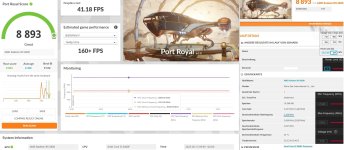
in PR is my highest clock@Synthetics, but Rome-Demo=UE5@AFMF boosts higherGerryB schrieb:or
How is the eff.Clock in 33 ?
may be too high, then 5...10MHz less in MCT
(in Dune Awakening it´s required for me, to set the maxClock 10...20MHz lower, may be in 33 the same)
this is moore Boost then usually@stock:
so it´s no surprise, that not every game can run stable with this boost-overshot
edit:
der 25.6.2 läuft auch ganz gut
Anhänge

Zuletzt bearbeitet:

therealcola
Commander
- Registriert
- Sep. 2020
- Beiträge
- 2.292
Ups Falscher Thread
GerryB
Rear Admiral
- Registriert
- Sep. 2016
- Beiträge
- 5.442
therealcola schrieb:Ups Falscher Thread
... ein interessantes Tool, müsste man mal für FT1 vs. FT2 testentherealcola schrieb:Könnt ihr mal laufen lassen, basierend auf der News
https://wccftech.com/rx-9070-xt-sam...-worse-than-sk-hynix-memory-based-rx-9070-xt/
Das Tool gibt es hier
https://github.com/clamchowder/Micr...ownload/08bbe54/MicrobenchmarkGui-08bbe54.zip
2066-FT1 läuft bei mir so, siehe Anhang
(fclk nur 1433, falls das auch ne Rolle spielt)
Anhänge

Zuletzt bearbeitet: