Hallo Community,
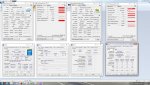
ich habe mir letztin ein Notebook der Firma NEXOC besorgt, das folgende Hardwarekonfigurationen aufweist:
Intel Core I7 4710 mit Intel HD 4600 Grafik
8GB RAM
Nvidia Geforce GTX 860M mit 2GB GDDR5 Speicher
128 GB SSD und 1000 GB HDD
Installiert habe ich darauf Window 7 Professional.
Ich werde ca. einmal die Woche von einem Bluescreen geplagt. Nach Neuaufsetzen von Windows sind die Probleme
geblieben. Eine RAM Analyse mit MemTest hat keine Fehler aufgezeigt. Die Minidumps haben einen 0x1A Stopfehler zurückgeliefert. Ich habe jetzt mal die Memory.dmp ausgelesen, kann damit aber selber wenig anfangen.
MEMORY_MANAGEMENT (1a)
# Any other values for parameter 1 must be individually examined.
Arguments:
Arg1: 0000000000041790, A page table page has been corrupted. On a 64 bit OS, parameter 2
contains the address of the PFN for the corrupted page table page.
On a 32 bit OS, parameter 2 contains a pointer to the number of used
PTEs, and parameter 3 contains the number of used PTEs.
Arg2: fffffa8000e0e200
Arg3: 000000000000ffff
Arg4: 0000000000000000
Debugging Details:
------------------
BUGCHECK_STR: 0x1a_41790
DEFAULT_BUCKET_ID: WIN7_DRIVER_FAULT
PROCESS_NAME: andy.exe
CURRENT_IRQL: 0
ANALYSIS_VERSION: 6.3.9600.17237 (debuggers(dbg).140716-0327) amd64fre
LAST_CONTROL_TRANSFER: from fffff80002d37d50 to fffff80002cc6bc0
STACK_TEXT:
fffff880`0aca3748 fffff800`02d37d50 : 00000000`0000001a 00000000`00041790 fffffa80`00e0e200 00000000`0000ffff : nt!KeBugCheckEx
fffff880`0aca3750 fffff800`02c97e75 : ffffffff`00000000 00000000`0642ffff fffffa80`00000000 fffffa80`0b52db50 : nt! ?? ::FNODOBFM::`string'+0x35084
fffff880`0aca3910 fffff800`02f9c05a : fffff8a0`0980e060 00000000`00000001 00000000`00000000 fffffa80`0b52db50 : nt!MmCleanProcessAddressSpace+0x679
fffff880`0aca3960 fffff800`02f7ef48 : 00000000`00000000 00000000`00000001 000007ff`fffde000 00000000`00000000 : nt!PspExitThread+0x56a
fffff880`0aca3a60 fffff800`02cc5e53 : fffffa80`0b425060 fffff880`00000000 fffffa80`0b52db50 fffffa80`0a88d510 : nt!NtTerminateProcess+0x138
fffff880`0aca3ae0 00000000`77a9157a : 00000000`00000000 00000000`00000000 00000000`00000000 00000000`00000000 : nt!KiSystemServiceCopyEnd+0x13
00000000`002bfe08 00000000`00000000 : 00000000`00000000 00000000`00000000 00000000`00000000 00000000`00000000 : 0x77a9157a
STACK_COMMAND: kb
FOLLOWUP_IP:
nt! ?? ::FNODOBFM::`string'+35084
fffff800`02d37d50 cc int 3
SYMBOL_STACK_INDEX: 1
SYMBOL_NAME: nt! ?? ::FNODOBFM::`string'+35084
FOLLOWUP_NAME: MachineOwner
MODULE_NAME: nt
IMAGE_NAME: ntkrnlmp.exe
DEBUG_FLR_IMAGE_TIMESTAMP: 531590fb
IMAGE_VERSION: 6.1.7601.18409
FAILURE_BUCKET_ID: X64_0x1a_41790_nt!_??_::FNODOBFM::_string_+35084
BUCKET_ID: X64_0x1a_41790_nt!_??_::FNODOBFM::_string_+35084
ANALYSIS_SOURCE: KM
FAILURE_ID_HASH_STRING: km:x64_0x1a_41790_nt!_??_::fnodobfm::_string_+35084
FAILURE_ID_HASH: {f6a6ed79-e275-9f8c-d5a4-3a37a32b0b4e}
Followup: MachineOwner
---------
Bevor ich den PC neu aufgesetzt habe war die NTOSKRNL.EXE als Fehlergrund angegeben. Bis jetzt hab ich erst ein mal seit Neuinstallation einen Bluescreen gehabt (Neuinstallation ist knappe Woche her). Zudem möchte ich erwähnen, dass sich der Laptop manchmal nicht komplettt herunterfährt sondern sich dabei aufhängt (im Herunterfahrenbildschirm).
Ich hoffe jemand kann mir mit meinem Problem weiterhelfen.
Grüße
ich habe mir letztin ein Notebook der Firma NEXOC besorgt, das folgende Hardwarekonfigurationen aufweist:
Intel Core I7 4710 mit Intel HD 4600 Grafik
8GB RAM
Nvidia Geforce GTX 860M mit 2GB GDDR5 Speicher
128 GB SSD und 1000 GB HDD
Installiert habe ich darauf Window 7 Professional.
Ich werde ca. einmal die Woche von einem Bluescreen geplagt. Nach Neuaufsetzen von Windows sind die Probleme
geblieben. Eine RAM Analyse mit MemTest hat keine Fehler aufgezeigt. Die Minidumps haben einen 0x1A Stopfehler zurückgeliefert. Ich habe jetzt mal die Memory.dmp ausgelesen, kann damit aber selber wenig anfangen.
MEMORY_MANAGEMENT (1a)
# Any other values for parameter 1 must be individually examined.
Arguments:
Arg1: 0000000000041790, A page table page has been corrupted. On a 64 bit OS, parameter 2
contains the address of the PFN for the corrupted page table page.
On a 32 bit OS, parameter 2 contains a pointer to the number of used
PTEs, and parameter 3 contains the number of used PTEs.
Arg2: fffffa8000e0e200
Arg3: 000000000000ffff
Arg4: 0000000000000000
Debugging Details:
------------------
BUGCHECK_STR: 0x1a_41790
DEFAULT_BUCKET_ID: WIN7_DRIVER_FAULT
PROCESS_NAME: andy.exe
CURRENT_IRQL: 0
ANALYSIS_VERSION: 6.3.9600.17237 (debuggers(dbg).140716-0327) amd64fre
LAST_CONTROL_TRANSFER: from fffff80002d37d50 to fffff80002cc6bc0
STACK_TEXT:
fffff880`0aca3748 fffff800`02d37d50 : 00000000`0000001a 00000000`00041790 fffffa80`00e0e200 00000000`0000ffff : nt!KeBugCheckEx
fffff880`0aca3750 fffff800`02c97e75 : ffffffff`00000000 00000000`0642ffff fffffa80`00000000 fffffa80`0b52db50 : nt! ?? ::FNODOBFM::`string'+0x35084
fffff880`0aca3910 fffff800`02f9c05a : fffff8a0`0980e060 00000000`00000001 00000000`00000000 fffffa80`0b52db50 : nt!MmCleanProcessAddressSpace+0x679
fffff880`0aca3960 fffff800`02f7ef48 : 00000000`00000000 00000000`00000001 000007ff`fffde000 00000000`00000000 : nt!PspExitThread+0x56a
fffff880`0aca3a60 fffff800`02cc5e53 : fffffa80`0b425060 fffff880`00000000 fffffa80`0b52db50 fffffa80`0a88d510 : nt!NtTerminateProcess+0x138
fffff880`0aca3ae0 00000000`77a9157a : 00000000`00000000 00000000`00000000 00000000`00000000 00000000`00000000 : nt!KiSystemServiceCopyEnd+0x13
00000000`002bfe08 00000000`00000000 : 00000000`00000000 00000000`00000000 00000000`00000000 00000000`00000000 : 0x77a9157a
STACK_COMMAND: kb
FOLLOWUP_IP:
nt! ?? ::FNODOBFM::`string'+35084
fffff800`02d37d50 cc int 3
SYMBOL_STACK_INDEX: 1
SYMBOL_NAME: nt! ?? ::FNODOBFM::`string'+35084
FOLLOWUP_NAME: MachineOwner
MODULE_NAME: nt
IMAGE_NAME: ntkrnlmp.exe
DEBUG_FLR_IMAGE_TIMESTAMP: 531590fb
IMAGE_VERSION: 6.1.7601.18409
FAILURE_BUCKET_ID: X64_0x1a_41790_nt!_??_::FNODOBFM::_string_+35084
BUCKET_ID: X64_0x1a_41790_nt!_??_::FNODOBFM::_string_+35084
ANALYSIS_SOURCE: KM
FAILURE_ID_HASH_STRING: km:x64_0x1a_41790_nt!_??_::fnodobfm::_string_+35084
FAILURE_ID_HASH: {f6a6ed79-e275-9f8c-d5a4-3a37a32b0b4e}
Followup: MachineOwner
---------
Bevor ich den PC neu aufgesetzt habe war die NTOSKRNL.EXE als Fehlergrund angegeben. Bis jetzt hab ich erst ein mal seit Neuinstallation einen Bluescreen gehabt (Neuinstallation ist knappe Woche her). Zudem möchte ich erwähnen, dass sich der Laptop manchmal nicht komplettt herunterfährt sondern sich dabei aufhängt (im Herunterfahrenbildschirm).
Ich hoffe jemand kann mir mit meinem Problem weiterhelfen.
Grüße