IDontWantAName
Captain
- Registriert
- Dez. 2011
- Beiträge
- 3.914
Wie der Raspberry Pi Mitarbeiter Simon Long mitgeteilt hat, hat Raspberry Pi OS ein Update erhalten, dass den Desktop überarbeitet.
Die neuen Images gibt es hier:
https://www.raspberrypi.com/software/operating-systems/
Releasenotes:
2026-09-15:
* Support for dock added to wf-panel-pi
* New icon menu and icon tasklist plugins for wf-panel-pi added
* Analogue display option added to clock plugin
* Dock panel added to Control Centre to configure display of dock
* Widgets panel added to Control Centre to enable configuration of dock and taskbar replacing dialog within wf-panel-pi itself
* Notifications panel added to Control Centre replacing dialog within wf-panel-pi itself
* Shortcuts panel added to Control Centre to enable viewing and configuration of system keyboard shortcuts
* Option to switch various dock-based layouts added to Defaults panel in Control Centre
* Option for defaults for very large screens added to Defaults panel
* Options to make taskbar autohide and to not overlay maximised windows added to Taskbar panel in Control Centre
* Option for 96x96 pixel icons added to wf-panel-pi and lxpanel-pi
* Option to use swaybg instead of pcmanfm to draw desktop background added to Desktop panel in Control Centre
* New screenshot tool added, allowing default behaviour (open, copy to clipboard etc) to be selected
* New monolithic build of file manager, pcmanfm-pi, integrating pcmanfm and libfm into one application
* Switchable automount of external drives added to ejecter plugin; pcmanfm no longer automounts by default
* wf-panel-pi plugin architecture modified to remove requirement for XML metadata files for default values
* Structure of source code for plugins modified to improve consistency between behaviour under lxpanel-pi and wf-panel-pi
* wf-panel-pi source code restructured and cleaned up to remove legacy functionality and simplify maintenance
* Support for wayfire removed from Screens, Mouse and Keyboard panels in Control Centre
* Bug fix - menus popped up from gtk-layer-shell windows now constrained to monitor dimensions
* labwc and wlroots updated to version 0.20
* Raspberry Pi firmware b76effded7afe5ed92070ff169e0109a8487fb82
* Linux kernel 6.18.50 - cff533aec2fa601846766b32ff57204e0a61bed7
Ich hatte das ganze diese Woche zwar als News eingesendet, aber da kommt wohl nichts dazu, also hier das Thema.
Die größte Neuerung ist die Einführung einer Symbolleiste, die entweder die bestehende Taskleiste ersetzen oder zusätzlich verwendet werden kann.
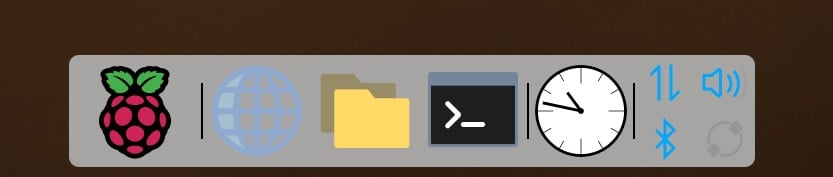
Das Himbeersymbol für den grafischen Anwendungsstarter öffnet den Startbildschirm. (Dies soll das bisherige Standard-Anwendungsstarter-Widget im Hauptmenü ersetzen.)
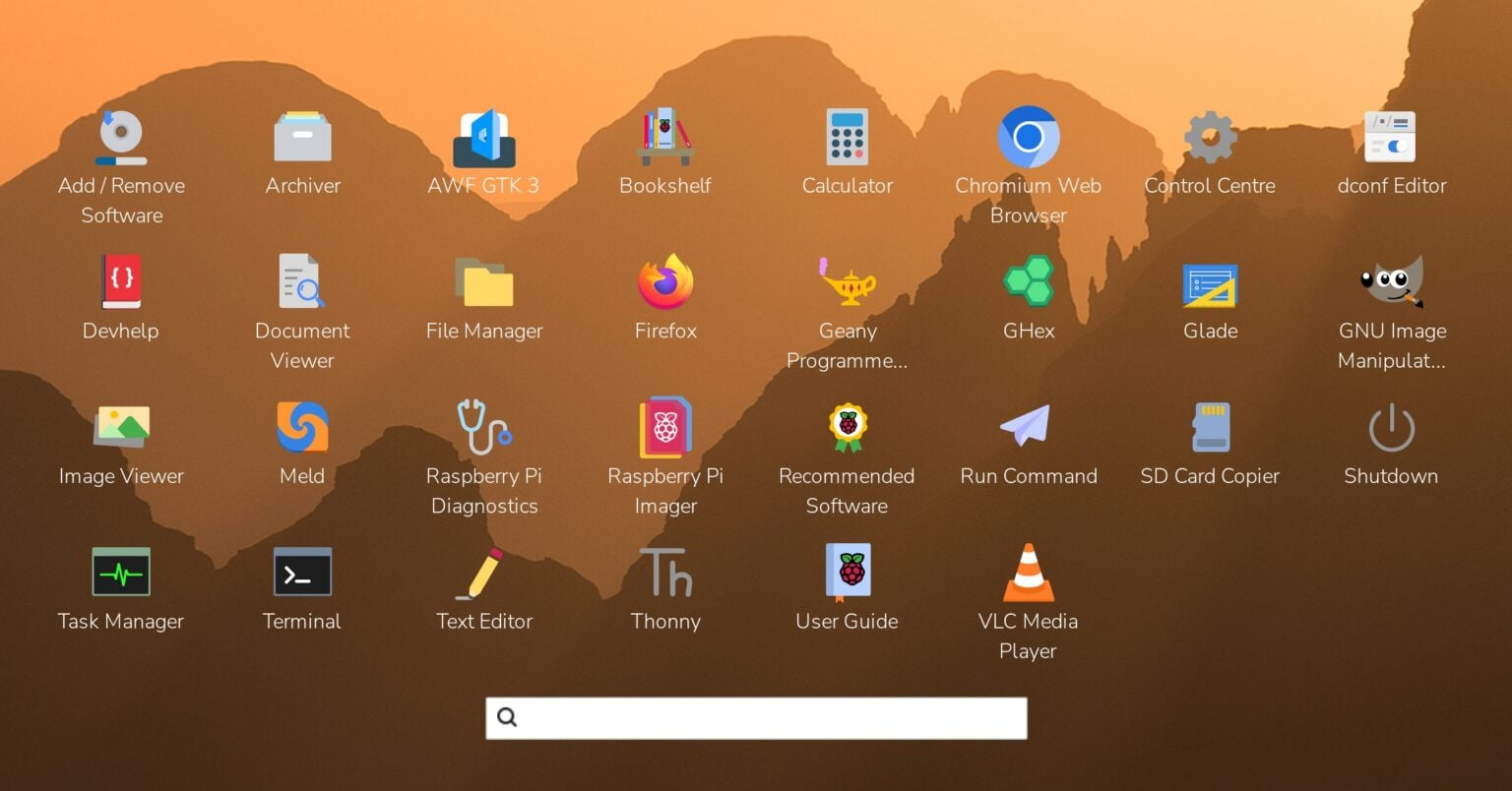
Hier werden alle Anwendungssymbole angezeigt, die sich normalerweise im Hauptmenü befinden. Standardmäßig sind die Symbole alphabetisch sortiert, können aber per Drag & Drop neu angeordnet werden. Ein einfacher Klick auf ein Symbol startet die Anwendung; ein Rechtsklick (oder ein längerer Druck auf einem Touchscreen) öffnet ein Kontextmenü, ähnlich dem des herkömmlichen Hauptmenüs.
Wenn Sie das neue Image installieren, bleibt das Standardaussehen des Desktops unverändert: mit Taskleiste, aber ohne Dock. Um das Dock auszuprobieren, öffnen Sie einfach das Kontrollzentrum, gehen Sie zur Seite „Standardeinstellungen“ und wählen Sie entweder den Stil „Taskleiste/Dock“ oder „Dock“.
Die neuen Images gibt es hier:
https://www.raspberrypi.com/software/operating-systems/
Releasenotes:
2026-09-15:
* Support for dock added to wf-panel-pi
* New icon menu and icon tasklist plugins for wf-panel-pi added
* Analogue display option added to clock plugin
* Dock panel added to Control Centre to configure display of dock
* Widgets panel added to Control Centre to enable configuration of dock and taskbar replacing dialog within wf-panel-pi itself
* Notifications panel added to Control Centre replacing dialog within wf-panel-pi itself
* Shortcuts panel added to Control Centre to enable viewing and configuration of system keyboard shortcuts
* Option to switch various dock-based layouts added to Defaults panel in Control Centre
* Option for defaults for very large screens added to Defaults panel
* Options to make taskbar autohide and to not overlay maximised windows added to Taskbar panel in Control Centre
* Option for 96x96 pixel icons added to wf-panel-pi and lxpanel-pi
* Option to use swaybg instead of pcmanfm to draw desktop background added to Desktop panel in Control Centre
* New screenshot tool added, allowing default behaviour (open, copy to clipboard etc) to be selected
* New monolithic build of file manager, pcmanfm-pi, integrating pcmanfm and libfm into one application
* Switchable automount of external drives added to ejecter plugin; pcmanfm no longer automounts by default
* wf-panel-pi plugin architecture modified to remove requirement for XML metadata files for default values
* Structure of source code for plugins modified to improve consistency between behaviour under lxpanel-pi and wf-panel-pi
* wf-panel-pi source code restructured and cleaned up to remove legacy functionality and simplify maintenance
* Support for wayfire removed from Screens, Mouse and Keyboard panels in Control Centre
* Bug fix - menus popped up from gtk-layer-shell windows now constrained to monitor dimensions
* labwc and wlroots updated to version 0.20
* Raspberry Pi firmware b76effded7afe5ed92070ff169e0109a8487fb82
* Linux kernel 6.18.50 - cff533aec2fa601846766b32ff57204e0a61bed7
Ich hatte das ganze diese Woche zwar als News eingesendet, aber da kommt wohl nichts dazu, also hier das Thema.