Markus
I am afraid the update blows the capacity of the device to deal with all three cards at the same time and keep WiFi going. Please tell me whether your status appears altered (“custom”) when the device keeps trying to switch on WiFi? Mine did so. And then I knew, when it shows “custom” it will start trying switchin on WiFi and only a restart would help.
That’s why I didn’t upgrade my device since unboxing, still going with shipped ROM and security level from July last year. Waiting to see if Nougat brings some relief.
Rodrigo Ultramari
Hi, I don’t believe this is the problem, because it was working OK and there were no updates in that afternoon.
Joemar Canillas
after 3 attempts of throwing my sim card 1 sd card..i did it right right.. it was cool 🙂
Rodrigo Ultramari
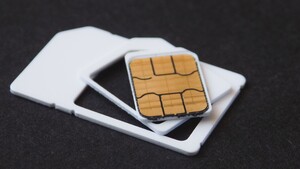
news about it. Three days ago when you asked, I tryed with 2 SIM on the tray, mine and my wife’s, both from the same brazilian carrier (CLARO). I answered you that it was OK. That was because my company SIM was glued to the microSD (carrier OI). I asked for the IT guy at the company to get a new SIM card to replace my “freak glued one”. Since then, I was using only one SIM, from CLARO. Today the company SIM (OI) arrived. I inserted the tray with both SIMs, the first SIM (CLARO) got signal, the exact moment the second SIM (OI) connected, wifi dropped out. After several attempts and restarts, I tryed to change the SIMs positions on tray (CLARO from 1 to 2, OI from 2 to 1). It’s working ok until now. I believe it might be related to some information on the SIMCARD. I’m afraid that within few days I’ll change my carrier from CLARO to VIVO. So, if it work OK with OI on 1 and VIVO on slot 2, I might to glue it again in a microsd m/
What I really don’t understand is that it was working perfectly in other phone with exactly same firmware…
Rodrigo Ultramari
Just placebo. It worked for few hours. Wi-Fi off again and Bluetooth unstable. Gonna try a factory reset on weekend…. Pissed off of it
Hyacinth Rocero
Thanks Rodrigo. I did it! It’s a success.
olee22
Some learning:
1. Acetone is cheap (can get from a store which sells paint), and removes the sim-chip from the plastic very easily. Just drop in for an hour or two, and it separates.
2. One drop of superglue is enough to hold the simcard, and can be removed easily with a knife.
3. Better switch off the phone when inserting removing the simcard-sdcard combo. I had varied success when the phone was on.
KalichVydra
Hi does it work on S7 edge which is marked like single sim? G935F?
Rodrigo Ultramari
nope. only in the models ended with FD . SM-G930FD (flat), SM-G935FD (edge)
KalichVydra
Thanks
Sonny
Hi shr540i. I thought I got everything correct. SIM well glued to 64Gb microSd and fits tight but inserted successfully. Two SIMs detected! Wow! But then it says portable SD “corrupted”. It gave me option to format which i did but got stuck at 20%. My SD broke already right? Any chance of saving it? What did i do wrong? Is SD really fragile to sand paper & pressing to make glue stick?
Sonny
Hi Rocero & Rodrigo. I had success in sticking SIM & SD together with glue. It was tight going in the phone but it went in. The two SIMs were detected! I was so happy but when i checked storage, it said portable SD is corrupted.
1) Do you think i pressed or sanded SD to hard?
2) Which side of SD did you sand? Side w/ the label only or both?
3) Did you file or sandpaper the “raised edge” on the top of the microSD?
Sonny
Hi RCMAAD. My 2 SIMs are detected. I was so happy but upon checking, my S7 says that the SD is corrupted. I am now observing what you posted. Yes maybe the SD is not making “complete” contact w/ the connectors inside the phone. I will try your “tape” method later.
Rodrigo Ultramari
You may sand only the “label side” of the microSD and you can/need to sand the raised edge to make it flat.
Sonny
Thanks for the quick reply Rodrigo
Sonny
That is what I did also. I filed the raised edge and made it flat then I sanded the label side only. The two SIMs are recognized but the SD is corrupted and cannot be formatted. I plan to buy another SD and try again but I still don’t know what I did wrong. I am afraid I might repeat the mistake 🙁
RCMAAD
Nice Sonny..
Mines been in and out a few times changing sim companies..and works every time..stick with it.
Ramesh Kumar
I installed a 200GB Micro-SD card with so much fear.
It felt really tight to have the hybrid SIM tray inserted but it finally worked like a charm.
I had to sand down the label side of the memory card and the back of the ripped SIM and used super glue to put them together 🙂
Alyssa Ardilla
sucks phone,I am not brave to do that. I was afraid to damage my sim card.
Christopher Loughrey
Is it difficult to remove the sim tray after you close it? I’d be afraid it would get stuck and the sim tray would be unable to be removed
Κωστής Τσατσός
I did it on Lenovo P2 and so far it works.I don’t know if the signal is affected but I always had pretty bad signal in my house…
Christopher Loughrey
Cutting down the sim card is unnecessary and is causing people to damage the sim card. It can work without cutting anything
Dalia Fayed
I used it in my Samsung s7 and. Worked fine both Sims working and then both stopped working and after few seconds no SIM card detected and then flipped back to working and then in the end SIM card 2 crashed and please contact supplier.
Rick
I did the following:
1) Removed plastic from SIM with acetone
2) Cut the SIM’s short sides, so it perfectly fits the tray
3) Adhered SIM to SD card with superglue
4) Put it on the tray and moved the tray into the phone. Was a bit harder than before but not too hard imo.
And now: The tray is STUCK! The needle of the tray removal tool pierces itself all in, but the tray hardly moves.
Any ideas what to do?
NiceGuy NoMore
All mSD cards are of standardised dimensions, so there are no thinner ones. [This youtube video](
https://www.youtube.com/watch?v=a_lQdg8yAwM) shows how the mSD card could be filed down so that the mSD+SIM combo can better fit into the hybrid tray space. Kudos to *noreplied*; to having thought of this hack. I look forward to doing this when/if the Note 8 uses the hybrid SIM tray too on the dual SIM version.