Du verwendest einen veralteten Browser. Es ist möglich, dass diese oder andere Websites nicht korrekt angezeigt werden. Du solltest ein Upgrade durchführen oder einen alternativen Browser verwenden.
Vlt. kann mir hier wer helfen denn ich weiß nicht mehr weiter.
Mein PC fährt immer öfter ab was in einem Bluescreen und einem Neustart endet.
Die Ereignissanzeige zeigt dann folgenden Fehler:
System
//./root/CIMV2
SELECT * FROM __InstanceModificationEvent WITHIN 60 WHERE TargetInstance ISA "Win32_Processor" AND TargetInstance.LoadPercentage > 99
0x80041003
Mein Windows wird immer langsamer und ich weiß nicht wie ich das wieder weg bekomme.
Betriebssystem ist Windows Vista 32Bit + Sp2 + alle Updates.
Solltet ihr noch anhaltspunkte Brauchen einfach Posten ich werd das im Forum Online stellen.
Besten Dank schonmal im Vorraus
lg
Da ich seit der erstellung des Threads bereits den 4ten Bluescreen hatte kam auch mal eine Windows Meldung die vlt. auch noch hilft das Problem einzugrenzen.
Zusatzinformationen zum Problem:
BCCode: 1000007f
BCP1: 00000008
BCP2: 8B516130
BCP3: 00000000
BCP4: 00000000
OS Version: 6_0_6002
Service Pack: 2_0
Product: 768_1
Dateien, die bei der Beschreibung des Problems hilfreich sind:
C:\Windows\Minidump\Mini030810-01.dmp
C:\Users\Manfred\AppData\Local\Temp\WER-53586-0.sysdata.xml
C:\Users\Manfred\AppData\Local\Temp\WERB28C.tmp.version.txt
Als erstes wäre es hilfreich, deine Hardwarekomponenten zu erfahren. Ebenfalls, seit wann die Probleme auftreten, und ob dies evtl. mit dem Einbau einer neuen/anderen Hardwarekomponente zusammenhängt.
Die Fehlermeldung steht meist für defekte Hardware. Im günstigsten Fall sind es evtl. nur falsche Timings der RAM-Module.
Teste also als erstes deine RAM Module mit Memtest86+ (erst einzeln, dann zusammen).
Wenn es geht, mache ein paar Screenshots von CPU-Z (Reiter CPU, Mainboard, Memory und SPD).
Falls das gar nicht geht, stelle die Timings und die Spannung der RAM´s (das steht meist auf den Riegeln selbst) manuell im Bios ein.
Als letztes lese die Minidump-Datei aus, die zum Bluescreen gelesen wurde.
Dateien, die bei der Beschreibung des Problems hilfreich sind:
C:\Windows\Minidump\Mini030810-01.dmp
Nach der Installation findest du im Programmverzeichnis die 'Debugging Tools for Windows'. Hier befindet sich die Datei windbg.exe, diese starten (bei Vista als Administrator starten).
Der Debugger muss zunächst noch verschiedene Informationen über installierte Patches, SPs, Treiber, etc., bekommen. Dies macht er eigenständig...einfach warten.
Dann auf Files -> Symbol File Path und in das kleine Fenster folgenden Befehl eingeben (kopieren&einfügen):
einen Haken bei 'Reload' (sofern es nicht ausgegraut ist) und OK drücken. Jetzt können alle notwendigen Informationen zum Debuggen von MS geladen werden, das geschieht automatisch.
Anschließend über Files, das Speicherabbild für den Debugger öffnen: Files -> Open Crash Dump
Memory.dmp auswählen und öffnen (findest du unter C:\Windows\Minidump\).
Im letzten Schritt in die untere Befehlszeile "!analyze –v" eingeben und Entertaste drücken.
Der Debugger werkelt dann etwas und nach kurzer wird als Ausgabe eine eindeutige Zuweisung der Datei, die den Bluescreens hervorgerufen hat, gegeben.
Den Text der Auswertung kannst du dann uns posten.
Und als letztes: Herzlich Willkommen beim ComputerBase-Forum
Danke schon mal fürs erste ich werd das gleich in angriff nehmen und machen was ihr beschrieben habt.
Die Minidump Datei auslesen mit dem Windows Debugging Tool habe ich zwar schon probiert aber nach deiner Anleitung zur folge habe ich das nicht annähernd richtig gemacht. Probier ich aber auch nochmal. denn wenn der Rechner laufend in den Bluescreen geht ists etwas mühsam.
Werde euch dann bescheid geben was bei dem ganzen rausgekommen ist.
Vielen Lieben Danke fürs erste.
lg
Ergänzung ()
Ok das Debugging Tool wirft folgende Meldung aus...
Microsoft (R) Windows Debugger Version 6.11.0001.404 X86
Copyright (c) Microsoft Corporation. All rights reserved.
Loading Dump File [C:\Windows\Minidump\Mini030810-02.dmp]
Mini Kernel Dump File: Only registers and stack trace are available
Symbol search path is: SRV*C:\symbols*http://msdl.microsoft.com/download/symbols
Executable search path is:
Unable to load image \SystemRoot\system32\ntkrnlpa.exe, Win32 error 0n2
*** WARNING: Unable to verify timestamp for ntkrnlpa.exe
*** ERROR: Module load completed but symbols could not be loaded for ntkrnlpa.exe
Windows Server 2008/Windows Vista Kernel Version 6002 (Service Pack 2) MP (4 procs) Free x86 compatible
Product: WinNt, suite: TerminalServer SingleUserTS Personal
Machine Name:
Kernel base = 0x8240a000 PsLoadedModuleList = 0x82521c70
Debug session time: Mon Mar 8 20:08:08.876 2010 (GMT+1)
System Uptime: 0 days 0:27:40.964
Unable to load image \SystemRoot\system32\ntkrnlpa.exe, Win32 error 0n2
*** WARNING: Unable to verify timestamp for ntkrnlpa.exe
*** ERROR: Module load completed but symbols could not be loaded for ntkrnlpa.exe
Loading Kernel Symbols
...............................................................
................................................................
......................
Loading User Symbols
Loading unloaded module list
...
*******************************************************************************
* *
* Bugcheck Analysis *
* *
*******************************************************************************
Use !analyze -v to get detailed debugging information.
BugCheck 1000007F, {8, 8b516130, 0, 0}
Unable to load image \SystemRoot\system32\DRIVERS\VBoxNetFlt.sys, Win32 error 0n2
*** WARNING: Unable to verify timestamp for VBoxNetFlt.sys
*** ERROR: Module load completed but symbols could not be loaded for VBoxNetFlt.sys
Unable to load image \SystemRoot\system32\DRIVERS\netr28u.sys, Win32 error 0n2
*** WARNING: Unable to verify timestamp for netr28u.sys
*** ERROR: Module load completed but symbols could not be loaded for netr28u.sys
***** Kernel symbols are WRONG. Please fix symbols to do analysis.
*************************************************************************
*** ***
*** ***
*** Your debugger is not using the correct symbols ***
*** ***
*** In order for this command to work properly, your symbol path ***
*** must point to .pdb files that have full type information. ***
*** ***
*** Certain .pdb files (such as the public OS symbols) do not ***
*** contain the required information. Contact the group that ***
*** provided you with these symbols if you need this command to ***
*** work. ***
*** ***
*** Type referenced: nt!_KPRCB ***
*** ***
*************************************************************************
*************************************************************************
*** ***
*** ***
*** Your debugger is not using the correct symbols ***
*** ***
*** In order for this command to work properly, your symbol path ***
*** must point to .pdb files that have full type information. ***
*** ***
*** Certain .pdb files (such as the public OS symbols) do not ***
*** contain the required information. Contact the group that ***
*** provided you with these symbols if you need this command to ***
*** work. ***
*** ***
*** Type referenced: nt!KPRCB ***
*** ***
*************************************************************************
*************************************************************************
*** ***
*** ***
*** Your debugger is not using the correct symbols ***
*** ***
*** In order for this command to work properly, your symbol path ***
*** must point to .pdb files that have full type information. ***
*** ***
*** Certain .pdb files (such as the public OS symbols) do not ***
*** contain the required information. Contact the group that ***
*** provided you with these symbols if you need this command to ***
*** work. ***
*** ***
*** Type referenced: nt!_KPRCB ***
*** ***
*************************************************************************
*************************************************************************
*** ***
*** ***
*** Your debugger is not using the correct symbols ***
*** ***
*** In order for this command to work properly, your symbol path ***
*** must point to .pdb files that have full type information. ***
*** ***
*** Certain .pdb files (such as the public OS symbols) do not ***
*** contain the required information. Contact the group that ***
*** provided you with these symbols if you need this command to ***
*** work. ***
*** ***
*** Type referenced: nt!KPRCB ***
*** ***
*************************************************************************
*************************************************************************
*** ***
*** ***
*** Your debugger is not using the correct symbols ***
*** ***
*** In order for this command to work properly, your symbol path ***
*** must point to .pdb files that have full type information. ***
*** ***
*** Certain .pdb files (such as the public OS symbols) do not ***
*** contain the required information. Contact the group that ***
*** provided you with these symbols if you need this command to ***
*** work. ***
*** ***
*** Type referenced: nt!_KPRCB ***
*** ***
*************************************************************************
*************************************************************************
*** ***
*** ***
*** Your debugger is not using the correct symbols ***
*** ***
*** In order for this command to work properly, your symbol path ***
*** must point to .pdb files that have full type information. ***
*** ***
*** Certain .pdb files (such as the public OS symbols) do not ***
*** contain the required information. Contact the group that ***
*** provided you with these symbols if you need this command to ***
*** work. ***
*** ***
*** Type referenced: nt!_KPRCB ***
*** ***
*************************************************************************
*************************************************************************
*** ***
*** ***
*** Your debugger is not using the correct symbols ***
*** ***
*** In order for this command to work properly, your symbol path ***
*** must point to .pdb files that have full type information. ***
*** ***
*** Certain .pdb files (such as the public OS symbols) do not ***
*** contain the required information. Contact the group that ***
*** provided you with these symbols if you need this command to ***
*** work. ***
*** ***
*** Type referenced: nt!_KPRCB ***
*** ***
*************************************************************************
*************************************************************************
*** ***
*** ***
*** Your debugger is not using the correct symbols ***
*** ***
*** In order for this command to work properly, your symbol path ***
*** must point to .pdb files that have full type information. ***
*** ***
*** Certain .pdb files (such as the public OS symbols) do not ***
*** contain the required information. Contact the group that ***
*** provided you with these symbols if you need this command to ***
*** work. ***
*** ***
*** Type referenced: nt!_KPRCB ***
*** ***
*************************************************************************
Probably caused by : pacer.sys ( pacer!PcpMrkSendNetBufferListComplete+71 )
Followup: MachineOwner
---------
Aber schlauer bin aus dem ganzen noch nicht
Den Tip mit dem VB Script habe ich zwar probiert, allerdings ists auch möglich das ich was falsche gemacht habe denn es kommen dann 3 Fenster und das letzte mit einer Fehlermeldung. Werd ich aber morgen nochmal Prüfen ob ich da was falsch gemacht habe, ich hab noch nie so ein script gestartet. Zumindest nicht bewußt
Zum Ramtest bin ich noch nicht gekommen(leider war wenig Zeit heute dafür), werd mir mal die Beschreibung reinziehen auf der Seite damit ich weiß wie ich den zum laufen bekomme.
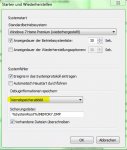
Der Debugger hat nicht die richtigen Symboldateien geladen. Schau mal in der Systemsteuerung -> System und Sicherheit -> System -> erweiterte Systemeinstellungen -> Starten und Wiederherstellen -> Einstellungen nach, ob dort "Kernelspeicherabbild" hinterlegt ist.
Sollte das der Fall sein, wiederhole das Auslesen der Minidump, wie beschrieben, gebe aber anstelle !analyze -v folgenden Befehl ein "!analyze -v;nt! KPRCB". Ein zweites mal mit "!analyze -v;r;kv;lmtn". Den ausgegebenen Text nach den Befehlen wieder hier reinposten.
Sollte in der Einstellung nur "kleines Speicherabbild" eingestellt sein, ändern in "Kernelspeicherabbild". Den nächsten Bluescreen abwarten und danach erneut auslesen (mit !analyze -v).
Auch wenn die Symbole nicht richtig angezeigt wurden, hat das Auslesen dennoch eine mögliche Ursache für den Bluescreen ausgespuckt:
Die pacer.sys ist ein Windows Systemtreiber, der für QoS Packet Scheduler benötigt wird.
Die Bluescreens können von einem Programm, aus auf den Paketplaner zugreift ausgelöst werden.
Die Frage ist nur, welches Programm, bzw. welcher Treiber des Programms die Zugriffsverletzung auslöst.
Ich hoffe mal, dass die neue Auswertung der Minidump vielleicht etwas dazu sagt.
Hast du irgendwelche speziellen Tools, oder Programme installiert, die deine Internetverbindung pushen oder überwachen?
Edit hierzu:
Module load completed but symbols could not be loaded for VBoxNetFlt.sys
Module load completed but symbols could not be loaded for netr28u.sys
Es ist zwar (noch) nicht sicher ob die Treiber in Verbindung mit den Bluescreens stehen, doch könntest du auf jeden Fall prüfen, ob du die aktuellste Version von VirtualBox hast (VBoxNetFlt.sys) und den aktuellsten Treiber für den Ralink 802.11n Wireless Adapter (netr28u.sys). Ebenso in der Ereignisanzeige nachsehen, ob Fehlermeldungen in Verbindung mit den Treibern genannt werden.Edit Ende.
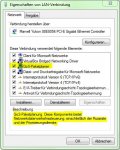
Schau bitte mal in den Eigenschaften deines Lan-Adapters nach, ob QoS aktiviert ist.
Also der Qos Paketplaner ist installiert.
Die neuerste von Virtualbox ist nicht drauf, denn als ich VBox gerade gestartet habe schreibt er "Eine neue Version ist Verfügbar". Machts Sinn nun die neue Version zu Installieren??
Beim Wireless Adapter ist sicher auch nicht der aktuellste Treiber drauf. Aktualisieren JA/NEIN??
Im Grunde habe ich VBox nur zum MS-Software Testen drauf, also würde auch nicht schmerzen wenn ich das Kicke. Sofern das halt was bringt.
Das Kernspeicherabbild ist schon bei mir eingestellt gewesen. Dies wird in die %Systemroot%\Memory.dmp gespeichert. Soll ich diese Datei nun auch Debuggen wie beschrieben? Oder nur die aus dem Minidump Verzeichniss?
Die Auwertung aus dem Minidump Verzeichnis (Datei:Mini030810-02.dmp) poste ich gleich im Anschluß, allerdings habe ich auch hier wieder das Gefühl, dass die Symboldatei (was immer das auch ist ) wieder nicht geladen wurde.
Den Memorytest mach ich dann gleich im Anschluß und Poste danach das Ergebniss
UNEXPECTED_KERNEL_MODE_TRAP_M (1000007f)
This means a trap occurred in kernel mode, and it's a trap of a kind
that the kernel isn't allowed to have/catch (bound trap) or that
is always instant death (double fault). The first number in the
bugcheck params is the number of the trap (8 = double fault, etc)
Consult an Intel x86 family manual to learn more about what these
traps are. Here is a *portion* of those codes:
If kv shows a taskGate
use .tss on the part before the colon, then kv.
Else if kv shows a trapframe
use .trap on that value
Else
.trap on the appropriate frame will show where the trap was taken
(on x86, this will be the ebp that goes with the procedure KiTrap)
Endif
kb will then show the corrected stack.
Arguments:
Arg1: 00000008, EXCEPTION_DOUBLE_FAULT
Arg2: 8b516130
Arg3: 00000000
Arg4: 00000000
Debugging Details:
------------------
***** Kernel symbols are WRONG. Please fix symbols to do analysis.
*************************************************************************
*** ***
*** ***
*** Your debugger is not using the correct symbols ***
*** ***
*** In order for this command to work properly, your symbol path ***
*** must point to .pdb files that have full type information. ***
*** ***
*** Certain .pdb files (such as the public OS symbols) do not ***
*** contain the required information. Contact the group that ***
*** provided you with these symbols if you need this command to ***
*** work. ***
*** ***
*** Type referenced: nt!_KPRCB ***
*** ***
*************************************************************************
*************************************************************************
*** ***
*** ***
*** Your debugger is not using the correct symbols ***
*** ***
*** In order for this command to work properly, your symbol path ***
*** must point to .pdb files that have full type information. ***
*** ***
*** Certain .pdb files (such as the public OS symbols) do not ***
*** contain the required information. Contact the group that ***
*** provided you with these symbols if you need this command to ***
*** work. ***
*** ***
*** Type referenced: nt!KPRCB ***
*** ***
*************************************************************************
*************************************************************************
*** ***
*** ***
*** Your debugger is not using the correct symbols ***
*** ***
*** In order for this command to work properly, your symbol path ***
*** must point to .pdb files that have full type information. ***
*** ***
*** Certain .pdb files (such as the public OS symbols) do not ***
*** contain the required information. Contact the group that ***
*** provided you with these symbols if you need this command to ***
*** work. ***
*** ***
*** Type referenced: nt!_KPRCB ***
*** ***
*************************************************************************
*************************************************************************
*** ***
*** ***
*** Your debugger is not using the correct symbols ***
*** ***
*** In order for this command to work properly, your symbol path ***
*** must point to .pdb files that have full type information. ***
*** ***
*** Certain .pdb files (such as the public OS symbols) do not ***
*** contain the required information. Contact the group that ***
*** provided you with these symbols if you need this command to ***
*** work. ***
*** ***
*** Type referenced: nt!KPRCB ***
*** ***
*************************************************************************
*************************************************************************
*** ***
*** ***
*** Your debugger is not using the correct symbols ***
*** ***
*** In order for this command to work properly, your symbol path ***
*** must point to .pdb files that have full type information. ***
*** ***
*** Certain .pdb files (such as the public OS symbols) do not ***
*** contain the required information. Contact the group that ***
*** provided you with these symbols if you need this command to ***
*** work. ***
*** ***
*** Type referenced: nt!_KPRCB ***
*** ***
*************************************************************************
*************************************************************************
*** ***
*** ***
*** Your debugger is not using the correct symbols ***
*** ***
*** In order for this command to work properly, your symbol path ***
*** must point to .pdb files that have full type information. ***
*** ***
*** Certain .pdb files (such as the public OS symbols) do not ***
*** contain the required information. Contact the group that ***
*** provided you with these symbols if you need this command to ***
*** work. ***
*** ***
*** Type referenced: nt!_KPRCB ***
*** ***
*************************************************************************
*************************************************************************
*** ***
*** ***
*** Your debugger is not using the correct symbols ***
*** ***
*** In order for this command to work properly, your symbol path ***
*** must point to .pdb files that have full type information. ***
*** ***
*** Certain .pdb files (such as the public OS symbols) do not ***
*** contain the required information. Contact the group that ***
*** provided you with these symbols if you need this command to ***
*** work. ***
*** ***
*** Type referenced: nt!_KPRCB ***
*** ***
*************************************************************************
*************************************************************************
*** ***
*** ***
*** Your debugger is not using the correct symbols ***
*** ***
*** In order for this command to work properly, your symbol path ***
*** must point to .pdb files that have full type information. ***
*** ***
*** Certain .pdb files (such as the public OS symbols) do not ***
*** contain the required information. Contact the group that ***
*** provided you with these symbols if you need this command to ***
*** work. ***
*** ***
*** Type referenced: nt!_KPRCB ***
*** ***
*************************************************************************
ADDITIONAL_DEBUG_TEXT:
Use '!findthebuild' command to search for the target build information.
If the build information is available, run '!findthebuild -s ; .reload' to set symbol path and load symbols.
UNEXPECTED_KERNEL_MODE_TRAP_M (1000007f)
This means a trap occurred in kernel mode, and it's a trap of a kind
that the kernel isn't allowed to have/catch (bound trap) or that
is always instant death (double fault). The first number in the
bugcheck params is the number of the trap (8 = double fault, etc)
Consult an Intel x86 family manual to learn more about what these
traps are. Here is a *portion* of those codes:
If kv shows a taskGate
use .tss on the part before the colon, then kv.
Else if kv shows a trapframe
use .trap on that value
Else
.trap on the appropriate frame will show where the trap was taken
(on x86, this will be the ebp that goes with the procedure KiTrap)
Endif
kb will then show the corrected stack.
Arguments:
Arg1: 00000008, EXCEPTION_DOUBLE_FAULT
Arg2: 8b516130
Arg3: 00000000
Arg4: 00000000
Debugging Details:
------------------
***** Kernel symbols are WRONG. Please fix symbols to do analysis.
*************************************************************************
*** ***
*** ***
*** Your debugger is not using the correct symbols ***
*** ***
*** In order for this command to work properly, your symbol path ***
*** must point to .pdb files that have full type information. ***
*** ***
*** Certain .pdb files (such as the public OS symbols) do not ***
*** contain the required information. Contact the group that ***
*** provided you with these symbols if you need this command to ***
*** work. ***
*** ***
*** Type referenced: nt!_KPRCB ***
*** ***
*************************************************************************
*************************************************************************
*** ***
*** ***
*** Your debugger is not using the correct symbols ***
*** ***
*** In order for this command to work properly, your symbol path ***
*** must point to .pdb files that have full type information. ***
*** ***
*** Certain .pdb files (such as the public OS symbols) do not ***
*** contain the required information. Contact the group that ***
*** provided you with these symbols if you need this command to ***
*** work. ***
*** ***
*** Type referenced: nt!KPRCB ***
*** ***
*************************************************************************
*************************************************************************
*** ***
*** ***
*** Your debugger is not using the correct symbols ***
*** ***
*** In order for this command to work properly, your symbol path ***
*** must point to .pdb files that have full type information. ***
*** ***
*** Certain .pdb files (such as the public OS symbols) do not ***
*** contain the required information. Contact the group that ***
*** provided you with these symbols if you need this command to ***
*** work. ***
*** ***
*** Type referenced: nt!_KPRCB ***
*** ***
*************************************************************************
*************************************************************************
*** ***
*** ***
*** Your debugger is not using the correct symbols ***
*** ***
*** In order for this command to work properly, your symbol path ***
*** must point to .pdb files that have full type information. ***
*** ***
*** Certain .pdb files (such as the public OS symbols) do not ***
*** contain the required information. Contact the group that ***
*** provided you with these symbols if you need this command to ***
*** work. ***
*** ***
*** Type referenced: nt!KPRCB ***
*** ***
*************************************************************************
*************************************************************************
*** ***
*** ***
*** Your debugger is not using the correct symbols ***
*** ***
*** In order for this command to work properly, your symbol path ***
*** must point to .pdb files that have full type information. ***
*** ***
*** Certain .pdb files (such as the public OS symbols) do not ***
*** contain the required information. Contact the group that ***
*** provided you with these symbols if you need this command to ***
*** work. ***
*** ***
*** Type referenced: nt!_KPRCB ***
*** ***
*************************************************************************
*************************************************************************
*** ***
*** ***
*** Your debugger is not using the correct symbols ***
*** ***
*** In order for this command to work properly, your symbol path ***
*** must point to .pdb files that have full type information. ***
*** ***
*** Certain .pdb files (such as the public OS symbols) do not ***
*** contain the required information. Contact the group that ***
*** provided you with these symbols if you need this command to ***
*** work. ***
*** ***
*** Type referenced: nt!_KPRCB ***
*** ***
*************************************************************************
*************************************************************************
*** ***
*** ***
*** Your debugger is not using the correct symbols ***
*** ***
*** In order for this command to work properly, your symbol path ***
*** must point to .pdb files that have full type information. ***
*** ***
*** Certain .pdb files (such as the public OS symbols) do not ***
*** contain the required information. Contact the group that ***
*** provided you with these symbols if you need this command to ***
*** work. ***
*** ***
*** Type referenced: nt!_KPRCB ***
*** ***
*************************************************************************
*************************************************************************
*** ***
*** ***
*** Your debugger is not using the correct symbols ***
*** ***
*** In order for this command to work properly, your symbol path ***
*** must point to .pdb files that have full type information. ***
*** ***
*** Certain .pdb files (such as the public OS symbols) do not ***
*** contain the required information. Contact the group that ***
*** provided you with these symbols if you need this command to ***
*** work. ***
*** ***
*** Type referenced: nt!_KPRCB ***
*** ***
*************************************************************************
ADDITIONAL_DEBUG_TEXT:
Use '!findthebuild' command to search for the target build information.
If the build information is available, run '!findthebuild -s ; .reload' to set symbol path and load symbols.
UNEXPECTED_KERNEL_MODE_TRAP_M (1000007f)
This means a trap occurred in kernel mode, and it's a trap of a kind
that the kernel isn't allowed to have/catch (bound trap) or that
is always instant death (double fault). The first number in the
bugcheck params is the number of the trap (8 = double fault, etc)
Consult an Intel x86 family manual to learn more about what these
traps are. Here is a *portion* of those codes:
If kv shows a taskGate
use .tss on the part before the colon, then kv.
Else if kv shows a trapframe
use .trap on that value
Else
.trap on the appropriate frame will show where the trap was taken
(on x86, this will be the ebp that goes with the procedure KiTrap)
Endif
kb will then show the corrected stack.
Arguments:
Arg1: 00000008, EXCEPTION_DOUBLE_FAULT
Arg2: 8b516130
Arg3: 00000000
Arg4: 00000000
Debugging Details:
------------------
***** Kernel symbols are WRONG. Please fix symbols to do analysis.
*************************************************************************
*** ***
*** ***
*** Your debugger is not using the correct symbols ***
*** ***
*** In order for this command to work properly, your symbol path ***
*** must point to .pdb files that have full type information. ***
*** ***
*** Certain .pdb files (such as the public OS symbols) do not ***
*** contain the required information. Contact the group that ***
*** provided you with these symbols if you need this command to ***
*** work. ***
*** ***
*** Type referenced: nt!_KPRCB ***
*** ***
*************************************************************************
*************************************************************************
*** ***
*** ***
*** Your debugger is not using the correct symbols ***
*** ***
*** In order for this command to work properly, your symbol path ***
*** must point to .pdb files that have full type information. ***
*** ***
*** Certain .pdb files (such as the public OS symbols) do not ***
*** contain the required information. Contact the group that ***
*** provided you with these symbols if you need this command to ***
*** work. ***
*** ***
*** Type referenced: nt!KPRCB ***
*** ***
*************************************************************************
*************************************************************************
*** ***
*** ***
*** Your debugger is not using the correct symbols ***
*** ***
*** In order for this command to work properly, your symbol path ***
*** must point to .pdb files that have full type information. ***
*** ***
*** Certain .pdb files (such as the public OS symbols) do not ***
*** contain the required information. Contact the group that ***
*** provided you with these symbols if you need this command to ***
*** work. ***
*** ***
*** Type referenced: nt!_KPRCB ***
*** ***
*************************************************************************
*************************************************************************
*** ***
*** ***
*** Your debugger is not using the correct symbols ***
*** ***
*** In order for this command to work properly, your symbol path ***
*** must point to .pdb files that have full type information. ***
*** ***
*** Certain .pdb files (such as the public OS symbols) do not ***
*** contain the required information. Contact the group that ***
*** provided you with these symbols if you need this command to ***
*** work. ***
*** ***
*** Type referenced: nt!KPRCB ***
*** ***
*************************************************************************
*************************************************************************
*** ***
*** ***
*** Your debugger is not using the correct symbols ***
*** ***
*** In order for this command to work properly, your symbol path ***
*** must point to .pdb files that have full type information. ***
*** ***
*** Certain .pdb files (such as the public OS symbols) do not ***
*** contain the required information. Contact the group that ***
*** provided you with these symbols if you need this command to ***
*** work. ***
*** ***
*** Type referenced: nt!_KPRCB ***
*** ***
*************************************************************************
*************************************************************************
*** ***
*** ***
*** Your debugger is not using the correct symbols ***
*** ***
*** In order for this command to work properly, your symbol path ***
*** must point to .pdb files that have full type information. ***
*** ***
*** Certain .pdb files (such as the public OS symbols) do not ***
*** contain the required information. Contact the group that ***
*** provided you with these symbols if you need this command to ***
*** work. ***
*** ***
*** Type referenced: nt!_KPRCB ***
*** ***
*************************************************************************
*************************************************************************
*** ***
*** ***
*** Your debugger is not using the correct symbols ***
*** ***
*** In order for this command to work properly, your symbol path ***
*** must point to .pdb files that have full type information. ***
*** ***
*** Certain .pdb files (such as the public OS symbols) do not ***
*** contain the required information. Contact the group that ***
*** provided you with these symbols if you need this command to ***
*** work. ***
*** ***
*** Type referenced: nt!_KPRCB ***
*** ***
*************************************************************************
*************************************************************************
*** ***
*** ***
*** Your debugger is not using the correct symbols ***
*** ***
*** In order for this command to work properly, your symbol path ***
*** must point to .pdb files that have full type information. ***
*** ***
*** Certain .pdb files (such as the public OS symbols) do not ***
*** contain the required information. Contact the group that ***
*** provided you with these symbols if you need this command to ***
*** work. ***
*** ***
*** Type referenced: nt!_KPRCB ***
*** ***
*************************************************************************
(Mußte ich aufteilen weil die Zeichenlänge im Beitrag überschritten war)
ADDITIONAL_DEBUG_TEXT:
Use '!findthebuild' command to search for the target build information.
If the build information is available, run '!findthebuild -s ; .reload' to set symbol path and load symbols.
Die neuerste von Virtualbox ist nicht drauf, denn als ich VBox gerade gestartet habe schreibt er "Eine neue Version ist Verfügbar". Machts Sinn nun die neue Version zu Installieren??
Beim Wireless Adapter ist sicher auch nicht der aktuellste Treiber drauf. Aktualisieren JA/NEIN??
Zumindest wird jetzt die pacer.sys als Problemquelle näher benannt. Ich vermute mal, dass dies mit VirtualBox und/oder dem Treiber des Wireless Adapters zusammen hängt.
Das mit dem Symbols schau ich mir später noch mal genauer an. Habe im Moment leider keine Zeit.
Im Zweifel, lädst du das Symbolpaket von Microsoft herunter (ich sage dir dann wie).
Aber mit dem Memorytest und der Installation der neuesten Versionen kommen wir vielleicht schon mal weiter.
Viel Erfolg. Gruß
So ich hab den Memorytest 2mal Komplett durchlaufen lassen und es wird mir kein Fehler angezeigt.
(Gott sei Dank )
Wlan Treiber scheint der doch der aktuellste Installiert zu sein.
VBox habe ich nun auch installiert und gleich die neuen Windows Treiber.
glg
Ergänzung ()
Habe den Memorytest die ganze Nacht laufen lassen mit dem Ergebnis, das wieder kein einziger Fehler angezeigt wurde.
Ja Ram habe ich einzeln und zusammen getestet, in der Nacht beide zusammen.
Absturz hatte ich gestern keinen, also ists mal etwas besser geworden.
Aber diese Ereignis 10 Fehlermeldung in der Ereignisanzeige ist nach wie vor da.
Nicht Windowstreiber habe ich draufgehauen sondern die neuen Windows Updates.
Für den Bluescreen sind die Fehler nicht verantwortlich. Haben die Ereignisse ein aktuelles Datum, oder sind das ältere Meldungen?
Hast du diesbezüglich den Link von Frogger9 angesehen?
Edit:
Bezüglich der Symbole, kannst du dir hier das komplette Symbolpaket für Vista SP2 32bit herunterladen.
Die Datei auf (z.B.) C:\Symbols entpacken und den Symbolpfad im Debugger (Files -> Symbol File Path) entsprechend anpassen (C:\Symbols).
Um zu überprüfen, ob die richtigen Symbole jetzt geladen werden, kannst du die letzte Minidump nochmals mit !analyze -v auslesen.
Echt tausend dank Simpel für deine Hilfe.
Bezüglich der Ereignis 10 Meldung.. Die kommt bei jedem Neustart aber schon länger als die Bluescreens wie ich merkte also hast du völlig recht die haben mit dem Bluescreen nix zu tun. Den Thread mit dem VB Script habe ich gesehen und probiert aber das script endet mit einer Fehlermeldung und der Fehler ist noch immer da also was solls.. hats mit den Bluescreens nix zu tun ists mir eh gleich *gg*
Ich würde auch sagen wir warten mal ab ob der Bluescreen wieder kommt oder nicht, habe auch den Qos Paketplaner mal ausgeschalten Sicherheitshalber.
Das mit der Symboldatei werd ich noch machen morgen und mir das ansehen. Dafür auch nochmal danke.
hab die antivir freeware. is den ess.. besser? tuneup habsch auch vom rechner geschmissen nach dem ich etliche berichte gelesen hab, das es auch zu bluescreens fürt....
kennst du eine andere regestrie software die mein system cleant??
wenn ja empfehl mir doch ma paar sachen
@Randorkan: Hey, gern geschehen. Den QoS Paketplaner kannst du aber ruhig wieder anschalten.
@duphi24: Ich würde mal sagen, dass sich antivir und Essentials in der Qualität nicht viel Unterscheiden. Der wichtigste Faktor für Virenschutz sitzt immer noch vor dem Bildschirm . Ein registry cleaner ist m.E. nicht notwendig. Die Dinger verbessern keinesfalls die Leistung. Wenn du unbedingt einen haben willst, würde ich dir den CCleaner empfehlen.
Als Tipp, vor der Reinigung ein Image deines Systems machen, falls "zu viel" gereinigt wird, kannst du das dann jederzeit rückgängig machen.