Boot Reihenfolge lässt sich nicht ändern

Chris_HH

Cadet 2nd Year
Registriert
Okt. 2019
Beiträge
19
Hi Leute,
Ich brauche mal Hilfe. Ich habe ein Lenovo Thinkpad T450.
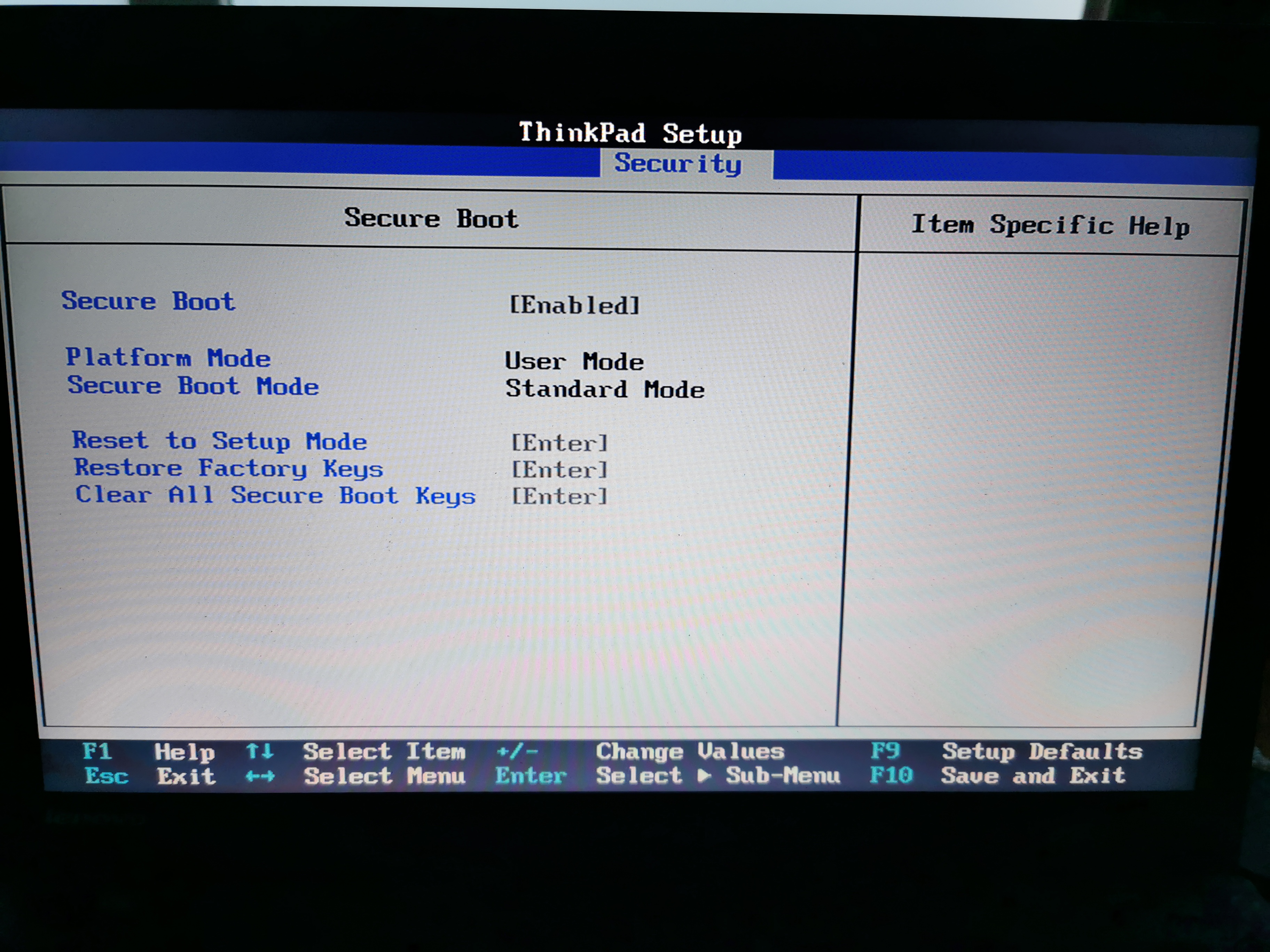
Mein Problem ist das ich die Boot Reihenfolge nicht verändern kann und auch den Secure Boot nicht raus nehmen kann. Im großen und ganzen kann ich so gut wie nichts umstellen, da so gut wie alle grau hinterlegt ist.

IMG_20191003_073257.jpg

IMG_20191003_073316.jpg

IMG_20191003_073350.jpg

Ich hoffe ihr könnt mir helfen wie ich da ran komme.

Danke und Gruß
Chris
 
Probier mal das BIOS zu updaten. Könnte sein das es danach funktioniert.
 
Wie mache ich das wenn ich den Laptop nicht hoch fahren kann weil der sich zerschossen hat?
 
Hast du noch einen anderen PC oder Laptop?
Auf Lenovo BIOS Datei runterladen und auf USB Stick kopieren und vom Stick starten und BIOS aktualisieren.
Weißt du wie man das Bootmenü aufrufen kann?
Das geht meist mit den F-Tasten.
 
F12 beim booten geht nicht? Ist ja laut Bios enabled.

Ansonsten wird man das Secure boot auf disabled setzen müssen.

Ach ja, das Quick boot auch erstmal abschalten.
 
Ich kann den Secure Boot nicht ändern und beim Boot Mode gibt es nur "Quick und Diagnostics"
 
Warum hast du ueberhaupt am BIOS rumgespielt. Also, was wolltest du urspruenglich machen?

Bzgl. neuem BIOS:
Code:
(BIOS ID: JBET72WW)
-------------------
<1.36>
[Important] Update includes a security fix.
- (Fix) Fixed an issue where Windows 10 may fail to startup on certain the system
        that have less than 8 GB of RAM after installing KB4467691.

<1.35>
[Important] Update includes a security fix.
[Important] Added Hyper Threading enable/disable option to ThinkPad Setup for virtualized
  system users in order to address LEN-24163 L1 Terminal Fault Side Channel
  Vulnerabilities (CVE-2018-3646) Refer to Lenovo's Security Advisory page for
  additional information.(https://support.lenovo.com/us/en/solutions/LEN-24163)
  (NOTE) Disabling Hyper Threading may increase system power consumption during sleep.
- (Fix) Fixed BIOS silent update with system account.

<1.34>
- [Important updates] Security fix addresses LEN-22133 Speculative Execution Side Channel Variants 4 and 3a (CVE-2018-3639, CVE-2018-3640).

<1.33>
- [Important] Security fix addresses LEN-19568 Intel Active Management Technology MEBx Access Control Bypass.

<1.32>
- [Important] Enhancement to address CVE-2017-5715.

<1.31>
- [Important] Enhancement to address CVE-2017-5715.

<1.30>
- [Important] Update includes a security fix.
              (Note)
              If the UEFI BIOS has been updated to 1.30 or higher,
              it is no longer able to roll back to the version before 1.30
              for security improvement.

<1.29>
- (New) Updated the CPU microcode.
- (Fix) Fixed an issue of lock UEFI BIOS settings.
- (Fix) Fixed an issue USB HDD device exists in PCI LAN on BIOS Setup/Boot Menu.
- (Fix) Fixed some security fixes.
- (Fix) Fixed an issue that SVP verification failed after ReadyBoost.

<1.28>
-(Fix) Rollback InRom Diagnostic version to 02.09.09.

<1.27>
- (Fix) Fix USB key listed in PCI LAN item in boot menu.
- (New) Updated the Diagnostics module to version 03.07.001.

<1.26>
- (New) Updated for Security fix
- (New) Updated the Diagnostics module to version 2.09.09.
- (Fix) Fixed system may hang windows splash logo after update BIOS v1.25.

<1.25>
- (New) Updated for Security fix addresses LEN-8324 System Management Mode (SMM) BIOS Vulnerability and some security fixes.


<1.24>
- (New) Updated InRom diagnostic.
- (New) Updated the CPU microcode.
- (Fix) Fixed an issue related to SVP storing failure after the WMI packet processing

<1.22>
- (New) Updated the CPU microcode.
- (Fix) Fixed an issue where system might not resume from hibernate with Intel PTT on Windows 10.
- (Fix) Fixed an issue where Intel Rapid Start Technology might not work on Windows 10.
- (Fix) Fixed an issue where display might only on external monitor after lid resume from S3 with Intel PTT.

<1.21>
- (New) Updated BIOS flash tool.
- (New) Modified UEFI PXE resolution.
- (New) Removed the intruder function to turn off when LID is open.
- (Fix) Fixed an issue related to system unable to power on due to chipset hang in some specific situation.
- (Fix) Fixed an issue related to screen resolution abnormal during UEFI PXE boot.
- (Fix) Fixed an issue related to SVP clear not working with SRsetupwin tool

<1.21>  (Drop)
- (New) Modified UEFI PXE resolution
- (New) Removed the intruder function to turn off when LID is open.
- (Fix) Fixed an issue related to screen resolution abnormal during UEFI PXE boot.
- (Fix) Fixed an issue related to SVP clear not working with SRsetupwin tool

<1.20>
- (New) Improved windows 7 32-bit OS available memory size.
- (New) Updated EDID table for new panel.
- (New) Updated Haswell C0/D0 MCU to 0000001Dh (M7240651_0000001D)
- (New) Updated Broadwell E0/F0 MCU to 00000022h (MC0306D4_00000022)
- (New) Supported multiple Legacy USB LAN Option ROMs.
- (New) Supported the Internal storage tamper detection.
- (Fix) Fixed an issue related to incorrect password behavior at unattended boot.
- (Fix) Fixed an issue related to BIOS windows flash failure with Intel PTT/windows 10.
- (Fix) Fixed an issue related SMM stack leak in SmiFlashAllow.
 
Ach ja und unter F12 kommt nur das Boot menu mir Windows Manager und der HDD
 
Setze das BIOS mal auf default!
Hast mein Post #9 nicht gelesen?
1.37 vom August 2019 ist das neuste und das solltest du aktualisieren!
 
Schon mal die Defaults geladen und dann noch einmal probiert?
 
@abcddcba der Laptop hat sich komplett zerschossen und ich wollte den formatieren und neu aufsetzen. Dafür wollte ich von einen Stick booten und bin dann auf das Problem gestoßen.

@BlackNinja2019 Ich kann deine Posts überhaupt nicht sehen. Bei mit kommt nur (Post #9)
 
Schatho schrieb:
Schon mal die Defaults geladen und dann noch einmal probiert?

was genau meinst du damit? Ich kann einen Rechner neu aufsetzen und die Boot Reihenfolge verändern,
danach hört mein Computer-Wissen auch schon auf.
 
Das BIOS auf Setup defaults oder Load Optimized defaults setzen!
Ist das so schwer?
 
Zurück
Oben