

Du verwendest einen veralteten Browser. Es ist möglich, dass diese oder andere Websites nicht korrekt angezeigt werden.
Du solltest ein Upgrade durchführen oder einen alternativen Browser verwenden.
Du solltest ein Upgrade durchführen oder einen alternativen Browser verwenden.
Fester für Window 11 Installation öffne sich nicht
- Ersteller 3dboy
- Erstellt am
Ich kann das Setup gar nicht starten. das fester der Benutzerkontensteuerung erscheint, aber danach passiert nicht.
Man sieht das Setup kurz in Task Manager aufblitzen.
mit der Deskmodder "Zero" ISO habe ich noch nicht versucht. Mache ich gleich mal.
Aber ich vermute das Problem hat nichts mit den Eigentlichen Update zu tun
Man sieht das Setup kurz in Task Manager aufblitzen.
mit der Deskmodder "Zero" ISO habe ich noch nicht versucht. Mache ich gleich mal.
Aber ich vermute das Problem hat nichts mit den Eigentlichen Update zu tun
Ist nicht erforderlich. Die kochen auch nur mit Wasser.3dboy schrieb:Mache ich gleich mal.
Mit welcher ISO bist du auf die 23H2 gekommen?
Starte mit der ISO eine Inplace Reparatur.
Vielleicht so: 23H2 ist schon lange her.
https://www.computerwoche.de/article/3551808/windows-11-neue-reparatur-option-nutzen.html
Zuletzt bearbeitet:
kommdieter schrieb:Für den Wechsel von 22H2 auf 23H2 brauchst du nur das Funktionsupdate
https://www.deskmodder.de/blog/2023...uer-windows-11-23h2-22631-enablement-package/
Klappt auch bei nicht unterstützter HW
Dadurch bin auf 23H2 gekommen. Da es damals schon nicht funktioniert hat.
Meinen Laptop konnte ich gestern ohne Probleme mit einem Inplace Update auf 25H2 bringen
eine Inplace Reparatur kann ich aber nur in der Windows Umgebung starten oder? Denn das geht ja nicht.
Ja.3dboy schrieb:eine Inplace Reparatur kann ich aber nur in der Windows Umgebung starten oder?
Gehe alle setup.exe bei dir nicht?
z.B Notepad++.exe (npp.x.x.x.Installer.x64.exe) Installation auf diesem Weg starten.
Zuletzt bearbeitet:
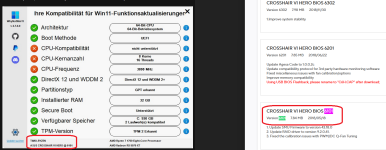
Ja geht, hab eben die 8.9 von Notepad++ installiert
BIOS Update wäre eine Überlegung, aber ich denke nicht, dass dadurch der Start einer Setup Datei verhindert wird.
Aber gut ich bin mittlerweile relativ verzweifelt
Ergänzung ()
BIOS Update wäre eine Überlegung, aber ich denke nicht, dass dadurch der Start einer Setup Datei verhindert wird.
Aber gut ich bin mittlerweile relativ verzweifelt

PonJoe58
Banned
- Registriert
- Juli 2025
- Beiträge
- 1.764
Deine Verzweiflung kannst du eventuell damit unterbinden.3dboy schrieb:ich bin mittlerweile relativ verzweifelt
Aber das liegt an dir.
Das ist richtig3dboy schrieb:aber ich denke nicht, dass dadurch der Start einer Setup Datei verhindert wird.
Passiert da was, wenn du auf die bereitgestellte ISO setup.exe einen Rechtsklick machst und als Admin starten auswählst?
Zuletzt bearbeitet:
ja die Benutzerkontensteuerung erscheint und fragt ob ich ausführen möchte.
Habe die Benutzerkontensteuerung auch schon deaktiviert bringt aber nichts.
Habe die Benutzerkontensteuerung auch schon deaktiviert bringt aber nichts.
hast du eine Anleitung wie das geht. Wissentlich habe ich es nicht deaktiviert, aber ein versuch ist es wertBaltimore schrieb:In den Gruppenrichtlinien / Registry konnte man Upgrades auf höhere Versionen unterbinden. Hast das mal gemacht?
Ich habe vergessen wie es geht.3dboy schrieb:hast du eine Anleitung wie das geht.
Ich hab es gerade mal auf einem 25H2 Rechner mit einer WIN 10 ISO versucht. Die startet sofort wenn ich die setup.exe doppelklicke.
Hast du den
$WINDOWS.~BT Ordner auch vorher gelöscht?
Findest du dort C:\Windows\Logs\MoSetup ein LOG-File?
Zuletzt bearbeitet:
ja habe ich gemacht. Hatte es vorhin als tipp gelesen.
Wenn ich die Option "Probleme mittels Windows Update beheben" auswähle kann er nicht mal das Windows runterladen.
Ich glaube da ist etwas komplett kaputt bei mir
Hier liegen mehrere Dateien ab:
ActionList
BlueBox
DeviceInventory
udiapi-osget
UpdateAgent
UpdateAgent.Old
Wenn ich die Option "Probleme mittels Windows Update beheben" auswähle kann er nicht mal das Windows runterladen.
Ich glaube da ist etwas komplett kaputt bei mir
Hier liegen mehrere Dateien ab:
ActionList
BlueBox
DeviceInventory
udiapi-osget
UpdateAgent
UpdateAgent.Old
das Letze sieht Interessant aus:
2025-12-28 14:54:52: MainHr: Error = 0x80070002
2025-12-28 14:54:52: wWinMain: Error = 0x80070002
2025-12-28 14:54:52: MainHr: Error = 0x80070002
2025-12-28 14:54:52: wWinMain: Error = 0x80070002
2025-12-28 14:54:52: BuildInfo: [10.0.26100.1 (ge_release.240331-1435)]
2025-12-28 14:54:52: CommandLine: [D:\Sources\SetupPrep.exe ]
2025-12-28 14:54:52: Opening Box: [D:\Sources\SetupPrep.exe]
2025-12-28 14:54:52: Opening Box Result: [0x0]
2025-12-28 14:54:52: Detecting Product from config file.
2025-12-28 14:54:52: ParseCommandLine: Product from Setup.cfg: [0]
2025-12-28 14:54:52: Deleting box result...
2025-12-28 14:54:52: ScenarioCtrlHelpers::GenerateBoxHash: Calculating file hash...
2025-12-28 14:54:52: ScenarioCtrlHelpers::VerifySetupVersionMatch: Found previously stored file hash.
2025-12-28 14:54:52: ScenarioCtrlHelpers::VerifySetupVersionMatch: Box file hash matches.
2025-12-28 14:54:52: VersionMatch: [Yes]
2025-12-28 14:54:52: StateMatch: Attempting to get Installation Scenario from registry...
2025-12-28 14:54:52: StateMatch: InstallScenario found : 0x1
2025-12-28 14:54:52: StateMatch: Current mode is Install - Attempting to resume...
2025-12-28 14:54:52: Compat Resume Found: [No]
2025-12-28 14:54:52: StateMatch: [No]
2025-12-28 14:54:52: ResumeMode: [No]
2025-12-28 14:54:52: OsUninstallWarning: Execute file found [TRUE].
2025-12-28 14:54:52: OsUninstallWarning: Os Uninstall Active [FALSE].
2025-12-28 14:54:52: OsUninstallWarning: [No]
2025-12-28 14:54:52: Checking cleanup registry value...
2025-12-28 14:54:52: Cleanup value missing... assuming no cleanup.
2025-12-28 14:54:52: Skipping cleanup.
2025-12-28 14:54:52: Preserve working path: [No]
2025-12-28 14:54:52: Cleaning alternate storage paths...
2025-12-28 14:54:52: Cleaning MoSetup Volatile key...
2025-12-28 14:54:52: Removing CorrelationVector registry value...
2025-12-28 14:54:52: Removing cleanup registry value...
2025-12-28 14:54:52: Flushing MoSetup registry key...
2025-12-28 14:54:52: Cleaning working dir...
2025-12-28 14:54:52: Attempting to preserve existing logs...
2025-12-28 14:54:52: Nothing to preserve.
2025-12-28 14:54:52: Attempting to clean installation drive at [C]...
2025-12-28 14:54:52: Acquiring privileges...
2025-12-28 14:54:52, Info SPCleanupInstallationDrive: Cleaning up C:\
2025-12-28 14:54:52, Info Active tracing sessions:
2025-12-28 14:54:52, Info Session name: Circular Kernel Context Logger
2025-12-28 14:54:52, Info Log file name:
2025-12-28 14:54:52, Info Log file mode: 0x02800480
2025-12-28 14:54:52, Info Flush timer: 0
2025-12-28 14:54:52, Info Enable flags: 0x00002065
2025-12-28 14:54:52, Info Session name: AppModel
2025-12-28 14:54:52, Info Log file name:
2025-12-28 14:54:52, Info Log file mode: 0x10808400
2025-12-28 14:54:52, Info Flush timer: 0
2025-12-28 14:54:52, Info Enable flags: 0x00000000
2025-12-28 14:54:52, Info Session name: DiagLog
2025-12-28 14:54:52, Info Log file name:
2025-12-28 14:54:52, Info Log file mode: 0x10800180
2025-12-28 14:54:52, Info Flush timer: 1
2025-12-28 14:54:52, Info Enable flags: 0x00000000
2025-12-28 14:54:52, Info Session name: Diagtrack-Listener
2025-12-28 14:54:52, Info Log file name: C:\WINDOWS\System32\LogFiles\WMI\Diagtrack-Listener.etl.005
2025-12-28 14:54:52, Info Log file mode: 0x08800011
2025-12-28 14:54:52, Info Flush timer: 0
2025-12-28 14:54:52, Info Enable flags: 0x00000000
2025-12-28 14:54:52, Info Session name: EventLog-Application
2025-12-28 14:54:52, Info Log file name:
2025-12-28 14:54:52, Info Log file mode: 0x19800180
2025-12-28 14:54:52, Info Flush timer: 1
2025-12-28 14:54:52, Info Enable flags: 0x00000000
2025-12-28 14:54:52, Info Session name: EventLog-Microsoft-Windows-CodeIntegrity-Verbose
2025-12-28 14:54:52, Info Log file name: C:\WINDOWS\System32\Winevt\Logs\Microsoft-Windows-CodeIntegrity%4Verbose.etl
2025-12-28 14:54:52, Info Log file mode: 0x08800082
2025-12-28 14:54:52, Info Flush timer: 5
2025-12-28 14:54:52, Info Enable flags: 0x00000000
2025-12-28 14:54:52, Info Session name: EventLog-System
2025-12-28 14:54:52, Info Log file name:
2025-12-28 14:54:52, Info Log file mode: 0x98800180
2025-12-28 14:54:52, Info Flush timer: 1
2025-12-28 14:54:52, Info Enable flags: 0x00000000
2025-12-28 14:54:52, Info Session name: LwtNetLog
2025-12-28 14:54:52, Info Log file name: C:\WINDOWS\System32\LogFiles\WMI\LwtNetLog.etl
2025-12-28 14:54:52, Info Log file mode: 0x00800002
2025-12-28 14:54:52, Info Flush timer: 0
2025-12-28 14:54:52, Info Enable flags: 0x00000000
2025-12-28 14:54:52, Info Session name: Microsoft-Windows-Rdp-Graphics-RdpIdd-Trace
2025-12-28 14:54:52, Info Log file name: C:\WINDOWS\system32\Logfiles\WMI\Microsoft-Windows-Rdp-Graphics-RdpIdd-Trace.etl
2025-12-28 14:54:52, Info Log file mode: 0x80800002
2025-12-28 14:54:52, Info Flush timer: 0
2025-12-28 14:54:52, Info Enable flags: 0x00000000
2025-12-28 14:54:52, Info Session name: NetCore
2025-12-28 14:54:52, Info Log file name: C:\WINDOWS\System32\LogFiles\WMI\NetCore.etl
2025-12-28 14:54:52, Info Log file mode: 0x00800022
2025-12-28 14:54:52, Info Flush timer: 0
2025-12-28 14:54:52, Info Enable flags: 0x00000000
2025-12-28 14:54:52, Info Session name: NtfsLog
2025-12-28 14:54:52, Info Log file name: C:\WINDOWS\system32\Logfiles\WMI\NtfsLog.etl
2025-12-28 14:54:52, Info Log file mode: 0x00800000
2025-12-28 14:54:52, Info Flush timer: 0
2025-12-28 14:54:52, Info Enable flags: 0x00000000
2025-12-28 14:54:52, Info Session name: RadioMgr
2025-12-28 14:54:52, Info Log file name: C:\WINDOWS\System32\LogFiles\WMI\RadioMgr.etl
2025-12-28 14:54:52, Info Log file mode: 0x00800022
2025-12-28 14:54:52, Info Flush timer: 0
2025-12-28 14:54:52, Info Enable flags: 0x00000000
2025-12-28 14:54:52, Info Session name: ReFSLog
2025-12-28 14:54:52, Info Log file name: C:\WINDOWS\system32\Logfiles\WMI\ReFSLog.etl
2025-12-28 14:54:52, Info Log file mode: 0x00800000
2025-12-28 14:54:52, Info Flush timer: 0
2025-12-28 14:54:52, Info Enable flags: 0x00000000
2025-12-28 14:54:52, Info Session name: UBPM
2025-12-28 14:54:52, Info Log file name:
2025-12-28 14:54:52, Info Log file mode: 0x108001d0
2025-12-28 14:54:52, Info Flush timer: 20
2025-12-28 14:54:52, Info Enable flags: 0x00000000
2025-12-28 14:54:52, Info Session name: WdiContextLog
2025-12-28 14:54:52, Info Log file name: C:\WINDOWS\System32\WDI\LogFiles\WdiContextLog.etl.002
2025-12-28 14:54:52, Info Log file mode: 0x00800082
2025-12-28 14:54:52, Info Flush timer: 0
2025-12-28 14:54:52, Info Enable flags: 0x00000000
2025-12-28 14:54:52, Info Session name: WiFiSession
2025-12-28 14:54:52, Info Log file name: C:\WINDOWS\System32\LogFiles\WMI\Wifi.etl
2025-12-28 14:54:52, Info Log file mode: 0x80800002
2025-12-28 14:54:52, Info Flush timer: 0
2025-12-28 14:54:52, Info Enable flags: 0x00000000
2025-12-28 14:54:52, Info Session name: UpdateSessionOrchestration
2025-12-28 14:54:52, Info Log file name: C:\ProgramData\USOShared\Logs\System\UpdateSessionOrchestration.010ccc1a-962f-4c5d-b5a7-bcae7c8562f1.1.etl
2025-12-28 14:54:52, Info Log file mode: 0x10802009
2025-12-28 14:54:52, Info Flush timer: 60
2025-12-28 14:54:52, Info Enable flags: 0x00000000
2025-12-28 14:54:52, Info Session name: SHS-12282025-141138-7-1ff
2025-12-28 14:54:52, Info Log file name: C:\ProgramData\Microsoft\Windows Security Health\Logs\SHS-12282025-141138-7-1ff-22621.1.amd64fre.ni_release.220506-1250.etl
2025-12-28 14:54:52, Info Log file mode: 0x00800002
2025-12-28 14:54:52, Info Flush timer: 0
2025-12-28 14:54:52, Info Enable flags: 0x00000000
2025-12-28 14:54:52, Info Session name: SleepStudyTraceSession
2025-12-28 14:54:52, Info Log file name: C:\WINDOWS\system32\SleepStudy\SleepStudyTraceSession.etl
2025-12-28 14:54:52, Info Log file mode: 0x10800002
2025-12-28 14:54:52, Info Flush timer: 0
2025-12-28 14:54:52, Info Enable flags: 0x00000000
2025-12-28 14:54:52, Info Session name: CldFltLog
2025-12-28 14:54:52, Info Log file name: C:\WINDOWS\System32\LogFiles\CloudFiles\CldFlt1.etl
2025-12-28 14:54:52, Info Log file mode: 0x90800002
2025-12-28 14:54:52, Info Flush timer: 0
2025-12-28 14:54:52, Info Enable flags: 0x00000000
2025-12-28 14:54:52, Info Session name: GamingServices
2025-12-28 14:54:52, Info Log file name: C:\WINDOWS\system32\LogFiles\WMI\GamingServices.etl
2025-12-28 14:54:52, Info Log file mode: 0x10808002
2025-12-28 14:54:52, Info Flush timer: 0
2025-12-28 14:54:52, Info Enable flags: 0x00000000
2025-12-28 14:54:52, Info Session name: MpWppCoreTracing-20251228-141126-00000003-100000000
2025-12-28 14:54:52, Info Log file name: C:\ProgramData\Microsoft\Windows Defender\Support\MpWppCoreTracing-20251228-141126-00000003-100000000.bin
2025-12-28 14:54:52, Info Log file mode: 0x00800002
2025-12-28 14:54:52, Info Flush timer: 0
2025-12-28 14:54:52, Info Enable flags: 0x00000000
2025-12-28 14:54:52, Info Session name: MoUxCoreWorker
2025-12-28 14:54:52, Info Log file name: C:\ProgramData\USOShared\Logs\System\MoUxCoreWorker.95eec9cc-988e-4e97-97f6-3a14133a0ba7.1.etl
2025-12-28 14:54:52, Info Log file mode: 0x10802009
2025-12-28 14:54:52, Info Flush timer: 60
2025-12-28 14:54:52, Info Enable flags: 0x00000000
2025-12-28 14:54:52, Info Session name: MpWppTracing-20251228-131126-00000003-fffffffeffffffff
2025-12-28 14:54:52, Info Log file name: C:\ProgramData\Microsoft\Windows Defender\Support\MpWppTracing-20251228-131126-00000003-fffffffeffffffff.bin
2025-12-28 14:54:52, Info Log file mode: 0x00800002
2025-12-28 14:54:52, Info Flush timer: 0
2025-12-28 14:54:52, Info Enable flags: 0x00000000
2025-12-28 14:54:52, Info Session name: 1DSListener
2025-12-28 14:54:52, Info Log file name:
2025-12-28 14:54:52, Info Log file mode: 0x08800180
2025-12-28 14:54:52, Info Flush timer: 5
2025-12-28 14:54:52, Info Enable flags: 0x00000000
2025-12-28 14:54:52, Info Session name: ScreenOnPowerStudyTraceSession
2025-12-28 14:54:52, Info Log file name: C:\WINDOWS\system32\SleepStudy\ScreenOn\ScreenOnPowerStudyTraceSession-2025-12-28-14-11-27.etl
2025-12-28 14:54:52, Info Log file mode: 0x10800002
2025-12-28 14:54:52, Info Flush timer: 0
2025-12-28 14:54:52, Info Enable flags: 0x00000000
2025-12-28 14:54:52, Info Session name: WINNETESP
2025-12-28 14:54:52, Info Log file name:
2025-12-28 14:54:52, Info Log file mode: 0x00800100
2025-12-28 14:54:52, Info Flush timer: 1
2025-12-28 14:54:52, Info Enable flags: 0x00000000
2025-12-28 14:54:52, Info Session name: Cloud Files Diagnostic Event Listener
2025-12-28 14:54:52, Info Log file name:
2025-12-28 14:54:52, Info Log file mode: 0x00400100
2025-12-28 14:54:52, Info Flush timer: 1
2025-12-28 14:54:52, Info Enable flags: 0x00000000
2025-12-28 14:54:52, Info Filter WinSetupMon not installed; nothing to unload
2025-12-28 14:54:52, Info SPCleanupInstallationDrive: Not suspended data in registry keys, no need for cleanup
2025-12-28 14:54:52, Info DeletePath: Attempting to obliterate [C:\$WINDOWS.~BT] (final path [\\?\Volume{b9fc58de-ddba-11ec-a1c7-6045cb9e0c6c}\$WINDOWS.~BT]).
2025-12-28 14:54:52: Creating path (with ACL): [C:\$WINDOWS.~BT]...
2025-12-28 14:54:52: Creating path: [C:\$WINDOWS.~BT\Sources]...
2025-12-28 14:54:52: ScenarioCtrlHelpers::SetStateInRegistry: Setting Current Scenario: [0x1]...
2025-12-28 14:54:52: ScenarioCtrlHelpers::SetStateInRegistry: Setting Install mode...
2025-12-28 14:54:52: ScenarioCtrlHelpers::GenerateBoxHash: Calculating file hash...
2025-12-28 14:54:52: Launching process: [C:\$WINDOWS.~BT\Sources\SetupHost.exe] with command-line [/Install /Media /InstallFile "D:\Sources\Install.wim" /MediaPath "D:"] in Session: [-1]
2025-12-28 14:54:52: Launching: [C:\$WINDOWS.~BT\Sources\SetupHost.exe] [/Install /Media /InstallFile "D:\Sources\Install.wim" /MediaPath "D:"] from []!
2025-12-28 14:54:52: LaunchProcessInSession: Error = 0x80070002
2025-12-28 14:54:52: SetupHost process returned: [0x80070002], but SetupHostResult registry key was missing.
2025-12-28 14:54:52: LaunchProcessInSession returned: [0x80070002]
2025-12-28 14:54:52: Checking cleanup registry value...
2025-12-28 14:54:52: Cleanup value missing... assuming no cleanup.
2025-12-28 14:54:52: Skipping cleanup.
2025-12-28 14:54:52: MainHr: Error = 0x80070002
2025-12-28 14:54:52: wWinMain: Error = 0x80070002
2025-12-28 14:54:52: CommandLine: [D:\Sources\SetupPrep.exe ]
2025-12-28 14:54:52: Opening Box: [D:\Sources\SetupPrep.exe]
2025-12-28 14:54:52: Opening Box Result: [0x0]
2025-12-28 14:54:52: Detecting Product from config file.
2025-12-28 14:54:52: ParseCommandLine: Product from Setup.cfg: [0]
2025-12-28 14:54:52: Deleting box result...
2025-12-28 14:54:52: ScenarioCtrlHelpers::GenerateBoxHash: Calculating file hash...
2025-12-28 14:54:52: ScenarioCtrlHelpers::VerifySetupVersionMatch: Found previously stored file hash.
2025-12-28 14:54:52: ScenarioCtrlHelpers::VerifySetupVersionMatch: Box file hash matches.
2025-12-28 14:54:52: VersionMatch: [Yes]
2025-12-28 14:54:52: StateMatch: Attempting to get Installation Scenario from registry...
2025-12-28 14:54:52: StateMatch: InstallScenario found : 0x1
2025-12-28 14:54:52: StateMatch: Current mode is Install - Attempting to resume...
2025-12-28 14:54:52: Compat Resume Found: [No]
2025-12-28 14:54:52: StateMatch: [No]
2025-12-28 14:54:52: ResumeMode: [No]
2025-12-28 14:54:52: OsUninstallWarning: Execute file found [TRUE].
2025-12-28 14:54:52: OsUninstallWarning: Os Uninstall Active [FALSE].
2025-12-28 14:54:52: OsUninstallWarning: [No]
2025-12-28 14:54:52: Checking cleanup registry value...
2025-12-28 14:54:52: Cleanup value missing... assuming no cleanup.
2025-12-28 14:54:52: Skipping cleanup.
2025-12-28 14:54:52: Preserve working path: [No]
2025-12-28 14:54:52: Cleaning alternate storage paths...
2025-12-28 14:54:52: Cleaning MoSetup Volatile key...
2025-12-28 14:54:52: Removing CorrelationVector registry value...
2025-12-28 14:54:52: Removing cleanup registry value...
2025-12-28 14:54:52: Flushing MoSetup registry key...
2025-12-28 14:54:52: Cleaning working dir...
2025-12-28 14:54:52: Attempting to preserve existing logs...
2025-12-28 14:54:52: Nothing to preserve.
2025-12-28 14:54:52: Attempting to clean installation drive at [C]...
2025-12-28 14:54:52: Acquiring privileges...
2025-12-28 14:54:52, Info SPCleanupInstallationDrive: Cleaning up C:\
2025-12-28 14:54:52, Info Active tracing sessions:
2025-12-28 14:54:52, Info Session name: Circular Kernel Context Logger
2025-12-28 14:54:52, Info Log file name:
2025-12-28 14:54:52, Info Log file mode: 0x02800480
2025-12-28 14:54:52, Info Flush timer: 0
2025-12-28 14:54:52, Info Enable flags: 0x00002065
2025-12-28 14:54:52, Info Session name: AppModel
2025-12-28 14:54:52, Info Log file name:
2025-12-28 14:54:52, Info Log file mode: 0x10808400
2025-12-28 14:54:52, Info Flush timer: 0
2025-12-28 14:54:52, Info Enable flags: 0x00000000
2025-12-28 14:54:52, Info Session name: DiagLog
2025-12-28 14:54:52, Info Log file name:
2025-12-28 14:54:52, Info Log file mode: 0x10800180
2025-12-28 14:54:52, Info Flush timer: 1
2025-12-28 14:54:52, Info Enable flags: 0x00000000
2025-12-28 14:54:52, Info Session name: Diagtrack-Listener
2025-12-28 14:54:52, Info Log file name: C:\WINDOWS\System32\LogFiles\WMI\Diagtrack-Listener.etl.005
2025-12-28 14:54:52, Info Log file mode: 0x08800011
2025-12-28 14:54:52, Info Flush timer: 0
2025-12-28 14:54:52, Info Enable flags: 0x00000000
2025-12-28 14:54:52, Info Session name: EventLog-Application
2025-12-28 14:54:52, Info Log file name:
2025-12-28 14:54:52, Info Log file mode: 0x19800180
2025-12-28 14:54:52, Info Flush timer: 1
2025-12-28 14:54:52, Info Enable flags: 0x00000000
2025-12-28 14:54:52, Info Session name: EventLog-Microsoft-Windows-CodeIntegrity-Verbose
2025-12-28 14:54:52, Info Log file name: C:\WINDOWS\System32\Winevt\Logs\Microsoft-Windows-CodeIntegrity%4Verbose.etl
2025-12-28 14:54:52, Info Log file mode: 0x08800082
2025-12-28 14:54:52, Info Flush timer: 5
2025-12-28 14:54:52, Info Enable flags: 0x00000000
2025-12-28 14:54:52, Info Session name: EventLog-System
2025-12-28 14:54:52, Info Log file name:
2025-12-28 14:54:52, Info Log file mode: 0x98800180
2025-12-28 14:54:52, Info Flush timer: 1
2025-12-28 14:54:52, Info Enable flags: 0x00000000
2025-12-28 14:54:52, Info Session name: LwtNetLog
2025-12-28 14:54:52, Info Log file name: C:\WINDOWS\System32\LogFiles\WMI\LwtNetLog.etl
2025-12-28 14:54:52, Info Log file mode: 0x00800002
2025-12-28 14:54:52, Info Flush timer: 0
2025-12-28 14:54:52, Info Enable flags: 0x00000000
2025-12-28 14:54:52, Info Session name: Microsoft-Windows-Rdp-Graphics-RdpIdd-Trace
2025-12-28 14:54:52, Info Log file name: C:\WINDOWS\system32\Logfiles\WMI\Microsoft-Windows-Rdp-Graphics-RdpIdd-Trace.etl
2025-12-28 14:54:52, Info Log file mode: 0x80800002
2025-12-28 14:54:52, Info Flush timer: 0
2025-12-28 14:54:52, Info Enable flags: 0x00000000
2025-12-28 14:54:52, Info Session name: NetCore
2025-12-28 14:54:52, Info Log file name: C:\WINDOWS\System32\LogFiles\WMI\NetCore.etl
2025-12-28 14:54:52, Info Log file mode: 0x00800022
2025-12-28 14:54:52, Info Flush timer: 0
2025-12-28 14:54:52, Info Enable flags: 0x00000000
2025-12-28 14:54:52, Info Session name: NtfsLog
2025-12-28 14:54:52, Info Log file name: C:\WINDOWS\system32\Logfiles\WMI\NtfsLog.etl
2025-12-28 14:54:52, Info Log file mode: 0x00800000
2025-12-28 14:54:52, Info Flush timer: 0
2025-12-28 14:54:52, Info Enable flags: 0x00000000
2025-12-28 14:54:52, Info Session name: RadioMgr
2025-12-28 14:54:52, Info Log file name: C:\WINDOWS\System32\LogFiles\WMI\RadioMgr.etl
2025-12-28 14:54:52, Info Log file mode: 0x00800022
2025-12-28 14:54:52, Info Flush timer: 0
2025-12-28 14:54:52, Info Enable flags: 0x00000000
2025-12-28 14:54:52, Info Session name: ReFSLog
2025-12-28 14:54:52, Info Log file name: C:\WINDOWS\system32\Logfiles\WMI\ReFSLog.etl
2025-12-28 14:54:52, Info Log file mode: 0x00800000
2025-12-28 14:54:52, Info Flush timer: 0
2025-12-28 14:54:52, Info Enable flags: 0x00000000
2025-12-28 14:54:52, Info Session name: UBPM
2025-12-28 14:54:52, Info Log file name:
2025-12-28 14:54:52, Info Log file mode: 0x108001d0
2025-12-28 14:54:52, Info Flush timer: 20
2025-12-28 14:54:52, Info Enable flags: 0x00000000
2025-12-28 14:54:52, Info Session name: WdiContextLog
2025-12-28 14:54:52, Info Log file name: C:\WINDOWS\System32\WDI\LogFiles\WdiContextLog.etl.002
2025-12-28 14:54:52, Info Log file mode: 0x00800082
2025-12-28 14:54:52, Info Flush timer: 0
2025-12-28 14:54:52, Info Enable flags: 0x00000000
2025-12-28 14:54:52, Info Session name: WiFiSession
2025-12-28 14:54:52, Info Log file name: C:\WINDOWS\System32\LogFiles\WMI\Wifi.etl
2025-12-28 14:54:52, Info Log file mode: 0x80800002
2025-12-28 14:54:52, Info Flush timer: 0
2025-12-28 14:54:52, Info Enable flags: 0x00000000
2025-12-28 14:54:52, Info Session name: UpdateSessionOrchestration
2025-12-28 14:54:52, Info Log file name: C:\ProgramData\USOShared\Logs\System\UpdateSessionOrchestration.010ccc1a-962f-4c5d-b5a7-bcae7c8562f1.1.etl
2025-12-28 14:54:52, Info Log file mode: 0x10802009
2025-12-28 14:54:52, Info Flush timer: 60
2025-12-28 14:54:52, Info Enable flags: 0x00000000
2025-12-28 14:54:52, Info Session name: SHS-12282025-141138-7-1ff
2025-12-28 14:54:52, Info Log file name: C:\ProgramData\Microsoft\Windows Security Health\Logs\SHS-12282025-141138-7-1ff-22621.1.amd64fre.ni_release.220506-1250.etl
2025-12-28 14:54:52, Info Log file mode: 0x00800002
2025-12-28 14:54:52, Info Flush timer: 0
2025-12-28 14:54:52, Info Enable flags: 0x00000000
2025-12-28 14:54:52, Info Session name: SleepStudyTraceSession
2025-12-28 14:54:52, Info Log file name: C:\WINDOWS\system32\SleepStudy\SleepStudyTraceSession.etl
2025-12-28 14:54:52, Info Log file mode: 0x10800002
2025-12-28 14:54:52, Info Flush timer: 0
2025-12-28 14:54:52, Info Enable flags: 0x00000000
2025-12-28 14:54:52, Info Session name: CldFltLog
2025-12-28 14:54:52, Info Log file name: C:\WINDOWS\System32\LogFiles\CloudFiles\CldFlt1.etl
2025-12-28 14:54:52, Info Log file mode: 0x90800002
2025-12-28 14:54:52, Info Flush timer: 0
2025-12-28 14:54:52, Info Enable flags: 0x00000000
2025-12-28 14:54:52, Info Session name: GamingServices
2025-12-28 14:54:52, Info Log file name: C:\WINDOWS\system32\LogFiles\WMI\GamingServices.etl
2025-12-28 14:54:52, Info Log file mode: 0x10808002
2025-12-28 14:54:52, Info Flush timer: 0
2025-12-28 14:54:52, Info Enable flags: 0x00000000
2025-12-28 14:54:52, Info Session name: MpWppCoreTracing-20251228-141126-00000003-100000000
2025-12-28 14:54:52, Info Log file name: C:\ProgramData\Microsoft\Windows Defender\Support\MpWppCoreTracing-20251228-141126-00000003-100000000.bin
2025-12-28 14:54:52, Info Log file mode: 0x00800002
2025-12-28 14:54:52, Info Flush timer: 0
2025-12-28 14:54:52, Info Enable flags: 0x00000000
2025-12-28 14:54:52, Info Session name: MoUxCoreWorker
2025-12-28 14:54:52, Info Log file name: C:\ProgramData\USOShared\Logs\System\MoUxCoreWorker.95eec9cc-988e-4e97-97f6-3a14133a0ba7.1.etl
2025-12-28 14:54:52, Info Log file mode: 0x10802009
2025-12-28 14:54:52, Info Flush timer: 60
2025-12-28 14:54:52, Info Enable flags: 0x00000000
2025-12-28 14:54:52, Info Session name: MpWppTracing-20251228-131126-00000003-fffffffeffffffff
2025-12-28 14:54:52, Info Log file name: C:\ProgramData\Microsoft\Windows Defender\Support\MpWppTracing-20251228-131126-00000003-fffffffeffffffff.bin
2025-12-28 14:54:52, Info Log file mode: 0x00800002
2025-12-28 14:54:52, Info Flush timer: 0
2025-12-28 14:54:52, Info Enable flags: 0x00000000
2025-12-28 14:54:52, Info Session name: 1DSListener
2025-12-28 14:54:52, Info Log file name:
2025-12-28 14:54:52, Info Log file mode: 0x08800180
2025-12-28 14:54:52, Info Flush timer: 5
2025-12-28 14:54:52, Info Enable flags: 0x00000000
2025-12-28 14:54:52, Info Session name: ScreenOnPowerStudyTraceSession
2025-12-28 14:54:52, Info Log file name: C:\WINDOWS\system32\SleepStudy\ScreenOn\ScreenOnPowerStudyTraceSession-2025-12-28-14-11-27.etl
2025-12-28 14:54:52, Info Log file mode: 0x10800002
2025-12-28 14:54:52, Info Flush timer: 0
2025-12-28 14:54:52, Info Enable flags: 0x00000000
2025-12-28 14:54:52, Info Session name: WINNETESP
2025-12-28 14:54:52, Info Log file name:
2025-12-28 14:54:52, Info Log file mode: 0x00800100
2025-12-28 14:54:52, Info Flush timer: 1
2025-12-28 14:54:52, Info Enable flags: 0x00000000
2025-12-28 14:54:52, Info Session name: Cloud Files Diagnostic Event Listener
2025-12-28 14:54:52, Info Log file name:
2025-12-28 14:54:52, Info Log file mode: 0x00400100
2025-12-28 14:54:52, Info Flush timer: 1
2025-12-28 14:54:52, Info Enable flags: 0x00000000
2025-12-28 14:54:52, Info Filter WinSetupMon not installed; nothing to unload
2025-12-28 14:54:52, Info SPCleanupInstallationDrive: Not suspended data in registry keys, no need for cleanup
2025-12-28 14:54:52, Info DeletePath: Attempting to obliterate [C:\$WINDOWS.~BT] (final path [\\?\Volume{b9fc58de-ddba-11ec-a1c7-6045cb9e0c6c}\$WINDOWS.~BT]).
2025-12-28 14:54:52: Creating path (with ACL): [C:\$WINDOWS.~BT]...
2025-12-28 14:54:52: Creating path: [C:\$WINDOWS.~BT\Sources]...
2025-12-28 14:54:52: ScenarioCtrlHelpers::SetStateInRegistry: Setting Current Scenario: [0x1]...
2025-12-28 14:54:52: ScenarioCtrlHelpers::SetStateInRegistry: Setting Install mode...
2025-12-28 14:54:52: ScenarioCtrlHelpers::GenerateBoxHash: Calculating file hash...
2025-12-28 14:54:52: Launching process: [C:\$WINDOWS.~BT\Sources\SetupHost.exe] with command-line [/Install /Media /InstallFile "D:\Sources\Install.wim" /MediaPath "D:"] in Session: [-1]
2025-12-28 14:54:52: Launching: [C:\$WINDOWS.~BT\Sources\SetupHost.exe] [/Install /Media /InstallFile "D:\Sources\Install.wim" /MediaPath "D:"] from []!
2025-12-28 14:54:52: LaunchProcessInSession: Error = 0x80070002
2025-12-28 14:54:52: SetupHost process returned: [0x80070002], but SetupHostResult registry key was missing.
2025-12-28 14:54:52: LaunchProcessInSession returned: [0x80070002]
2025-12-28 14:54:52: Checking cleanup registry value...
2025-12-28 14:54:52: Cleanup value missing... assuming no cleanup.
2025-12-28 14:54:52: Skipping cleanup.
2025-12-28 14:54:52: MainHr: Error = 0x80070002
2025-12-28 14:54:52: wWinMain: Error = 0x80070002
Zuletzt bearbeitet:
PonJoe58
Banned
- Registriert
- Juli 2025
- Beiträge
- 1.764
das Letze sieht Interessant aus:
2025-12-28 14:54:52: MainHr: Error = 0x80070002
2025-12-28 14:54:52: wWinMain: Error = 0x80070002
ganzer log vom letzten startversuch der Setup Datei
2025-12-28 14:54:52: BuildInfo: [10.0.26100.1 (ge_release.240331-1435)]
2025-12-28 14:54:52: CommandLine: [D:\Sources\SetupPrep.exe ]
2025-12-28 14:54:52: MainHr: Error = 0x80070002
2025-12-28 14:54:52: wWinMain: Error = 0x80070002
ganzer log vom letzten startversuch der Setup Datei
2025-12-28 14:54:52: BuildInfo: [10.0.26100.1 (ge_release.240331-1435)]
2025-12-28 14:54:52: CommandLine: [D:\Sources\SetupPrep.exe ]
Text markieren - Spoiler Symbol (verdecktes Auge)
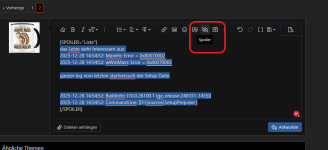
Danke. Ist übersichtlicher so.

Zuletzt bearbeitet:
Ähnliche Themen
- Antworten
- 16
- Aufrufe
- 1.725

- Antworten
- 9
- Aufrufe
- 1.531

- Antworten
- 11
- Aufrufe
- 3.525

- Antworten
- 33
- Aufrufe
- 4.249

- Antworten
- 12
- Aufrufe
- 3.606