RX 9070 XT Apex Legends Crash OBS - 0x887A0006 DXGI_ERROR_DEVICE_HUNG

apfelschorlie

Cadet 1st Year
Registriert
Jan. 2020
Beiträge
8
Aktuelle Hardware

  • Prozessor (CPU): AMD Ryzen 5 5600X
  • Arbeitsspeicher (RAM): 32 GB RAM Corsair
  • Mainboard: B450M Pro VDH Max
  • Netzteil: MSI MAG A850GL
  • Gehäuse: bequiet
  • Grafikkarte: RX 9070 XT
  • HDD / SSD: 250GB nvme m2 SSD und 1 TB SSD
  • 2 Monitor Setup - 144hz 24 Zoll MSI FHD Monitor und 180hz 27 Zoll MSI WQHD Monitor
  • AMD Treiber 26.1.1
Problem:
Ich streame mit OBS auf Twitch, hauptsächlich Apex Legends und Dead by Daylight.
Seitdem ich mit der Graka von der 6600XT geswitched bin, crashed mein Game wenn ich es nicht unbedingt auf 100-120 FPS gecappt habe. Und selbst dann crashed es, nur nicht mehr so oft.

Fehlermeldung:

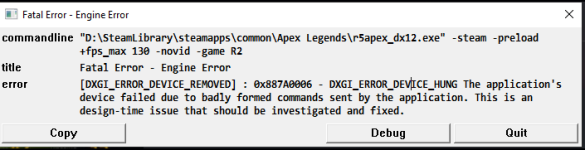
[DXGI_ERROR_DEVICE_REMOVED] : 0x887A0006 - DXGI_ERROR_DEVICE_HUNG

Außerdem laden jedes Mal die Shader beim Start von Apex Legends. Das könne ja aber auch einfach ein Treiber Problem sein, wollte ich dennoch erwähnen.
Aktuell konnte ich dieses Problem nur in Apex feststellen. Dead by Daylight ist nicht wirklich anfällig für Crashes und andere Games streame ich nicht.

Folgendes habe ich schon getestet:
1x Treiber gecleared mit dem AMD Tool und neu installiert
1x Treiber gecleared mit DDU und neu installiert
1x AMD Adrenalin sämtliche Einstellungen ausgestellt
1x Sämtliche Shader gecleared
1x Apex auf Fehler überprüft
1x Apex neuinstalliert
2. Monitor auf 59,9 hz und den anderen auf 144hz
beide gemeinsam auf 144hz
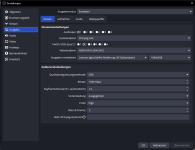
verschiedene OBS Einstellungen probiert, auch versucht über die CPU zu streamen (unmöglich)

Bin langsam echt verzweifelt, weil ich ursprünglich nur geswitched bin, weil ich unbedingt Apex streamen wollte und meine alte Graka nicht mit meinem WQHD Monitor kompatibel war.
 

Anhänge

  • image.png
    image.png
    47,8 KB · Aufrufe: 70
  • 63B2394F-F90E-41FE-9052-38ED76A63D66.png
    63B2394F-F90E-41FE-9052-38ED76A63D66.png
    15,9 KB · Aufrufe: 68
apfelschorlie schrieb:
Ich habe das Problem ausschließlich wenn ich streame.
Ja und damit eine Belastung, die du sonst nicht hast ;)

apfelschorlie schrieb:
Ich habe schon an ein Encoder Problem gedacht?
Eher weniger, dieses "DEVICE_HUNG" ist in der Regel ein Hardwarefehler. Du kannst noch eine ältere Treiberversion probieren.
 
Ok, gut, eine Idee hätte ich noch. Im Bios mal auf "4" den PCIe schalten und nicht auf Auto. Nur als Test.
 
Habe hier auch einen 5000er Ryzen mit einer 9070XT, spiele auch APEX, auch in WQHD, auch Treiber 26.1.1. Streame zwar nicht, aber Abstürze kenn ich nicht und Shader refresh gibt es nach einem neuen Treiber oder nach einem Season Split oder neuer Seson, sonst gar nicht.

Denke dein GPU Treiber stürzt ab oder die Karte hat nen Bug.

Ist der RAM stabil?
Und wie betreibst du ihn?
Wie stark ist dein Netzteil?
Lass mal HWINFO mitlaufen, wie hoch sind deine CPU, GPU, GPU Hotspit, GPU VRAM, Systemtemps?
Screenshots genügen.
 
Zuletzt bearbeitet:
Update GPU Drivers: The most effective fix for 0x887A0006 - DXGI_ERROR_DEVICE_HUNG in Apex Legends, especially during OBS streaming, is updating your AMD GPU drivers. Visit the AMD Driver Support page and download the latest Adrenalin Edition driver for your specific GPU model. Avoid using older or beta drivers if the issue started recently.

Disable Overclocking and XMP: Overclocked GPU clocks, memory, or CPU XMP profiles can trigger this error. Reset your GPU to factory settings using AMD Radeon Software (Performance > Tuning > Reset to Default). Also, disable XMP in BIOS and use standard JEDEC memory speeds.

Use DDU to Clean Install Drivers: If updating doesn't help, use Display Driver Uninstaller (DDU) in Safe Mode to completely remove all AMD driver traces, then reinstall the latest drivers fresh.

Reset BIOS Settings: Load optimized defaults in BIOS (often under "Exit" > "Load Optimized Defaults"). Ensure PCIe settings are set to "4" (not Auto) for stability with high-end GPUs like the RX 9070 XT.

Disable Conflicting Software: Turn off OBS Game Capture, Xbox Game Bar, and Discord overlays during gameplay. These can interfere with DirectX and cause GPU hangs.

Registry Fix (Advanced): If the error persists, modify the TdrLevel registry key:

  1. Press Win + R, type regedit, and run as administrator.
  2. Navigate to HKEY_LOCAL_MACHINE\SYSTEM\CurrentControlSet\Control\GraphicsDrivers.
  3. Create a new DWORD (32-bit) Value named TdrLevel.
  4. Set its value to 0.
  5. Restart your PC.
Hardware Check: If the error occurs consistently after a few minutes of gameplay, especially with a newly upgraded GPU like the RX 9070 XT, it may indicate a hardware defect. Contact the manufacturer for RMA if under warranty.
source: search.brave.com "during obs streaming and gaming apex legends [DXGI_ERROR_DEVICE_REMOVED] : 0x887A0006 - DXGI_ERROR_DEVICE_HUNG amd gpu fatal error engine error apex legends"

scheint ein bekanntes Problem zu sein

Registry Fix (Advanced): If the error persists, modify the TdrLevel registry key:

  1. Press Win + R, type regedit, and run as administrator.
  2. Navigate to HKEY_LOCAL_MACHINE\SYSTEM\CurrentControlSet\Control\GraphicsDrivers.
  3. Create a new DWORD (32-bit) Value named TdrLevel.
  4. Set its value to 0.
  5. Restart your PC.

weitere Quellen:
https://www.reddit.com/r/apexlegends/comments/wfo8sx/deleted_by_user/
https://forums.ea.com/discussions/a...-en/0x887a0006-dxgi-error-device-hung/5617634
@justvibingbruh @StykxTV I have a minor update on this. The EA team is aware of, and looking into this issue in general. It appears to be a GPU driver issue, so they have currently recommended a full reinstall or trying older drivers. It looks like you have already tried these methods though, so I'm not sure if that will better your situation. Hopefully there is more information or a fix, in the near future. I'll be sure to update, if I do see anything. Sorry I couldn't help out more!
https://www.reddit.com/r/apexlegends/comments/uinl6d/dxgi_error_device_hung_need_help/
https://www.reddit.com/r/apexlegends/comments/s5usbr/engine_error_0x887a0006_dxgi_error_device_hung/
 
Ist es richtig, dass du immer mit OBS zusammen testest? Tritt das crashen auch ohne Streaming auf?

Du sagst, dass du die Grafikkarte geswitched hast. Eventuell überreste von der alten bezüglich Undervolting / Overclocking in Programmen oder Bios? Das könnte das ganze auch erklären. (Ist aber nicht wahrscheinlich, da du DDU ja auch schon benutzt hast und wahrscheinlich auch sonst nichts hast wie z.B Afterburner.)
 
Zurück
Oben