Welche Sprache und wie umsetzen?

Zufällig

Newbie
Registriert
Nov. 2016
Beiträge
5
Moin zusammen,

bei der Programmierung bin ich (offensichtlich) komplätter Anfänger.

Nun habe ich aber ein nettes Tool gefunden, wo man sich ebay Kleinanzeigenartikel entlang einer Route anzeigen lassen kann.
Leider liegt es bei GitHub sozusagen nur als Code und ich weiß nicht wie ich es umsetzen kann.

Hier mal der Link zu GitHub https://github.com/HPI-Hackathon/ProductRouteFinder

und der Screenshot, wie es aussehen soll:
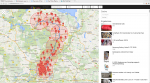
screenshot.png

HTML Programmieren kann ich, habe auch eigenen Webspace usw.

Nur bräuchte ich mal einen Anfang, wie ich mit den GitHub Dateien umgehen muss.

Vielleicht kann mir ja jemand behilflich sein.

Besten Dank
 
Letzte Aktualisierung April 2015 und keine Dokumentation - dürfte schwierig werden.

Aber scheints kannst Du an die Infos per Ebay API rankommen die Du via URL abfragen kannst: https://api.ebay-kleinanzeigen.de/api/ads.json?size=200&latitude=&longitude=&distance=100&q=
Doku:
http://api.ebay-kleinanzeigen.de/docs/pages/home
http://api.ebay-kleinanzeigen.de/docs/pages/schemas
Brauchst allerdings ein Login um die API verwenden zu können (der in dem Projekt verwendete Login geht nicht mehr).

Wenn Du das hast, brauchst Du eigentlich das Git Projekt da gar nicht, sondern kannst die Antwort direkt auswerten und auf einer GoogleMaps anzeigen.
 
Zuletzt bearbeitet:
Erstmal vielen Dank für die sehr schnelle Antwort.

Ist leider schon etwas älter das Projekt und von den Erstellern antwortet auch keiner.

Klingt alles sehr logisch was du schreibst. Für mich als Laien, aber erstmal etwas arg kompliziert ;)


Der API Login ist dann wohl nicht mein Zugang wie auf der normalen Kleinanzeigen Seite.
Gibt es da einen generellen, oder wie funktioniert das?

Wie würde die Auswertung dann aussehen und wie würde ich sie in Maps übertragen können?
 
Zu dem Git-Projekt:

Das ist eine JavaScript Webapp, sie basiert auf SailsJS als Frontend und NodeJS als Backend.

Installieren tust du das wie folgt:

Als erstes clonest du das Projekt. Hierfür musst du dir Git installieren unter Linux (Ubuntu, Debian ...) geht das mit apt-get install git. Ist das installiert, dann kannst du folgenden Befehl eingeben:

Code:
git clone https://github.com/HPI-Hackathon/ProductRouteFinder.git

Das zieht alle Dateien auf deine Festplatte in den Order ProductRouteFinder. Dieser wird an der aktuellen Position erstellt. führst du den Befehl in C:\ aus, dann wird er Ordner auch unter C:\ProductRouteFinder erstellt.

Als nächstes brauchst du Bower und NPM, unter Linux erfolgt die Installation wieder mittels apt-get install bower und apt-get install npm.

Jetzt gehts du in den Ordner des Git-Projekts und führst
Code:
bower install
aus. Dann werden alle Abhängigkeiten für die Oberfläche wie Jquery, Bootstrap etc. installiert.

Als nächstes machst du ein
Code:
npm install
. Damit werden alle Abhängigkeiten deines Backends installiert.

Und zum Schluss führst du noch den Befehl
Code:
npm start
aus und deine App startet und kann über einen Browser unter http://127.0.0.1:1337 erreicht werden.

Code:
nas@nas:~/ProductRouteFinder$ npm start

> sails_test@0.0.0 start /home/nas/ProductRouteFinder
> node app.js

info: 
info:                .-..-.
info: 
info:    Sails              <|    .-..-.
info:    v0.11.5             |\
info:                       /|.\
info:                      / || \
info:                    ,'  |'  \
info:                 .-'.-==|/_--'
info:                 `--'-------' 
info:    __---___--___---___--___---___--___
info:  ____---___--___---___--___---___--___-__
info: 
info: Server lifted in `/home/nas/ProductRouteFinder`
info: To see your app, visit http://localhost:1337
info: To shut down Sails, press <CTRL> + C at any time.

debug: --------------------------------------------------------
debug: :: Tue Nov 22 2016 18:49:36 GMT+0100 (CET)

debug: Environment : development
debug: Port        : 1337
debug: --------------------------------------------------------
 
Zuletzt bearbeitet:
Super danke, hast du es gerade so probiert und es hat geklappt.
Oben hieß es ja, dass die API Zugangsdaten wohl veraltet sind?

Werde das mal so versuchen nachzuvollziehen.

Also ist das dann für die lokale Anwendung und man kann es nicht online stellen?

Wundert mich, dass es so eine Kombination aus Maps und Kleinanzeigen noch nicht online gibt.
 
Nein, das ist dann schon online (bzw in einem Browser) - bloss das Git Projekt wird eben lokal geklont (im Prinzip werden einfach alle Dateien runtergeladen).

Aber ist schon richtig: Ohne ein API Zugang kannst Du dir die ganze Mühe sparen weil Du wirst es dann nicht funktionsfähig kriegen.
 
Installieren geht, ich könnte mir vorstellen, dass die App auch "noch" funktioniert. Jedoch sind die Zugangsdaten wirklich veraltet:

Code:
<html><head><title>Apache Tomcat/7.0.61 - Error report</title><style><!--H1 {font-family:Tahoma,Arial,sans-serif;color:white;background-color:#525D76;font-size:22px;} H2 {font-family:Tahoma,Arial,sans-serif;color:white;background-color:#525D76;font-size:16px;} H3 {font-family:Tahoma,Arial,sans-serif;color:white;background-color:#525D76;font-size:14px;} BODY {font-family:Tahoma,Arial,sans-serif;color:black;background-color:white;} B {font-family:Tahoma,Arial,sans-serif;color:white;background-color:#525D76;} P {font-family:Tahoma,Arial,sans-serif;background:white;color:black;font-size:12px;}A {color : black;}A.name {color : black;}HR {color : #525D76;}--></style> </head><body><h1>[B]HTTP Status 401 - User account is locked[/B]</h1><HR size="1" noshade="noshade"><p><b>type</b> Status report</p><p><b>message</b> <u>User account is locked</u></p><p><b>description</b> <u>This request requires HTTP authentication.</u></p><HR size="1" noshade="noshade"><h3>Apache Tomcat/7.0.61</h3></body></html>

Die Zugangsdaten kannst du in die Datei https://github.com/HPI-Hackathon/ProductRouteFinder/blob/master/api/controllers/EbayAPIController.js eintragen.

Prinzipiell ist das schon eine Online-App, die wirst du aber ohne Code-Anpassungen nur über NodeJS zum laufen bekommen. Das kannst du aber auf einem normalen Webspace nicht installieren. Dafür brauchst du einen Server mit vollem Zugang (Gibts zb. bei Kimsufi ab 4€/Monat). Oder du nutzt es halt lokal.
 
Okay, danke für die ausführlichen Erklärungen.

Kann man einen API Zugang irgendwo herbekommen?
Müsste es doch für Entwickler irgendwo kostenlos geben.
 
Musst bei Ebay anfragen ob und wie die das rausrücken, ob der kostenlos ist erfährst Du dann - von "müssen" kann keine Rede sein.
 
hab nun mal mein altes Ubuntu ausgekramt und es versucht... Hab aber ein Problem mit bower install.

Ging zuerst nicht, dann habe ich direkt versucht npm zu installieren, das ging wohl. Am Ende kamen ein paar Err Meldungen (siehe Code).
Danach hatte ich erst mal versucht bower mit folgendem Befehl richtig zu installieren...
Code:
sudo npm install -g bower

Der Befehl:
Code:
sudo apt-get install bower

schien wohl nicht richtig zu funktionieren.

Dann auch im Ordner neu versucht.

ich kopiere mal beide Codefolgen hier hin, evtl werdet ihr schlauer daraus...

Code 1:

Code:
pc@ubuntu:~$ sudo apt-get install bower
[sudo] password for pc: 
Reading package lists... Done
Building dependency tree       
Reading state information... Done
E: Unable to locate package bower
pc@ubuntu:~$  sudo apt-get install npm
Reading package lists... Done
Building dependency tree       
Reading state information... Done
The following additional packages will be installed:
  gyp javascript-common libjs-inherits libjs-jquery libjs-node-uuid
  libjs-underscore libssl-dev libssl-doc libuv1 libuv1-dev node-abbrev
  node-ansi node-ansi-color-table node-archy node-async node-block-stream
  node-combined-stream node-cookie-jar node-delayed-stream node-forever-agent
  node-form-data node-fstream node-fstream-ignore node-github-url-from-git
  node-glob node-graceful-fs node-gyp node-inherits node-ini
  node-json-stringify-safe node-lockfile node-lru-cache node-mime
  node-minimatch node-mkdirp node-mute-stream node-node-uuid node-nopt
  node-normalize-package-data node-npmlog node-once node-osenv node-qs
  node-read node-read-package-json node-request node-retry node-rimraf
  node-semver node-sha node-sigmund node-slide node-tar node-tunnel-agent
  node-underscore node-which nodejs nodejs-dev python-pkg-resources zlib1g-dev
Suggested packages:
  apache2 | lighttpd | httpd node-hawk node-aws-sign node-oauth-sign
  node-http-signature debhelper python-setuptools
The following NEW packages will be installed:
  gyp javascript-common libjs-inherits libjs-jquery libjs-node-uuid
  libjs-underscore libssl-dev libssl-doc libuv1 libuv1-dev node-abbrev
  node-ansi node-ansi-color-table node-archy node-async node-block-stream
  node-combined-stream node-cookie-jar node-delayed-stream node-forever-agent
  node-form-data node-fstream node-fstream-ignore node-github-url-from-git
  node-glob node-graceful-fs node-gyp node-inherits node-ini
.
.
.
.
.
.
Setting up node-fstream-ignore (0.0.6-2) ...
Setting up node-read-package-json (1.2.4-1) ...
Setting up node-tar (1.0.3-2) ...
Setting up node-gyp (3.4.0-1) ...
Setting up npm (3.5.2-0ubuntu4) ...
pc@ubuntu:~$ npm install -g bower
npm WARN checkPermissions Missing write access to /usr/local/lib
/usr/local/lib
└── bower@1.8.0 

npm ERR! Linux 4.8.0-22-generic
npm ERR! argv "/usr/bin/nodejs" "/usr/bin/npm" "install" "-g" "bower"
npm ERR! node v4.2.6
npm ERR! npm  v3.5.2
npm ERR! path /usr/local/lib
npm ERR! code EACCES
npm ERR! errno -13
npm ERR! syscall access

npm ERR! Error: EACCES: permission denied, access '/usr/local/lib'
npm ERR!     at Error (native)
npm ERR!  { [Error: EACCES: permission denied, access '/usr/local/lib']
npm ERR!   errno: -13,
npm ERR!   code: 'EACCES',
npm ERR!   syscall: 'access',
npm ERR!   path: '/usr/local/lib' }
npm ERR! 
npm ERR! Please try running this command again as root/Administrator.

npm ERR! Please include the following file with any support request:
npm ERR!     /home/pc/npm-debug.log
pc@ubuntu:~$ sudo npm install -g bower
/usr/local/bin/bower -> /usr/local/lib/node_modules/bower/bin/bower
/usr/local/lib
└── bower@1.8.0


Code 2:

Code:
pc@ubuntu:~/ProductRouteFinder$ bower install
No command 'bower' found, did you mean:
 Command 'boxer' from package 'boxer' (universe)
bower: command not found
pc@ubuntu:~/ProductRouteFinder$ bower install
No command 'bower' found, did you mean:
 Command 'boxer' from package 'boxer' (universe)
bower: command not found
pc@ubuntu:~/ProductRouteFinder$ npm install
npm WARN deprecated minimatch@0.2.14: Please update to minimatch 3.0.2 or higher to avoid a RegExp DoS issue
npm WARN deprecated minimatch@0.3.0: Please update to minimatch 3.0.2 or higher to avoid a RegExp DoS issue
npm WARN deprecated graceful-fs@1.2.3: graceful-fs v3.0.0 and before will fail on node releases >= v7.0. Please update to graceful-fs@^4.0.0 as soon as possible. Use 'npm ls graceful-fs' to find it in the tree.
npm WARN deprecated graceful-fs@1.1.14: graceful-fs v3.0.0 and before will fail on node releases >= v7.0. Please update to graceful-fs@^4.0.0 as soon as possible. Use 'npm ls graceful-fs' to find it in the tree.
npm WARN deprecated wrench@1.4.4: wrench.js is deprecated! You should check out fs-extra (https://github.com/jprichardson/node-fs-extra) for any operations you were using wrench for. Thanks for all the usage over the years.
npm WARN deprecated graceful-fs@2.0.3: graceful-fs v3.0.0 and before will fail on node releases >= v7.0. Please update to graceful-fs@^4.0.0 as soon as possible. Use 'npm ls graceful-fs' to find it in the tree.
npm WARN deprecated node-uuid@1.4.7: use uuid module instead
npm WARN deprecated minimatch@1.0.0: Please update to minimatch 3.0.2 or higher to avoid a RegExp DoS issue
npm WARN deprecated tough-cookie@0.12.1: ReDoS vulnerability parsing Set-Cookie https://nodesecurity.io/advisories/130
npm WARN deprecated npmconf@2.1.2: this package has been reintegrated into npm and is now out of date with respect to npm
npm WARN deprecated grunt-lib-contrib@0.7.1: DEPRECATED. See readme: https://github.com/gruntjs/grunt-lib-contrib
npm WARN deprecated tough-cookie@0.9.15: ReDoS vulnerability parsing Set-Cookie https://nodesecurity.io/advisories/130
npm WARN deprecated native-or-bluebird@1.1.2: 'native-or-bluebird' is deprecated. Please use 'any-promise' instead.

> sails@0.11.5 preinstall /home/pc/ProductRouteFinder/node_modules/.staging/sails-b073d812
> node ./lib/preinstall_npmcheck.js

sh: 1: node: not found
sails_test@0.0.0 /home/pc/ProductRouteFinder
├── ejs@0.8.8 
├─┬ grunt@0.4.2 
│ ├── async@0.1.22 
│ ├── coffee-script@1.3.3 
│ ├── colors@0.6.2 
│ ├── dateformat@1.0.2-1.2.3 
│ ├── eventemitter2@0.4.14 

.
.
.
.
.

  ├── lodash@3.10.1 
  ├─┬ waterline-criteria@1.0.1 
  │ └── lodash@3.10.1 
  ├─┬ waterline-cursor@0.0.7 
  │ ├── async@1.5.2 
  │ └── lodash@3.10.1 
  └── waterline-errors@0.10.1 

npm ERR! Linux 4.8.0-22-generic
npm ERR! argv "/usr/bin/nodejs" "/usr/bin/npm" "install"
npm ERR! node v4.2.6
npm ERR! npm  v3.5.2
npm ERR! file sh
npm ERR! code ELIFECYCLE
npm ERR! errno ENOENT
npm ERR! syscall spawn

npm ERR! sails@0.11.5 preinstall: `node ./lib/preinstall_npmcheck.js`
npm ERR! spawn ENOENT
npm ERR! 
npm ERR! Failed at the sails@0.11.5 preinstall script 'node ./lib/preinstall_npmcheck.js'.
npm ERR! Make sure you have the latest version of node.js and npm installed.
npm ERR! If you do, this is most likely a problem with the sails package,
npm ERR! not with npm itself.
npm ERR! Tell the author that this fails on your system:
npm ERR!     node ./lib/preinstall_npmcheck.js
npm ERR! You can get information on how to open an issue for this project with:
npm ERR!     npm bugs sails
npm ERR! Or if that isn't available, you can get their info via:
npm ERR!     npm owner ls sails
npm ERR! There is likely additional logging output above.

npm ERR! Please include the following file with any support request:
npm ERR!     /home/pc/ProductRouteFinder/npm-debug.log
pc@ubuntu:~/ProductRouteFinder$ install bower
install: missing destination file operand after 'bower'
Try 'install --help' for more information.
pc@ubuntu:~/ProductRouteFinder$ bower install
/usr/bin/env: ‘node’: No such file or directory
pc@ubuntu:~/ProductRouteFinder$


Wäre super, wenn ihr weiterhelfen könntet

Besten Dank
 
Sorry, das sind die Eigenheiten, die ich verdrängt habe :D

Zuerst mal zu bower:

Wenn du mit npm Pakete global installierst (-g), dann musst du den Befehl mit sudo ausführen.

Code:
sudo npm install -g bower

danach steht dir bower Systemweit zur Verfügung.

Nodejs hat bei Ubuntu Probleme mit dem Namen, früher hieß die Binary lediglich node, heute jedoch nodejs. Die App will node, du hast nur nodejs. Also brauchen wir noch einen Symlink:

Code:
sudo ln -s /usr/bin/nodejs /usr/bin/node

bzw. wenn das nicht geht, dann kurz ein
Code:
which nodejs
hinter her und den Pfad austauschen.

Dann nach das Git-Projekt nochmal, wie zuvor beschrieben, installieren.
 
Zurück
Oben