lspci -v
00:00.0 Host bridge: Intel Corporation 82G33/G31/P35/P31 Express DRAM Controller (rev 02)
Subsystem: Gigabyte Technology Co., Ltd Device 5000
Flags: bus master, fast devsel, latency 0
Capabilities: <access denied>
00:01.0 PCI bridge: Intel Corporation 82G33/G31/P35/P31 Express PCI Express Root Port (rev 02) (prog-if 00 [Normal decode])
Flags: bus master, fast devsel, latency 0
Bus: primary=00, secondary=01, subordinate=01, sec-latency=0
I/O behind bridge: 0000a000-0000afff
Memory behind bridge: f4000000-f7ffffff
Prefetchable memory behind bridge: 00000000e0000000-00000000efffffff
Capabilities: <access denied>
Kernel driver in use: pcieport
00:1a.0 USB controller: Intel Corporation 82801I (ICH9 Family) USB UHCI Controller #4 (rev 02) (prog-if 00 [UHCI])
Subsystem: Gigabyte Technology Co., Ltd Device 5004
Flags: bus master, medium devsel, latency 0, IRQ 16
I/O ports at e000
Capabilities: <access denied>
Kernel driver in use: uhci_hcd
00:1a.1 USB controller: Intel Corporation 82801I (ICH9 Family) USB UHCI Controller #5 (rev 02) (prog-if 00 [UHCI])
Subsystem: Gigabyte Technology Co., Ltd Device 5004
Flags: bus master, medium devsel, latency 0, IRQ 21
I/O ports at e100
Capabilities: <access denied>
Kernel driver in use: uhci_hcd
00:1a.2 USB controller: Intel Corporation 82801I (ICH9 Family) USB UHCI Controller #6 (rev 02) (prog-if 00 [UHCI])
Subsystem: Gigabyte Technology Co., Ltd Device 5004
Flags: bus master, medium devsel, latency 0, IRQ 18
I/O ports at e500
Capabilities: <access denied>
Kernel driver in use: uhci_hcd
00:1a.7 USB controller: Intel Corporation 82801I (ICH9 Family) USB2 EHCI Controller #2 (rev 02) (prog-if 20 [EHCI])
Subsystem: Gigabyte Technology Co., Ltd Device 5006
Flags: bus master, medium devsel, latency 0, IRQ 18
Memory at fa104000 (32-bit, non-prefetchable) [size=1K]
Capabilities: <access denied>
Kernel driver in use: ehci-pci
00:1b.0 Audio device: Intel Corporation 82801I (ICH9 Family) HD Audio Controller (rev 02)
Subsystem: Gigabyte Technology Co., Ltd Device a002
Flags: bus master, fast devsel, latency 0, IRQ 45
Memory at fa100000 (64-bit, non-prefetchable) [size=16K]
Capabilities: <access denied>
Kernel driver in use: snd_hda_intel
00:1c.0 PCI bridge: Intel Corporation 82801I (ICH9 Family) PCI Express Port 1 (rev 02) (prog-if 00 [Normal decode])
Flags: bus master, fast devsel, latency 0
Bus: primary=00, secondary=02, subordinate=02, sec-latency=0
I/O behind bridge: 00009000-00009fff
Memory behind bridge: fa200000-fa3fffff
Prefetchable memory behind bridge: 00000000fa400000-00000000fa5fffff
Capabilities: <access denied>
Kernel driver in use: pcieport
00:1c.3 PCI bridge: Intel Corporation 82801I (ICH9 Family) PCI Express Port 4 (rev 02) (prog-if 00 [Normal decode])
Flags: bus master, fast devsel, latency 0
Bus: primary=00, secondary=03, subordinate=03, sec-latency=0
I/O behind bridge: 0000b000-0000bfff
Memory behind bridge: fa000000-fa0fffff
Prefetchable memory behind bridge: 00000000fa600000-00000000fa7fffff
Capabilities: <access denied>
Kernel driver in use: pcieport
00:1c.4 PCI bridge: Intel Corporation 82801I (ICH9 Family) PCI Express Port 5 (rev 02) (prog-if 00 [Normal decode])
Flags: bus master, fast devsel, latency 0
Bus: primary=00, secondary=04, subordinate=04, sec-latency=0
I/O behind bridge: 0000c000-0000cfff
Memory behind bridge: f8000000-f9ffffff
Prefetchable memory behind bridge: 00000000fa800000-00000000faafffff
Capabilities: <access denied>
Kernel driver in use: pcieport
00:1d.0 USB controller: Intel Corporation 82801I (ICH9 Family) USB UHCI Controller #1 (rev 02) (prog-if 00 [UHCI])
Subsystem: Gigabyte Technology Co., Ltd Device 5004
Flags: bus master, medium devsel, latency 0, IRQ 23
I/O ports at e200
Capabilities: <access denied>
Kernel driver in use: uhci_hcd
00:1d.1 USB controller: Intel Corporation 82801I (ICH9 Family) USB UHCI Controller #2 (rev 02) (prog-if 00 [UHCI])
Subsystem: Gigabyte Technology Co., Ltd Device 5004
Flags: bus master, medium devsel, latency 0, IRQ 19
I/O ports at e300
Capabilities: <access denied>
Kernel driver in use: uhci_hcd
00:1d.2 USB controller: Intel Corporation 82801I (ICH9 Family) USB UHCI Controller #3 (rev 02) (prog-if 00 [UHCI])
Subsystem: Gigabyte Technology Co., Ltd Device 5004
Flags: bus master, medium devsel, latency 0, IRQ 18
I/O ports at e400
Capabilities: <access denied>
Kernel driver in use: uhci_hcd
00:1d.7 USB controller: Intel Corporation 82801I (ICH9 Family) USB2 EHCI Controller #1 (rev 02) (prog-if 20 [EHCI])
Subsystem: Gigabyte Technology Co., Ltd Device 5006
Flags: bus master, medium devsel, latency 0, IRQ 23
Memory at fa105000 (32-bit, non-prefetchable) [size=1K]
Capabilities: <access denied>
Kernel driver in use: ehci-pci
00:1e.0 PCI bridge: Intel Corporation 82801 PCI Bridge (rev 92) (prog-if 01 [Subtractive decode])
Flags: bus master, fast devsel, latency 0
Bus: primary=00, secondary=05, subordinate=05, sec-latency=32
I/O behind bridge: 0000d000-0000dfff
Capabilities: <access denied>
00:1f.0 ISA bridge: Intel Corporation 82801IB (ICH9) LPC Interface Controller (rev 02)
Subsystem: Gigabyte Technology Co., Ltd Device 5001
Flags: bus master, medium devsel, latency 0
Capabilities: <access denied>
Kernel driver in use: lpc_ich
00:1f.2 IDE interface: Intel Corporation 82801IB (ICH9) 2 port SATA Controller [IDE mode] (rev 02) (prog-if 8a [Master SecP PriP])
Subsystem: Gigabyte Technology Co., Ltd Device b002
Flags: bus master, 66MHz, medium devsel, latency 0, IRQ 19
I/O ports at 01f0
I/O ports at 03f4
I/O ports at 0170
I/O ports at 0374
I/O ports at f000
I/O ports at fc00
Capabilities: <access denied>
Kernel driver in use: ata_piix
00:1f.3 SMBus: Intel Corporation 82801I (ICH9 Family) SMBus Controller (rev 02)
Subsystem: Gigabyte Technology Co., Ltd Device 5001
Flags: medium devsel, IRQ 5
Memory at fa106000 (64-bit, non-prefetchable)
I/O ports at 0500
00:1f.5 IDE interface: Intel Corporation 82801I (ICH9 Family) 2 port SATA Controller [IDE mode] (rev 02) (prog-if 85 [Master SecO PriO])
Subsystem: Gigabyte Technology Co., Ltd Device b002
Flags: bus master, 66MHz, medium devsel, latency 0, IRQ 19
I/O ports at e700
I/O ports at e800
I/O ports at e900
I/O ports at ea00
I/O ports at eb00
I/O ports at ec00
Capabilities: <access denied>
Kernel driver in use: ata_piix
01:00.0 VGA compatible controller: NVIDIA Corporation G92 [GeForce 8800 GT] (rev a2) (prog-if 00 [VGA controller])
Subsystem: ASUSTeK Computer Inc. Device 8267
Flags: bus master, fast devsel, latency 0, IRQ 16
Memory at f6000000 (32-bit, non-prefetchable) [size=16M]
Memory at e0000000 (64-bit, prefetchable) [size=256M]
Memory at f4000000 (64-bit, non-prefetchable) [size=32M]
I/O ports at a000 [size=128]
[virtual] Expansion ROM at f7000000 [disabled] [size=128K]
Capabilities: <access denied>
Kernel driver in use: nouveau
03:00.0 SATA controller: JMicron Technology Corp. JMB363 SATA/IDE Controller (rev 02) (prog-if 01 [AHCI 1.0])
Subsystem: Gigabyte Technology Co., Ltd Motherboard
Flags: bus master, fast devsel, latency 0, IRQ 19
Memory at fa000000 (32-bit, non-prefetchable) [size=8K]
Capabilities: <access denied>
Kernel driver in use: ahci
03:00.1 IDE interface: JMicron Technology Corp. JMB363 SATA/IDE Controller (rev 02) (prog-if 85 [Master SecO PriO])
Subsystem: Gigabyte Technology Co., Ltd Motherboard
Flags: bus master, fast devsel, latency 0, IRQ 16
I/O ports at b000 [size=8]
I/O ports at b100 [size=5]
I/O ports at b200 [size=8]
I/O ports at b300 [size=5]
I/O ports at b400 [size=16]
Capabilities: <access denied>
Kernel driver in use: pata_jmicron
04:00.0 Ethernet controller: Realtek Semiconductor Co., Ltd. RTL8111/8168 PCI Express Gigabit Ethernet controller (rev 01)
Subsystem: Gigabyte Technology Co., Ltd Motherboard
Flags: bus master, fast devsel, latency 0, IRQ 44
I/O ports at c000 [size=256]
Memory at f9000000 (64-bit, non-prefetchable) [size=4K]
[virtual] Expansion ROM at fa800000 [disabled] [size=128K]
Capabilities: <access denied>
Kernel driver in use: r8169
05:02.0 Multimedia audio controller: C-Media Electronics Inc CMI8738/CMI8768 PCI Audio (rev 10)
Subsystem: C-Media Electronics Inc CMI8738/C3DX PCI Audio Device
Flags: bus master, stepping, medium devsel, latency 32, IRQ 18
I/O ports at d000 [size=256]
Capabilities: <access denied>
Kernel driver in use: snd_cmipci
[automerge]1369677120[/automerge]
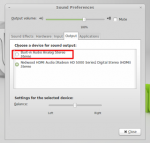
alsa und pulse habe ich grade installiert aber immernoch kein mux