Müritzer
Commodore
- Registriert
- März 2017
- Beiträge
- 5.093
[Bitte fülle den folgenden Fragebogen unbedingt vollständig aus, damit andere Nutzer dir effizient helfen können. Danke!  ]
]
1. Nenne uns bitte deine aktuelle Hardware:
(Bitte tatsächlich hier auflisten und nicht auf Signatur verweisen, da diese von einigen nicht gesehen wird und Hardware sich ändert)
Problemsystem:
System Info
CPU: AMD Ryzen 7 5700X3D
https://geizhals.de/amd-ryzen-7-5700x3d-100-100001503wof-a3094294.html?hloc=de
gewechselt auf: ( jetzt noch verbaut )
Motherboard: MSI MEG B550 UNIFY-X
https://geizhals.de/msi-meg-b550-unify-x-a2430582.html
Memory: LC-Power LC-RAM RGB DIMM Kit 32GB, DDR4-3200
https://geizhals.de/lc-power-lc-ram-rgb-dimm-kit-32gb-lc-ram-ddr4-3200-rgb-32gb-kit-a2315874.html
Kühlung: MSI MPG CoreLiquid K360 V2, 360mm
https://geizhals.de/msi-mpg-coreliquid-k360-v2-9s6-6a0321-035-a2654835.html
Netzteil: MSI MPG A750GF 750W ATX 2.4
https://geizhals.de/msi-mpg-a750gf-750w-atx-2-4-306-7zp0b11-ce0-a2389531.html
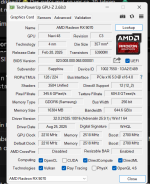
Graphics: Sapphire Nitro+ Radeon RX 9070, 16GB GDDR6
https://geizhals.de/sapphire-nitro-radeon-rx-9070-11349-01-20g-a3430059.html?hloc=de
M.2 NVMe PCIe:
C: MSI Spatium M480 1TB, M.2
https://geizhals.de/msi-spatium-m480-1tb-s78-440l490-p83-a2570108.html?hloc=de
F: fanxiang S500 Pro 2TB NVMe SSD M.2 PCIe Gen3x4
https://www.amazon.de/fanxiang-S500-Pro-Eingebaute-Wärmeleitpaste/dp/B0BCQS37R7/
G: Silicon Power US70 2TB, M.2
https://geizhals.de/silicon-power-us70-2tb-sp02kgbp44us7005-a2413621.html?hloc=de
H: Crucial P2 SSD 2TB, M.2
https://geizhals.de/crucial-p2-ssd-2tb-ct2000p2ssd8-a2383560.html?hloc=de
2,5“ SATA SSD:
D: SanDisk Ultra 3D 2TB, SATA
https://geizhals.de/sandisk-ultra-3d-2tb-sdssdh3-2t00-g25-a1649852.html?hloc=de
Tastatur: MSI Vigor GK71 Sonic, LEDs RGB, MSI Sonic RED, USB, DE
https://geizhals.de/msi-vigor-gk71-sonic-s11-04de232-cla-a2796976.html
Maus: MSI Clutch GM50 Gaming Mouse schwarz, USB
https://geizhals.de/msi-clutch-gm50-gaming-mouse-schwarz-s12-0400c60-pa3-a1988347.html
Headset: MSI IMMERSIVE GH50
https://geizhals.de/msi-immerse-gh50-s37-0400020-sv1-a2136613.html
Monitor: Lenovo Legion R27qe, 27"
https://geizhals.de/lenovo-legion-r27qe-67c5gac1eu-a3354791.html?hloc=de
Drucker: Brother MFC-L8690CDW, Laser, mehrfarbig
https://geizhals.de/brother-mfc-l8690cdw-mfcl8690cdwg1-a1596191.html?hloc=de
Gehäuse: MSI MPG Velox 100P Airflow, Glasfenster
https://geizhals.de/msi-mpg-velox-100p-airflow-a2610251.html
Lüfter:
3 x Front – rein Thermaltake Riing 12 LED RGB Radiator Fan Sync Edition, 3er-Pack, 120mm
https://geizhals.de/thermaltake-rii...n-sync-edition-cl-f071-pl12sw-a-a1817178.html
2 x Seite – rein SilverStone Air Slimmer 120 ARGB, 120mm
https://geizhals.de/silverstone-air-slimmer-120-argb-sst-as120b-argb-a2686893.html
3 x Radiator oben – raus MSI 3x 120mm, 500-2500rpm, 39.9dB(A), 131.5m³/h, 4.29mmH₂O
Original Lüfter die mit der AiO geliefert werden
1 x Hinten – raus MSI Lüfter der beim Gehäuse dabei war
OS: Microsoft Windows 11 Home
2. System ( keine Probleme da nicht am Internet und ältere Windows 11 Version ):
Mein System:
CPU: Ryzen 5 3600
CPU Kühler: Thermalright ARO M14
RAM: TeamGroup T-Force Xcalibur Phantom Gaming [General Edition] DIMM Kit 16GB, DDR4-3600, CL18-20-20-44 (TF8D416G3600HC18EDC01)
MB: MSI B 450 M Mortar
GPU: MSI RX 6700 XT Gaming X 12G
NT: Sharkoon Silentstorm Cool Zero 650W ATX 2.4
FP1 M.2 NVMe SSD 256 GB ( System und Programme )
FP2: M.2 SATA SSD 1 TB ( Games )
Gehäuse: MSI Mag Pylon ( 6 x 120 mm Lüfter gesamt, 3 x vorne rein / 2 x ober raus / 1 x hinten raus )
2. Beschreibe dein Problem. Je genauer und besser du dein Problem beschreibst, desto besser kann dir geholfen werden (zusätzliche Bilder könnten z. B. hilfreich sein):
Die Problemliste:
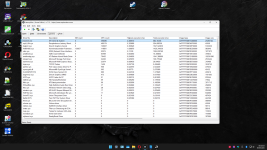
Diese Teile habe in LatencyMon hohe Zeiten, nicht immer alle zur gleichen Zeit. Das resultiert in knacken und knistern in den Soundausgaben und Einbrüche bei den Spielen. In verschiedenen Spielen habe ich 5 bis 30 Minuten spielen können dann sind die FPS aus 3 bis 10 FPS eingebrochen, also unspielbar. Das ist passiert bei Spielen die ich über STEAM oder Ubisoft Connect gestartet habe.
ntoskrnl.sys
wdf01000.sys
dxgkrnl.sys
storport.sys
ntoskrnl.exe
Zuerst dachte ich das es an meinem 2. Monitor liegt aber auch nach dessen Entfernung ist es immer gleich. Zum Glück bin ich in der glücklichen Lage 2 System zu besitzen, beide AM4.
3. Welche Schritte hast du bereits unternommen/versucht, um das Problem zu lösen und was hat es gebracht?
Hier ist eine lange Liste aller Maßnahmen, die ich bisher ohne Erfolg versucht habe:
- Die neueste BIOS-Version für das Motherboard und die Chipsatztreiber waren bereits installiert. Ich habe einige trotzdem neu installiert.
- Installation von alten BIOS Versionen über Flashback Funktion ( Gott segne diese Funktion, die mir schon sehr oft die Nerven gerettet hat, hier haben die alten BIOS Versionen nichts gebracht )
- Auf Windows-Updates überprüft.
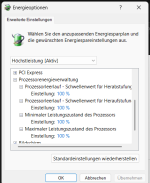
- Windows-Energieplan auf Ultimative Leistung eingestellt.
- Audio- und GPU-Treiber mit den neuesten Treibern neu installiert (mit DDU deinstalliert).
- SFC /Scannow
- Ältere GPU-/Audiotreiber ausprobiert.
- Alle anderen Audiotreiber deaktiviert/deinstalliert (Monitor und AMD )
- Onboard Soundkarte deaktiviert
- Spielmodus deaktiviert.
- USB-Treiber so eingestellt, dass der Computer sie nicht ausschalten kann, um Strom zu sparen.
- Netzwerktreiber deaktiviert (nur ein Treiber installiert, kein WLAN).
- Alle versteckten USB-Treiber deaktiviert.
- GPU im BIOS auf PCIe 3.0 und 4.0 eingestellt
- Globale C-Zustände im BIOS deaktiviert
- A-XMP im BIOS deaktiviert
- PowerSettingsExplorer verwendet, um die Schwellenwerte für die Herabstufung/Hochstufung im Leerlauf auf 100 % festzulegen. (ISR-Latenz nur gering verringert, geringe Auswirkungen auf DPC aber das kacken und knistern beim Sound ist weg )
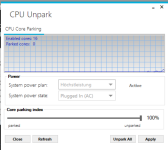
- Alle Kerne mit dem Programm UnpackCPU aus dem Parkzustand genommen (sie schienen bereits aus dem Parkzustand genommen zu sein)
- AMD Cool & Quite im BIOS deaktiviert
- Kein ECO Mode, CPU läuft auf volle Leistung, keinerlei Energiespareinstellungen
- Windows neu installiert ( ca 12 mal ). Das Problem bestand weiterhin, obwohl nur LatencyMon, Steam installiert waren. Nach der Installation der GPU- und Motherboard-Treiber von AMD / MSI hat sich nichts verbessert.
- 3 NT versucht, mit 750W, 1000W und 1200W
- verschiedene Festplatten getestet auf denen Windows installiert wurde, eine M.2 NVMe, eine M.2 SATA und ein 2,5“ SATA
- andere GPU getestet ( MSI RX 6700 XT die im System seit 2022 ohne Probleme stabil lief, genau wie das gesamte System )
- alle Windows Funktionen die man nicht braucht deinstalliert ( CoPilpt, Dev Home, Edge und andere )
- 2 Monitore probiert
- CPU gewechselt vom 5700X3D auf den 5800X
- BIOS auf Werkseinstellung zurückgesetzt OHNE was einzustellen auch R-Bar aus und KEIN XMP
- Leider keine Möglichkeit mit CapFrameX was aufzuzeichnen, hat mir 3 mal die Windows Installation zerschossen da immer wieder Trojaner Warnung und Meldung
- Temperaturen sind alle gut, in Game CPU nicht mehr wie 68 °C und GPU 60°C Hotspot nicht über 75°C.
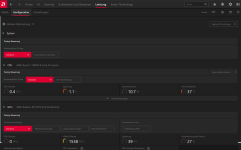
- GPU taktet bis 3100 MHz hoch mit max. 250W ( non XT eigentlich bis 2700 MHz aber keinerlei OC eingestellt )
Hier habe ich das gefunden was mir geholfen hat, so dachte ich aber da ist wohl mehr im argen.

https://www.reddit.com/r/techsupport/comments/13avw59/fix_for_high_dpc_latency_wdf01000_ntoskrnl
CONCLUSION
_________________________________________________________________________________________________________
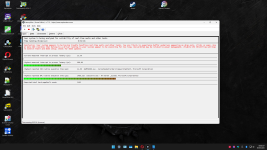
Your system appears to be having trouble handling real-time audio and other tasks. You are likely to experience buffer underruns appearing as drop outs, clicks or pops. One or more DPC
routines that belong to a driver running in your system appear to be executing for too long. One problem may be related to power management, disable CPU throttling settings in Control
Panel and BIOS setup. Check for BIOS updates.
LatencyMon has been analyzing your system for 0:37:35 (h:mm:ss) on all processors.
_________________________________________________________________________________________________________
SYSTEM INFORMATION
_________________________________________________________________________________________________________
Computer name: AMD-5800X
OS version: Windows 11, 10.0, version 2009, build: 26100 (x64)
Hardware: MS-7D13, Micro-Star International Co., Ltd.
BIOS: A.E0
CPU: AuthenticAMD AMD Ryzen 7 5800X 8-Core Processor
Logical processors: 16
Processor groups: 1
Processor group size: 16
RAM: 32688 MB total
_________________________________________________________________________________________________________
CPU SPEED
_________________________________________________________________________________________________________
Reported CPU speed (WMI): 3801 MHz
Reported CPU speed (registry): 380 MHz
Note: reported execution times may be calculated based on a fixed reported CPU speed. Disable variable speed settings like Intel Speed Step and AMD Cool N Quiet in the BIOS setup for
more accurate results.
_________________________________________________________________________________________________________
MEASURED INTERRUPT TO USER PROCESS LATENCIES
_________________________________________________________________________________________________________
The interrupt to process latency reflects the measured interval that a usermode process needed to respond to a hardware request from the moment the interrupt service routine started
execution. This includes the scheduling and execution of a DPC routine, the signaling of an event and the waking up of a usermode thread from an idle wait state in response to that
event.
Highest measured interrupt to process latency (µs): 239693,40
Average measured interrupt to process latency (µs): 6,405934
Highest measured interrupt to DPC latency (µs): 239689,40
Average measured interrupt to DPC latency (µs): 2,358855
________________________________________________________________________________________________________
REPORTED ISRs
_________________________________________________________________________________________________________
Interrupt service routines are routines installed by the OS and device drivers that execute in response to a hardware interrupt signal.
Highest ISR routine execution time (µs): 11,90
Driver with highest ISR routine execution time: Wdf01000.sys - Kernelmodustreiber-Frameworklaufzeit, Microsoft Corporation
Highest reported total ISR routine time (%): 0,000259
Driver with highest ISR total time: Wdf01000.sys - Kernelmodustreiber-Frameworklaufzeit, Microsoft Corporation
Total time spent in ISRs (%) 0,000259
ISR count (execution time <250 µs): 130957
ISR count (execution time 250-500 µs): 0
ISR count (execution time 500-1000 µs): 0
ISR count (execution time 1000-2000 µs): 0
ISR count (execution time 2000-4000 µs): 0
ISR count (execution time >=4000 µs): 0
________________________________________________________________________________________________________
REPORTED DPCs
_________________________________________________________________________________________________________
DPC routines are part of the interrupt servicing dispatch mechanism and disable the possibility for a process to utilize the CPU while it is interrupted until the DPC has finished
execution.
Highest DPC routine execution time (µs): 2480,510
Driver with highest DPC routine execution time: ntoskrnl.exe - NT Kernel & System, Microsoft Corporation
Highest reported total DPC routine time (%): 0,005374
Driver with highest DPC total execution time: dxgkrnl.sys - DirectX Graphics Kernel, Microsoft Corporation
Total time spent in DPCs (%) 0,020464
DPC count (execution time <250 µs): 1640467
DPC count (execution time 250-500 µs): 0
DPC count (execution time 500-10000 µs): 2267
DPC count (execution time 1000-2000 µs): 5
DPC count (execution time 2000-4000 µs): 3
DPC count (execution time >=4000 µs): 0
_________________________________________________________________________________________________________
REPORTED HARD PAGEFAULTS
_________________________________________________________________________________________________________
Hard pagefaults are events that get triggered by making use of virtual memory that is not resident in RAM but backed by a memory mapped file on disk. The process of resolving the hard
pagefault requires reading in the memory from disk while the process is interrupted and blocked from execution.
NOTE: some processes were hit by hard pagefaults. If these were programs producing audio, they are likely to interrupt the audio stream resulting in dropouts, clicks and pops. Check the
Processes tab to see which programs were hit.
Process with highest pagefault count: explorer.exe
Total number of hard pagefaults 10418
Hard pagefault count of hardest hit process: 2134
Number of processes hit: 41
________________________________________________________________________________________________________
PER CPU DATA
_________________________________________________________________________________________________________
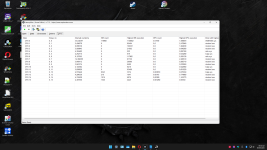
CPU 0 Interrupt cycle time (s): 33,434398
CPU 0 ISR highest execution time (µs): 11,90
CPU 0 ISR total execution time (s): 0,089153
CPU 0 ISR count: 118968
CPU 0 DPC highest execution time (µs): 1098,870
CPU 0 DPC total execution time (s): 5,789946
CPU 0 DPC count: 1120662
_________________________________________________________________________________________________________
CPU 1 Interrupt cycle time (s): 5,404979
CPU 1 ISR highest execution time (µs): 0,0
CPU 1 ISR total execution time (s): 0,0
CPU 1 ISR count: 0
CPU 1 DPC highest execution time (µs): 2472,840
CPU 1 DPC total execution time (s): 0,115715
CPU 1 DPC count: 85404
_________________________________________________________________________________________________________
CPU 2 Interrupt cycle time (s): 6,096136
CPU 2 ISR highest execution time (µs): 0,0
CPU 2 ISR total execution time (s): 0,0
CPU 2 ISR count: 0
CPU 2 DPC highest execution time (µs): 1684,030
CPU 2 DPC total execution time (s): 0,670104
CPU 2 DPC count: 100521
_________________________________________________________________________________________________________
CPU 3 Interrupt cycle time (s): 5,009846
CPU 3 ISR highest execution time (µs): 0,0
CPU 3 ISR total execution time (s): 0,0
CPU 3 ISR count: 0
CPU 3 DPC highest execution time (µs): 40,260
CPU 3 DPC total execution time (s): 0,026320
CPU 3 DPC count: 21602
_________________________________________________________________________________________________________
CPU 4 Interrupt cycle time (s): 4,355482
CPU 4 ISR highest execution time (µs): 0,0
CPU 4 ISR total execution time (s): 0,0
CPU 4 ISR count: 0
CPU 4 DPC highest execution time (µs): 82,160
CPU 4 DPC total execution time (s): 0,001660
CPU 4 DPC count: 932
_________________________________________________________________________________________________________
CPU 5 Interrupt cycle time (s): 4,252111
CPU 5 ISR highest execution time (µs): 0,0
CPU 5 ISR total execution time (s): 0,0
CPU 5 ISR count: 0
CPU 5 DPC highest execution time (µs): 34,280
CPU 5 DPC total execution time (s): 0,001254
CPU 5 DPC count: 619
_________________________________________________________________________________________________________
CPU 6 Interrupt cycle time (s): 6,127056
CPU 6 ISR highest execution time (µs): 0,0
CPU 6 ISR total execution time (s): 0,0
CPU 6 ISR count: 0
CPU 6 DPC highest execution time (µs): 308,130
CPU 6 DPC total execution time (s): 0,173685
CPU 6 DPC count: 117965
_________________________________________________________________________________________________________
CPU 7 Interrupt cycle time (s): 14,366399
CPU 7 ISR highest execution time (µs): 0,0
CPU 7 ISR total execution time (s): 0,0
CPU 7 ISR count: 0
CPU 7 DPC highest execution time (µs): 2480,510
CPU 7 DPC total execution time (s): 0,233153
CPU 7 DPC count: 81750
_________________________________________________________________________________________________________
CPU 8 Interrupt cycle time (s): 3,648113
CPU 8 ISR highest execution time (µs): 0,0
CPU 8 ISR total execution time (s): 0,0
CPU 8 ISR count: 0
CPU 8 DPC highest execution time (µs): 266,710
CPU 8 DPC total execution time (s): 0,011858
CPU 8 DPC count: 20980
_________________________________________________________________________________________________________
CPU 9 Interrupt cycle time (s): 3,847575
CPU 9 ISR highest execution time (µs): 0,0
CPU 9 ISR total execution time (s): 0,0
CPU 9 ISR count: 0
CPU 9 DPC highest execution time (µs): 39,950
CPU 9 DPC total execution time (s): 0,009791
CPU 9 DPC count: 6589
_________________________________________________________________________________________________________
CPU 10 Interrupt cycle time (s): 4,140305
CPU 10 ISR highest execution time (µs): 0,0
CPU 10 ISR total execution time (s): 0,0
CPU 10 ISR count: 0
CPU 10 DPC highest execution time (µs): 42,060
CPU 10 DPC total execution time (s): 0,027949
CPU 10 DPC count: 8416
_________________________________________________________________________________________________________
CPU 11 Interrupt cycle time (s): 5,606620
CPU 11 ISR highest execution time (µs): 0,0
CPU 11 ISR total execution time (s): 0,0
CPU 11 ISR count: 0
CPU 11 DPC highest execution time (µs): 691,220
CPU 11 DPC total execution time (s): 0,297023
CPU 11 DPC count: 63460
_________________________________________________________________________________________________________
CPU 12 Interrupt cycle time (s): 4,915447
CPU 12 ISR highest execution time (µs): 3,810
CPU 12 ISR total execution time (s): 0,002692
CPU 12 ISR count: 8343
CPU 12 DPC highest execution time (µs): 75,550
CPU 12 DPC total execution time (s): 0,006808
CPU 12 DPC count: 3374
_________________________________________________________________________________________________________
CPU 13 Interrupt cycle time (s): 4,284536
CPU 13 ISR highest execution time (µs): 1,10
CPU 13 ISR total execution time (s): 0,000090
CPU 13 ISR count: 210
CPU 13 DPC highest execution time (µs): 774,860
CPU 13 DPC total execution time (s): 0,002487
CPU 13 DPC count: 1047
_________________________________________________________________________________________________________
CPU 14 Interrupt cycle time (s): 4,316528
CPU 14 ISR highest execution time (µs): 3,80
CPU 14 ISR total execution time (s): 0,000878
CPU 14 ISR count: 1916
CPU 14 DPC highest execution time (µs): 1343,770
CPU 14 DPC total execution time (s): 0,009681
CPU 14 DPC count: 6976
_________________________________________________________________________________________________________
CPU 15 Interrupt cycle time (s): 4,301930
CPU 15 ISR highest execution time (µs): 1,260
CPU 15 ISR total execution time (s): 0,000612
CPU 15 ISR count: 1520
CPU 15 DPC highest execution time (µs): 55,50
CPU 15 DPC total execution time (s): 0,006398
CPU 15 DPC count: 2445
_________________________________________________________________________________________________________
P.S.: Beachte auch die verschiedenen angepinnten Themen und die Forensuche. Möglicherweise findest du da bereits die Lösung zu deinem Problem.
]1. Nenne uns bitte deine aktuelle Hardware:
(Bitte tatsächlich hier auflisten und nicht auf Signatur verweisen, da diese von einigen nicht gesehen wird und Hardware sich ändert)
Problemsystem:
System Info
CPU: AMD Ryzen 7 5700X3D
https://geizhals.de/amd-ryzen-7-5700x3d-100-100001503wof-a3094294.html?hloc=de
gewechselt auf: ( jetzt noch verbaut )
AMD Ryzen 7 5800X, 8C/16T, 3.80-4.70GHz, boxed ohne Kühler
https://geizhals.de/amd-ryzen-7-5800x-100-100000063wof-a2392525.html?hloc=deMotherboard: MSI MEG B550 UNIFY-X
https://geizhals.de/msi-meg-b550-unify-x-a2430582.html
Memory: LC-Power LC-RAM RGB DIMM Kit 32GB, DDR4-3200
https://geizhals.de/lc-power-lc-ram-rgb-dimm-kit-32gb-lc-ram-ddr4-3200-rgb-32gb-kit-a2315874.html
Kühlung: MSI MPG CoreLiquid K360 V2, 360mm
https://geizhals.de/msi-mpg-coreliquid-k360-v2-9s6-6a0321-035-a2654835.html
Netzteil: MSI MPG A750GF 750W ATX 2.4
https://geizhals.de/msi-mpg-a750gf-750w-atx-2-4-306-7zp0b11-ce0-a2389531.html
Graphics: Sapphire Nitro+ Radeon RX 9070, 16GB GDDR6
https://geizhals.de/sapphire-nitro-radeon-rx-9070-11349-01-20g-a3430059.html?hloc=de
M.2 NVMe PCIe:
C: MSI Spatium M480 1TB, M.2
https://geizhals.de/msi-spatium-m480-1tb-s78-440l490-p83-a2570108.html?hloc=de
F: fanxiang S500 Pro 2TB NVMe SSD M.2 PCIe Gen3x4
https://www.amazon.de/fanxiang-S500-Pro-Eingebaute-Wärmeleitpaste/dp/B0BCQS37R7/
G: Silicon Power US70 2TB, M.2
https://geizhals.de/silicon-power-us70-2tb-sp02kgbp44us7005-a2413621.html?hloc=de
H: Crucial P2 SSD 2TB, M.2
https://geizhals.de/crucial-p2-ssd-2tb-ct2000p2ssd8-a2383560.html?hloc=de
2,5“ SATA SSD:
D: SanDisk Ultra 3D 2TB, SATA
https://geizhals.de/sandisk-ultra-3d-2tb-sdssdh3-2t00-g25-a1649852.html?hloc=de
Tastatur: MSI Vigor GK71 Sonic, LEDs RGB, MSI Sonic RED, USB, DE
https://geizhals.de/msi-vigor-gk71-sonic-s11-04de232-cla-a2796976.html
Maus: MSI Clutch GM50 Gaming Mouse schwarz, USB
https://geizhals.de/msi-clutch-gm50-gaming-mouse-schwarz-s12-0400c60-pa3-a1988347.html
Headset: MSI IMMERSIVE GH50
https://geizhals.de/msi-immerse-gh50-s37-0400020-sv1-a2136613.html
Monitor: Lenovo Legion R27qe, 27"
https://geizhals.de/lenovo-legion-r27qe-67c5gac1eu-a3354791.html?hloc=de
Drucker: Brother MFC-L8690CDW, Laser, mehrfarbig
https://geizhals.de/brother-mfc-l8690cdw-mfcl8690cdwg1-a1596191.html?hloc=de
Gehäuse: MSI MPG Velox 100P Airflow, Glasfenster
https://geizhals.de/msi-mpg-velox-100p-airflow-a2610251.html
Lüfter:
3 x Front – rein Thermaltake Riing 12 LED RGB Radiator Fan Sync Edition, 3er-Pack, 120mm
https://geizhals.de/thermaltake-rii...n-sync-edition-cl-f071-pl12sw-a-a1817178.html
2 x Seite – rein SilverStone Air Slimmer 120 ARGB, 120mm
https://geizhals.de/silverstone-air-slimmer-120-argb-sst-as120b-argb-a2686893.html
3 x Radiator oben – raus MSI 3x 120mm, 500-2500rpm, 39.9dB(A), 131.5m³/h, 4.29mmH₂O
Original Lüfter die mit der AiO geliefert werden
1 x Hinten – raus MSI Lüfter der beim Gehäuse dabei war
OS: Microsoft Windows 11 Home
2. System ( keine Probleme da nicht am Internet und ältere Windows 11 Version ):
Mein System:
CPU: Ryzen 5 3600
CPU Kühler: Thermalright ARO M14
RAM: TeamGroup T-Force Xcalibur Phantom Gaming [General Edition] DIMM Kit 16GB, DDR4-3600, CL18-20-20-44 (TF8D416G3600HC18EDC01)
MB: MSI B 450 M Mortar
GPU: MSI RX 6700 XT Gaming X 12G
NT: Sharkoon Silentstorm Cool Zero 650W ATX 2.4
FP1 M.2 NVMe SSD 256 GB ( System und Programme )
FP2: M.2 SATA SSD 1 TB ( Games )
Gehäuse: MSI Mag Pylon ( 6 x 120 mm Lüfter gesamt, 3 x vorne rein / 2 x ober raus / 1 x hinten raus )
2. Beschreibe dein Problem. Je genauer und besser du dein Problem beschreibst, desto besser kann dir geholfen werden (zusätzliche Bilder könnten z. B. hilfreich sein):
Die Problemliste:
Diese Teile habe in LatencyMon hohe Zeiten, nicht immer alle zur gleichen Zeit. Das resultiert in knacken und knistern in den Soundausgaben und Einbrüche bei den Spielen. In verschiedenen Spielen habe ich 5 bis 30 Minuten spielen können dann sind die FPS aus 3 bis 10 FPS eingebrochen, also unspielbar. Das ist passiert bei Spielen die ich über STEAM oder Ubisoft Connect gestartet habe.
ntoskrnl.sys
wdf01000.sys
dxgkrnl.sys
storport.sys
ntoskrnl.exe
Zuerst dachte ich das es an meinem 2. Monitor liegt aber auch nach dessen Entfernung ist es immer gleich. Zum Glück bin ich in der glücklichen Lage 2 System zu besitzen, beide AM4.
3. Welche Schritte hast du bereits unternommen/versucht, um das Problem zu lösen und was hat es gebracht?
Hier ist eine lange Liste aller Maßnahmen, die ich bisher ohne Erfolg versucht habe:
- Die neueste BIOS-Version für das Motherboard und die Chipsatztreiber waren bereits installiert. Ich habe einige trotzdem neu installiert.
- Installation von alten BIOS Versionen über Flashback Funktion ( Gott segne diese Funktion, die mir schon sehr oft die Nerven gerettet hat, hier haben die alten BIOS Versionen nichts gebracht )
- Auf Windows-Updates überprüft.
- Windows-Energieplan auf Ultimative Leistung eingestellt.
- Audio- und GPU-Treiber mit den neuesten Treibern neu installiert (mit DDU deinstalliert).
- SFC /Scannow
- Ältere GPU-/Audiotreiber ausprobiert.
- Alle anderen Audiotreiber deaktiviert/deinstalliert (Monitor und AMD )
- Onboard Soundkarte deaktiviert
- Spielmodus deaktiviert.
- USB-Treiber so eingestellt, dass der Computer sie nicht ausschalten kann, um Strom zu sparen.
- Netzwerktreiber deaktiviert (nur ein Treiber installiert, kein WLAN).
- Alle versteckten USB-Treiber deaktiviert.
- GPU im BIOS auf PCIe 3.0 und 4.0 eingestellt
- Globale C-Zustände im BIOS deaktiviert
- A-XMP im BIOS deaktiviert
- PowerSettingsExplorer verwendet, um die Schwellenwerte für die Herabstufung/Hochstufung im Leerlauf auf 100 % festzulegen. (ISR-Latenz nur gering verringert, geringe Auswirkungen auf DPC aber das kacken und knistern beim Sound ist weg )
- Alle Kerne mit dem Programm UnpackCPU aus dem Parkzustand genommen (sie schienen bereits aus dem Parkzustand genommen zu sein)
- AMD Cool & Quite im BIOS deaktiviert
- Kein ECO Mode, CPU läuft auf volle Leistung, keinerlei Energiespareinstellungen
- Windows neu installiert ( ca 12 mal ). Das Problem bestand weiterhin, obwohl nur LatencyMon, Steam installiert waren. Nach der Installation der GPU- und Motherboard-Treiber von AMD / MSI hat sich nichts verbessert.
- 3 NT versucht, mit 750W, 1000W und 1200W
- verschiedene Festplatten getestet auf denen Windows installiert wurde, eine M.2 NVMe, eine M.2 SATA und ein 2,5“ SATA
- andere GPU getestet ( MSI RX 6700 XT die im System seit 2022 ohne Probleme stabil lief, genau wie das gesamte System )
- alle Windows Funktionen die man nicht braucht deinstalliert ( CoPilpt, Dev Home, Edge und andere )
- 2 Monitore probiert
- CPU gewechselt vom 5700X3D auf den 5800X
- BIOS auf Werkseinstellung zurückgesetzt OHNE was einzustellen auch R-Bar aus und KEIN XMP
- Leider keine Möglichkeit mit CapFrameX was aufzuzeichnen, hat mir 3 mal die Windows Installation zerschossen da immer wieder Trojaner Warnung und Meldung
- Temperaturen sind alle gut, in Game CPU nicht mehr wie 68 °C und GPU 60°C Hotspot nicht über 75°C.
- GPU taktet bis 3100 MHz hoch mit max. 250W ( non XT eigentlich bis 2700 MHz aber keinerlei OC eingestellt )
Hier habe ich das gefunden was mir geholfen hat, so dachte ich aber da ist wohl mehr im argen.
YouTube
An dieser Stelle steht ein externer Inhalt von YouTube, der den Forumbeitrag ergänzt. Er kann mit einem Klick geladen und auch wieder ausgeblendet werden.
Ich bin damit einverstanden, dass YouTube-Embeds geladen werden. Dabei können personenbezogene Daten an YouTube übermittelt werden. Mehr dazu in der Datenschutzerklärung.
YouTube
An dieser Stelle steht ein externer Inhalt von YouTube, der den Forumbeitrag ergänzt. Er kann mit einem Klick geladen und auch wieder ausgeblendet werden.
Ich bin damit einverstanden, dass YouTube-Embeds geladen werden. Dabei können personenbezogene Daten an YouTube übermittelt werden. Mehr dazu in der Datenschutzerklärung.
https://www.reddit.com/r/techsupport/comments/13avw59/fix_for_high_dpc_latency_wdf01000_ntoskrnl
CONCLUSION
_________________________________________________________________________________________________________
Your system appears to be having trouble handling real-time audio and other tasks. You are likely to experience buffer underruns appearing as drop outs, clicks or pops. One or more DPC
routines that belong to a driver running in your system appear to be executing for too long. One problem may be related to power management, disable CPU throttling settings in Control
Panel and BIOS setup. Check for BIOS updates.
LatencyMon has been analyzing your system for 0:37:35 (h:mm:ss) on all processors.
_________________________________________________________________________________________________________
SYSTEM INFORMATION
_________________________________________________________________________________________________________
Computer name: AMD-5800X
OS version: Windows 11, 10.0, version 2009, build: 26100 (x64)
Hardware: MS-7D13, Micro-Star International Co., Ltd.
BIOS: A.E0
CPU: AuthenticAMD AMD Ryzen 7 5800X 8-Core Processor
Logical processors: 16
Processor groups: 1
Processor group size: 16
RAM: 32688 MB total
_________________________________________________________________________________________________________
CPU SPEED
_________________________________________________________________________________________________________
Reported CPU speed (WMI): 3801 MHz
Reported CPU speed (registry): 380 MHz
Note: reported execution times may be calculated based on a fixed reported CPU speed. Disable variable speed settings like Intel Speed Step and AMD Cool N Quiet in the BIOS setup for
more accurate results.
_________________________________________________________________________________________________________
MEASURED INTERRUPT TO USER PROCESS LATENCIES
_________________________________________________________________________________________________________
The interrupt to process latency reflects the measured interval that a usermode process needed to respond to a hardware request from the moment the interrupt service routine started
execution. This includes the scheduling and execution of a DPC routine, the signaling of an event and the waking up of a usermode thread from an idle wait state in response to that
event.
Highest measured interrupt to process latency (µs): 239693,40
Average measured interrupt to process latency (µs): 6,405934
Highest measured interrupt to DPC latency (µs): 239689,40
Average measured interrupt to DPC latency (µs): 2,358855
________________________________________________________________________________________________________
REPORTED ISRs
_________________________________________________________________________________________________________
Interrupt service routines are routines installed by the OS and device drivers that execute in response to a hardware interrupt signal.
Highest ISR routine execution time (µs): 11,90
Driver with highest ISR routine execution time: Wdf01000.sys - Kernelmodustreiber-Frameworklaufzeit, Microsoft Corporation
Highest reported total ISR routine time (%): 0,000259
Driver with highest ISR total time: Wdf01000.sys - Kernelmodustreiber-Frameworklaufzeit, Microsoft Corporation
Total time spent in ISRs (%) 0,000259
ISR count (execution time <250 µs): 130957
ISR count (execution time 250-500 µs): 0
ISR count (execution time 500-1000 µs): 0
ISR count (execution time 1000-2000 µs): 0
ISR count (execution time 2000-4000 µs): 0
ISR count (execution time >=4000 µs): 0
________________________________________________________________________________________________________
REPORTED DPCs
_________________________________________________________________________________________________________
DPC routines are part of the interrupt servicing dispatch mechanism and disable the possibility for a process to utilize the CPU while it is interrupted until the DPC has finished
execution.
Highest DPC routine execution time (µs): 2480,510
Driver with highest DPC routine execution time: ntoskrnl.exe - NT Kernel & System, Microsoft Corporation
Highest reported total DPC routine time (%): 0,005374
Driver with highest DPC total execution time: dxgkrnl.sys - DirectX Graphics Kernel, Microsoft Corporation
Total time spent in DPCs (%) 0,020464
DPC count (execution time <250 µs): 1640467
DPC count (execution time 250-500 µs): 0
DPC count (execution time 500-10000 µs): 2267
DPC count (execution time 1000-2000 µs): 5
DPC count (execution time 2000-4000 µs): 3
DPC count (execution time >=4000 µs): 0
_________________________________________________________________________________________________________
REPORTED HARD PAGEFAULTS
_________________________________________________________________________________________________________
Hard pagefaults are events that get triggered by making use of virtual memory that is not resident in RAM but backed by a memory mapped file on disk. The process of resolving the hard
pagefault requires reading in the memory from disk while the process is interrupted and blocked from execution.
NOTE: some processes were hit by hard pagefaults. If these were programs producing audio, they are likely to interrupt the audio stream resulting in dropouts, clicks and pops. Check the
Processes tab to see which programs were hit.
Process with highest pagefault count: explorer.exe
Total number of hard pagefaults 10418
Hard pagefault count of hardest hit process: 2134
Number of processes hit: 41
________________________________________________________________________________________________________
PER CPU DATA
_________________________________________________________________________________________________________
CPU 0 Interrupt cycle time (s): 33,434398
CPU 0 ISR highest execution time (µs): 11,90
CPU 0 ISR total execution time (s): 0,089153
CPU 0 ISR count: 118968
CPU 0 DPC highest execution time (µs): 1098,870
CPU 0 DPC total execution time (s): 5,789946
CPU 0 DPC count: 1120662
_________________________________________________________________________________________________________
CPU 1 Interrupt cycle time (s): 5,404979
CPU 1 ISR highest execution time (µs): 0,0
CPU 1 ISR total execution time (s): 0,0
CPU 1 ISR count: 0
CPU 1 DPC highest execution time (µs): 2472,840
CPU 1 DPC total execution time (s): 0,115715
CPU 1 DPC count: 85404
_________________________________________________________________________________________________________
CPU 2 Interrupt cycle time (s): 6,096136
CPU 2 ISR highest execution time (µs): 0,0
CPU 2 ISR total execution time (s): 0,0
CPU 2 ISR count: 0
CPU 2 DPC highest execution time (µs): 1684,030
CPU 2 DPC total execution time (s): 0,670104
CPU 2 DPC count: 100521
_________________________________________________________________________________________________________
CPU 3 Interrupt cycle time (s): 5,009846
CPU 3 ISR highest execution time (µs): 0,0
CPU 3 ISR total execution time (s): 0,0
CPU 3 ISR count: 0
CPU 3 DPC highest execution time (µs): 40,260
CPU 3 DPC total execution time (s): 0,026320
CPU 3 DPC count: 21602
_________________________________________________________________________________________________________
CPU 4 Interrupt cycle time (s): 4,355482
CPU 4 ISR highest execution time (µs): 0,0
CPU 4 ISR total execution time (s): 0,0
CPU 4 ISR count: 0
CPU 4 DPC highest execution time (µs): 82,160
CPU 4 DPC total execution time (s): 0,001660
CPU 4 DPC count: 932
_________________________________________________________________________________________________________
CPU 5 Interrupt cycle time (s): 4,252111
CPU 5 ISR highest execution time (µs): 0,0
CPU 5 ISR total execution time (s): 0,0
CPU 5 ISR count: 0
CPU 5 DPC highest execution time (µs): 34,280
CPU 5 DPC total execution time (s): 0,001254
CPU 5 DPC count: 619
_________________________________________________________________________________________________________
CPU 6 Interrupt cycle time (s): 6,127056
CPU 6 ISR highest execution time (µs): 0,0
CPU 6 ISR total execution time (s): 0,0
CPU 6 ISR count: 0
CPU 6 DPC highest execution time (µs): 308,130
CPU 6 DPC total execution time (s): 0,173685
CPU 6 DPC count: 117965
_________________________________________________________________________________________________________
CPU 7 Interrupt cycle time (s): 14,366399
CPU 7 ISR highest execution time (µs): 0,0
CPU 7 ISR total execution time (s): 0,0
CPU 7 ISR count: 0
CPU 7 DPC highest execution time (µs): 2480,510
CPU 7 DPC total execution time (s): 0,233153
CPU 7 DPC count: 81750
_________________________________________________________________________________________________________
CPU 8 Interrupt cycle time (s): 3,648113
CPU 8 ISR highest execution time (µs): 0,0
CPU 8 ISR total execution time (s): 0,0
CPU 8 ISR count: 0
CPU 8 DPC highest execution time (µs): 266,710
CPU 8 DPC total execution time (s): 0,011858
CPU 8 DPC count: 20980
_________________________________________________________________________________________________________
CPU 9 Interrupt cycle time (s): 3,847575
CPU 9 ISR highest execution time (µs): 0,0
CPU 9 ISR total execution time (s): 0,0
CPU 9 ISR count: 0
CPU 9 DPC highest execution time (µs): 39,950
CPU 9 DPC total execution time (s): 0,009791
CPU 9 DPC count: 6589
_________________________________________________________________________________________________________
CPU 10 Interrupt cycle time (s): 4,140305
CPU 10 ISR highest execution time (µs): 0,0
CPU 10 ISR total execution time (s): 0,0
CPU 10 ISR count: 0
CPU 10 DPC highest execution time (µs): 42,060
CPU 10 DPC total execution time (s): 0,027949
CPU 10 DPC count: 8416
_________________________________________________________________________________________________________
CPU 11 Interrupt cycle time (s): 5,606620
CPU 11 ISR highest execution time (µs): 0,0
CPU 11 ISR total execution time (s): 0,0
CPU 11 ISR count: 0
CPU 11 DPC highest execution time (µs): 691,220
CPU 11 DPC total execution time (s): 0,297023
CPU 11 DPC count: 63460
_________________________________________________________________________________________________________
CPU 12 Interrupt cycle time (s): 4,915447
CPU 12 ISR highest execution time (µs): 3,810
CPU 12 ISR total execution time (s): 0,002692
CPU 12 ISR count: 8343
CPU 12 DPC highest execution time (µs): 75,550
CPU 12 DPC total execution time (s): 0,006808
CPU 12 DPC count: 3374
_________________________________________________________________________________________________________
CPU 13 Interrupt cycle time (s): 4,284536
CPU 13 ISR highest execution time (µs): 1,10
CPU 13 ISR total execution time (s): 0,000090
CPU 13 ISR count: 210
CPU 13 DPC highest execution time (µs): 774,860
CPU 13 DPC total execution time (s): 0,002487
CPU 13 DPC count: 1047
_________________________________________________________________________________________________________
CPU 14 Interrupt cycle time (s): 4,316528
CPU 14 ISR highest execution time (µs): 3,80
CPU 14 ISR total execution time (s): 0,000878
CPU 14 ISR count: 1916
CPU 14 DPC highest execution time (µs): 1343,770
CPU 14 DPC total execution time (s): 0,009681
CPU 14 DPC count: 6976
_________________________________________________________________________________________________________
CPU 15 Interrupt cycle time (s): 4,301930
CPU 15 ISR highest execution time (µs): 1,260
CPU 15 ISR total execution time (s): 0,000612
CPU 15 ISR count: 1520
CPU 15 DPC highest execution time (µs): 55,50
CPU 15 DPC total execution time (s): 0,006398
CPU 15 DPC count: 2445
_________________________________________________________________________________________________________
P.S.: Beachte auch die verschiedenen angepinnten Themen und die Forensuche. Möglicherweise findest du da bereits die Lösung zu deinem Problem.


 Das gab's mal, so vor ca. 20 Jahren ...