
Du verwendest einen veralteten Browser. Es ist möglich, dass diese oder andere Websites nicht korrekt angezeigt werden.
Du solltest ein Upgrade durchführen oder einen alternativen Browser verwenden.
Du solltest ein Upgrade durchführen oder einen alternativen Browser verwenden.
Ventoy startet nicht auf DELL 5400
- Ersteller Steve_
- Erstellt am


Sensei21
Captain
- Registriert
- März 2002
- Beiträge
- 3.186
UEFI Secure Boot deaktivieren
source: search.brave.comThe "Verification failed: (0x1A) Security Violation" error when booting from a Ventoy USB drive occurs primarily due to UEFI Secure Boot being enabled in the system's BIOS/UEFI settings.
This security feature prevents the system from loading boot components that are not signed with a trusted key, and Ventoy's bootloader may not be recognized as trusted by default.
The most common and straightforward solution is to disable Secure Boot in the BIOS/UEFI settings. This can be done by accessing the BIOS/UEFI during startup (typically by pressing a key like F2, Del, F10, or Esc) and navigating to the Security tab to set Secure Boot to Disabled.
After disabling Secure Boot, the Ventoy USB should boot successfully.
Alternatively, if you wish to keep Secure Boot enabled, you can enroll Ventoy's signing key into the system's Machine Owner Key (MOK) database. When the error screen appears, click OK and press any key to access the MOK management interface.
Select "Enroll key from disk," navigate to the VTOYEFI directory on the USB drive, and select the file ENROLL_THIS_KEY_IN_MOKMANAGER.cer. Confirm the enrollment by selecting Continue, then Yes, and finally reboot.
This process allows the system to trust Ventoy's bootloader while maintaining Secure Boot.
Another method involves enrolling the hash of the boot loader file (grubx64.efi) instead of the key, which can be done through the "Enroll hash from disk" option in the MOK manager.
This approach is useful if the key enrollment fails.
It is important to note that some systems may have a blacklisted version of GRUB (used by Ventoy) in their UEFI firmware database (DBX), particularly if the system has received a firmware update via Windows Update. In such cases, even enrolling the key may not resolve the issue, as the firmware actively blocks the boot process.
For these systems, disabling Secure Boot is the most reliable solution.
If the error persists after attempting these steps, consider using an alternative tool like Rufus to create the bootable USB drive, as compatibility issues with Ventoy and certain hardware configurations can occur.

cyberpirate
Fleet Admiral Pro
- Registriert
- Jan. 2007
- Beiträge
- 25.780

PonJoe58
Banned
- Registriert
- Juli 2025
- Beiträge
- 1.764
Oder mit deinem Windows 11 TPM und SecureBoot installieren.

- Registriert
- Sep. 2024
- Beiträge
- 189
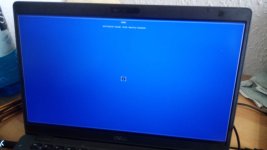
ok, stimmt, ist vllt. aber gar nicht notwendig, oben steht die Fehlermeldung. In der Mitte ist ein Button ok. Druecke ich die Enter Taste macht das Notebook anschliessend einen Hardware Pruefung. Das ist hier aber wohl nicht relevant?
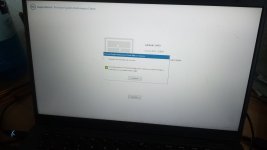
Secure Boot enabled zu disabled. Das wars, jetzt startet es! Danke euch!
Ergänzung ()
Secure Boot enabled zu disabled. Das wars, jetzt startet es! Danke euch!
Das funktioniert bei Dell wohl nicht.cyberpirate schrieb:oder den Key enrollen. alles dazu hier:
Dazu gibt es einige Beiträge.
Scheint wohl eine Dell-Eigenheit zu sein.
Aber generell Secure Boot auszuschalten kann ja auch nicht die Lösung sein.
Es wird wohl eine Daseinsberechtigung haben. Wie so vieles andere auch.

cumulonimbus8
Fleet Admiral
- Registriert
- Apr. 2012
- Beiträge
- 19.475
Um MS glücklich zu machen.DHC schrieb:Aber generell Secure Boot auszuschalten kann ja auch nicht die Lösung sein.
Es wird wohl eine Daseinsberechtigung haben. Wie so vieles andere auch.
Die haben das de facto erfunden und und aufgezwungen damit anhand einer White-List nur bestimmte Boot-Loader booten dürfen. Solche die bei LINUX z.B. nun mal nicht mitkommen. Siehe eben VenToy.
Nutzen gleich Null wenn man es abschalten kann… …und muss um andere OS als das von MS normal, vom Stick, booten zu können!
CN8
@cumulonimbus8
Man kann doch einen Key enrollen oder etwa nicht?
Es geht doch hauptsächlich zum Schutz im Bootvorgang, damit keine Schadsoftware geladen werden kann.
So zumindest habe ich es verstanden.
Ich gehe mal davon aus, das der größte Teil der PCs/Laptops, die im Geschäftsbereich eingesetzt werden mit Windows laufen.
Als weitere Schutzmaßnahme kann man ja auch noch verschlüsseln.
Aber wenn das System beim Bootvorgang kompromittiert wird, wird die Verschlüsselung wohl auch nicht viel helfen oder?
Außerdem arbeitet MS ja mit Linux zusammen, soweit ich das richtig verstanden habe.
Die bieten ja auch eine Implementierung von Linux in Windows an.
Ob die funktioniert, bzw. wie gut, kann ich nicht beurteilen.
Ich persönlich finde es besser lieber zu viele Vorhängeschlösser zur Absicherung zu haben als zu wenige.
Aber sei es drum.
Wenn man das auf das Haus/die Wohnung bezieht, dann kann man auch einen Türgriff außen an der Haus-/Wohnungstüre anbringen und das Schoß ausbauen.
Ist ja im Prinzip das selbe.
Man kann doch einen Key enrollen oder etwa nicht?
Es geht doch hauptsächlich zum Schutz im Bootvorgang, damit keine Schadsoftware geladen werden kann.
So zumindest habe ich es verstanden.
Ich gehe mal davon aus, das der größte Teil der PCs/Laptops, die im Geschäftsbereich eingesetzt werden mit Windows laufen.
Als weitere Schutzmaßnahme kann man ja auch noch verschlüsseln.
Aber wenn das System beim Bootvorgang kompromittiert wird, wird die Verschlüsselung wohl auch nicht viel helfen oder?
Außerdem arbeitet MS ja mit Linux zusammen, soweit ich das richtig verstanden habe.
Die bieten ja auch eine Implementierung von Linux in Windows an.
Ob die funktioniert, bzw. wie gut, kann ich nicht beurteilen.
Ich persönlich finde es besser lieber zu viele Vorhängeschlösser zur Absicherung zu haben als zu wenige.
Aber sei es drum.
Wenn man das auf das Haus/die Wohnung bezieht, dann kann man auch einen Türgriff außen an der Haus-/Wohnungstüre anbringen und das Schoß ausbauen.
Ist ja im Prinzip das selbe.

netzwanze
Ensign
- Registriert
- Okt. 2021
- Beiträge
- 228
cumulonimbus8
Fleet Admiral
- Registriert
- Apr. 2012
- Beiträge
- 19.475
Ja. Den müsste man erst mal haben und das auch wissen. Ventoy hat einen und (gewiss, selber gemacht) bootet wenigstens nun ohne Mosern. Bis MS eine anderen haben will…DHC schrieb:Man kann doch einen Key enrollen oder etwa nicht?
NS will das System vor etwas schützen das nicht von selbst wie ein Vögelchen angeflogen kommt sondern es hält den braven User von einer Nothilfe ab. Denn der User hat aktiv Hand zum Booten angelegt. was also soll geschützt werden, wovor?
CN8
Ähnliche Themen


- Antworten
- 32
- Aufrufe
- 1.855
- Antworten
- 5
- Aufrufe
- 602

- Antworten
- 51
- Aufrufe
- 2.049


- Antworten
- 14
- Aufrufe
- 1.072