Du verwendest einen veralteten Browser. Es ist möglich, dass diese oder andere Websites nicht korrekt angezeigt werden. Du solltest ein Upgrade durchführen oder einen alternativen Browser verwenden.
NewsAnalogue 3D: Nintendo-64-Retro-Konsole wird in Kürze ausgeliefert
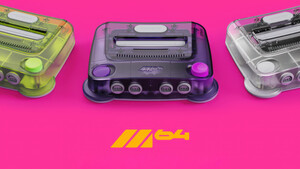
Falls wer an der ModRetro m64 interessiert ist, so habe ich in deren Thread gerade 3 YouTube Shorts verlinkt. Sieht durchaus wertig aus und ist aktuell meinem Empfinden nach mein Favorit. Den Analogue 3D finde ich nicht schlecht, aber vom Bauch her löst der m64 wesentlich mehr ein "haben will" aus.
Für die 8bitdo 64 Controller ist ebenfalls ein Firmware Update (Version 2.4) erschienen, welches für meinen Geschmack die Sensitivität des Analogsticks etwas verringert und dadurch das Erlebnis eindeutig verbessert hat. Vor allem Goldeneye/Perfect Dark waren für mich unspielbar bisher. Es ist nun zwar immer noch nicht perfekt, aber es ist mit ein wenig Einübung sehr gut spielbar.
Um die Firmware auf einem Windows PC upzudaten, braucht ihr die 8bitdo Ultimate Software V2. Schliesst dann den Controller per Kabel an den Rechner. Dann könnt ihr die Firmware über das Programm erneuern und auch auf ältere Versionen zurückflashen, falls ihr unzufrieden mit dem Update seid. Darüber hinaus bietet die Software eine Rekalibrierung des Analogsticks an.
Fix: ODM selection and game configuration applied incorrectly for unknown cartridges under certain conditions
OS
New: Added ‘Startup Action’ feature. You can now directly play the inserted cartridge when powering on 3D. Navigate to Settings → System → ‘Startup Action’ and select ‘Cartridge’ or ‘Library’
New: Added ‘Power Off’ from OS menu. You can now power off 3D from either the in-game menu or settings menu
Improved: Virtual Controller Pak, game configuration, and playtime are now saved if 3D is powered off during gameplay
Improved: Auto overclock behavior
Improved: OS visual polish
Notes
Original N64 games required an active controller to start. When Startup Action is set to Cartridge, a controller must be connected on P1 when 3D is powered on
@Mr.Zweig Schön zu sehen, dass die Firmware noch aktiv weiterentwickelt wird. Die verbesserte GameShark-Kompatibilität dürfte einige freuen, und RSP-Fixes sind immer willkommen für schwierigere Titel.
Jo, so wie ich gehört habe geht die Entwicklung jetzt erst richtig los. Das ganze 3D OS war ja quasi noch in Beta als die Kiste released wurde. Es fehlt unter anderem immer noch die Integration des WiFi Chips, der sich ja schon auf dem Board befindet.
Ich denke wir werden dann noch einiges sehen, denn die werden das höchst wahrscheinlich auch für kommende(?) Konsolen Projekte (PSX/Saturn/Dreamcast etc. maybe) benutzen wollen. Entsprechend angepasst versteht sich.
New: Advanced Library detection for variable game headers.
If a cartridge changes its header, this is detected, added and tracked in the Library. Virtual Controller Pak and per-game configuration is applied automatically and can be adjusted normally in the Library or in-game menu.
Improved: General system behavior in preparation for upcoming OS features
OS
New: “Ready” label added to currently inserted cartridge. Easily jump to the ready cartridge by pressing B in the Library.
Original Display Modes now take full advantage of modern HDR brightness and color gamut
Max luminance is adjustable to accurately match consumer CRTs, broadcast monitors, and beyond
For the most accurate picture: Before adjusting the max luminance setting, set your display HDR tone mapping to disabled or HGiG and check that game mode is enabled
Core
New: Support for Advanced HDR
OS
New: ‘Max. Luminance’ display setting
Navigate to Settings → Display→ ‘Max. Luminance’. This can be adjusted only when HDR is enabled
New: Alphabetical navigation in Library
Press Up in the Library to display the alphabetical index and select a letter by moving Left and Right. Press Down to return to the Library. Jump to the inserted cartridge by pressing B
Improved: Library scrolling, responsiveness, and speed
Improved: Automatic virtual Rumble Pak selection for several games
Improved: OS visual polish
Fix: Library organization issues in rare instances
Fix: Library updating issue when a blank SD card is inserted in rare instances
Fix: ALLM and HDR settings sometimes apply incorrectly with 1080p displays
Controllers
Improved: Pair controllers in-game without opening the menu
Fix: Controller LED remains on in rare instances
Note: Recreating a CRT beam demands high peak localized brightness (the display must get much brighter in specific, small spots). Modern OLED displays, which excel at this, are recommended with Advanced HDR.
Our signature save-state system, bringing modern convenience to the full 900+ N64 cartridge library
First introduced on Analogue Pocket in 2022, Memories lets you capture and reload gameplay at any moment without the need to reach a save point or rely on original Controller Paks
Memories is seamlessly implemented to maintain total hardware accuracy of the original N64 including compatibility with all original accessories, such as the Transfer Pak with Pokémon Stadium’s GB Tower
New: Games can save across different Controller Paks, improving compatibility with Controller Pak swapping and Memories
Core
New: Support for Memories
Improved: Progressive Output (beta) for certain games
OS
New: Memories list
Part of 3DOS Library and the in-game menu, Memories are visually organized and managed on a per-game basis
In Library, press Down to access the list if Memories exist for that game. Access the list from the in-game menu too
Each game currently supports up to 20 Memories. When full, the oldest Memory will automatically be deleted when creating a new Memory. Pin a Memory to preserve it
Improved: Menu speed when switching ODMs and virtual Paks in-game
Fix: Play Cartridge option disabled in rare instances
Controllers
New: Hotkeys for creating and loading Memories
To create a Memory:
8BitDo 64 controller: Hold Home then press D-Pad Up
Original controllers: Hold Z and Start then press C-Up
To quickly load the most recently loaded or created Memory
8BitDo 64 controller: Hold Home then press D-Pad Down
Original controllers: Hold Z and Start then press C-Down
New: Added ‘No Pak’ option when switching virtual Paks with wireless controllers
Fixes cartridge save access in Blast Corps when using wireless controllers and automatically sets ‘No Pak’ when playing the cartridge
Fix: 8BitDo 64 BT controllers unable to press C-Left/Right or C-Up/Down simultaneously
Fixes save management with 8BitDo 64 BT controllers in games such as Doom 64 and Cruisin’ USA
Fix: Chameleon Twist starts with the virtual Rumble Pak instead of Controller Pak, fixing boot issues with wireless controllers
Fix: P1 controller slot remained occupied in some instances when using original controllers
Modretro hat das Review Embargo für das M64 aufgehoben und die Retro Szene auf Youtube hat entsprechend abgeliefert.
Leider kann man das vom M64 wohl aktuell noch nicht so ganz sagen, aber seht selbst.
YouTube
An dieser Stelle steht ein externer Inhalt von YouTube, der den Forumbeitrag ergänzt. Er kann mit einem Klick geladen und auch wieder ausgeblendet werden.
Ein neuer interner Upscaling Prozess wurde eingeführt. Liesst sich sehr interessant. Auf Reddit gibt es bereits vorher/nachher Screenshots und Videos. Die bisherigen Kommentare zur neuen Upscaling Technik lesen sich sehr enthusiastisch.
New: Overclocking and Force Original Hardware are now adjustable in-game 1
New: Added ‘Off’ option for overclock which can be used in conjunction with other Hardware settings
Core
Improved: CPU I-cache behavior
Improved: Horizontal Upscaling and Progressive Output performance
Fix: Regression with video cropping for certain games
OS
New: Library customization for Unknown Cartridges. Game title, developer, publisher, and more can now be customized for unknown cartridges in your Library 2
New: Optimized Library defaults and reset options. Newly optimized default settings for Auto Overclock, Horizontal Upscaling, Progressive Output, and more for the entire N64 library
New: Create Memory from In-Game Menu. You can now create a new Memory directly from the In-Game Menu in addition to the hotkey. From the In-Game Menu navigate to the + tile on the right side of the Memories list and press A to ‘Create Memory’
New: Added options to reset to default Hardware and Advanced, or Original Display Mode configurations for your entire cartridge Library 3. Navigate to Settings → System → Maintenance for reset options
New: You can now view the default or currently selected Virtual Accessory when using a wireless or USB controller. Navigate to ‘Hardware’ → ‘Virtual Accessory’ from the Configure menu or In-Game Menu
Improved: OS visual polish
Improved: VRU (USA) and VRS (Japan) support are now differentiated in the Library
Improved: 3DOS update files are moved to ‘/System/Archived’ on the SD card after updating
Improved: ‘Hardware’ and ‘Advanced’ menu options can now be reset to default in the In-Game Menu
Fix: Joystick and D-pad sensitivity issues with some menu toggles
Fix: Issue with the alphabetical index when Masters ‘98: Harukanaru Augusta is added to the Library
Fix: Changing ODM settings in Gallery sometimes affected in-game ODM settings
Note: The last stage of this OS update may take longer than normal, and the system may reboot during the process.
Overclock changes may take a few seconds to apply when adjusted in-game
For more information about Library customization visit the Platform docs
We recommend resetting your Library Hardware configurations for the best plug-and-play experience
Für alle SC Besitzer und/oder die kompatible Emu Cartriges haben:
Mateusz Faderewski (der SummerCart Entwickler) hat bereits Ende August ein grosses Update für das SC Menü (User Frontend), sowie für alle kompatiblen Cartridges rausgebracht und auf seinem Github zur Verfügung gestellt.
Die Menü Software ist nicht mit der eigentlichen Firmware der SC zu verwechseln. Diese ist in einem anderem Github verfügbar, allerdings seit Ende 2024 nicht mehr aktualisiert worden und sollte nur bei grösseren Schwierigkeiten mit der SummerCart geflasht werden. Der Prozess ist nicht ohne. Bei Bedarf kann ich gerne behilflich sein.