Du verwendest einen veralteten Browser. Es ist möglich, dass diese oder andere Websites nicht korrekt angezeigt werden. Du solltest ein Upgrade durchführen oder einen alternativen Browser verwenden.
bin am Ende mit meinem Latein. Bekomme ständig Bluescreens wenn ich ca 20-30minuten zocke.
Habe bisher Arbeitsspeicher überprüft, die Festplatte und auch Treiber aktualisiert.
Hier ersteinmal Angaben zu meinem PC:
Operating System
Windows 7 Home Premium 64-bit SP1
CPU
AMD Phenom II X6 1100T 41 °C
Thuban 45nm Technology
RAM
8,00GB Dual-Channel DDR3 @ 803MHz (10-10-10-27)
Motherboard
Gigabyte Technology Co., Ltd. GA-890GPA-UD3H (Socket M2) 30 °C
Graphics
PL2409HD (1920x1080@60Hz)
2048MB ATI AMD Radeon HD 6900 Series (ATI) 34 °C
Storage
119GB Crucial C300-CTF DDAC128MAG SATA Disk Device (SSD)
Optical Drives
TSSTcorp CDDVDW SH-S223C SATA CdRom Device
Audio
USB Multi-Channel Audio Device
Also wenn du OC gemacht hast, lass es!
Es könnte RAM sein, ein defekter Slot, Stromversorgung der CPU während Last,... also ziemlich viele Quellen könnte es haben.
Dann zuerst im BIOS schauen ob Timings und Spannung richtig eingestellt sind. Ggf. OC zurücksetzen.
Dann mit weniger RAM-Riegeln testen bis das System stabil ist.
Wenn du kein Plan hast und etwas verstellst und immer noch die Probleme hast oder neue macht das wenig Sinn, oder? Aber bitte:
Wenn du dich traust , beim ersten mal wenn du ins Bios kommst, auf der rechten Seite die Option " Load Fail Save Defaults" auswählen und bestätigen. Dann solltest du die Einstellungen überprüfen. Da du keine Ahnung hast musst du das Überspringen und die Settings speichern und dann verlassen. Dann startet er neu und dann ist Daumendrücken angesagt.^^
Deine Entscheidung.
Wenn du kein Plan hast und etwas verstellst und immer noch die Probleme hast oder neue macht das wenig Sinn, oder? Aber bitte:
Wenn du dich traust , beim ersten mal wenn du ins Bios kommst, auf der rechten Seite die Option " Load Fail Save Defaults" auswählen und bestätigen. Dann solltest du die Einstellungen überprüfen. Da du keine Ahnung hast musst du das Überspringen und die Settings speichern und dann verlassen. Dann startet er neu und dann ist Daumendrücken angesagt.^^
Deine Entscheidung.
On Sun 15.02.2015 16:45:18 GMT your computer crashed
crash dump file: C:\Windows\Minidump\021515-11887-01.dmp
This was probably caused by the following module: ntoskrnl.exe (nt+0x74EC0)
Bugcheck code: 0x1A (0x41287, 0x97FFFFFFF89, 0x0, 0x0)
Error: MEMORY_MANAGEMENT
file path: C:\Windows\system32\ntoskrnl.exe
product: Microsoft® Windows® Operating System
company: Microsoft Corporation
description: NT Kernel & System
Bug check description: This indicates that a severe memory management error occurred.
This might be a case of memory corruption. More often memory corruption happens because of software errors in buggy drivers, not because of faulty RAM modules.
The crash took place in the Windows kernel. Possibly this problem is caused by another driver that cannot be identified at this time.
On Sun 15.02.2015 16:45:18 GMT your computer crashed
crash dump file: C:\Windows\memory.dmp
This was probably caused by the following module: ntkrnlmp.exe (nt!KeBugCheckEx+0x0)
Bugcheck code: 0x1A (0x41287, 0x97FFFFFFF89, 0x0, 0x0)
Error: MEMORY_MANAGEMENT
Bug check description: This indicates that a severe memory management error occurred.
This might be a case of memory corruption. More often memory corruption happens because of software errors in buggy drivers, not because of faulty RAM modules.
The crash took place in the Windows kernel. Possibly this problem is caused by another driver that cannot be identified at this time.
On Sun 15.02.2015 13:35:59 GMT your computer crashed
crash dump file: C:\Windows\Minidump\021515-10296-01.dmp
This was probably caused by the following module: ntoskrnl.exe (nt+0x74EC0)
Bugcheck code: 0x3B (0xC0000005, 0xFFFFF80003484D44, 0xFFFFF8800294F7E0, 0x0)
Error: SYSTEM_SERVICE_EXCEPTION
file path: C:\Windows\system32\ntoskrnl.exe
product: Microsoft® Windows® Operating System
company: Microsoft Corporation
description: NT Kernel & System
Bug check description: This indicates that an exception happened while executing a routine that transitions from non-privileged code to privileged code.
This appears to be a typical software driver bug and is not likely to be caused by a hardware problem.
The crash took place in the Windows kernel. Possibly this problem is caused by another driver that cannot be identified at this time.
On Sun 15.02.2015 12:37:36 GMT your computer crashed
crash dump file: C:\Windows\Minidump\021515-15537-01.dmp
This was probably caused by the following module: ntoskrnl.exe (nt+0x74EC0)
Bugcheck code: 0x1E (0xFFFFFFFFC0000005, 0xFFFFF800034DBECF, 0x0, 0xFFFFFFFFFFFFFFFF)
Error: KMODE_EXCEPTION_NOT_HANDLED
file path: C:\Windows\system32\ntoskrnl.exe
product: Microsoft® Windows® Operating System
company: Microsoft Corporation
description: NT Kernel & System
Bug check description: This indicates that a kernel-mode program generated an exception which the error handler did not catch.
This appears to be a typical software driver bug and is not likely to be caused by a hardware problem.
The crash took place in the Windows kernel. Possibly this problem is caused by another driver that cannot be identified at this time.
On Sun 15.02.2015 02:21:37 GMT your computer crashed
crash dump file: C:\Windows\Minidump\021515-11544-01.dmp
This was probably caused by the following module: fltmgr.sys (0xFFFFF8800117D787)
Bugcheck code: 0x50 (0xFFFFF8803518A170, 0x0, 0xFFFFF8800117D787, 0x2)
Error: PAGE_FAULT_IN_NONPAGED_AREA
file path: C:\Windows\system32\drivers\fltmgr.sys
product: Betriebssystem Microsoft® Windows®
company: Microsoft Corporation
description: Microsoft Dateisystem-Filter-Manager
Bug check description: This indicates that invalid system memory has been referenced.
This appears to be a typical software driver bug and is not likely to be caused by a hardware problem.
The crash took place in a standard Microsoft module. Your system configuration may be incorrect. Possibly this problem is caused by another driver on your system that cannot be identified at this time.
On Sun 15.02.2015 02:02:42 GMT your computer crashed
crash dump file: C:\Windows\Minidump\021515-10374-01.dmp
This was probably caused by the following module: usbport.sys (USBPORT+0x2783)
Bugcheck code: 0x1E (0x0, 0x0, 0x0, 0x0)
Error: KMODE_EXCEPTION_NOT_HANDLED
file path: C:\Windows\system32\drivers\usbport.sys
product: Betriebssystem Microsoft® Windows®
company: Microsoft Corporation
description: USB 1.1 & 2.0-Porttreiber
Bug check description: This indicates that a kernel-mode program generated an exception which the error handler did not catch.
This appears to be a typical software driver bug and is not likely to be caused by a hardware problem.
The crash took place in a standard Microsoft module. Your system configuration may be incorrect. Possibly this problem is caused by another driver on your system that cannot be identified at this time.
6 crash dumps have been found and analyzed. No offending third party drivers have been found. Connsider using WhoCrashed Professional which offers more detailed analysis using symbol resolution. Also configuring your system to produce a full memory dump may help you.
Read the topic general suggestions for troubleshooting system crashes for more information.
Note that it's not always possible to state with certainty whether a reported driver is responsible for crashing your system or that the root cause is in another module. Nonetheless it's suggested you look for updates for the products that these drivers belong to and regularly visit Windows update or enable automatic updates for Windows. In case a piece of malfunctioning hardware is causing trouble, a search with Google on the bug check errors together with the model name and brand of your computer may help you investigate this further.
hmmm also doch Ram? und nun? trotzdem mal Bios auf default?
Ergänzung ()
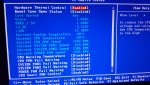
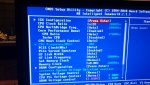
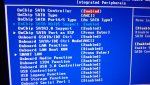
Okay...also habe Bios umgestellt und bisher läufts ohne Absturz
Vielen lieben Dank schon mal im voraus...werd mal noch was weiter testen.
tja... wenn man falsch übertaktet, läuft das system nicht mehr stabil.... und wenn man es mit übertakten übertreibt, darf man die hardware neu kaufen und die alte entsorgen.


 (((
(((