[Bitte fülle den folgenden Fragebogen unbedingt vollständig aus, damit andere Nutzer dir effizient helfen können. Danke!  ]
]
1. Nenne uns bitte deine aktuelle Hardware:
(Bitte tatsächlich hier auflisten und nicht auf Signatur verweisen, da diese von einigen nicht gesehen wird und Hardware sich ändert)
2. Beschreibe dein Problem. Je genauer und besser du dein Problem beschreibst, desto besser kann dir geholfen werden (zusätzliche Bilder könnten z. B. hilfreich sein):
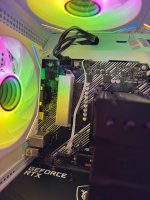
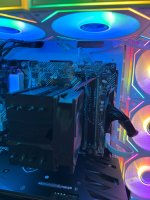
Hello, so ive wanted to upgrade my motherboard from an Asus Prime A320m-k to a Asus Prime A520m-a II. Ive encountered so many problems with doing that, its unbelievable. (im doing this for a friend). ive built and rebuilt computers for almost 8 years now every now and then, but now im almost 3 days in and i cant find the problem.
at first it was bitlocker, we got that solved. (i removed bitlocker from the HDD and the NVMe for clarification)
then it was the NVMe at 0-2% speed and the GPU also at 0-2%.
then ive reinstalled windows from the media creation tool because i thought the reinstall wasnt clean.
now my cpu is running constantly at 0.40GHz, all the time.
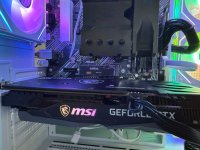
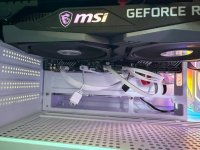
ive checked bios, did a cmos reset, updated the bios firmware, installed the chipset driver, quadruple checked the wiring, took the cpu out and placed it back in with new thermal paste. replaced the GPU in and out the PCIex16 slot, same with the NVMe. checked the HDD. ive basically checked everything there is to check multiple times. (if not please tell me what else there is)
i do not know what to do anymore. only thing i can imagine is the power supply is faulty or the "new" motherboard came damaged.
i have a spare 600W bequiet PSU home if this helps?
-cpu temp is okay
ive also noticed my gpu isnt showing up in task manager anymore (it showed up before the clean windows install)
maybe also noteworthy is that everything (i mean everything) is extremely slow.
one windows reinstall almost took 4 hours. i cant use microsoft edge without waiting 2 mins for a tab to open.
everything is just slow.
any help is appreciated, ty
3. Welche Schritte hast du bereits unternommen/versucht, um das Problem zu lösen und was hat es gebracht?
...
P.S.: Beachte auch die verschiedenen angepinnten Themen und die Forensuche. Möglicherweise findest du da bereits die Lösung zu deinem Problem.
]1. Nenne uns bitte deine aktuelle Hardware:
(Bitte tatsächlich hier auflisten und nicht auf Signatur verweisen, da diese von einigen nicht gesehen wird und Hardware sich ändert)
- Prozessor (CPU): AMD Ryzen 5 4500
- Arbeitsspeicher (RAM): 2x Nanya 8192MB 3200MHz
- Mainboard: Asus Prime A520a-m II
- Netzteil: CSL 500W
- Gehäuse: tower/cube
- Grafikkarte: Geforce RTX 3050
- HDD / SSD: 1x HDD 2TB, 1x NVMe m.2 KIOXIA Exceria SSD 500GB
- Weitere Hardware, die offensichtlich mit dem Problem zu tun hat (Monitormodell, Kühlung usw.):
2. Beschreibe dein Problem. Je genauer und besser du dein Problem beschreibst, desto besser kann dir geholfen werden (zusätzliche Bilder könnten z. B. hilfreich sein):
Hello, so ive wanted to upgrade my motherboard from an Asus Prime A320m-k to a Asus Prime A520m-a II. Ive encountered so many problems with doing that, its unbelievable. (im doing this for a friend). ive built and rebuilt computers for almost 8 years now every now and then, but now im almost 3 days in and i cant find the problem.
at first it was bitlocker, we got that solved. (i removed bitlocker from the HDD and the NVMe for clarification)
then it was the NVMe at 0-2% speed and the GPU also at 0-2%.
then ive reinstalled windows from the media creation tool because i thought the reinstall wasnt clean.
now my cpu is running constantly at 0.40GHz, all the time.
ive checked bios, did a cmos reset, updated the bios firmware, installed the chipset driver, quadruple checked the wiring, took the cpu out and placed it back in with new thermal paste. replaced the GPU in and out the PCIex16 slot, same with the NVMe. checked the HDD. ive basically checked everything there is to check multiple times. (if not please tell me what else there is)
i do not know what to do anymore. only thing i can imagine is the power supply is faulty or the "new" motherboard came damaged.
i have a spare 600W bequiet PSU home if this helps?
-cpu temp is okay
ive also noticed my gpu isnt showing up in task manager anymore (it showed up before the clean windows install)
maybe also noteworthy is that everything (i mean everything) is extremely slow.
one windows reinstall almost took 4 hours. i cant use microsoft edge without waiting 2 mins for a tab to open.
everything is just slow.
any help is appreciated, ty
3. Welche Schritte hast du bereits unternommen/versucht, um das Problem zu lösen und was hat es gebracht?
...
P.S.: Beachte auch die verschiedenen angepinnten Themen und die Forensuche. Möglicherweise findest du da bereits die Lösung zu deinem Problem.