Benmchmarking 2

CPU running at 0,40GHz after upgrading motherboard

Status
Für weitere Antworten geschlossen.
TorenAltair schrieb:
The CPU only gets 0.74V and the internal GPU isn‘t recognized either. Try to flash the UEFI with the latest version and load default settings after reboot. Then check the settings for CPU in the UEFI.
what should i look for in the bios settings after flashing/rebooting?
Tevur schrieb:
Da fehlen Befestigungsschrauben am MB.

Abstandshalter sind drunter?
sind drunter ja
 
imsorry schrieb:
what should i look for in the bios settings after flashing/rebooting?
If the settings are really set back to default/auto.
 
mistake
Ergänzung ()

TorenAltair schrieb:
If the settings are really set back to default/auto.
just flashed the bios, looking for the settngs now
Ergänzung ()

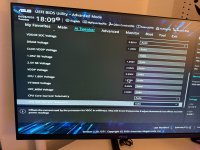
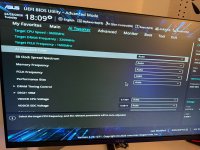
here are the bios pics
 

Anhänge

  • IMG_7461.JPG
    IMG_7461.JPG
    1,4 MB · Aufrufe: 24
  • IMG_7462.JPG
    IMG_7462.JPG
    1,8 MB · Aufrufe: 25
Zuletzt bearbeitet:
Looking at the cut-pictures you posted, on the far-right side, in the BIOS the frequency, ratio etc. should be ok? There should be frequency 3600, Ratio x36...

After trying everything else (like re-flashing, loading default settings...), try some usb boot stick with Linux and check if it runs there like it should or also with slow speed. Maybe the energy settings in Windows (and Windows installer) are fubar.
Did you try some memory test like memtest from USB stick? There you should also see if the CPU runs like it should or if the cpu is slow as hell.

edit: Maybe the mainboard is defect? Also possible.
 
@ugul the data on the right side of bios is also normal, just like you said. sorry i didnt capture it fully.

i will try the linux version now.

we swapped for the old mb just to be safe. it didnt even turn on and the power got cut off in the whole apartment after trying to start it.

i think the mobo os defect atp.

the only really weird thing is the cpu speed at 0,40GHz and i cant find why that is.
 
  • Gefällt mir
Reaktionen: incurable
imsorry schrieb:
Auch nur dort, wo sie hingehören, also unter den Verschraubungslöchern? Sonst sollten/ dürfen die nirgends sein.

imsorry schrieb:
we swapped for the old mb just to be safe. it didnt even turn on and the power got cut off in the whole apartment after trying to start it.
Was the old main board installed to the case? If so, try it outside the case on a non-conductive surface.
 
@motorazrv3 genau dort wo sie hingehören, es gibt auch ein neues case.

und ja das haben wir auch gemacht, hat sich nichts gebracht.

ich verstehe nur absolut nicht wieso der cpu auf 0,4GHz gecappt ist. bios passt alles, systemeinstellungen auch
 
Boah was ein Thread da wirste doch ganz kirre mit Englisch, Deutsch und wieder Englisch. 💀🤣

Edit:

Eigentlich sollten die Spannungswandler bei dieser CPU nicht unbedingt überfordert sein schon seltsam.

Nichts desto trotz würde ich mir niemals so ein spartanisches Mainboard einbauen wenn man auch nur bisschen darauf zocken möchte.

Deine ganzen Lian Li Lüfter kosten wesentlich mehr als dein neues Mainboard. 🙃😅
 
Zuletzt bearbeitet:
xXDariusXx schrieb:
Boah was ein Thread da wirste doch ganz kirre mit Englisch, Deutsch und wieder Englisch. 💀🤣

Edit:

Eigentlich sollten die Spannungswandler bei dieser CPU nicht unbedingt überfordert sein schon seltsam.

Nichts desto trotz würde ich mir niemals so ein spartanisches Mainboard einbauen wenn man auch nur bisschen darauf zocken möchte.

Deine ganzen Lian Li Lüfter kosten wesentlich mehr als dein neues Mainboard. 🙃😅
macht mich auch schon wuscshig

ich habe jetzt eh mal ein neues MB bestellt.
 
  • Gefällt mir
Reaktionen: xXDariusXx
Dann ist das Problem ja vorerst gelöst und wir können hier zu machen.

Und die anderen Usern mit solchen deutsch/englisch Nummern zu veralbern ist garantiert nicht der richtige Weg wenn man Hilfe sucht.
 
Zuletzt bearbeitet:
  • Gefällt mir
Reaktionen: xXDariusXx und DJMadMax
Status
Für weitere Antworten geschlossen.
Sapphire Forum
Zurück
Oben