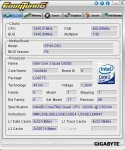
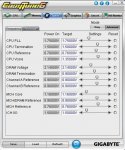
So jetzt läuft es absolut stabil, muste allerdings noch ein paar sachen umstellen!
Das Hauptproblem war wohl doch nur die zu geringe MCH Core!
Der mini Bug beim D-Teiler bleibt zwar und läst sich ja auch nicht umgehen, dafür startet er jetzt von alleine durch!

Hab mir gleich 2. Profile erstellt, einmal für B und D.
---------------------------------------------------------
Robust Graphics Booster [Auto]
CPU Clock Ratio [ 7 X]
x Fine CPU Clock Ratio [+0.5]
CPU Frequency 3.375GHz(450x7,5)
********** Clock Chip Control **********
>>>>> Standard Clock Control
CPU Host Clock Control [Enabled]
CPU Host Frequency(Mhz) [450]
PCI Express Frequency(Mhz) [Auto]
C.I.A.2 [Disabled]
>>>>> Advanced Clock Control
> Advanced Clock Control [Press Enter]
****** DRAM Performance Control *******
Performance Enhance [Standard]
(G)MCH Frequency Latch [Auto]
System Memory Multiplier (SPD) [2.40B]
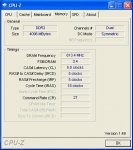
Memory Frequency(Mhz) 800 1080
DRAM Timing Selectable (SPD) [Manual]
>>>>> Standard Timing Control
CAS Latency Time 5 [5]
tRCD 5 [5]
tRP 5 [5]
tRAS 18 [15]
>>>>> Advanced Timing Control
> Advanced Timing Control [Press Enter]
***** Mother Board Voltage Control ******
Voltages Types Normal Current
---------------------------------------------------------
>>> CPU
CPU Vcore 1.22500V [1.3500V]
CPU Termination 1.200V [Auto]
CPU PLL 1.500V [Auto]
CPU Reference 0.760V [Auto]
>>> MCH/ICH
MCH Core 1.100V [1.160V]
MCH Reference 0.760V [Auto]
MCH/DRAM Reference 0.900V [Auto]
ICH I/O 1.500V [Auto]
ICH Core 1.100V [Auto]
>>> DRAM
DRAM Voltage 1.800V [2.100V]
DRAM Termination 0.900V [Auto]
Channel A Reference 0.900V [Auto]
Channel B Reference 0.900V [Auto]
==================================================
Advanced Clock Control
CMOS Setup Utility - Copyright (C) 1984-2008 Award Software
Advanced Clock Control
CPU Clock Drive [ 800mV]
PCI Express Clock Drive [ 900mV]
CPU Clock Skew [ 0ps]
MCH Clock Skew [ 0ps]
Advanced Timing Control
CMOS Setup Utility - Copyright (C) 1984-2008 Award Software
Advanced Timing Control
tRRD 3 [4]
tWTR 3 [4]
tWR 6 [8]
tRFC 42 [36]
tRTP 3 [4]
Command Rate(CMD) 0 [Auto]
>>>>> Channel A
> Channel A Timing Settings [Press Enter]
> Channel A Driving Settings [Press Enter]
>>>>> Channel B
> Channel B Timing Settings [Press Enter]
> Channel B Driving Settings [Press Enter]
Channel A Timing Settings
CMOS Setup Utility - Copyright (C) 1984-2008 Award Software
Channel A Timing Settings
Static tREAD Value [9]
Rest alles auf [Auto]
Channel B Timing Settings
CMOS Setup Utility - Copyright (C) 1984-2008 Award Software
Channel B Timing Settings
Static tREAD Value [9]
Rest alles auf [Auto]
Channel A Driving Settings
CMOS Setup Utility - Copyright (C) 1984-2008 Award Software
Channel A Driving Settings
Alles auf [Auto]
Channel B Driving Settings
CMOS Setup Utility - Copyright (C) 1984-2008 Award Software
Channel B Driving Settings
Alles auf [Auto]
---------------------------------------------------------
für den D-Teiler:
---------------------------------------------------------
Robust Graphics Booster [Auto]
CPU Clock Ratio [ 7 X]
x Fine CPU Clock Ratio [+0.5]
CPU Frequency 3.450GHz(460x7,5)
********** Clock Chip Control **********
>>>>> Standard Clock Control
CPU Host Clock Control [Enabled]
CPU Host Frequency(Mhz) [460]
PCI Express Frequency(Mhz) [Auto]
C.I.A.2 [Disabled]
>>>>> Advanced Clock Control
> Advanced Clock Control [Press Enter]
****** DRAM Performance Control *******
Performance Enhance [Standard]
(G)MCH Frequency Latch [Auto]
System Memory Multiplier (SPD) [2.66D]
Memory Frequency(Mhz) 800 1224
DRAM Timing Selectable (SPD) [Manual]
>>>>> Standard Timing Control
CAS Latency Time 5 [5]
tRCD 5 [5]
tRP 5 [5]
tRAS 18 [18]
>>>>> Advanced Timing Control
> Advanced Timing Control [Press Enter]
***** Mother Board Voltage Control ******
Voltages Types Normal Current
---------------------------------------------------------
>>> CPU
CPU Vcore 1.22500V [1.3500V]
CPU Termination 1.200V [Auto]
CPU PLL 1.500V [Auto]
CPU Reference 0.760V [Auto]
>>> MCH/ICH
MCH Core 1.100V [1.160V]
MCH Reference 0.760V [Auto]
MCH/DRAM Reference 0.900V [Auto]
ICH I/O 1.500V [Auto]
ICH Core 1.100V [Auto]
>>> DRAM
DRAM Voltage 1.800V [2.140V]
DRAM Termination 0.900V [Auto]
Channel A Reference 0.900V [Auto]
Channel B Reference 0.900V [Auto]
==================================================
Advanced Clock Control
CMOS Setup Utility - Copyright (C) 1984-2008 Award Software
Advanced Clock Control
CPU Clock Drive [ 800mV]
PCI Express Clock Drive [ 900mV]
CPU Clock Skew [ 0ps]
MCH Clock Skew [ 0ps]
Advanced Timing Control
CMOS Setup Utility - Copyright (C) 1984-2008 Award Software
Advanced Timing Control
tRRD 3 [6]
tWTR 3 [6]
tWR 6 [9]
tRFC 42 [42]
tRTP 3 [6]
Command Rate(CMD) 0 [Auto]
>>>>> Channel A
> Channel A Timing Settings [Press Enter]
> Channel A Driving Settings [Press Enter]
>>>>> Channel B
> Channel B Timing Settings [Press Enter]
> Channel B Driving Settings [Press Enter]
Channel A Timing Settings
CMOS Setup Utility - Copyright (C) 1984-2008 Award Software
Channel A Timing Settings
Static tREAD Value [11]
Rest alles auf [Auto]
Channel B Timing Settings
CMOS Setup Utility - Copyright (C) 1984-2008 Award Software
Channel B Timing Settings
Static tREAD Value [11]
Rest alles auf [Auto]
Channel A Driving Settings
CMOS Setup Utility - Copyright (C) 1984-2008 Award Software
Channel A Driving Settings
Alles auf [Auto]
Channel B Driving Settings
CMOS Setup Utility - Copyright (C) 1984-2008 Award Software
Channel B Driving Settings
Alles auf [Auto]
MfG.


 ).
).