Du verwendest einen veralteten Browser. Es ist möglich, dass diese oder andere Websites nicht korrekt angezeigt werden. Du solltest ein Upgrade durchführen oder einen alternativen Browser verwenden.
Der Verursache ist sicher der ATI-Treiber.
Angeblich soll es auch helfen, wenn Du im CCC die ersten beiden Optionen Spiele+3D-Anwendungen einstellst, "Anwendungseinstellungen verwenden"
wie soll ich das einstellen wenn ich nicht in windows reinkomme? vor dem neustart noch quasi oder?
edit:
habs grad neu installiert und wollte das ccc starten bevor ich neustarte, ging aber nicht
ich mein langsam das die grafikkarte defekt is...
Ergänzung ()
kann es sein das ich an der ram spannung was ändern muss?
wenn ja wo mach ich das im bios?
standard sollten ja 1.35v sein bei mir jedoch hab ich das im bios nirgends gefunden
Ergänzung ()
hier noch die auswerung vom analysetool von windows (siehe post 3 oder 4) [sorry der download hat bisschen gedauert...]
Microsoft (R) Windows Debugger Version 6.12.0002.633 AMD64
Copyright (c) Microsoft Corporation. All rights reserved.
Loading Dump File [C:\Windows\MEMORY.DMP]
Kernel Summary Dump File: Only kernel address space is available
Symbol search path is: *** Invalid ***
****************************************************************************
* Symbol loading may be unreliable without a symbol search path. *
* Use .symfix to have the debugger choose a symbol path. *
* After setting your symbol path, use .reload to refresh symbol locations. *
****************************************************************************
Executable search path is:
*********************************************************************
* Symbols can not be loaded because symbol path is not initialized. *
* *
* The Symbol Path can be set by: *
* using the _NT_SYMBOL_PATH environment variable. *
* using the -y <symbol_path> argument when starting the debugger. *
* using .sympath and .sympath+ *
*********************************************************************
*** ERROR: Symbol file could not be found. Defaulted to export symbols for ntkrnlmp.exe -
Windows 7 Kernel Version 7600 MP (3 procs) Free x64
Product: WinNt, suite: TerminalServer SingleUserTS
Built by: 7600.16385.amd64fre.win7_rtm.090713-1255
Machine Name:
Kernel base = 0xfffff800`02866000 PsLoadedModuleList = 0xfffff800`02aa3e50
Debug session time: Sat Feb 19 22:35:14.433 2011 (UTC + 1:00)
System Uptime: 0 days 0:00:23.041
*********************************************************************
* Symbols can not be loaded because symbol path is not initialized. *
* *
* The Symbol Path can be set by: *
* using the _NT_SYMBOL_PATH environment variable. *
* using the -y <symbol_path> argument when starting the debugger. *
* using .sympath and .sympath+ *
*********************************************************************
*** ERROR: Symbol file could not be found. Defaulted to export symbols for ntkrnlmp.exe -
Loading Kernel Symbols
...............................................................
...............................................................
Loading User Symbols
Loading unloaded module list
....
*** ERROR: Symbol file could not be found. Defaulted to export symbols for dxgkrnl.sys -
*******************************************************************************
* *
* Bugcheck Analysis *
* *
*******************************************************************************
Use !analyze -v to get detailed debugging information.
*** ERROR: Symbol file could not be found. Defaulted to export symbols for dxgmms1.sys -
***** Kernel symbols are WRONG. Please fix symbols to do analysis.
*************************************************************************
*** ***
*** ***
*** Your debugger is not using the correct symbols ***
*** ***
*** In order for this command to work properly, your symbol path ***
*** must point to .pdb files that have full type information. ***
*** ***
*** Certain .pdb files (such as the public OS symbols) do not ***
*** contain the required information. Contact the group that ***
*** provided you with these symbols if you need this command to ***
*** work. ***
*** ***
*** Type referenced: nt!_KPRCB ***
*** ***
*************************************************************************
*** ERROR: Module load completed but symbols could not be loaded for atikmpag.sys
*************************************************************************
*** ***
*** ***
*** Your debugger is not using the correct symbols ***
*** ***
*** In order for this command to work properly, your symbol path ***
*** must point to .pdb files that have full type information. ***
*** ***
*** Certain .pdb files (such as the public OS symbols) do not ***
*** contain the required information. Contact the group that ***
*** provided you with these symbols if you need this command to ***
*** work. ***
*** ***
*** Type referenced: nt!_KPRCB ***
*** ***
*************************************************************************
*************************************************************************
*** ***
*** ***
*** Your debugger is not using the correct symbols ***
*** ***
*** In order for this command to work properly, your symbol path ***
*** must point to .pdb files that have full type information. ***
*** ***
*** Certain .pdb files (such as the public OS symbols) do not ***
*** contain the required information. Contact the group that ***
*** provided you with these symbols if you need this command to ***
*** work. ***
*** ***
*** Type referenced: nt!_KPRCB ***
*** ***
*************************************************************************
Probably caused by : atikmpag.sys ( atikmpag+73bc )
VIDEO_TDR_FAILURE (116)
Attempt to reset the display driver and recover from timeout failed.
Arguments:
Arg1: fffffa80057fd4e0, Optional pointer to internal TDR recovery context (TDR_RECOVERY_CONTEXT).
Arg2: fffff88003c553bc, The pointer into responsible device driver module (e.g. owner tag).
Arg3: 0000000000000000, Optional error code (NTSTATUS) of the last failed operation.
Arg4: 0000000000000002, Optional internal context dependent data.
Debugging Details:
------------------
***** Kernel symbols are WRONG. Please fix symbols to do analysis.
*************************************************************************
*** ***
*** ***
*** Your debugger is not using the correct symbols ***
*** ***
*** In order for this command to work properly, your symbol path ***
*** must point to .pdb files that have full type information. ***
*** ***
*** Certain .pdb files (such as the public OS symbols) do not ***
*** contain the required information. Contact the group that ***
*** provided you with these symbols if you need this command to ***
*** work. ***
*** ***
*** Type referenced: nt!_KPRCB ***
*** ***
*************************************************************************
*************************************************************************
*** ***
*** ***
*** Your debugger is not using the correct symbols ***
*** ***
*** In order for this command to work properly, your symbol path ***
*** must point to .pdb files that have full type information. ***
*** ***
*** Certain .pdb files (such as the public OS symbols) do not ***
*** contain the required information. Contact the group that ***
*** provided you with these symbols if you need this command to ***
*** work. ***
*** ***
*** Type referenced: nt!_KPRCB ***
*** ***
*************************************************************************
*************************************************************************
*** ***
*** ***
*** Your debugger is not using the correct symbols ***
*** ***
*** In order for this command to work properly, your symbol path ***
*** must point to .pdb files that have full type information. ***
*** ***
*** Certain .pdb files (such as the public OS symbols) do not ***
*** contain the required information. Contact the group that ***
*** provided you with these symbols if you need this command to ***
*** work. ***
*** ***
*** Type referenced: nt!_KPRCB ***
*** ***
*************************************************************************
ADDITIONAL_DEBUG_TEXT:
Use '!findthebuild' command to search for the target build information.
If the build information is available, run '!findthebuild -s ; .reload' to set symbol path and load symbols.
FAULTING_MODULE: fffff80002866000 nt
DEBUG_FLR_IMAGE_TIMESTAMP: 4d409c8d
FAULTING_IP:
atikmpag+73bc
fffff880`03c553bc 4883ec28 sub rsp,28h
Du solltest eine Signatur anlegen.
Die RAM-Spannung im BIOS musst auf 1,60 V einstellen. Suche mal unter Spannungen (frequenzies) VDIMM oder so ähnlich.
1,35V ist zu wenig.
Hast Du den CCC eingestellt, wie ich Dir empfohlen habe?
laut g.skill sollte der mit 1.35v laufen. der speicher is auch im handbuch von asus aufgeführt mit 1.35v
die einstellungen im ccc konnte ich nicht machen weil ich erst neustarten muss bevor ich das programm starten kann. und nach dem neustart komm ich nich mehr soweit das ich es ausprobieren kann. im abegesicherten modus kann ich dann ccc auch nicht starten
werde mit der spannung mal hochgehen und dann kucken obs läuft
-> das heißt ich ändere DRAM Voltage oder?
sollte ich bei
-PCIE Frequency
-DRAM Frequency
auch noch was einstellen?
Ergänzung ()
das netzteil sollte doch eigentlich ausreichen oder?
power supply calculator hat mir ein 330W netzteil vorgeschlagen von dem her sollten 400w doch passen?
die speicher packen das schon oder? wenn sie ursprünglich mit 1.35 laufen sollten wäre das dann doch ne ziemliche erhöhung oder nicht?
sorry aber will mich nur nochmal absichern
Das packen die Speicher. Habe die ECO schon eine längere Testphase mit der Spannung laufen lassen.
Es soll ja zunächst auch nur testweise eingestellt werden, ob sich dadurch eine Änderung ergibt. Wenn nicht, kannst du die Spannung wieder reduzieren.
Was ist mit der Karte, lief diese schon mal fehlerfrei?
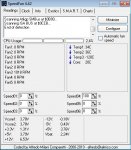
bevor ich anfang hier noch nen interessanter screenshot von speedfan
temp1 temp2 temp3 sollten doch meine temperaturen von den 3 kernen sein oder?
wieso bekomm ich bei temp3 -120°?
edit: die vcore kann doch auch nicht stimmen oder?
defekt is der nich oder?
wenn ich die änderungen schritt für schritt durchgehe, muss ich dann jedesmal die treiber neu installieren oder sollte dann windows ganz normal starten wenn die einstellungen dann mal passen sollten?
update 1: hab jetzt die PCIE Frequenz auf 100mhz fix eingestellt.
-> immer noch das alte, soll ich die einstellung auf 100mhz lassen oder soll ichs wieder zurückändern?
update 2: dram frequenz auf 1067 gesetzt -> immer noch beim alten
update 3: dram fequenz auf 1067 und spannung auf 1.5v ->immer noch beim alten
update 4: dram fequenz auf 1067 und spannung auf 1.55v ->immer noch beim alten
update 5: dram frequenz auf auto und spannung auf 1.55v -> immer noch beim alten
update 6: dram frequenz auf auto und spannung auf 1.60v -> immer noch beim alten
update 6: dram frequenz auf 1067 und spannung auf 1.60v -> immer noch beim alten
update 7: dram frequenz auf 1067 und spannung auf 1.55v und command rate auf 2T
-> immer noch beim alten
update 8: dram frequenz auf auto und spannung auf 1.55v und command rate auf 2T
-> immer noch beim alten
hat jmd noch ne idee was man noch ausprobieren könnte?
kurz bevor ich den bluescreen bekomme ruckelt das bild kurz. vielleicht könnt ihr ja was damit anfangen
andere grafikkarte heißt bei mir alte zurückschicken und neue bestellen.
nur kommt dann die frage auf ob ich wieder ati kaufen soll oder doch lieber nvidia?
was meint ihr?
Das ist egal, hauptsache sie funktioniert. Du hast ja gesagt das sie neu ist , also hast Du noch Garantie drauf und der Umtausch ist kein Problem (ausser bei den nicht seriösen Anbietern^^).
ja sie ist neu. umtausch ist kein problem
wenns es jedoch nur ein treiberproblem is, was ich zwar mittlweile nicht mehr glaube nach den zahlreichen tests, aber immer noch sein kann, dann würde die neue grafikkarte nichts dran ändern.
mit ner nvidia wäre ich aber scheinbar eher auf der sicheren seite was diese treiberprobleme angeht