• Mitspieler gesucht? Du willst dich locker mit der Community austauschen? Schau gerne auf unserem ComputerBase Discord vorbei!

BF4 Battlefield 4 kann nicht installiert werden!

Tob0767

Cadet 2nd Year
Registriert
März 2013
Beiträge
22
Hallo,
wollte garde Battlefield 4 installieren von der CD.
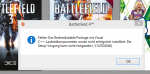
Nachdem es die ganzen Daten von der CD auf die Festplatte kopiert hat und es dan installieren will kommt folgende Fehlermeldung: bf4 fehler.png

Was soll ich machen würde so gerne endlich zocken !
 
Kannst es noch über Origin downloaden und installieren.
 
wen ich das downloade bin ich bei unserem Internet noch in einer Woche dran
 
1. PC neustarten
2. nochmal versuchen

wenn das nicht hilft, die Redist von von Hand installieren.
 
Würde erst die Redist installieren -> neustarten -> nochmal versuchen.
 
Das Hilft nicht bereits gemacht.
Wie geht das?
Unter C:\Program Files (x86)\Origin Games\Battlefield 4\__Installer\vc\vc2012Update3\redist die Datei vcredist_x64 öffnen?
 
Jo
 
Inhalt der DVD auf die Platte ziehen und Installation erneut starten.
Klappts dann?
 
Vergiss das, was sr1 geschrieben hat, das ist visual studio express. Du brauchst aber wenn überhaupt das visual c++ redistributable package. Es gibt z.B. die Versionen von 2008, 2010 und 2012 jeweils für 32(x86)- & 64(x64)-Bit Windows.

http://support.microsoft.com/kb/2019667

Ich würde mal schauen, was schon installiert ist (Start, Programme und Funktionen). Ansonsten wird es vermutlich das neueste sein: http://www.microsoft.com/de-de/download/details.aspx?id=30679
edit: die Version steht ja auch oben. Versuchs also mal damit. Du bist schon unter Windows 8, 64-Bit?
 
Endlich ! Habe es geschafft. Habe VC2012 mal deinstalliert und dan habe ich die komplette installation nochmal probiert.
Nun ging es ohne Probleme. Anscheinend war die installation von vc2012 nicht richtig.

Nun noch eine Frage es läd grade ein Update runter wie groß ist das den? Damit ich die Zeit mal berechnen kan bis ich zocken kann :)
 
Update 1:
~472 MB

Changelog:
FEATURES & IMPROVEMENTS:
- Added game manuals for various languages and platforms
- We now show your custom emblem on the Soldier page in the mobile app
- You can now choose to use the system language in the Battlelog tablet app
- Made the "Set Active Kit" button in Loadout bigger and more touch-friendly
- Implemented a new look and behavior for all popups, so they look better
- Implemented custom style for checkboxes and radio buttons
- Names for awards and unlocks are now displayed directly in Battle Reports
- Made the emblem bigger on Home and Profile pages
- "Misc" is now showed as the last, not first, category for Dog Tags
- We now show the criteria for unlocking the SP Assignments
- Various improvements for the PC in-game Battlelog
- Added a profanity filter when saving clan tags
- Polish when showing Battlepacks items, so they are more aligned, and also made the boost image bigger
- You can now click on feed event for completed SP levels to see the stats and progression for that user

FIXES:
- Fixed an issue that caused a memory leak
- Play Now for Squad Deathmatch and Domination now works as intended
- Fixed an issue where the Missions tab in the PC in-game Battlelog didn't load correctly
- Fixed an issue where the New User Experience would show several times for console soldiers
- Fixed an issue for Battle Reports, where the selected soldier wasn't marked in the scoreboard
- Show tag before name on the Dog Tags, so it is displayed as we do it in-game
- We now should the right cursor, when hovering your soldier portrait in Settings
- Fixed some flickering on iOS6 and iOS5 for the tablet app
- Report button is now shown for users, comments, forum posts etc. in the tablet app
- Removed some Server Browser filter options that weren't actually supported, and fixed other filters that didn't work as intended
- Fixed an issue where you couldn't click the notification icons in the header with BattleScreen open on tablet
- Fixed an issue where the share popup for Battle Reports was cut-off on Android tablets
- Fixed an issue where the Battle Reports overview page wouldn't show correctly if you didn't have any favorite Battle Reports
- Fixed an issue where navigating away from and back to BattleScreen would break the map
- Fixed an issue where deeplinking for dog tags and weapons from Battlepacks didn't always work
- Fixed an issue where completed SP levels would sometimes show multiple times in the feed
- Fixed it so the Punkbuster Needed popup links to the correct Punkbuster page
- Fixed an issue in Loadout, where the info button couldn't be clicked in IE9
- Fixed an issue where not all stats populated in the in-game Battlelog Soldier tab
- Fixed an issue where the New Player flow would show several times for console soldiers
- Removed the Cancel button for finished Missions
- Various fixes for opening Battlepacks on Battlelog
- Various fixes for the Unified Game Manager
- Various fixes for the popup dialogues
- Various fixes for the PC in-game Battlelog
- Many other small fixes and issues addressed
 
eruanno schrieb:
Vergiss das, was sr1 geschrieben hat, das ist visual studio express. Du brauchst aber wenn überhaupt das visual c++ redistributable package. Es gibt z.B. die Versionen von 2008, 2010 und 2012 jeweils für 32(x86)- & 64(x64)-Bit Windows.

http://support.microsoft.com/kb/2019667

Ich würde mal schauen, was schon installiert ist (Start, Programme und Funktionen). Ansonsten wird es vermutlich das neueste sein: http://www.microsoft.com/de-de/download/details.aspx?id=30679
edit: die Version steht ja auch oben. Versuchs also mal damit. Du bist schon unter Windows 8, 64-Bit?

Manchmal gibt es Unterschiede zwischen den versionen, manche Programme laufen nur auf einer ganz bestimmten Version. Du kannst auch eine 32bit Version auf einem 64bit Rechner installiren, um es zu testen.
 
Hi,

ich habe auch ein Problem bei der Installation von CD.

Ich komme in Origin bis zum Produktcode, den kann ich dann auch noch eingeben und dann auf "Weiter" und nochmal auf "Weiter" drücken und dann kommt folgende Fehlermeldung.

"Bei der Bearbeitung deiner Anfrage ist ein Fehler aufgetreten. Bitte versuche es später noch einmal."

Ich habe den Rechner schon einmal neu gestartet und warte jetzt schon seit ca. einer Stunde glaube ich so langsam nicht mehr das es nur ein vorübergehender Fehler ist.
 
Zurück
Oben