Absturzprobleme mit Win7

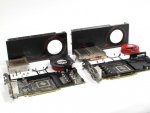
Möglich...bei diesem Bild sind zumindest Kühlkörper drauf:

HD6k-Launch-Review-05.jpg
 
Okay, dann isses nen Produktionsfehler, meine Karte entspricht genau der rechten Karte, nur das eben die VRAM komplett frei liegen...schätze mal das die dann zu heiß wurden beim ersten Gebrauch und dadurch nen Schaden bekommen haben...beim ersten mal lief sie ja auch ein paar Stunden recht gut...
 
ohne Digicam schlecht...

Soweit ich sehe sind 8 Ramchips drauf, 4 liegen unter dem Kühlkörper ( zwischen VRAM und Kühlkörper sind aber ca 2mm Luft zwischen, also Kühlkörper liegt nicht richtig auf und 4 weitere VRAM liegen völlig frei und ca nen cm drüber ist dann der Kühlkörper, bzw ein paar Kühlrippen vom Kühlkörper...) Macht schon ein Eindruck als ob da so Abdeckplatte fehlt wie man oben im Bild sie sieht...
Nun habe ja den Support von Club3D angeschrieben, allerdings ist mir erst danach aufgefallen das vll ein Produktionsfehler vorliegt...erstmal schauen was die sagen...habe denen ja Teile aus der Minidump gepostet wo du meintest, das die auf einen Defekt an der Grakar hindeuten...Schätze das ist aber auch was ich mal gelesen habe, das man halt den Lüfter auf max stellen soll manuell, da die VRAM vll nicht genug gekühlt werden...
na mal abwarten was Support sagt, vll ists denen ja bekannt ( wollten ja Seriennummer )...
 
So, habe verwunderlicherweise die Karte umtauschen können, diesmal hat er mir eine von XFX mit gegeben...mal schauen ob ich nun von Abstürzen verschont bleibe....

OK, bis jetzt läuft sie gut, zumindest bei WoT bringt sie unter max Details noch über 50-60 FPS...nur bin ich etwas erschrocken über die Temp...78 Grad normal unter Last? Wenns OKay ist und nicht zu heiß...dann denke ich kann Threat geclosed werden, scheint alles zu funzen jetzt :)

Und danke für deine Hilfe Simpel1970!
Ergänzung ()

So, jetzt bin ich mit mein Latein am Ende....

Microsoft (R) Windows Debugger Version 6.12.0002.633 AMD64
Copyright (c) Microsoft Corporation. All rights reserved.


Loading Dump File [C:\Windows\Minidump\051311-21949-01.dmp]
Mini Kernel Dump File: Only registers and stack trace are available

Symbol search path is: SRV*C:\symbols*http://msdl.microsoft.com/download/symbols
Executable search path is:
Windows 7 Kernel Version 7601 (Service Pack 1) MP (4 procs) Free x64
Product: WinNt, suite: TerminalServer SingleUserTS
Built by: 7601.17592.amd64fre.win7sp1_gdr.110408-1631
Machine Name:
Kernel base = 0xfffff800`02e01000 PsLoadedModuleList = 0xfffff800`03046650
Debug session time: Fri May 13 13:42:28.419 2011 (UTC + 2:00)
System Uptime: 0 days 0:57:46.417
Loading Kernel Symbols
...............................................................
................................................................
.....................................
Loading User Symbols
Loading unloaded module list
.........
*******************************************************************************
* *
* Bugcheck Analysis *
* *
*******************************************************************************

Use !analyze -v to get detailed debugging information.

BugCheck 1E, {0, 0, 0, 0}

Probably caused by : hidusb.sys ( hidusb!HumReadReport+13f )

Followup: MachineOwner
---------

0: kd> !analyze -v
*******************************************************************************
* *
* Bugcheck Analysis *
* *
*******************************************************************************

KMODE_EXCEPTION_NOT_HANDLED (1e)
This is a very common bugcheck. Usually the exception address pinpoints
the driver/function that caused the problem. Always note this address
as well as the link date of the driver/image that contains this address.
Arguments:
Arg1: 0000000000000000, The exception code that was not handled
Arg2: 0000000000000000, The address that the exception occurred at
Arg3: 0000000000000000, Parameter 0 of the exception
Arg4: 0000000000000000, Parameter 1 of the exception

Debugging Details:
------------------


EXCEPTION_CODE: (Win32) 0 (0) - Der Vorgang wurde erfolgreich beendet.

FAULTING_IP:
+3237346534303934
00000000`00000000 ?? ???

EXCEPTION_PARAMETER1: 0000000000000000

EXCEPTION_PARAMETER2: 0000000000000000

ERROR_CODE: (NTSTATUS) 0 - STATUS_WAIT_0

BUGCHECK_STR: 0x1E_0

CUSTOMER_CRASH_COUNT: 1

DEFAULT_BUCKET_ID: VISTA_DRIVER_FAULT

PROCESS_NAME: System

CURRENT_IRQL: 2

EXCEPTION_RECORD: fffff80000b9c318 -- (.exr 0xfffff80000b9c318)
ExceptionAddress: fffff88004c245a4 (USBPORT!USBPORT_NeoValidDeviceHandle+0x00000000000000a4)
ExceptionCode: c0000005 (Access violation)
ExceptionFlags: 00000000
NumberParameters: 2
Parameter[0]: 0000000000000000
Parameter[1]: ffffffffffffffff
Attempt to read from address ffffffffffffffff

TRAP_FRAME: fffff80000b9c3c0 -- (.trap 0xfffff80000b9c3c0)
NOTE: The trap frame does not contain all registers.
Some register values may be zeroed or incorrect.
rax=ff0e0f0dff2a227d rbx=0000000000000000 rcx=ff0e0f0dff2a231d
rdx=fffffa80050ea148 rsi=0000000000000000 rdi=0000000000000000
rip=fffff88004c245a4 rsp=fffff80000b9c550 rbp=fffffa8004036a00
r8=000000004f444648 r9=0000000000000000 r10=0000000000000000
r11=0000000000000008 r12=0000000000000000 r13=0000000000000000
r14=0000000000000000 r15=0000000000000000
iopl=0 nv up ei ng nz na po nc
USBPORT!USBPORT_NeoValidDeviceHandle+0xa4:
fffff880`04c245a4 488b88a0000000 mov rcx,qword ptr [rax+0A0h] ds:ff0e0f0d`ff2a231d=????????????????
Resetting default scope

LAST_CONTROL_TRANSFER: from fffff80002e786be to fffff80002e80cd0

STACK_TEXT:
fffff800`00b9b3f8 fffff800`02e786be : 00000000`00000000 00000000`00000000 fffff800`00b9bb70 fffff800`02eac890 : nt!KeBugCheck
fffff800`00b9b400 fffff800`02eac55d : fffff800`03087968 fffff800`02fc4cbc fffff800`02e01000 fffff800`00b9c318 : nt!KiKernelCalloutExceptionHandler+0xe
fffff800`00b9b430 fffff800`02eab335 : fffff800`02fc80fc fffff800`00b9b4a8 fffff800`00b9c318 fffff800`02e01000 : nt!RtlpExecuteHandlerForException+0xd
fffff800`00b9b460 fffff800`02ebc3b1 : fffff800`00b9c318 fffff800`00b9bb70 fffff800`00000000 fffffa80`00000003 : nt!RtlDispatchException+0x415
fffff800`00b9bb40 fffff800`02e80382 : fffff800`00b9c318 fffffa80`03cde2c0 fffff800`00b9c3c0 00000000`00000000 : nt!KiDispatchException+0x135
fffff800`00b9c1e0 fffff800`02e7ec8a : fffffa80`05f14000 fffffa80`05f14000 fffffa80`05ebd000 fffff880`059b1691 : nt!KiExceptionDispatch+0xc2
fffff800`00b9c3c0 fffff880`04c245a4 : 00000000`00000000 ffffe419`55ad1f5c fffffa80`050e91a0 fffffa80`03cde2c0 : nt!KiGeneralProtectionFault+0x10a
fffff800`00b9c550 fffff880`04c21d12 : fffffa80`03cde2c0 00000000`00000000 fffffa80`050e9050 00000000`00000000 : USBPORT!USBPORT_NeoValidDeviceHandle+0xa4
fffff800`00b9c590 fffff880`04c2ae74 : fffffa80`05380290 fffffa80`05830009 fffffa80`05380290 fffffa80`04036a00 : USBPORT!USBPORT_ProcessURB+0x39e
fffff800`00b9c640 fffff880`04c04af4 : 00000000`00000000 fffffa80`0583b050 fffffa80`06bed6f0 fffffa80`05380290 : USBPORT!USBPORT_PdoInternalDeviceControlIrp+0x138
fffff800`00b9c680 fffff880`05da9566 : fffffa80`059a9050 fffffa80`05eb7060 fffffa80`05380290 fffffa80`059a91a0 : USBPORT!USBPORT_Dispatch+0x1dc
fffff800`00b9c6c0 fffff880`05dd9d8f : 00000000`00000000 00000000`00000000 fffffa80`05eb7060 00000000`00000801 : usbhub!UsbhFdoUrbPdoFilter+0xde
fffff800`00b9c6f0 fffff880`05da7fb7 : fffffa80`05b36b58 00000000`00000000 fffffa80`05380290 fffffa80`05b32b58 : usbhub!UsbhPdoInternalDeviceControl+0x373
fffff800`00b9c740 fffff880`07670ec4 : 00000000`00000000 fffffa80`05b32c58 00000000`00000002 fffffa80`05b32b58 : usbhub!UsbhGenDispatch+0x57
fffff800`00b9c770 fffff880`0766d812 : fffffa80`05b36b58 fffffa80`05380290 fffffa80`00000324 fffffa80`05380290 : usbccgp!UsbcForwardIrp+0x30
fffff800`00b9c7a0 fffff880`0766daba : fffffa80`05b32b58 00000000`00220003 fffffa80`05380290 fffffa80`05b36b58 : usbccgp!DispatchPdoUrb+0xfa
fffff800`00b9c7e0 fffff880`0766b72e : 00000000`0000000f fffffa80`05b36b50 fffffa80`05b36b58 fffffa80`05380290 : usbccgp!DispatchPdoInternalDeviceControl+0x17a
fffff800`00b9c810 fffff880`0768b48f : fffffa80`05b36a00 fffffa80`05380201 00000000`00000000 00000000`000007ff : usbccgp!USBC_Dispatch+0x2de
fffff800`00b9c890 fffff880`0768af5b : fffffa80`05380510 fffffa80`05b3cc01 fffff800`00b9c950 fffffa80`05b3cb30 : hidusb!HumReadReport+0x13f
fffff800`00b9c8e0 fffff880`05c63555 : fffffa80`054efd01 fffffa80`054efde0 fffffa80`05380290 00000000`00000007 : hidusb!HumInternalIoctl+0x137
fffff800`00b9c950 fffff880`05c63d75 : fffffa80`054efde0 fffffa80`05b3cca0 00000000`00000000 00000000`00000007 : HIDCLASS!HidpSubmitInterruptRead+0xdd
fffff800`00b9c9b0 fffff800`02e84091 : fffffa80`05380513 00000000`00000000 fffffa80`05b3cb01 fffffa80`05380200 : HIDCLASS!HidpInterruptReadComplete+0x37d
fffff800`00b9ca40 fffff880`04c13631 : fffffa80`050e9050 fffffa80`04036a00 00000000`00000000 00000000`00000000 : nt!IopfCompleteRequest+0x3b1
fffff800`00b9cb20 fffff880`04c13b0f : fffffa80`06d47002 fffffa80`05380290 00000000`ffffffff fffffa80`050e9eb0 : USBPORT!USBPORT_Core_iCompleteDoneTransfer+0xa15
fffff800`00b9cc00 fffff880`04c1166f : fffffa80`050e9eb0 fffffa80`050e91a0 fffffa80`050ea050 00000000`00000000 : USBPORT!USBPORT_Core_iIrpCsqCompleteDoneTransfer+0x3a7
fffff800`00b9cc60 fffff880`04c02f89 : fffffa80`050e9050 00000000`00000000 fffffa80`050e9e02 fffffa80`050e9eb0 : USBPORT!USBPORT_Core_UsbIocDpc_Worker+0xf3
fffff800`00b9cca0 fffff800`02e8c10c : fffff800`02ff3e80 fffffa80`050e9eb0 fffffa80`050e9ec8 00000000`00000000 : USBPORT!USBPORT_Xdpc_Worker+0x1d9
fffff800`00b9ccd0 fffff800`02e78a2a : fffff800`02ff3e80 fffff800`03001cc0 00000000`00000000 fffff880`04c02db0 : nt!KiRetireDpcList+0x1bc
fffff800`00b9cd80 00000000`00000000 : fffff800`00b9d000 fffff800`00b97000 fffff800`00b9cd40 00000000`00000000 : nt!KiIdleLoop+0x5a


STACK_COMMAND: kb

FOLLOWUP_IP:
hidusb!HumReadReport+13f
fffff880`0768b48f 488b4c2460 mov rcx,qword ptr [rsp+60h]

SYMBOL_STACK_INDEX: 12

SYMBOL_NAME: hidusb!HumReadReport+13f

FOLLOWUP_NAME: MachineOwner

MODULE_NAME: hidusb

IMAGE_NAME: hidusb.sys

DEBUG_FLR_IMAGE_TIMESTAMP: 4ce7a665

FAILURE_BUCKET_ID: X64_0x1E_0_hidusb!HumReadReport+13f

BUCKET_ID: X64_0x1E_0_hidusb!HumReadReport+13f

Followup: MachineOwner
---------

0: kd> !analyze -v
*******************************************************************************
* *
* Bugcheck Analysis *
* *
*******************************************************************************

KMODE_EXCEPTION_NOT_HANDLED (1e)
This is a very common bugcheck. Usually the exception address pinpoints
the driver/function that caused the problem. Always note this address
as well as the link date of the driver/image that contains this address.
Arguments:
Arg1: 0000000000000000, The exception code that was not handled
Arg2: 0000000000000000, The address that the exception occurred at
Arg3: 0000000000000000, Parameter 0 of the exception
Arg4: 0000000000000000, Parameter 1 of the exception

Debugging Details:
------------------


EXCEPTION_CODE: (Win32) 0 (0) - Der Vorgang wurde erfolgreich beendet.

FAULTING_IP:
+3237346534303934
00000000`00000000 ?? ???

EXCEPTION_PARAMETER1: 0000000000000000

EXCEPTION_PARAMETER2: 0000000000000000

ERROR_CODE: (NTSTATUS) 0 - STATUS_WAIT_0

BUGCHECK_STR: 0x1E_0

CUSTOMER_CRASH_COUNT: 1

DEFAULT_BUCKET_ID: VISTA_DRIVER_FAULT

PROCESS_NAME: System

CURRENT_IRQL: 2

EXCEPTION_RECORD: fffff80000b9c318 -- (.exr 0xfffff80000b9c318)
ExceptionAddress: fffff88004c245a4 (USBPORT!USBPORT_NeoValidDeviceHandle+0x00000000000000a4)
ExceptionCode: c0000005 (Access violation)
ExceptionFlags: 00000000
NumberParameters: 2
Parameter[0]: 0000000000000000
Parameter[1]: ffffffffffffffff
Attempt to read from address ffffffffffffffff

TRAP_FRAME: fffff80000b9c3c0 -- (.trap 0xfffff80000b9c3c0)
NOTE: The trap frame does not contain all registers.
Some register values may be zeroed or incorrect.
rax=ff0e0f0dff2a227d rbx=0000000000000000 rcx=ff0e0f0dff2a231d
rdx=fffffa80050ea148 rsi=0000000000000000 rdi=0000000000000000
rip=fffff88004c245a4 rsp=fffff80000b9c550 rbp=fffffa8004036a00
r8=000000004f444648 r9=0000000000000000 r10=0000000000000000
r11=0000000000000008 r12=0000000000000000 r13=0000000000000000
r14=0000000000000000 r15=0000000000000000
iopl=0 nv up ei ng nz na po nc
USBPORT!USBPORT_NeoValidDeviceHandle+0xa4:
fffff880`04c245a4 488b88a0000000 mov rcx,qword ptr [rax+0A0h] ds:ff0e0f0d`ff2a231d=????????????????
Resetting default scope

LAST_CONTROL_TRANSFER: from fffff80002e786be to fffff80002e80cd0

STACK_TEXT:
fffff800`00b9b3f8 fffff800`02e786be : 00000000`00000000 00000000`00000000 fffff800`00b9bb70 fffff800`02eac890 : nt!KeBugCheck
fffff800`00b9b400 fffff800`02eac55d : fffff800`03087968 fffff800`02fc4cbc fffff800`02e01000 fffff800`00b9c318 : nt!KiKernelCalloutExceptionHandler+0xe
fffff800`00b9b430 fffff800`02eab335 : fffff800`02fc80fc fffff800`00b9b4a8 fffff800`00b9c318 fffff800`02e01000 : nt!RtlpExecuteHandlerForException+0xd
fffff800`00b9b460 fffff800`02ebc3b1 : fffff800`00b9c318 fffff800`00b9bb70 fffff800`00000000 fffffa80`00000003 : nt!RtlDispatchException+0x415
fffff800`00b9bb40 fffff800`02e80382 : fffff800`00b9c318 fffffa80`03cde2c0 fffff800`00b9c3c0 00000000`00000000 : nt!KiDispatchException+0x135
fffff800`00b9c1e0 fffff800`02e7ec8a : fffffa80`05f14000 fffffa80`05f14000 fffffa80`05ebd000 fffff880`059b1691 : nt!KiExceptionDispatch+0xc2
fffff800`00b9c3c0 fffff880`04c245a4 : 00000000`00000000 ffffe419`55ad1f5c fffffa80`050e91a0 fffffa80`03cde2c0 : nt!KiGeneralProtectionFault+0x10a
fffff800`00b9c550 fffff880`04c21d12 : fffffa80`03cde2c0 00000000`00000000 fffffa80`050e9050 00000000`00000000 : USBPORT!USBPORT_NeoValidDeviceHandle+0xa4
fffff800`00b9c590 fffff880`04c2ae74 : fffffa80`05380290 fffffa80`05830009 fffffa80`05380290 fffffa80`04036a00 : USBPORT!USBPORT_ProcessURB+0x39e
fffff800`00b9c640 fffff880`04c04af4 : 00000000`00000000 fffffa80`0583b050 fffffa80`06bed6f0 fffffa80`05380290 : USBPORT!USBPORT_PdoInternalDeviceControlIrp+0x138
fffff800`00b9c680 fffff880`05da9566 : fffffa80`059a9050 fffffa80`05eb7060 fffffa80`05380290 fffffa80`059a91a0 : USBPORT!USBPORT_Dispatch+0x1dc
fffff800`00b9c6c0 fffff880`05dd9d8f : 00000000`00000000 00000000`00000000 fffffa80`05eb7060 00000000`00000801 : usbhub!UsbhFdoUrbPdoFilter+0xde
fffff800`00b9c6f0 fffff880`05da7fb7 : fffffa80`05b36b58 00000000`00000000 fffffa80`05380290 fffffa80`05b32b58 : usbhub!UsbhPdoInternalDeviceControl+0x373
fffff800`00b9c740 fffff880`07670ec4 : 00000000`00000000 fffffa80`05b32c58 00000000`00000002 fffffa80`05b32b58 : usbhub!UsbhGenDispatch+0x57
fffff800`00b9c770 fffff880`0766d812 : fffffa80`05b36b58 fffffa80`05380290 fffffa80`00000324 fffffa80`05380290 : usbccgp!UsbcForwardIrp+0x30
fffff800`00b9c7a0 fffff880`0766daba : fffffa80`05b32b58 00000000`00220003 fffffa80`05380290 fffffa80`05b36b58 : usbccgp!DispatchPdoUrb+0xfa
fffff800`00b9c7e0 fffff880`0766b72e : 00000000`0000000f fffffa80`05b36b50 fffffa80`05b36b58 fffffa80`05380290 : usbccgp!DispatchPdoInternalDeviceControl+0x17a
fffff800`00b9c810 fffff880`0768b48f : fffffa80`05b36a00 fffffa80`05380201 00000000`00000000 00000000`000007ff : usbccgp!USBC_Dispatch+0x2de
fffff800`00b9c890 fffff880`0768af5b : fffffa80`05380510 fffffa80`05b3cc01 fffff800`00b9c950 fffffa80`05b3cb30 : hidusb!HumReadReport+0x13f
fffff800`00b9c8e0 fffff880`05c63555 : fffffa80`054efd01 fffffa80`054efde0 fffffa80`05380290 00000000`00000007 : hidusb!HumInternalIoctl+0x137
fffff800`00b9c950 fffff880`05c63d75 : fffffa80`054efde0 fffffa80`05b3cca0 00000000`00000000 00000000`00000007 : HIDCLASS!HidpSubmitInterruptRead+0xdd
fffff800`00b9c9b0 fffff800`02e84091 : fffffa80`05380513 00000000`00000000 fffffa80`05b3cb01 fffffa80`05380200 : HIDCLASS!HidpInterruptReadComplete+0x37d
fffff800`00b9ca40 fffff880`04c13631 : fffffa80`050e9050 fffffa80`04036a00 00000000`00000000 00000000`00000000 : nt!IopfCompleteRequest+0x3b1
fffff800`00b9cb20 fffff880`04c13b0f : fffffa80`06d47002 fffffa80`05380290 00000000`ffffffff fffffa80`050e9eb0 : USBPORT!USBPORT_Core_iCompleteDoneTransfer+0xa15
fffff800`00b9cc00 fffff880`04c1166f : fffffa80`050e9eb0 fffffa80`050e91a0 fffffa80`050ea050 00000000`00000000 : USBPORT!USBPORT_Core_iIrpCsqCompleteDoneTransfer+0x3a7
fffff800`00b9cc60 fffff880`04c02f89 : fffffa80`050e9050 00000000`00000000 fffffa80`050e9e02 fffffa80`050e9eb0 : USBPORT!USBPORT_Core_UsbIocDpc_Worker+0xf3
fffff800`00b9cca0 fffff800`02e8c10c : fffff800`02ff3e80 fffffa80`050e9eb0 fffffa80`050e9ec8 00000000`00000000 : USBPORT!USBPORT_Xdpc_Worker+0x1d9
fffff800`00b9ccd0 fffff800`02e78a2a : fffff800`02ff3e80 fffff800`03001cc0 00000000`00000000 fffff880`04c02db0 : nt!KiRetireDpcList+0x1bc
fffff800`00b9cd80 00000000`00000000 : fffff800`00b9d000 fffff800`00b97000 fffff800`00b9cd40 00000000`00000000 : nt!KiIdleLoop+0x5a


STACK_COMMAND: kb

FOLLOWUP_IP:
hidusb!HumReadReport+13f
fffff880`0768b48f 488b4c2460 mov rcx,qword ptr [rsp+60h]

SYMBOL_STACK_INDEX: 12

SYMBOL_NAME: hidusb!HumReadReport+13f

FOLLOWUP_NAME: MachineOwner

MODULE_NAME: hidusb

IMAGE_NAME: hidusb.sys

DEBUG_FLR_IMAGE_TIMESTAMP: 4ce7a665

FAILURE_BUCKET_ID: X64_0x1E_0_hidusb!HumReadReport+13f

BUCKET_ID: X64_0x1E_0_hidusb!HumReadReport+13f

Followup: MachineOwner
Ergänzung ()

Habe jetzt testweise Ram auf 1,95V gesetzt, war die nächste einstellabre Stufe
Ergebnis...Blue Screen...ich krieg solangsam nen Kotzreiz...
 
Zuletzt bearbeitet:
Das is der letzte Blue Screen...Win7 hatte ich extra für die neue Karte neu aufgespielt, vor dem Grakartreiber hab ich sogar Windows Update gemacht ( wo schon die ersten verzerrten Bilder kamen )...


Microsoft (R) Windows Debugger Version 6.12.0002.633 AMD64
Copyright (c) Microsoft Corporation. All rights reserved.


Loading Dump File [C:\Windows\Minidump\051311-25178-01.dmp]
Mini Kernel Dump File: Only registers and stack trace are available

Symbol search path is: *** Invalid ***
****************************************************************************
* Symbol loading may be unreliable without a symbol search path. *
* Use .symfix to have the debugger choose a symbol path. *
* After setting your symbol path, use .reload to refresh symbol locations. *
****************************************************************************
Executable search path is:
*********************************************************************
* Symbols can not be loaded because symbol path is not initialized. *
* *
* The Symbol Path can be set by: *
* using the _NT_SYMBOL_PATH environment variable. *
* using the -y <symbol_path> argument when starting the debugger. *
* using .sympath and .sympath+ *
*********************************************************************
Unable to load image \SystemRoot\system32\ntoskrnl.exe, Win32 error 0n2
*** WARNING: Unable to verify timestamp for ntoskrnl.exe
*** ERROR: Module load completed but symbols could not be loaded for ntoskrnl.exe
Windows 7 Kernel Version 7601 (Service Pack 1) MP (4 procs) Free x64
Product: WinNt, suite: TerminalServer SingleUserTS
Built by: 7601.17592.amd64fre.win7sp1_gdr.110408-1631
Machine Name:
Kernel base = 0xfffff800`02a4f000 PsLoadedModuleList = 0xfffff800`02c94650
Debug session time: Fri May 13 15:49:32.712 2011 (UTC + 2:00)
System Uptime: 0 days 0:07:01.709
*********************************************************************
* Symbols can not be loaded because symbol path is not initialized. *
* *
* The Symbol Path can be set by: *
* using the _NT_SYMBOL_PATH environment variable. *
* using the -y <symbol_path> argument when starting the debugger. *
* using .sympath and .sympath+ *
*********************************************************************
Unable to load image \SystemRoot\system32\ntoskrnl.exe, Win32 error 0n2
*** WARNING: Unable to verify timestamp for ntoskrnl.exe
*** ERROR: Module load completed but symbols could not be loaded for ntoskrnl.exe
Loading Kernel Symbols
...............................................................
................................................................
................................
Loading User Symbols
Loading unloaded module list
.....
Unable to load image \SystemRoot\System32\drivers\dxgkrnl.sys, Win32 error 0n2
*** WARNING: Unable to verify timestamp for dxgkrnl.sys
*** ERROR: Module load completed but symbols could not be loaded for dxgkrnl.sys
*******************************************************************************
* *
* Bugcheck Analysis *
* *
*******************************************************************************

Use !analyze -v to get detailed debugging information.

BugCheck 116, {fffffa80042d24e0, fffff88004ab640c, 0, 2}

*** WARNING: Unable to verify timestamp for atikmpag.sys
*** ERROR: Module load completed but symbols could not be loaded for atikmpag.sys
***** Kernel symbols are WRONG. Please fix symbols to do analysis.

*************************************************************************
*** ***
*** ***
*** Your debugger is not using the correct symbols ***
*** ***
*** In order for this command to work properly, your symbol path ***
*** must point to .pdb files that have full type information. ***
*** ***
*** Certain .pdb files (such as the public OS symbols) do not ***
*** contain the required information. Contact the group that ***
*** provided you with these symbols if you need this command to ***
*** work. ***
*** ***
*** Type referenced: nt!_KPRCB ***
*** ***
*************************************************************************
*************************************************************************
*** ***
*** ***
*** Your debugger is not using the correct symbols ***
*** ***
*** In order for this command to work properly, your symbol path ***
*** must point to .pdb files that have full type information. ***
*** ***
*** Certain .pdb files (such as the public OS symbols) do not ***
*** contain the required information. Contact the group that ***
*** provided you with these symbols if you need this command to ***
*** work. ***
*** ***
*** Type referenced: nt!KPRCB ***
*** ***
*************************************************************************
*************************************************************************
*** ***
*** ***
*** Your debugger is not using the correct symbols ***
*** ***
*** In order for this command to work properly, your symbol path ***
*** must point to .pdb files that have full type information. ***
*** ***
*** Certain .pdb files (such as the public OS symbols) do not ***
*** contain the required information. Contact the group that ***
*** provided you with these symbols if you need this command to ***
*** work. ***
*** ***
*** Type referenced: nt!_KPRCB ***
*** ***
*************************************************************************
*************************************************************************
*** ***
*** ***
*** Your debugger is not using the correct symbols ***
*** ***
*** In order for this command to work properly, your symbol path ***
*** must point to .pdb files that have full type information. ***
*** ***
*** Certain .pdb files (such as the public OS symbols) do not ***
*** contain the required information. Contact the group that ***
*** provided you with these symbols if you need this command to ***
*** work. ***
*** ***
*** Type referenced: nt!KPRCB ***
*** ***
*************************************************************************
*************************************************************************
*** ***
*** ***
*** Your debugger is not using the correct symbols ***
*** ***
*** In order for this command to work properly, your symbol path ***
*** must point to .pdb files that have full type information. ***
*** ***
*** Certain .pdb files (such as the public OS symbols) do not ***
*** contain the required information. Contact the group that ***
*** provided you with these symbols if you need this command to ***
*** work. ***
*** ***
*** Type referenced: nt!_KPRCB ***
*** ***
*************************************************************************
*************************************************************************
*** ***
*** ***
*** Your debugger is not using the correct symbols ***
*** ***
*** In order for this command to work properly, your symbol path ***
*** must point to .pdb files that have full type information. ***
*** ***
*** Certain .pdb files (such as the public OS symbols) do not ***
*** contain the required information. Contact the group that ***
*** provided you with these symbols if you need this command to ***
*** work. ***
*** ***
*** Type referenced: nt!_KPRCB ***
*** ***
*************************************************************************
*************************************************************************
*** ***
*** ***
*** Your debugger is not using the correct symbols ***
*** ***
*** In order for this command to work properly, your symbol path ***
*** must point to .pdb files that have full type information. ***
*** ***
*** Certain .pdb files (such as the public OS symbols) do not ***
*** contain the required information. Contact the group that ***
*** provided you with these symbols if you need this command to ***
*** work. ***
*** ***
*** Type referenced: nt!_KPRCB ***
*** ***
*************************************************************************
*************************************************************************
*** ***
*** ***
*** Your debugger is not using the correct symbols ***
*** ***
*** In order for this command to work properly, your symbol path ***
*** must point to .pdb files that have full type information. ***
*** ***
*** Certain .pdb files (such as the public OS symbols) do not ***
*** contain the required information. Contact the group that ***
*** provided you with these symbols if you need this command to ***
*** work. ***
*** ***
*** Type referenced: nt!_KPRCB ***
*** ***
*************************************************************************
Probably caused by : atikmpag.sys ( atikmpag+740c )

Followup: MachineOwner
---------

2: kd> !analyze -v
*******************************************************************************
* *
* Bugcheck Analysis *
* *
*******************************************************************************

VIDEO_TDR_FAILURE (116)
Attempt to reset the display driver and recover from timeout failed.
Arguments:
Arg1: fffffa80042d24e0, Optional pointer to internal TDR recovery context (TDR_RECOVERY_CONTEXT).
Arg2: fffff88004ab640c, The pointer into responsible device driver module (e.g. owner tag).
Arg3: 0000000000000000, Optional error code (NTSTATUS) of the last failed operation.
Arg4: 0000000000000002, Optional internal context dependent data.

Debugging Details:
------------------

***** Kernel symbols are WRONG. Please fix symbols to do analysis.

*************************************************************************
*** ***
*** ***
*** Your debugger is not using the correct symbols ***
*** ***
*** In order for this command to work properly, your symbol path ***
*** must point to .pdb files that have full type information. ***
*** ***
*** Certain .pdb files (such as the public OS symbols) do not ***
*** contain the required information. Contact the group that ***
*** provided you with these symbols if you need this command to ***
*** work. ***
*** ***
*** Type referenced: nt!_KPRCB ***
*** ***
*************************************************************************
*************************************************************************
*** ***
*** ***
*** Your debugger is not using the correct symbols ***
*** ***
*** In order for this command to work properly, your symbol path ***
*** must point to .pdb files that have full type information. ***
*** ***
*** Certain .pdb files (such as the public OS symbols) do not ***
*** contain the required information. Contact the group that ***
*** provided you with these symbols if you need this command to ***
*** work. ***
*** ***
*** Type referenced: nt!KPRCB ***
*** ***
*************************************************************************
*************************************************************************
*** ***
*** ***
*** Your debugger is not using the correct symbols ***
*** ***
*** In order for this command to work properly, your symbol path ***
*** must point to .pdb files that have full type information. ***
*** ***
*** Certain .pdb files (such as the public OS symbols) do not ***
*** contain the required information. Contact the group that ***
*** provided you with these symbols if you need this command to ***
*** work. ***
*** ***
*** Type referenced: nt!_KPRCB ***
*** ***
*************************************************************************
*************************************************************************
*** ***
*** ***
*** Your debugger is not using the correct symbols ***
*** ***
*** In order for this command to work properly, your symbol path ***
*** must point to .pdb files that have full type information. ***
*** ***
*** Certain .pdb files (such as the public OS symbols) do not ***
*** contain the required information. Contact the group that ***
*** provided you with these symbols if you need this command to ***
*** work. ***
*** ***
*** Type referenced: nt!KPRCB ***
*** ***
*************************************************************************
*************************************************************************
*** ***
*** ***
*** Your debugger is not using the correct symbols ***
*** ***
*** In order for this command to work properly, your symbol path ***
*** must point to .pdb files that have full type information. ***
*** ***
*** Certain .pdb files (such as the public OS symbols) do not ***
*** contain the required information. Contact the group that ***
*** provided you with these symbols if you need this command to ***
*** work. ***
*** ***
*** Type referenced: nt!_KPRCB ***
*** ***
*************************************************************************
*************************************************************************
*** ***
*** ***
*** Your debugger is not using the correct symbols ***
*** ***
*** In order for this command to work properly, your symbol path ***
*** must point to .pdb files that have full type information. ***
*** ***
*** Certain .pdb files (such as the public OS symbols) do not ***
*** contain the required information. Contact the group that ***
*** provided you with these symbols if you need this command to ***
*** work. ***
*** ***
*** Type referenced: nt!_KPRCB ***
*** ***
*************************************************************************
*************************************************************************
*** ***
*** ***
*** Your debugger is not using the correct symbols ***
*** ***
*** In order for this command to work properly, your symbol path ***
*** must point to .pdb files that have full type information. ***
*** ***
*** Certain .pdb files (such as the public OS symbols) do not ***
*** contain the required information. Contact the group that ***
*** provided you with these symbols if you need this command to ***
*** work. ***
*** ***
*** Type referenced: nt!_KPRCB ***
*** ***
*************************************************************************
*************************************************************************
*** ***
*** ***
*** Your debugger is not using the correct symbols ***
*** ***
*** In order for this command to work properly, your symbol path ***
*** must point to .pdb files that have full type information. ***
*** ***
*** Certain .pdb files (such as the public OS symbols) do not ***
*** contain the required information. Contact the group that ***
*** provided you with these symbols if you need this command to ***
*** work. ***
*** ***
*** Type referenced: nt!_KPRCB ***
*** ***
*************************************************************************

ADDITIONAL_DEBUG_TEXT:
Use '!findthebuild' command to search for the target build information.
If the build information is available, run '!findthebuild -s ; .reload' to set symbol path and load symbols.

FAULTING_MODULE: fffff80002a4f000 nt

DEBUG_FLR_IMAGE_TIMESTAMP: 4d76ff66

FAULTING_IP:
atikmpag+740c
fffff880`04ab640c 4883ec28 sub rsp,28h

DEFAULT_BUCKET_ID: GRAPHICS_DRIVER_TDR_FAULT

CUSTOMER_CRASH_COUNT: 1

BUGCHECK_STR: 0x116

CURRENT_IRQL: 0

STACK_TEXT:
fffff880`061d1498 fffff880`04b5b000 : 00000000`00000116 fffffa80`042d24e0 fffff880`04ab640c 00000000`00000000 : nt+0x7fd00
fffff880`061d14a0 00000000`00000116 : fffffa80`042d24e0 fffff880`04ab640c 00000000`00000000 00000000`00000002 : dxgkrnl+0x5d000
fffff880`061d14a8 fffffa80`042d24e0 : fffff880`04ab640c 00000000`00000000 00000000`00000002 00000000`00000000 : 0x116
fffff880`061d14b0 fffff880`04ab640c : 00000000`00000000 00000000`00000002 00000000`00000000 00000000`00000000 : 0xfffffa80`042d24e0
fffff880`061d14b8 00000000`00000000 : 00000000`00000002 00000000`00000000 00000000`00000000 fffff880`04b5ad0a : atikmpag+0x740c


STACK_COMMAND: kb

FOLLOWUP_IP:
atikmpag+740c
fffff880`04ab640c 4883ec28 sub rsp,28h

SYMBOL_STACK_INDEX: 4

SYMBOL_NAME: atikmpag+740c

FOLLOWUP_NAME: MachineOwner

MODULE_NAME: atikmpag

IMAGE_NAME: atikmpag.sys

BUCKET_ID: WRONG_SYMBOLS

Followup: MachineOwner
---------

Habe die Karte jetzt wieder ausgebaut, also entweder ATI ist zu unfähig ordentliche Karten zu basteln oder ach keine Ahnung...solangsam finde ichs Witzlos, die GT 9600 läuft wieder normal wie sie sollte....
 
RAM habe ich aktuell wieder auf 1,8v gestellt nachdem das auf 1,95v nix gebracht hat...die settings sind noch die selben wie cpu-z anzeigt...denke ich mal, im bios ist ja alles auf auto...
THX für den Hotfix, ob der was bringt, bezweifel ich, da die Grakar ja auch schon abgeschmiert ist direkt nach der isntallation als ich nur chipsettreiber drauf hatte und vga standart microsofttreiber, wärend ich windows update ausgeführt habe...da schmierte der pc schon das erste mal im blue screen ab mit total verwischtem bild...

Wäre es auch ein RAM Problem, also defekter RAM, müsste er ja auch Grafikkartenunabhängig rumspinnen...denke ich mal...ich habe echt keine Ahnung mehr...

DEFAULT_BUCKET_ID: GRAPHICS_DRIVER_TDR_FAULT
hat 100% was mit dem ATi Treiber zu tun...

MODULE_NAME: hidusb

IMAGE_NAME: hidusb.sys
aber was das jetzt sein soll...keine Ahnung...irgendwasm it USB...das kam vor der Neuinstallation, das untere mit dem Treiber nach der Installation...schätze auch mal das es mir Windows zerschossen hat weil der erste Absturz schon beim Updaten von Windows kam...bin mit meinem Latein am Ende jedenfalls...3x ne defekte Karte in Folge zu bekommen ist schon eher ein Ding der Unmöglichkeit...

Mein Netzteil ist vernünftig eingebaut, daran liegt es auch nicht...alles sitzt fest...weiss echt nicht mehr weiter...vor allem, die erste Stund elief die Karte ganz gut, dann kam der erste Absturz und nachdem ersten Absturz war dann komplett sense, mit Glücl lief der PC dann noch 10 Minuten bis der nächste Blue Screen kam und das auch schon nur beim surfen im Netz..also ohne 3D Anwendungen...brauchte zum Teil auch gar nichts tun, den PC in Ruhe lassen und der Blue Screen kam...
 
Zuletzt bearbeitet:
Schwarzblut schrieb:
da schmierte der pc schon das erste mal im blue screen ab mit total verwischtem bild...

Ne...das heist nichts Gutes.
Chipsatztreiber sind brandaktuell?

Mich verwundern nur etwas die Stop 0x1E (hidusb.sys) Fehler. Was für USB Geräte hängen an dem PC?
 
ne Logitech g15 und ne roccat kova+ maus...den logitechtreiber hatte ich ja auch nicht drauf

Chipsatztreiber Brandaktuell?...Der Witz is gut!...

Lade ich den aktuellsten bei Nvidia runter ( nforce15,58 ) und installiere den, will er nur Speichertreiber installieren, wärend der alte 9,xx Speichertreiber, IDE Treiber und noch anderes Zeug installiert...also installiere ich erstmal den 9.xx ( von der Acer HP, ka obs mittlerweile nen aktuelleren dort gibt ) und bügel den 15.58 drüber...

Bei der LogitechG15 ist glaub ich ein Wackelkontackt drinne...die LEDs bei der Mediacontrolle flackern desöfteren mal und manchmal setzen paar Tasten aus, aber kann mir nicht vorstellen das es an der tastatur liegt, weil dann müsste es doch auch bei der GT 9600 zu Abstürzen kommen...

EDIT...ups...sehe gerade das Acer ne ganze Reihe an Win7 Treiber extra hat...darunter Chipset, Audio, Lan, ATI Driver usw...vll sollte ich lieber die benutzen ( inklusive dem ATI Treiber ) und erstmal gucken obs dann läuft...bin eher von ausgegangen das Vista und Win7 die gleichen Treiber nutzen...*pfiffel...
Hm, Aber daran kanns auch nicht wirklich liegen, dannmüsste doch auch meine GT9600 rumspinnen oder nicht?
Der Lantreiber würde mir eh nichts nutzen da ich Marvell Yukon habe und nicht Realtek...und beim Chipsettreiber von Acer sehe ich auch wieder das er nur Speichertreiber installieren will...ohne den ganzern anderen Gedöns...
Ergänzung ()

Bis ejtzt 4stunden stabil, selbst unter Stresstest, also 3h WoT am Stück auf max Details bis zu 70 FPS....Temp der Grakar 80 Grad ( ka obs normal ist für ATI )...

OK, nachdem ich die TV Karte isntalliert hatte, kam direkt der Absturz...

Microsoft (R) Windows Debugger Version 6.12.0002.633 AMD64
Copyright (c) Microsoft Corporation. All rights reserved.


Loading Dump File [C:\Windows\Minidump\051411-25693-01.dmp]
Mini Kernel Dump File: Only registers and stack trace are available

Symbol search path is: *** Invalid ***
****************************************************************************
* Symbol loading may be unreliable without a symbol search path. *
* Use .symfix to have the debugger choose a symbol path. *
* After setting your symbol path, use .reload to refresh symbol locations. *
****************************************************************************
Executable search path is:
*********************************************************************
* Symbols can not be loaded because symbol path is not initialized. *
* *
* The Symbol Path can be set by: *
* using the _NT_SYMBOL_PATH environment variable. *
* using the -y <symbol_path> argument when starting the debugger. *
* using .sympath and .sympath+ *
*********************************************************************
Unable to load image \SystemRoot\system32\ntoskrnl.exe, Win32 error 0n2
*** WARNING: Unable to verify timestamp for ntoskrnl.exe
*** ERROR: Module load completed but symbols could not be loaded for ntoskrnl.exe
Windows 7 Kernel Version 7601 (Service Pack 1) MP (4 procs) Free x64
Product: WinNt, suite: TerminalServer SingleUserTS
Built by: 7601.17592.amd64fre.win7sp1_gdr.110408-1631
Machine Name:
Kernel base = 0xfffff800`02a14000 PsLoadedModuleList = 0xfffff800`02c59650
Debug session time: Sat May 14 00:23:07.615 2011 (UTC + 2:00)
System Uptime: 0 days 1:51:03.223
*********************************************************************
* Symbols can not be loaded because symbol path is not initialized. *
* *
* The Symbol Path can be set by: *
* using the _NT_SYMBOL_PATH environment variable. *
* using the -y <symbol_path> argument when starting the debugger. *
* using .sympath and .sympath+ *
*********************************************************************
Unable to load image \SystemRoot\system32\ntoskrnl.exe, Win32 error 0n2
*** WARNING: Unable to verify timestamp for ntoskrnl.exe
*** ERROR: Module load completed but symbols could not be loaded for ntoskrnl.exe
Loading Kernel Symbols
...............................................................
................................................................
.................................
Loading User Symbols
Loading unloaded module list
.......................
Unable to load image \SystemRoot\System32\Drivers\Ntfs.sys, Win32 error 0n2
*** WARNING: Unable to verify timestamp for Ntfs.sys
*** ERROR: Module load completed but symbols could not be loaded for Ntfs.sys
*******************************************************************************
* *
* Bugcheck Analysis *
* *
*******************************************************************************

Use !analyze -v to get detailed debugging information.

BugCheck 24, {1904fb, fffff8800970f948, fffff8800970f1a0, fffff8800141a208}

***** Kernel symbols are WRONG. Please fix symbols to do analysis.

*************************************************************************
*** ***
*** ***
*** Your debugger is not using the correct symbols ***
*** ***
*** In order for this command to work properly, your symbol path ***
*** must point to .pdb files that have full type information. ***
*** ***
*** Certain .pdb files (such as the public OS symbols) do not ***
*** contain the required information. Contact the group that ***
*** provided you with these symbols if you need this command to ***
*** work. ***
*** ***
*** Type referenced: nt!_KPRCB ***
*** ***
*************************************************************************
*************************************************************************
*** ***
*** ***
*** Your debugger is not using the correct symbols ***
*** ***
*** In order for this command to work properly, your symbol path ***
*** must point to .pdb files that have full type information. ***
*** ***
*** Certain .pdb files (such as the public OS symbols) do not ***
*** contain the required information. Contact the group that ***
*** provided you with these symbols if you need this command to ***
*** work. ***
*** ***
*** Type referenced: nt!KPRCB ***
*** ***
*************************************************************************
*************************************************************************
*** ***
*** ***
*** Your debugger is not using the correct symbols ***
*** ***
*** In order for this command to work properly, your symbol path ***
*** must point to .pdb files that have full type information. ***
*** ***
*** Certain .pdb files (such as the public OS symbols) do not ***
*** contain the required information. Contact the group that ***
*** provided you with these symbols if you need this command to ***
*** work. ***
*** ***
*** Type referenced: nt!_KPRCB ***
*** ***
*************************************************************************
*************************************************************************
*** ***
*** ***
*** Your debugger is not using the correct symbols ***
*** ***
*** In order for this command to work properly, your symbol path ***
*** must point to .pdb files that have full type information. ***
*** ***
*** Certain .pdb files (such as the public OS symbols) do not ***
*** contain the required information. Contact the group that ***
*** provided you with these symbols if you need this command to ***
*** work. ***
*** ***
*** Type referenced: nt!KPRCB ***
*** ***
*************************************************************************
*************************************************************************
*** ***
*** ***
*** Your debugger is not using the correct symbols ***
*** ***
*** In order for this command to work properly, your symbol path ***
*** must point to .pdb files that have full type information. ***
*** ***
*** Certain .pdb files (such as the public OS symbols) do not ***
*** contain the required information. Contact the group that ***
*** provided you with these symbols if you need this command to ***
*** work. ***
*** ***
*** Type referenced: nt!_KPRCB ***
*** ***
*************************************************************************
*************************************************************************
*** ***
*** ***
*** Your debugger is not using the correct symbols ***
*** ***
*** In order for this command to work properly, your symbol path ***
*** must point to .pdb files that have full type information. ***
*** ***
*** Certain .pdb files (such as the public OS symbols) do not ***
*** contain the required information. Contact the group that ***
*** provided you with these symbols if you need this command to ***
*** work. ***
*** ***
*** Type referenced: nt!_KPRCB ***
*** ***
*************************************************************************
*************************************************************************
*** ***
*** ***
*** Your debugger is not using the correct symbols ***
*** ***
*** In order for this command to work properly, your symbol path ***
*** must point to .pdb files that have full type information. ***
*** ***
*** Certain .pdb files (such as the public OS symbols) do not ***
*** contain the required information. Contact the group that ***
*** provided you with these symbols if you need this command to ***
*** work. ***
*** ***
*** Type referenced: nt!_KPRCB ***
*** ***
*************************************************************************
*************************************************************************
*** ***
*** ***
*** Your debugger is not using the correct symbols ***
*** ***
*** In order for this command to work properly, your symbol path ***
*** must point to .pdb files that have full type information. ***
*** ***
*** Certain .pdb files (such as the public OS symbols) do not ***
*** contain the required information. Contact the group that ***
*** provided you with these symbols if you need this command to ***
*** work. ***
*** ***
*** Type referenced: nt!_KPRCB ***
*** ***
*************************************************************************
Probably caused by : hardware ( Ntfs+8208 )

Followup: MachineOwner
---------

2: kd> !analyze -v
*******************************************************************************
* *
* Bugcheck Analysis *
* *
*******************************************************************************

NTFS_FILE_SYSTEM (24)
If you see NtfsExceptionFilter on the stack then the 2nd and 3rd
parameters are the exception record and context record. Do a .cxr
on the 3rd parameter and then kb to obtain a more informative stack
trace.
Arguments:
Arg1: 00000000001904fb
Arg2: fffff8800970f948
Arg3: fffff8800970f1a0
Arg4: fffff8800141a208

Debugging Details:
------------------

***** Kernel symbols are WRONG. Please fix symbols to do analysis.

*************************************************************************
*** ***
*** ***
*** Your debugger is not using the correct symbols ***
*** ***
*** In order for this command to work properly, your symbol path ***
*** must point to .pdb files that have full type information. ***
*** ***
*** Certain .pdb files (such as the public OS symbols) do not ***
*** contain the required information. Contact the group that ***
*** provided you with these symbols if you need this command to ***
*** work. ***
*** ***
*** Type referenced: nt!_KPRCB ***
*** ***
*************************************************************************
*************************************************************************
*** ***
*** ***
*** Your debugger is not using the correct symbols ***
*** ***
*** In order for this command to work properly, your symbol path ***
*** must point to .pdb files that have full type information. ***
*** ***
*** Certain .pdb files (such as the public OS symbols) do not ***
*** contain the required information. Contact the group that ***
*** provided you with these symbols if you need this command to ***
*** work. ***
*** ***
*** Type referenced: nt!KPRCB ***
*** ***
*************************************************************************
*************************************************************************
*** ***
*** ***
*** Your debugger is not using the correct symbols ***
*** ***
*** In order for this command to work properly, your symbol path ***
*** must point to .pdb files that have full type information. ***
*** ***
*** Certain .pdb files (such as the public OS symbols) do not ***
*** contain the required information. Contact the group that ***
*** provided you with these symbols if you need this command to ***
*** work. ***
*** ***
*** Type referenced: nt!_KPRCB ***
*** ***
*************************************************************************
*************************************************************************
*** ***
*** ***
*** Your debugger is not using the correct symbols ***
*** ***
*** In order for this command to work properly, your symbol path ***
*** must point to .pdb files that have full type information. ***
*** ***
*** Certain .pdb files (such as the public OS symbols) do not ***
*** contain the required information. Contact the group that ***
*** provided you with these symbols if you need this command to ***
*** work. ***
*** ***
*** Type referenced: nt!KPRCB ***
*** ***
*************************************************************************
*************************************************************************
*** ***
*** ***
*** Your debugger is not using the correct symbols ***
*** ***
*** In order for this command to work properly, your symbol path ***
*** must point to .pdb files that have full type information. ***
*** ***
*** Certain .pdb files (such as the public OS symbols) do not ***
*** contain the required information. Contact the group that ***
*** provided you with these symbols if you need this command to ***
*** work. ***
*** ***
*** Type referenced: nt!_KPRCB ***
*** ***
*************************************************************************
*************************************************************************
*** ***
*** ***
*** Your debugger is not using the correct symbols ***
*** ***
*** In order for this command to work properly, your symbol path ***
*** must point to .pdb files that have full type information. ***
*** ***
*** Certain .pdb files (such as the public OS symbols) do not ***
*** contain the required information. Contact the group that ***
*** provided you with these symbols if you need this command to ***
*** work. ***
*** ***
*** Type referenced: nt!_KPRCB ***
*** ***
*************************************************************************
*************************************************************************
*** ***
*** ***
*** Your debugger is not using the correct symbols ***
*** ***
*** In order for this command to work properly, your symbol path ***
*** must point to .pdb files that have full type information. ***
*** ***
*** Certain .pdb files (such as the public OS symbols) do not ***
*** contain the required information. Contact the group that ***
*** provided you with these symbols if you need this command to ***
*** work. ***
*** ***
*** Type referenced: nt!_KPRCB ***
*** ***
*************************************************************************
*************************************************************************
*** ***
*** ***
*** Your debugger is not using the correct symbols ***
*** ***
*** In order for this command to work properly, your symbol path ***
*** must point to .pdb files that have full type information. ***
*** ***
*** Certain .pdb files (such as the public OS symbols) do not ***
*** contain the required information. Contact the group that ***
*** provided you with these symbols if you need this command to ***
*** work. ***
*** ***
*** Type referenced: nt!_KPRCB ***
*** ***
*************************************************************************

ADDITIONAL_DEBUG_TEXT:
Use '!findthebuild' command to search for the target build information.
If the build information is available, run '!findthebuild -s ; .reload' to set symbol path and load symbols.

FAULTING_MODULE: fffff80002a14000 nt

DEBUG_FLR_IMAGE_TIMESTAMP: 0

EXCEPTION_RECORD: fffff8800970f948 -- (.exr 0xfffff8800970f948)
ExceptionAddress: fffff8800141a208 (Ntfs+0x0000000000008208)
ExceptionCode: c000001d (Illegal instruction)
ExceptionFlags: 00000000
NumberParameters: 0

CONTEXT: fffff8800970f1a0 -- (.cxr 0xfffff8800970f1a0)
rax=fffffa8004db4180 rbx=0000000000000000 rcx=fffff8800970fd70
rdx=0000000000000000 rsi=0000000000000000 rdi=fffffa8004c5f840
rip=fffff8800141a208 rsp=fffff8800970fb88 rbp=fffff8800970ff30
r8=0000000000000000 r9=fffffa8004c5f840 r10=fffff80002c14c10
r11=fffff8800970fb60 r12=fffff8800970fd70 r13=0000000000000064
r14=0000000000000012 r15=0000000000000000
iopl=0 nv up ei pl zr na po nc
cs=0010 ss=0018 ds=002b es=002b fs=0053 gs=002b efl=00010246
Ntfs+0x8208:
fffff880`0141a208 61 ???
Resetting default scope

CUSTOMER_CRASH_COUNT: 1

DEFAULT_BUCKET_ID: VISTA_DRIVER_FAULT

BUGCHECK_STR: 0x24

CURRENT_IRQL: 0

MISALIGNED_IP:
Ntfs+8208
fffff880`0141a208 61 ???

LAST_CONTROL_TRANSFER: from fffff88001428e1a to fffff8800141a208

STACK_TEXT:
fffff880`0970fb88 fffff880`01428e1a : 00000000`00000000 00000000`00000000 fffffa80`04c5f840 fffffa80`04c5f840 : Ntfs+0x8208
fffff880`0970fb90 00000000`00000000 : 00000000`00000000 fffffa80`04c5f840 fffffa80`04c5f840 00000000`01d42000 : Ntfs+0x16e1a


FOLLOWUP_IP:
Ntfs+8208
fffff880`0141a208 61 ???

SYMBOL_STACK_INDEX: 0

SYMBOL_NAME: Ntfs+8208

FOLLOWUP_NAME: MachineOwner

IMAGE_NAME: hardware

STACK_COMMAND: .cxr 0xfffff8800970f1a0 ; kb

MODULE_NAME: hardware

FAILURE_BUCKET_ID: X64_IP_MISALIGNED_Ntfs.sys

BUCKET_ID: X64_IP_MISALIGNED_Ntfs.sys

Followup: MachineOwner
---------


Also irgendwie blicke ich nimmer durch bei all den verschiedenen Fehlern...
 
Zuletzt bearbeitet:
Den hatte ich heue Morgen gleich...

Microsoft (R) Windows Debugger Version 6.12.0002.633 AMD64
Copyright (c) Microsoft Corporation. All rights reserved.


Loading Dump File [C:\Windows\Minidump\051411-19890-01.dmp]
Mini Kernel Dump File: Only registers and stack trace are available

Symbol search path is: *** Invalid ***
****************************************************************************
* Symbol loading may be unreliable without a symbol search path. *
* Use .symfix to have the debugger choose a symbol path. *
* After setting your symbol path, use .reload to refresh symbol locations. *
****************************************************************************
Executable search path is:
*********************************************************************
* Symbols can not be loaded because symbol path is not initialized. *
* *
* The Symbol Path can be set by: *
* using the _NT_SYMBOL_PATH environment variable. *
* using the -y <symbol_path> argument when starting the debugger. *
* using .sympath and .sympath+ *
*********************************************************************
Unable to load image \SystemRoot\system32\ntoskrnl.exe, Win32 error 0n2
*** ERROR: Module load completed but symbols could not be loaded for ntoskrnl.exe
Windows 7 Kernel Version 7601 (Service Pack 1) MP (4 procs) Free x64
Product: WinNt, suite: TerminalServer SingleUserTS
Built by: 7601.17592.amd64fre.win7sp1_gdr.110408-1631
Machine Name:
Kernel base = 0xfffff800`02a58000 PsLoadedModuleList = 0xfffff800`02c9d650
Debug session time: Sat May 14 08:34:59.489 2011 (UTC + 2:00)
System Uptime: 0 days 8:11:10.097
*********************************************************************
* Symbols can not be loaded because symbol path is not initialized. *
* *
* The Symbol Path can be set by: *
* using the _NT_SYMBOL_PATH environment variable. *
* using the -y <symbol_path> argument when starting the debugger. *
* using .sympath and .sympath+ *
*********************************************************************
Unable to load image \SystemRoot\system32\ntoskrnl.exe, Win32 error 0n2
*** ERROR: Module load completed but symbols could not be loaded for ntoskrnl.exe
Loading Kernel Symbols
...............................................................
................................................................
.........................
Loading User Symbols
Loading unloaded module list
...............
*******************************************************************************
* *
* Bugcheck Analysis *
* *
*******************************************************************************

Use !analyze -v to get detailed debugging information.

BugCheck 1E, {0, 0, 0, 0}

Unable to load image \SystemRoot\System32\drivers\tcpip.sys, Win32 error 0n2
*** WARNING: Unable to verify timestamp for tcpip.sys
*** ERROR: Module load completed but symbols could not be loaded for tcpip.sys
***** Kernel symbols are WRONG. Please fix symbols to do analysis.

*************************************************************************
*** ***
*** ***
*** Your debugger is not using the correct symbols ***
*** ***
*** In order for this command to work properly, your symbol path ***
*** must point to .pdb files that have full type information. ***
*** ***
*** Certain .pdb files (such as the public OS symbols) do not ***
*** contain the required information. Contact the group that ***
*** provided you with these symbols if you need this command to ***
*** work. ***
*** ***
*** Type referenced: nt!_KPRCB ***
*** ***
*************************************************************************
*************************************************************************
*** ***
*** ***
*** Your debugger is not using the correct symbols ***
*** ***
*** In order for this command to work properly, your symbol path ***
*** must point to .pdb files that have full type information. ***
*** ***
*** Certain .pdb files (such as the public OS symbols) do not ***
*** contain the required information. Contact the group that ***
*** provided you with these symbols if you need this command to ***
*** work. ***
*** ***
*** Type referenced: nt!KPRCB ***
*** ***
*************************************************************************
*************************************************************************
*** ***
*** ***
*** Your debugger is not using the correct symbols ***
*** ***
*** In order for this command to work properly, your symbol path ***
*** must point to .pdb files that have full type information. ***
*** ***
*** Certain .pdb files (such as the public OS symbols) do not ***
*** contain the required information. Contact the group that ***
*** provided you with these symbols if you need this command to ***
*** work. ***
*** ***
*** Type referenced: nt!_KPRCB ***
*** ***
*************************************************************************
*************************************************************************
*** ***
*** ***
*** Your debugger is not using the correct symbols ***
*** ***
*** In order for this command to work properly, your symbol path ***
*** must point to .pdb files that have full type information. ***
*** ***
*** Certain .pdb files (such as the public OS symbols) do not ***
*** contain the required information. Contact the group that ***
*** provided you with these symbols if you need this command to ***
*** work. ***
*** ***
*** Type referenced: nt!KPRCB ***
*** ***
*************************************************************************
*************************************************************************
*** ***
*** ***
*** Your debugger is not using the correct symbols ***
*** ***
*** In order for this command to work properly, your symbol path ***
*** must point to .pdb files that have full type information. ***
*** ***
*** Certain .pdb files (such as the public OS symbols) do not ***
*** contain the required information. Contact the group that ***
*** provided you with these symbols if you need this command to ***
*** work. ***
*** ***
*** Type referenced: nt!_KPRCB ***
*** ***
*************************************************************************
*************************************************************************
*** ***
*** ***
*** Your debugger is not using the correct symbols ***
*** ***
*** In order for this command to work properly, your symbol path ***
*** must point to .pdb files that have full type information. ***
*** ***
*** Certain .pdb files (such as the public OS symbols) do not ***
*** contain the required information. Contact the group that ***
*** provided you with these symbols if you need this command to ***
*** work. ***
*** ***
*** Type referenced: nt!_KPRCB ***
*** ***
*************************************************************************
*************************************************************************
*** ***
*** ***
*** Your debugger is not using the correct symbols ***
*** ***
*** In order for this command to work properly, your symbol path ***
*** must point to .pdb files that have full type information. ***
*** ***
*** Certain .pdb files (such as the public OS symbols) do not ***
*** contain the required information. Contact the group that ***
*** provided you with these symbols if you need this command to ***
*** work. ***
*** ***
*** Type referenced: nt!_KPRCB ***
*** ***
*************************************************************************
*************************************************************************
*** ***
*** ***
*** Your debugger is not using the correct symbols ***
*** ***
*** In order for this command to work properly, your symbol path ***
*** must point to .pdb files that have full type information. ***
*** ***
*** Certain .pdb files (such as the public OS symbols) do not ***
*** contain the required information. Contact the group that ***
*** provided you with these symbols if you need this command to ***
*** work. ***
*** ***
*** Type referenced: nt!_KPRCB ***
*** ***
*************************************************************************
Probably caused by : tcpip.sys ( tcpip+1a9c3c )

Followup: MachineOwner
---------

1: kd> !analyze -v
*******************************************************************************
* *
* Bugcheck Analysis *
* *
*******************************************************************************

KMODE_EXCEPTION_NOT_HANDLED (1e)
This is a very common bugcheck. Usually the exception address pinpoints
the driver/function that caused the problem. Always note this address
as well as the link date of the driver/image that contains this address.
Arguments:
Arg1: 0000000000000000, The exception code that was not handled
Arg2: 0000000000000000, The address that the exception occurred at
Arg3: 0000000000000000, Parameter 0 of the exception
Arg4: 0000000000000000, Parameter 1 of the exception

Debugging Details:
------------------

***** Kernel symbols are WRONG. Please fix symbols to do analysis.

*************************************************************************
*** ***
*** ***
*** Your debugger is not using the correct symbols ***
*** ***
*** In order for this command to work properly, your symbol path ***
*** must point to .pdb files that have full type information. ***
*** ***
*** Certain .pdb files (such as the public OS symbols) do not ***
*** contain the required information. Contact the group that ***
*** provided you with these symbols if you need this command to ***
*** work. ***
*** ***
*** Type referenced: nt!_KPRCB ***
*** ***
*************************************************************************
*************************************************************************
*** ***
*** ***
*** Your debugger is not using the correct symbols ***
*** ***
*** In order for this command to work properly, your symbol path ***
*** must point to .pdb files that have full type information. ***
*** ***
*** Certain .pdb files (such as the public OS symbols) do not ***
*** contain the required information. Contact the group that ***
*** provided you with these symbols if you need this command to ***
*** work. ***
*** ***
*** Type referenced: nt!KPRCB ***
*** ***
*************************************************************************
*************************************************************************
*** ***
*** ***
*** Your debugger is not using the correct symbols ***
*** ***
*** In order for this command to work properly, your symbol path ***
*** must point to .pdb files that have full type information. ***
*** ***
*** Certain .pdb files (such as the public OS symbols) do not ***
*** contain the required information. Contact the group that ***
*** provided you with these symbols if you need this command to ***
*** work. ***
*** ***
*** Type referenced: nt!_KPRCB ***
*** ***
*************************************************************************
*************************************************************************
*** ***
*** ***
*** Your debugger is not using the correct symbols ***
*** ***
*** In order for this command to work properly, your symbol path ***
*** must point to .pdb files that have full type information. ***
*** ***
*** Certain .pdb files (such as the public OS symbols) do not ***
*** contain the required information. Contact the group that ***
*** provided you with these symbols if you need this command to ***
*** work. ***
*** ***
*** Type referenced: nt!KPRCB ***
*** ***
*************************************************************************
*************************************************************************
*** ***
*** ***
*** Your debugger is not using the correct symbols ***
*** ***
*** In order for this command to work properly, your symbol path ***
*** must point to .pdb files that have full type information. ***
*** ***
*** Certain .pdb files (such as the public OS symbols) do not ***
*** contain the required information. Contact the group that ***
*** provided you with these symbols if you need this command to ***
*** work. ***
*** ***
*** Type referenced: nt!_KPRCB ***
*** ***
*************************************************************************
*************************************************************************
*** ***
*** ***
*** Your debugger is not using the correct symbols ***
*** ***
*** In order for this command to work properly, your symbol path ***
*** must point to .pdb files that have full type information. ***
*** ***
*** Certain .pdb files (such as the public OS symbols) do not ***
*** contain the required information. Contact the group that ***
*** provided you with these symbols if you need this command to ***
*** work. ***
*** ***
*** Type referenced: nt!_KPRCB ***
*** ***
*************************************************************************
*************************************************************************
*** ***
*** ***
*** Your debugger is not using the correct symbols ***
*** ***
*** In order for this command to work properly, your symbol path ***
*** must point to .pdb files that have full type information. ***
*** ***
*** Certain .pdb files (such as the public OS symbols) do not ***
*** contain the required information. Contact the group that ***
*** provided you with these symbols if you need this command to ***
*** work. ***
*** ***
*** Type referenced: nt!_KPRCB ***
*** ***
*************************************************************************
*************************************************************************
*** ***
*** ***
*** Your debugger is not using the correct symbols ***
*** ***
*** In order for this command to work properly, your symbol path ***
*** must point to .pdb files that have full type information. ***
*** ***
*** Certain .pdb files (such as the public OS symbols) do not ***
*** contain the required information. Contact the group that ***
*** provided you with these symbols if you need this command to ***
*** work. ***
*** ***
*** Type referenced: nt!_KPRCB ***
*** ***
*************************************************************************

ADDITIONAL_DEBUG_TEXT:
Use '!findthebuild' command to search for the target build information.
If the build information is available, run '!findthebuild -s ; .reload' to set symbol path and load symbols.

MODULE_NAME: tcpip

FAULTING_MODULE: fffff80002a58000 nt

DEBUG_FLR_IMAGE_TIMESTAMP: 4ce79420

EXCEPTION_CODE: (Win32) 0 (0) - Der Vorgang wurde erfolgreich beendet.

FAULTING_IP:
+3064383233393663
00000000`00000000 ?? ???

EXCEPTION_PARAMETER1: 0000000000000000

EXCEPTION_PARAMETER2: 0000000000000000

ERROR_CODE: (NTSTATUS) 0 - STATUS_WAIT_0

BUGCHECK_STR: 0x1E_0

CUSTOMER_CRASH_COUNT: 1

DEFAULT_BUCKET_ID: VISTA_DRIVER_FAULT

CURRENT_IRQL: 0

LAST_CONTROL_TRANSFER: from fffff80002acf6be to fffff80002ad7cd0

STACK_TEXT:
fffff880`031192d8 fffff800`02acf6be : fffff880`019d1c3c fffff880`0188bb63 fffff880`0197eca4 fffff880`0311a1f8 : nt+0x7fcd0
fffff880`031192e0 fffff880`019d1c3c : fffff880`0188bb63 fffff880`0197eca4 fffff880`0311a1f8 00000000`00000000 : nt+0x776be
fffff880`031192e8 fffff880`0188bb63 : fffff880`0197eca4 fffff880`0311a1f8 00000000`00000000 fffff800`02b0355d : tcpip+0x1a9c3c
fffff880`031192f0 fffff880`0197eca4 : fffff880`0311a1f8 00000000`00000000 fffff800`02b0355d fffff800`02cde968 : tcpip+0x63b63
fffff880`031192f8 fffff880`0311a1f8 : 00000000`00000000 fffff800`02b0355d fffff800`02cde968 fffff800`02c1bcbc : tcpip+0x156ca4
fffff880`03119300 00000000`00000000 : fffff800`02b0355d fffff800`02cde968 fffff800`02c1bcbc fffff800`02a58000 : 0xfffff880`0311a1f8


STACK_COMMAND: kb

FOLLOWUP_IP:
tcpip+1a9c3c
fffff880`019d1c3c ?? ???

SYMBOL_STACK_INDEX: 2

SYMBOL_NAME: tcpip+1a9c3c

FOLLOWUP_NAME: MachineOwner

IMAGE_NAME: tcpip.sys

BUCKET_ID: WRONG_SYMBOLS

Followup: MachineOwner


Ich hab echt keinen Plan mehr....Ein paar Stunden lief er normal...dann plöpp....
Ergänzung ()

Okay, PC lief bis jetzt über 5 Stunden stabil...

RAM Test-> OK
WD DLGDIAG - > Extendet Test
HDD1 -> Dauer 2H
Capacity -> 640,13 GB
SMART Satus -> Not Available
Test Resultat -> PASS ( grün )

HDD2 -> Dauer 2H
Capacity -> 640,13 GB
SMART Status -> Not Available
Test Resultat -> PASS ( grün )

Mein PC besteht jeden Hardwaretest den ich ihm unterziehe problemlos...

Mit dem Einbau gestern der ATI habe ich auch Win7 neu installiert
Nach Win7 Installation nForce Chipsatz 15.58 für Win7 64 Bit ( merkwürdigerweise zeigt er mir auf Nvidia HP kein installierten Treiber an und fragt ob ich den aktuellen 15,58 runterladen will " konfus "???
Installiert ATI Cata 11.5
Win Updates gezogen-> Installiert-> Dein Hotfix installiert
Mehr Treiber habe ich nicht installiert
ca 4H World of Tanks in höchster Qualli + Skype ohne Probleme ( FPS schwankten je nach komplexität der Map zwischen 30 und 90 FPS )

WoT beendet -> installiert die TV Karte mit aktuellem Treibersatz wintv7_cd_2.3f -> kaum war installation beendet gabs Blue Screen!
WinTV deinstalliert -> TV Karte via Gerätemanager deinstalliert ( kein reboot gemacht ) -> VLC Media Player installiert -> BSG2003 2 Folgen angewählt und gestartet -> Monitor ausgemacht und hingelegt -> heute morgen Monitor angemacht und gleich schon den komisch verzerrten Mauszeiger gesehen -> kurz darauf Blue Screen....
Seit heute Morgen dann das Diagnose Tool von WD laufen lassen, Ergebnis siehe oben, bisher kein Absturz.

Daraus schließe ich das es sich eindeutig um ein Softwareproblem handeln muss...

Audio Treiber von Acer ( Realtek noch nicht installiert ) läuft mit Microsoft Standarttreiber
LAN Treiber ( Marvell Yokun noch nicht installiert ) läuft mit Microsoft Standart Treiber
SATA_Jmicron_1.17.50.2_Win7x64 noch nicht installiert ( ka für was der sein soll, im Gerätemanager wird Nvidia Raid Controller angegeben )

Also das war nun eine Detallierte Beschreibung von allen Schritten bisher die ich gemacht habe...
 
Nach nun fast 7H...

Microsoft (R) Windows Debugger Version 6.12.0002.633 AMD64
Copyright (c) Microsoft Corporation. All rights reserved.


Loading Dump File [C:\Windows\Minidump\051411-19593-01.dmp]
Mini Kernel Dump File: Only registers and stack trace are available

Symbol search path is: *** Invalid ***
****************************************************************************
* Symbol loading may be unreliable without a symbol search path. *
* Use .symfix to have the debugger choose a symbol path. *
* After setting your symbol path, use .reload to refresh symbol locations. *
****************************************************************************
Executable search path is:
*********************************************************************
* Symbols can not be loaded because symbol path is not initialized. *
* *
* The Symbol Path can be set by: *
* using the _NT_SYMBOL_PATH environment variable. *
* using the -y <symbol_path> argument when starting the debugger. *
* using .sympath and .sympath+ *
*********************************************************************
Unable to load image ntoskrnl.exe, Win32 error 0n2
*** WARNING: Unable to verify timestamp for ntoskrnl.exe
*** ERROR: Module load completed but symbols could not be loaded for ntoskrnl.exe
Windows 7 Kernel Version 7601 (Service Pack 1) MP (4 procs) Free x64
Product: WinNt, suite: TerminalServer SingleUserTS
Machine Name:
Kernel base = 0xfffff800`02a0b000 PsLoadedModuleList = 0xfffff800`02c50650
Debug session time: Sat May 14 19:55:33.597 2011 (UTC + 2:00)
System Uptime: 0 days 6:16:53.204
*********************************************************************
* Symbols can not be loaded because symbol path is not initialized. *
* *
* The Symbol Path can be set by: *
* using the _NT_SYMBOL_PATH environment variable. *
* using the -y <symbol_path> argument when starting the debugger. *
* using .sympath and .sympath+ *
*********************************************************************
Unable to load image ntoskrnl.exe, Win32 error 0n2
*** WARNING: Unable to verify timestamp for ntoskrnl.exe
*** ERROR: Module load completed but symbols could not be loaded for ntoskrnl.exe
Loading Kernel Symbols
...............................................................
................................................................
.......................
Loading User Symbols
Loading unloaded module list
............
*******************************************************************************
* *
* Bugcheck Analysis *
* *
*******************************************************************************

Use !analyze -v to get detailed debugging information.

BugCheck 1000007E, {ffffffffc000001d, fffff80002ae6270, fffff88003516918, fffff88003516170}

***** Kernel symbols are WRONG. Please fix symbols to do analysis.

*************************************************************************
*** ***
*** ***
*** Your debugger is not using the correct symbols ***
*** ***
*** In order for this command to work properly, your symbol path ***
*** must point to .pdb files that have full type information. ***
*** ***
*** Certain .pdb files (such as the public OS symbols) do not ***
*** contain the required information. Contact the group that ***
*** provided you with these symbols if you need this command to ***
*** work. ***
*** ***
*** Type referenced: nt!_KPRCB ***
*** ***
*************************************************************************
*************************************************************************
*** ***
*** ***
*** Your debugger is not using the correct symbols ***
*** ***
*** In order for this command to work properly, your symbol path ***
*** must point to .pdb files that have full type information. ***
*** ***
*** Certain .pdb files (such as the public OS symbols) do not ***
*** contain the required information. Contact the group that ***
*** provided you with these symbols if you need this command to ***
*** work. ***
*** ***
*** Type referenced: nt!KPRCB ***
*** ***
*************************************************************************
*************************************************************************
*** ***
*** ***
*** Your debugger is not using the correct symbols ***
*** ***
*** In order for this command to work properly, your symbol path ***
*** must point to .pdb files that have full type information. ***
*** ***
*** Certain .pdb files (such as the public OS symbols) do not ***
*** contain the required information. Contact the group that ***
*** provided you with these symbols if you need this command to ***
*** work. ***
*** ***
*** Type referenced: nt!_KPRCB ***
*** ***
*************************************************************************
*************************************************************************
*** ***
*** ***
*** Your debugger is not using the correct symbols ***
*** ***
*** In order for this command to work properly, your symbol path ***
*** must point to .pdb files that have full type information. ***
*** ***
*** Certain .pdb files (such as the public OS symbols) do not ***
*** contain the required information. Contact the group that ***
*** provided you with these symbols if you need this command to ***
*** work. ***
*** ***
*** Type referenced: nt!KPRCB ***
*** ***
*************************************************************************
*************************************************************************
*** ***
*** ***
*** Your debugger is not using the correct symbols ***
*** ***
*** In order for this command to work properly, your symbol path ***
*** must point to .pdb files that have full type information. ***
*** ***
*** Certain .pdb files (such as the public OS symbols) do not ***
*** contain the required information. Contact the group that ***
*** provided you with these symbols if you need this command to ***
*** work. ***
*** ***
*** Type referenced: nt!_KPRCB ***
*** ***
*************************************************************************
*************************************************************************
*** ***
*** ***
*** Your debugger is not using the correct symbols ***
*** ***
*** In order for this command to work properly, your symbol path ***
*** must point to .pdb files that have full type information. ***
*** ***
*** Certain .pdb files (such as the public OS symbols) do not ***
*** contain the required information. Contact the group that ***
*** provided you with these symbols if you need this command to ***
*** work. ***
*** ***
*** Type referenced: nt!_KPRCB ***
*** ***
*************************************************************************
*************************************************************************
*** ***
*** ***
*** Your debugger is not using the correct symbols ***
*** ***
*** In order for this command to work properly, your symbol path ***
*** must point to .pdb files that have full type information. ***
*** ***
*** Certain .pdb files (such as the public OS symbols) do not ***
*** contain the required information. Contact the group that ***
*** provided you with these symbols if you need this command to ***
*** work. ***
*** ***
*** Type referenced: nt!_KPRCB ***
*** ***
*************************************************************************
*************************************************************************
*** ***
*** ***
*** Your debugger is not using the correct symbols ***
*** ***
*** In order for this command to work properly, your symbol path ***
*** must point to .pdb files that have full type information. ***
*** ***
*** Certain .pdb files (such as the public OS symbols) do not ***
*** contain the required information. Contact the group that ***
*** provided you with these symbols if you need this command to ***
*** work. ***
*** ***
*** Type referenced: nt!_KPRCB ***
*** ***
*************************************************************************
Probably caused by : hardware ( nt+db270 )

Followup: MachineOwner
---------

1: kd> !analyze -v
*******************************************************************************
* *
* Bugcheck Analysis *
* *
*******************************************************************************

SYSTEM_THREAD_EXCEPTION_NOT_HANDLED_M (1000007e)
This is a very common bugcheck. Usually the exception address pinpoints
the driver/function that caused the problem. Always note this address
as well as the link date of the driver/image that contains this address.
Some common problems are exception code 0x80000003. This means a hard
coded breakpoint or assertion was hit, but this system was booted
/NODEBUG. This is not supposed to happen as developers should never have
hardcoded breakpoints in retail code, but ...
If this happens, make sure a debugger gets connected, and the
system is booted /DEBUG. This will let us see why this breakpoint is
happening.
Arguments:
Arg1: ffffffffc000001d, The exception code that was not handled
Arg2: fffff80002ae6270, The address that the exception occurred at
Arg3: fffff88003516918, Exception Record Address
Arg4: fffff88003516170, Context Record Address

Debugging Details:
------------------

***** Kernel symbols are WRONG. Please fix symbols to do analysis.

*************************************************************************
*** ***
*** ***
*** Your debugger is not using the correct symbols ***
*** ***
*** In order for this command to work properly, your symbol path ***
*** must point to .pdb files that have full type information. ***
*** ***
*** Certain .pdb files (such as the public OS symbols) do not ***
*** contain the required information. Contact the group that ***
*** provided you with these symbols if you need this command to ***
*** work. ***
*** ***
*** Type referenced: nt!_KPRCB ***
*** ***
*************************************************************************
*************************************************************************
*** ***
*** ***
*** Your debugger is not using the correct symbols ***
*** ***
*** In order for this command to work properly, your symbol path ***
*** must point to .pdb files that have full type information. ***
*** ***
*** Certain .pdb files (such as the public OS symbols) do not ***
*** contain the required information. Contact the group that ***
*** provided you with these symbols if you need this command to ***
*** work. ***
*** ***
*** Type referenced: nt!KPRCB ***
*** ***
*************************************************************************
*************************************************************************
*** ***
*** ***
*** Your debugger is not using the correct symbols ***
*** ***
*** In order for this command to work properly, your symbol path ***
*** must point to .pdb files that have full type information. ***
*** ***
*** Certain .pdb files (such as the public OS symbols) do not ***
*** contain the required information. Contact the group that ***
*** provided you with these symbols if you need this command to ***
*** work. ***
*** ***
*** Type referenced: nt!_KPRCB ***
*** ***
*************************************************************************
*************************************************************************
*** ***
*** ***
*** Your debugger is not using the correct symbols ***
*** ***
*** In order for this command to work properly, your symbol path ***
*** must point to .pdb files that have full type information. ***
*** ***
*** Certain .pdb files (such as the public OS symbols) do not ***
*** contain the required information. Contact the group that ***
*** provided you with these symbols if you need this command to ***
*** work. ***
*** ***
*** Type referenced: nt!KPRCB ***
*** ***
*************************************************************************
*************************************************************************
*** ***
*** ***
*** Your debugger is not using the correct symbols ***
*** ***
*** In order for this command to work properly, your symbol path ***
*** must point to .pdb files that have full type information. ***
*** ***
*** Certain .pdb files (such as the public OS symbols) do not ***
*** contain the required information. Contact the group that ***
*** provided you with these symbols if you need this command to ***
*** work. ***
*** ***
*** Type referenced: nt!_KPRCB ***
*** ***
*************************************************************************
*************************************************************************
*** ***
*** ***
*** Your debugger is not using the correct symbols ***
*** ***
*** In order for this command to work properly, your symbol path ***
*** must point to .pdb files that have full type information. ***
*** ***
*** Certain .pdb files (such as the public OS symbols) do not ***
*** contain the required information. Contact the group that ***
*** provided you with these symbols if you need this command to ***
*** work. ***
*** ***
*** Type referenced: nt!_KPRCB ***
*** ***
*************************************************************************
*************************************************************************
*** ***
*** ***
*** Your debugger is not using the correct symbols ***
*** ***
*** In order for this command to work properly, your symbol path ***
*** must point to .pdb files that have full type information. ***
*** ***
*** Certain .pdb files (such as the public OS symbols) do not ***
*** contain the required information. Contact the group that ***
*** provided you with these symbols if you need this command to ***
*** work. ***
*** ***
*** Type referenced: nt!_KPRCB ***
*** ***
*************************************************************************
*************************************************************************
*** ***
*** ***
*** Your debugger is not using the correct symbols ***
*** ***
*** In order for this command to work properly, your symbol path ***
*** must point to .pdb files that have full type information. ***
*** ***
*** Certain .pdb files (such as the public OS symbols) do not ***
*** contain the required information. Contact the group that ***
*** provided you with these symbols if you need this command to ***
*** work. ***
*** ***
*** Type referenced: nt!_KPRCB ***
*** ***
*************************************************************************

ADDITIONAL_DEBUG_TEXT:
Use '!findthebuild' command to search for the target build information.
If the build information is available, run '!findthebuild -s ; .reload' to set symbol path and load symbols.

FAULTING_MODULE: fffff80002a0b000 nt

DEBUG_FLR_IMAGE_TIMESTAMP: 0

EXCEPTION_CODE: (NTSTATUS) 0xc000001d - {AUSNAHME} Ung ltige Anweisung Es wurde versucht, eine ung ltige Anweisung auszuf hren.

FAULTING_IP:
nt+db270
fffff800`02ae6270 61 ???

EXCEPTION_RECORD: fffff88003516918 -- (.exr 0xfffff88003516918)
ExceptionAddress: fffff80002ae6270 (nt+0x00000000000db270)
ExceptionCode: c000001d (Illegal instruction)
ExceptionFlags: 00000000
NumberParameters: 0

CONTEXT: fffff88003516170 -- (.cxr 0xfffff88003516170)
rax=000000000002a18a rbx=0000000000000000 rcx=0000000000000653
rdx=fffff80002c3a020 rsi=0000000000000653 rdi=00000000000a8629
rip=fffff80002ae6270 rsp=fffff88003516b50 rbp=0000000000000320
r8=0000000000000000 r9=0000000000000100 r10=0000000000000000
r11=0000000000000000 r12=fffff88003516ba0 r13=fffff80002cbac40
r14=0000000000000000 r15=fffff88003167f40
iopl=0 nv up ei ng nz ac pe cy
cs=0010 ss=0018 ds=002b es=002b fs=0053 gs=002b efl=00010293
nt+0xdb270:
fffff800`02ae6270 61 ???
Resetting default scope

CUSTOMER_CRASH_COUNT: 1

DEFAULT_BUCKET_ID: VISTA_DRIVER_FAULT

BUGCHECK_STR: 0x7E

CURRENT_IRQL: 0

MISALIGNED_IP:
nt+db270
fffff800`02ae6270 61 ???

LAST_CONTROL_TRANSFER: from fffff88003167f40 to fffff80002ae6270

FAILED_INSTRUCTION_ADDRESS:
nt+db270
fffff800`02ae6270 61 ???

STACK_TEXT:
fffff880`03516b50 fffff880`03167f40 : 00000000`00000000 fffff800`02cbac40 00000000`00000000 00000000`00000000 : nt+0xdb270
fffff880`03516b58 00000000`00000000 : fffff800`02cbac40 00000000`00000000 00000000`00000000 fffff800`02a758ac : 0xfffff880`03167f40


FOLLOWUP_IP:
nt+db270
fffff800`02ae6270 61 ???

SYMBOL_STACK_INDEX: 0

SYMBOL_NAME: nt+db270

FOLLOWUP_NAME: MachineOwner

IMAGE_NAME: hardware

STACK_COMMAND: .cxr 0xfffff88003516170 ; kb

MODULE_NAME: hardware

FAILURE_BUCKET_ID: X64_IP_MISALIGNED

BUCKET_ID: X64_IP_MISALIGNED

Followup: MachineOwner
---------

Also solangsam hege ich den Gedanken den PC inne Tonne zu schmeißen...
Ergänzung ()

So, ne Runde Wot gespielt, nach geraumer Zeit wurde Bild einfach schwarz, kein Signal mehr, Skype lief aber weiter, konnt emich noch mit Kollegen utnerhalten...ca ne Minute später ist dann auch alles abgeschmiert und ich musste den Powerknopf betätigen...
Ich habe solangsam das Gefühl die ATI ist inkompatibel mit dem Board ( abgespeckte OEM Version ), vll kann das Board auch nicht genug Strom auf die Slots/Anschlüsse konstant halten und dadurch kommen die Abstürze...immerhin scheitn es mit keiner der neueren Grakars zu funktionieren...vll auch die Southbridge kaputt oder wird zu heiß...naja, habe jetzt halt die GT 9600 wieder drin...werde die Grakar mal bei nem Kollegen testen ( wobei ich nicht glaube das es an der Grakar liegt, bzw das es überhaupt an der Grakar gelegen hat )...
 
Beim Debugger musst du auch wieder den Symbolpfad korrekt einstellen. Die letzten Auswertungen bringen nicht viel an Infos, da der Symbolpfad nicht hinterlegt wurde ("Your debugger is not using the correct symbols").

Die Karte kannst du an keinem anderen PC austesten? Kein Bekannter, der dafür in Frage kommen könnte?
 
Und wie stelle ich den Symbolpfad der Minidumps richtig ein?

Ich glaube nicht das es an der Karte liegt, mal im Ernst, wie hoch ist die Wahrscheinlichkeit 3 kaputte Grakars in Folge zu bekommen?
Bin schon drauf und dran den PC in seine Einzelteile zu zerlegen und wieder zusammen zu bauen ( und dabei diese möchtegern CPU Wasserkühlung raus schmeißen und durch einen alten Scythe Samurai Revasion B zu ersetzen den ich schon bei meinem alten AMDbenutzt habe, hat nen 775 Slot Adapter )

Habe schon die G15 durch ne G11 ersetzt da in der G15 Tastatur höchstwahrscheinlich die Ansteuerung der Tastatur kaputt war ( flackern der LEDs, Aussetzer von einigen Tasten ) und gehofft es würde daran liegen, aber pustekuchen...Nen Kollege meinte aber es würde am Board liegen da es ja nur ein abgespecktes OEM ist, also kein vollwertiges Board...also würde es wohl nichts bringen den PC in seine Einzelteile zu zerlegen...:(

Das Blöde ist, es könnte auch genausogut am Netzteil liegen, vll reichen 650 Watt nicht aus? ( Laut Be Quit sollte es locker ausreichen, inklusiver HD 6870 nur 84% Auslastung )...ist nen P8, also nicht die verbugte P7 Reihe und die Mucken wie die verbugte Serie macht es ja nicht...

Edit: Habe gerade im Bezug zu Be Quit Dark Power Reihe von em Overclock Key gelesen, das man da alle 12V Schienen zu einer zusammen fassen kann, alternativ nen Adapter der diese Funktion Dauerhaft startet...beides habe ich nicht am Netzteil angeschlossen...könnte da der Fehler liegen? Ich wüsste jetzt auch nicht wie das im Zusammenhang mit der Grakar stehen sollte...
 
Zuletzt bearbeitet:
Wie du den Symbolpfad richtig einstellst, kannst du in der Anleitung in meiner Signatur nachlesen.

Die Wahrscheinlichkeit drei kaputte Grakas in Folge zu bekommen ist schon sehr unwahrscheinlich, da gebe ich dir recht. Das Netzteil aber reicht auf jeden Fall aus. Wenn dann würde ich auch eher auf das Board tippen. Der Kollege kann die Grafikkarte aber nicht bei sich mal ausprobieren?

Mach noch mal ein Bios Reset und probier das Ganze noch mal mit den Default Einstellungen. Poste danach noch mal ein Screenshot vom Reiter Memory.
 
Danke Simpel...nochmal die letzte Minidump...

Microsoft (R) Windows Debugger Version 6.12.0002.633 AMD64
Copyright (c) Microsoft Corporation. All rights reserved.


Loading Dump File [C:\Windows\Minidump\051411-19593-01.dmp]
Mini Kernel Dump File: Only registers and stack trace are available

Symbol search path is: SRV*C:\symbols*http://msdl.microsoft.com/download/symbols
Executable search path is:
Windows 7 Kernel Version 7601 (Service Pack 1) MP (4 procs) Free x64
Product: WinNt, suite: TerminalServer SingleUserTS
Built by: 7601.17592.amd64fre.win7sp1_gdr.110408-1631
Machine Name:
Kernel base = 0xfffff800`02a0b000 PsLoadedModuleList = 0xfffff800`02c50650
Debug session time: Sat May 14 19:55:33.597 2011 (UTC + 2:00)
System Uptime: 0 days 6:16:53.204
Loading Kernel Symbols
...............................................................
................................................................
.......................
Loading User Symbols
Loading unloaded module list
............
*******************************************************************************
* *
* Bugcheck Analysis *
* *
*******************************************************************************

Use !analyze -v to get detailed debugging information.

BugCheck 1000007E, {ffffffffc000001d, fffff80002ae6270, fffff88003516918, fffff88003516170}

Probably caused by : memory_corruption

Followup: memory_corruption
---------

1: kd> !analyze -v
*******************************************************************************
* *
* Bugcheck Analysis *
* *
*******************************************************************************

SYSTEM_THREAD_EXCEPTION_NOT_HANDLED_M (1000007e)
This is a very common bugcheck. Usually the exception address pinpoints
the driver/function that caused the problem. Always note this address
as well as the link date of the driver/image that contains this address.
Some common problems are exception code 0x80000003. This means a hard
coded breakpoint or assertion was hit, but this system was booted
/NODEBUG. This is not supposed to happen as developers should never have
hardcoded breakpoints in retail code, but ...
If this happens, make sure a debugger gets connected, and the
system is booted /DEBUG. This will let us see why this breakpoint is
happening.
Arguments:
Arg1: ffffffffc000001d, The exception code that was not handled
Arg2: fffff80002ae6270, The address that the exception occurred at
Arg3: fffff88003516918, Exception Record Address
Arg4: fffff88003516170, Context Record Address

Debugging Details:
------------------


EXCEPTION_CODE: (NTSTATUS) 0xc000001d - {AUSNAHME} Ung ltige Anweisung Es wurde versucht, eine ung ltige Anweisung auszuf hren.

FAULTING_IP:
nt! ?? ::FNODOBFM::`string'+10890
fffff800`02ae6270 61 ???

EXCEPTION_RECORD: fffff88003516918 -- (.exr 0xfffff88003516918)
ExceptionAddress: fffff80002ae6270 (nt! ?? ::FNODOBFM::`string'+0x0000000000010890)
ExceptionCode: c000001d (Illegal instruction)
ExceptionFlags: 00000000
NumberParameters: 0

CONTEXT: fffff88003516170 -- (.cxr 0xfffff88003516170)
rax=000000000002a18a rbx=0000000000000000 rcx=0000000000000653
rdx=fffff80002c3a020 rsi=0000000000000653 rdi=00000000000a8629
rip=fffff80002ae6270 rsp=fffff88003516b50 rbp=0000000000000320
r8=0000000000000000 r9=0000000000000100 r10=0000000000000000
r11=0000000000000000 r12=fffff88003516ba0 r13=fffff80002cbac40
r14=0000000000000000 r15=fffff88003167f40
iopl=0 nv up ei ng nz ac pe cy
cs=0010 ss=0018 ds=002b es=002b fs=0053 gs=002b efl=00010293
nt! ?? ::FNODOBFM::`string'+0x10890:
fffff800`02ae6270 61 ???
Resetting default scope

CUSTOMER_CRASH_COUNT: 1

DEFAULT_BUCKET_ID: CODE_CORRUPTION

BUGCHECK_STR: 0x7E

PROCESS_NAME: System

CURRENT_IRQL: 0

ERROR_CODE: (NTSTATUS) 0xc000001d - {AUSNAHME} Ung ltige Anweisung Es wurde versucht, eine ung ltige Anweisung auszuf hren.

MISALIGNED_IP:
nt! ?? ::FNODOBFM::`string'+10890
fffff800`02ae6270 61 ???

LAST_CONTROL_TRANSFER: from fffff80002a758ac to fffff80002ae6270

FAILED_INSTRUCTION_ADDRESS:
nt! ?? ::FNODOBFM::`string'+10890
fffff800`02ae6270 61 ???

STACK_TEXT:
fffff880`03516b50 fffff800`02a758ac : 00000000`00000008 00000000`00000001 fffffa80`03cd1b30 00000000`00000006 : nt! ?? ::FNODOBFM::`string'+0x10890
fffff880`03516b80 fffff800`02a75d67 : 00000000`00000008 fffff880`03516c10 00000000`00000001 fffffa80`00000000 : nt!MmWorkingSetManager+0x54
fffff880`03516bd0 fffff800`02d2732e : fffffa80`03ceba60 00000000`00000080 fffffa80`03cd1b30 00000000`00000001 : nt!KeBalanceSetManager+0x1c3
fffff880`03516d40 fffff800`02a7c666 : fffff880`03163180 fffffa80`03ceba60 fffff880`0316dfc0 763675f2`e4c4a9f0 : nt!PspSystemThreadStartup+0x5a
fffff880`03516d80 00000000`00000000 : fffff880`03517000 fffff880`03511000 fffff880`03516700 00000000`00000000 : nt!KiStartSystemThread+0x16


CHKIMG_EXTENSION: !chkimg -lo 50 -d !nt
fffff80002ae6000-fffff80002ae601c 29 bytes - nt! ?? ::FNODOBFM::`string'+10610
[ 0d d3 3a 15 00 0f 85 d4:61 03 e0 34 0f 00 00 00 ]
fffff80002ae601e-fffff80002ae604c 47 bytes - nt! ?? ::FNODOBFM::`string'+1062e (+0x1e)
[ e9 bc fa f8 ff 41 3b c9:00 00 61 43 e0 34 0f 00 ]
fffff80002ae604e-fffff80002ae605c 15 bytes - nt! ?? ::FNODOBFM::`string'+1065e (+0x30)
[ 83 f8 01 0f 85 88 fa f8:00 00 61 a3 e0 34 0f 00 ]
fffff80002ae605e-fffff80002ae6066 9 bytes - nt! ?? ::FNODOBFM::`string'+1066e (+0x10)
[ 48 8d 0d 5b 3a 15 00 ba:00 00 61 c3 e0 34 0f 00 ]
fffff80002ae6068-fffff80002ae6076 15 bytes - nt! ?? ::FNODOBFM::`string'+10678 (+0x0a)
[ 00 00 44 89 0d 4f 3c 15:61 d3 e0 34 0f 00 00 00 ]
fffff80002ae6078-fffff80002ae60ad 54 bytes - nt! ?? ::FNODOBFM::`string'+10688 (+0x10)
[ 01 00 00 00 4c 89 0d 3d:61 f3 e0 34 0f 00 00 00 ]
fffff80002ae60b0-fffff80002ae60bc 13 bytes - nt! ?? ::FNODOBFM::`string'+106cb (+0x38)
[ 00 44 0f 22 c0 65 48 8b:61 63 e1 34 0f 00 00 00 ]
fffff80002ae60be-fffff80002ae60d4 23 bytes - nt! ?? ::FNODOBFM::`string'+106d9 (+0x0e)
[ 8b 2d 40 c2 12 00 33 ff:00 00 61 83 e1 34 0f 00 ]
fffff80002ae60d7-fffff80002ae60ec 22 bytes - nt! ?? ::FNODOBFM::`string'+106f2 (+0x19)
[ 48 c1 e2 20 48 0b c2 4c:00 61 b3 e1 34 0f 00 00 ]
fffff80002ae60ef-fffff80002ae60f5 7 bytes - nt! ?? ::FNODOBFM::`string'+1070a (+0x18)
[ f0 0f ba 2d 48 6f 1d:00 61 e3 e1 34 0f 00 ]
fffff80002ae60f7-fffff80002ae610c 22 bytes - nt! ?? ::FNODOBFM::`string'+10712 (+0x08)
[ 1f 73 0e 48 8d 0d 3f 6f:00 61 f3 e1 34 0f 00 00 ]
fffff80002ae610e-fffff80002ae611c 15 bytes - nt! ?? ::FNODOBFM::`string'+10729 (+0x17)
[ 81 f9 00 00 00 80 74 2b:00 00 61 23 e2 34 0f 00 ]
fffff80002ae611e-fffff80002ae6124 7 bytes - nt! ?? ::FNODOBFM::`string'+10739 (+0x10)
[ 75 12 f6 05 41 3f 1d:00 00 61 43 e2 34 0f ]
fffff80002ae6126-fffff80002ae612e 9 bytes - nt! ?? ::FNODOBFM::`string'+10741 (+0x08)
[ 40 74 09 8b cf e8 a0 f4:00 00 61 53 e2 34 0f 00 ]
fffff80002ae6130-fffff80002ae613c 13 bytes - nt! ?? ::FNODOBFM::`string'+1074b (+0x0a)
[ eb 02 f3 90 8b 05 06 6f:61 63 e2 34 0f 00 00 00 ]
fffff80002ae613e-fffff80002ae614e 17 bytes - nt! ?? ::FNODOBFM::`string'+10759 (+0x0e)
[ 80 75 d5 85 ff 74 0c 01:00 00 61 83 e2 34 0f 00 ]
fffff80002ae6150-fffff80002ae6159 10 bytes - nt! ?? ::FNODOBFM::`string'+1076b (+0x12)
[ 00 40 84 ed 74 2b 0f 31:61 a3 e2 34 0f 00 00 00 ]
fffff80002ae615b-fffff80002ae6186 44 bytes - nt! ?? ::FNODOBFM::`string'+10776 (+0x0b)
[ 20 48 8d 0d dd 6e 1d 00:34 0f 00 00 00 61 c3 e2 ]
fffff80002ae6188-fffff80002ae61d6 79 bytes - nt! ?? ::FNODOBFM::`string'+107a3 (+0x2d)
[ ff 75 46 33 c0 0f ba 25:61 13 e3 34 0f 00 00 00 ]
fffff80002ae61d8-fffff80002ae61dd 6 bytes - nt! ?? ::FNODOBFM::`string'+107f3 (+0x50)
[ 48 83 25 20 39 15:61 b3 e3 34 0f 00 ]
fffff80002ae61e0-fffff80002ae61e5 6 bytes - nt! ?? ::FNODOBFM::`string'+107fb (+0x08)
[ 48 83 0d 30 39 15:61 c3 e3 34 0f 00 ]
fffff80002ae61e7-fffff80002ae61ed 7 bytes - nt! ?? ::FNODOBFM::`string'+10802 (+0x07)
[ ff 48 8d 0d 91 a9 16:00 61 d3 e3 34 0f 00 ]
fffff80002ae61ef-fffff80002ae61f4 6 bytes - nt! ?? ::FNODOBFM::`string'+1080a (+0x08)
[ 48 89 05 1a 39 15:00 61 e3 e3 34 0f ]
fffff80002ae61f6-fffff80002ae620e 25 bytes - nt! ?? ::FNODOBFM::`string'+10811 (+0x07)
[ 48 89 0d 0b 39 15 00 48:00 00 61 f3 e3 34 0f 00 ]
fffff80002ae6210-fffff80002ae6216 7 bytes - nt! ?? ::FNODOBFM::`string'+1082b (+0x1a)
[ 10 48 89 0d 70 a9 16:61 23 e4 34 0f 00 00 ]
fffff80002ae6218-fffff80002ae621b 4 bytes - nt! ?? ::FNODOBFM::`string'+10833 (+0x08)
[ 73 0d 8a cb:61 33 e4 34 ]
fffff80002ae621d-fffff80002ae622b 15 bytes - nt! ?? ::FNODOBFM::`string'+10838 (+0x05)
[ 31 48 c1 e2 20 48 0b c2:00 00 00 61 43 e4 34 0f ]
fffff80002ae622d-fffff80002ae622e 2 bytes - nt! ?? ::FNODOBFM::`string'+10848 (+0x10)
[ 6e 1d:00 00 ]
fffff80002ae6230-fffff80002ae6256 39 bytes - nt! ?? ::FNODOBFM::`string'+1084b (+0x03)
[ 00 84 c9 74 14 48 8b 54:61 63 e4 34 0f 00 00 00 ]
fffff80002ae6258-fffff80002ae6274 29 bytes - nt! ?? ::FNODOBFM::`string'+10873 (+0x28)
[ 45 33 c9 44 8b c3 33 d2:61 b3 e4 34 0f 00 00 00 ]
fffff80002ae6276-fffff80002ae62c4 79 bytes - nt! ?? ::FNODOBFM::`string'+10896 (+0x1e)
[ 83 cb 02 e9 f9 f8 f8 ff:00 00 61 f3 e4 34 0f 00 ]
fffff80002ae62c6-fffff80002ae62ed 40 bytes - nt! ?? ::FNODOBFM::`string'+108e6 (+0x50)
[ 80 f9 ff ff 4c 3b e8 0f:00 00 61 93 e5 34 0f 00 ]
fffff80002ae62f0-fffff80002ae6334 69 bytes - nt! ?? ::FNODOBFM::`string'+10910 (+0x2a)
[ 00 48 89 44 24 20 e8 05:61 e3 e5 34 0f 00 00 00 ]
fffff80002ae6336-fffff80002ae6345 16 bytes - nt! ?? ::FNODOBFM::`string'+10956 (+0x46)
[ eb 02 f3 90 8b 43 10 a8:00 00 61 73 e6 34 0f 00 ]
fffff80002ae6347-fffff80002ae6354 14 bytes - nt! ?? ::FNODOBFM::`string'+10967 (+0x11)
[ 72 d0 48 b9 ff ff ff ff:00 61 93 e6 34 0f 00 00 ]
fffff80002ae6358-fffff80002ae636d 22 bytes - nt! ?? ::FNODOBFM::`string'+10978 (+0x11)
[ 00 80 05 00 00 41 b8 02:61 b3 e6 34 0f 00 00 00 ]
fffff80002ae6370-fffff80002ae6386 23 bytes - nt! ?? ::FNODOBFM::`string'+10990 (+0x18)
[ 00 0f 85 6b 87 f7 ff e8:61 e3 e6 34 0f 00 00 00 ]
fffff80002ae6388-fffff80002ae63bc 53 bytes - nt! ?? ::FNODOBFM::`string'+109b6 (+0x18)
[ 47 00 00 48 c1 e2 20 48:61 13 e7 34 0f 00 00 00 ]
fffff80002ae63be - nt! ?? ::FNODOBFM::`string'+109ec (+0x36)
[ 3d:00 ]
fffff80002ae63c0-fffff80002ae63d5 22 bytes - nt! ?? ::FNODOBFM::`string'+109ee (+0x02)
[ 00 00 80 75 d5 e9 c6 1e:61 83 e7 34 0f 00 00 00 ]
fffff80002ae63d7-fffff80002ae6415 63 bytes - nt! ?? ::FNODOBFM::`string'+10a05 (+0x17)
[ 44 8b cb 48 0b c2 c6 44:00 61 b3 e7 34 0f 00 00 ]
fffff80002ae6417-fffff80002ae6419 3 bytes - nt! ?? ::FNODOBFM::`string'+10a45 (+0x40)
[ 4c 8b c0:00 61 33 ]
fffff80002ae641b-fffff80002ae641d 3 bytes - nt! ?? ::FNODOBFM::`string'+10a49 (+0x04)
[ 51 87 08:34 0f 00 ]
fffff80002ae641f-fffff80002ae6434 22 bytes - nt! ?? ::FNODOBFM::`string'+10a4d (+0x04)
[ 90 e9 c1 1e ff ff 0f 31:00 61 43 e8 34 0f 00 00 ]
fffff80002ae6436 - nt! ?? ::FNODOBFM::`string'+10a71 (+0x17)
[ 47:00 ]
fffff80002ae6438-fffff80002ae6474 61 bytes - nt! ?? ::FNODOBFM::`string'+10a73 (+0x02)
[ 00 89 44 24 78 e9 97 d4:61 73 e8 34 0f 00 00 00 ]
fffff80002ae6477-fffff80002ae6484 14 bytes - nt! ?? ::FNODOBFM::`string'+10ab2 (+0x3f)
[ 80 75 d8 e9 7d d4 f8 ff:00 61 f3 e8 34 0f 00 00 ]
fffff80002ae6487-fffff80002ae648c 6 bytes - nt! ?? ::FNODOBFM::`string'+10ac2 (+0x10)
[ 41 01 ac 24 08 4b:00 61 13 e9 34 0f ]
fffff80002ae648f-fffff80002ae6493 5 bytes - nt! ?? ::FNODOBFM::`string'+10aca (+0x08)
[ e9 70 d4 f8 ff:00 61 23 e9 34 ]
fffff80002ae6495-fffff80002ae64bd 41 bytes - nt! ?? ::FNODOBFM::`string'+10ad0 (+0x06)
[ 31 8b 4c 24 78 48 c1 e2:00 00 00 61 33 e9 34 0f ]
WARNING: !chkimg output was truncated to 50 lines. Invoke !chkimg without '-lo [num_lines]' to view entire output.
3839 errors : !nt (fffff80002ae6000-fffff80002ae6fff)

MODULE_NAME: memory_corruption

IMAGE_NAME: memory_corruption

FOLLOWUP_NAME: memory_corruption

DEBUG_FLR_IMAGE_TIMESTAMP: 0

MEMORY_CORRUPTOR: LARGE_4096

STACK_COMMAND: .cxr 0xfffff88003516170 ; kb

FAILURE_BUCKET_ID: X64_MEMORY_CORRUPTION_LARGE_4096

BUCKET_ID: X64_MEMORY_CORRUPTION_LARGE_4096

Followup: memory_corruption
---------

Memory corruption...hm...4096 das dürfte meine RAM Größe entsprechen, bzw Platz für Auslagerungsdateien...und das ist der vorletzte Blue Screen...


Microsoft (R) Windows Debugger Version 6.12.0002.633 AMD64
Copyright (c) Microsoft Corporation. All rights reserved.


Loading Dump File [C:\Windows\Minidump\051411-25693-01.dmp]
Mini Kernel Dump File: Only registers and stack trace are available

Symbol search path is: SRV*C:\symbols*http://msdl.microsoft.com/download/symbols
Executable search path is:
Windows 7 Kernel Version 7601 (Service Pack 1) MP (4 procs) Free x64
Product: WinNt, suite: TerminalServer SingleUserTS
Built by: 7601.17592.amd64fre.win7sp1_gdr.110408-1631
Machine Name:
Kernel base = 0xfffff800`02a14000 PsLoadedModuleList = 0xfffff800`02c59650
Debug session time: Sat May 14 00:23:07.615 2011 (UTC + 2:00)
System Uptime: 0 days 1:51:03.223
Loading Kernel Symbols
...............................................................
................................................................
.................................
Loading User Symbols
Loading unloaded module list
.......................
*******************************************************************************
* *
* Bugcheck Analysis *
* *
*******************************************************************************

Use !analyze -v to get detailed debugging information.

BugCheck 24, {1904fb, fffff8800970f948, fffff8800970f1a0, fffff8800141a208}

Probably caused by : memory_corruption

Followup: memory_corruption
---------

2: kd> !analyze -v
*******************************************************************************
* *
* Bugcheck Analysis *
* *
*******************************************************************************

NTFS_FILE_SYSTEM (24)
If you see NtfsExceptionFilter on the stack then the 2nd and 3rd
parameters are the exception record and context record. Do a .cxr
on the 3rd parameter and then kb to obtain a more informative stack
trace.
Arguments:
Arg1: 00000000001904fb
Arg2: fffff8800970f948
Arg3: fffff8800970f1a0
Arg4: fffff8800141a208

Debugging Details:
------------------


EXCEPTION_RECORD: fffff8800970f948 -- (.exr 0xfffff8800970f948)
ExceptionAddress: fffff8800141a208 (Ntfs!NtfsCleanupTransaction)
ExceptionCode: c000001d (Illegal instruction)
ExceptionFlags: 00000000
NumberParameters: 0

CONTEXT: fffff8800970f1a0 -- (.cxr 0xfffff8800970f1a0)
rax=fffffa8004db4180 rbx=0000000000000000 rcx=fffff8800970fd70
rdx=0000000000000000 rsi=0000000000000000 rdi=fffffa8004c5f840
rip=fffff8800141a208 rsp=fffff8800970fb88 rbp=fffff8800970ff30
r8=0000000000000000 r9=fffffa8004c5f840 r10=fffff80002c14c10
r11=fffff8800970fb60 r12=fffff8800970fd70 r13=0000000000000064
r14=0000000000000012 r15=0000000000000000
iopl=0 nv up ei pl zr na po nc
cs=0010 ss=0018 ds=002b es=002b fs=0053 gs=002b efl=00010246
Ntfs!NtfsCleanupTransaction:
fffff880`0141a208 61 ???
Resetting default scope

CUSTOMER_CRASH_COUNT: 1

DEFAULT_BUCKET_ID: CODE_CORRUPTION

BUGCHECK_STR: 0x24

PROCESS_NAME: services.exe

CURRENT_IRQL: 0

ERROR_CODE: (NTSTATUS) 0xc000001d - {AUSNAHME} Ung ltige Anweisung Es wurde versucht, eine ung ltige Anweisung auszuf hren.

EXCEPTION_CODE: (NTSTATUS) 0xc000001d - {AUSNAHME} Ung ltige Anweisung Es wurde versucht, eine ung ltige Anweisung auszuf hren.

LAST_CONTROL_TRANSFER: from fffff88001428e1a to fffff8800141a208

STACK_TEXT:
fffff880`0970fb88 fffff880`01428e1a : 00000000`00000000 00000000`00000000 fffffa80`04c5f840 fffffa80`04c5f840 : Ntfs!NtfsCleanupTransaction
fffff880`0970fb90 fffff880`014291a3 : fffff880`0970fd70 fffffa80`058a6c10 fffff880`0970ff00 fffff880`00001000 : Ntfs!NtfsCommonWrite+0x35b2
fffff880`0970fd40 fffff880`013a5bcf : fffffa80`058a6fb0 fffffa80`058a6c10 fffffa80`06ad0750 00000000`00000000 : Ntfs!NtfsFsdWrite+0x1c3
fffff880`0970ffc0 00000000`00000000 : 00000000`00000000 00000000`00000000 00000000`00000000 00000000`00000000 : fltmgr!FltpLegacyProcessingAfterPreCallbacksCompleted+0x24f


CHKIMG_EXTENSION: !chkimg -lo 50 -d !Ntfs
fffff8800141a000-fffff8800141a025 38 bytes - Ntfs!NtfsVerifyAndRevertUsaBlock+8c
[ 00 00 4d 3b eb 0f 84 a1:61 03 e0 38 0f 00 00 00 ]
fffff8800141a028-fffff8800141a02e 7 bytes - Ntfs!NtfsVerifyAndRevertUsaBlock+b4 (+0x28)
[ 66 39 0e 0f 84 90 01:61 53 e0 38 0f 00 00 ]
fffff8800141a030-fffff8800141a034 5 bytes - Ntfs!NtfsVerifyAndRevertUsaBlock+bc (+0x08)
[ 00 8b 9e 40 02:61 63 e0 38 0f ]
fffff8800141a037-fffff8800141a046 16 bytes - Ntfs!NtfsVerifyAndRevertUsaBlock+c3 (+0x07)
[ 45 3a f3 0f 85 dd e8 ff:00 61 73 e0 38 0f 00 00 ]
fffff8800141a048-fffff8800141a04c 5 bytes - Ntfs!NtfsVerifyAndRevertUsaBlock+d4 (+0x11)
[ 00 8b d3 41 b9:61 93 e0 38 0f ]
fffff8800141a04e - Ntfs!NtfsVerifyAndRevertUsaBlock+da (+0x06)
[ 02:00 ]
fffff8800141a050-fffff8800141a05c 13 bytes - Ntfs!NtfsVerifyAndRevertUsaBlock+dc (+0x02)
[ 00 c1 ea 09 89 54 24 40:61 a3 e0 38 0f 00 00 00 ]
fffff8800141a05f-fffff8800141a06c 14 bytes - Ntfs!NtfsVerifyAndRevertUsaBlock+eb (+0x0f)
[ 4d 3b eb 0f 84 d1 e8 ff:00 61 c3 e0 38 0f 00 00 ]
fffff8800141a06f-fffff8800141a084 22 bytes - Ntfs!NtfsVerifyAndRevertUsaBlock+fb (+0x10)
[ 41 2b c7 44 8d 24 08 41:00 61 e3 e0 38 0f 00 00 ]
fffff8800141a087-fffff8800141a08c 6 bytes - Ntfs!NtfsVerifyAndRevertUsaBlock+113 (+0x18)
[ 41 3b cb 0f 84 8d:00 61 13 e1 38 0f ]
fffff8800141a090-fffff8800141a0bc 45 bytes - Ntfs!NtfsVerifyAndRevertUsaBlock+11c (+0x09)
[ 0f b7 47 06 66 41 2b c0:61 23 e1 38 0f 00 00 00 ]
fffff8800141a0be-fffff8800141a0cc 15 bytes - Ntfs!NtfsVerifyAndRevertUsaBlock+14a (+0x2e)
[ 0f 85 b9 00 00 00 66 83:00 00 61 83 e1 38 0f 00 ]
fffff8800141a0ce-fffff8800141a0ed 32 bytes - Ntfs!NtfsVerifyAndRevertUsaBlock+15a (+0x10)
[ 66 41 3b c1 0f 83 06 e9:00 00 61 a3 e1 38 0f 00 ]
fffff8800141a0f0-fffff8800141a0f2 3 bytes - Ntfs!NtfsVerifyAndRevertUsaBlock+17c (+0x22)
[ 4d 8d 54:61 e3 e1 ]
fffff8800141a0f4-fffff8800141a115 34 bytes - Ntfs!NtfsVerifyAndRevertUsaBlock+180 (+0x04)
[ 02 41 8b c9 41 0f b7 04:0f 00 00 00 61 f3 e1 38 ]
fffff8800141a118-fffff8800141a13c 37 bytes - Ntfs!NtfsVerifyAndRevertUsaBlock+1a4 (+0x24)
[ 83 c1 ff 75 db 44 8a a4:61 33 e2 38 0f 00 00 00 ]
fffff8800141a13e-fffff8800141a14e 17 bytes - Ntfs!NtfsVerifyAndRevertUsaBlock+1ca (+0x26)
[ 8b 54 24 40 8b c3 48 01:00 00 61 83 e2 38 0f 00 ]
fffff8800141a150-fffff8800141a155 6 bytes - Ntfs!NtfsVerifyAndRevertUsaBlock+1dc (+0x12)
[ 00 00 41 b9 00 02:61 a3 e2 38 0f 00 ]
fffff8800141a158-fffff8800141a180 41 bytes - Ntfs!NtfsVerifyAndRevertUsaBlock+1e4 (+0x08)
[ 45 3b fb 0f 85 f7 fe ff:61 b3 e2 38 0f 00 00 00 ]
fffff8800141a182-fffff8800141a1c0 63 bytes - Ntfs!NtfsVerifyAndRevertUsaBlock+20e (+0x2a)
[ 00 75 0a 66 83 f8 28 0f:e3 38 0f 00 00 00 61 13 ]
fffff8800141a1c2-fffff8800141a1d4 19 bytes - Ntfs!NtfsVerifyAndRevertUsaBlock+24e (+0x40)
[ 38 ff 74 29 0f b7 40 06:e3 38 0f 00 00 00 61 93 ]
fffff8800141a1d6-fffff8800141a22d 88 bytes - Ntfs!NtfsVerifyAndRevertUsaBlock+262 (+0x14)
[ c1 e3 09 3b d8 0f 84 56:00 00 61 b3 e3 38 0f 00 ]
fffff8800141a22f-fffff8800141a235 7 bytes - Ntfs!NtfsCleanupTransaction+27 (+0x59)
[ 85 c0 78 36 83 b9 98:00 61 63 e4 38 0f 00 ]
fffff8800141a238-fffff8800141a23e 7 bytes - Ntfs!NtfsCleanupTransaction+30 (+0x09)
[ 00 00 75 14 83 b9 9c:61 73 e4 38 0f 00 00 ]
fffff8800141a240-fffff8800141a26b 44 bytes - Ntfs!NtfsCleanupTransaction+38 (+0x08)
[ 00 00 00 75 0b 48 8b 5c:61 83 e4 38 0f 00 00 00 ]
fffff8800141a26d-fffff8800141a274 8 bytes - Ntfs!NtfsCleanupTransaction+65 (+0x2d)
[ 85 6c c5 01 00 83 7f 14:00 00 00 61 e3 e4 38 0f ]
fffff8800141a276-fffff8800141a2b4 63 bytes - Ntfs!NtfsCleanupTransaction+6e (+0x09)
[ 74 bb e9 61 c5 01 00 90:00 00 61 f3 e4 38 0f 00 ]
fffff8800141a2b6-fffff8800141a2e5 48 bytes - Ntfs!NtfsFinishIoAtEof+32 (+0x40)
[ eb dd 90 90 90 90 90 90:00 00 61 73 e5 38 0f 00 ]
fffff8800141a2e8-fffff8800141a30c 37 bytes - Ntfs!NtfsFillBasicInfo+28 (+0x32)
[ 48 89 01 49 8b 41 08 48:61 d3 e5 38 0f 00 00 00 ]
fffff8800141a30f-fffff8800141a315 7 bytes - Ntfs!NtfsFillBasicInfo+4f (+0x27)
[ 0f 85 41 a4 01 00 b8:00 61 23 e6 38 0f 00 ]
fffff8800141a317-fffff8800141a326 16 bytes - Ntfs!NtfsFillBasicInfo+57 (+0x08)
[ 40 00 00 66 41 85 80 5c:00 61 33 e6 38 0f 00 00 ]
fffff8800141a328-fffff8800141a32d 6 bytes - Ntfs!NtfsFillBasicInfo+68 (+0x11)
[ 41 0f ba a0 a0 01:61 53 e6 38 0f 00 ]
fffff8800141a330-fffff8800141a335 6 bytes - Ntfs!NtfsFillBasicInfo+70 (+0x08)
[ 08 0f 82 33 a4 01:61 63 e6 38 0f 00 ]
fffff8800141a337-fffff8800141a33c 6 bytes - Ntfs!NtfsFillBasicInfo+77 (+0x07)
[ 41 81 b8 ac 00 00:00 61 73 e6 38 0f ]
fffff8800141a33e - Ntfs!NtfsFillBasicInfo+7e (+0x07)
[ a0:00 ]
fffff8800141a340-fffff8800141a36c 45 bytes - Ntfs!NtfsFillBasicInfo+80 (+0x02)
[ 00 00 74 12 41 80 b8 5c:61 83 e6 38 0f 00 00 00 ]
fffff8800141a36e - Ntfs!NtfsFillBasicInfo+ae (+0x2e)
[ 08:00 ]
fffff8800141a370-fffff8800141a37c 13 bytes - Ntfs!NtfsFillBasicInfo+b0 (+0x02)
[ 00 0b 41 20 89 41 20 eb:61 e3 e6 38 0f 00 00 00 ]
fffff8800141a380-fffff8800141a385 6 bytes - Ntfs!NtfsFillBasicInfo+c0 (+0x10)
[ c3 81 49 20 00 08:61 03 e7 38 0f 00 ]
fffff8800141a388-fffff8800141a3b4 45 bytes - Ntfs!NtfsFillBasicInfo+c8 (+0x08)
[ eb c4 90 90 90 90 90 90:61 13 e7 38 0f 00 00 00 ]
fffff8800141a3b6-fffff8800141a3ce 25 bytes - Ntfs!NtfsGetReservedBuffer+26 (+0x2e)
[ 48 39 41 08 74 73 66 83:00 00 61 73 e7 38 0f 00 ]
fffff8800141a3d0-fffff8800141a3dc 13 bytes - Ntfs!NtfsGetReservedBuffer+40 (+0x1a)
[ 00 84 c0 74 5a 8b 05 8d:61 a3 e7 38 0f 00 00 00 ]
fffff8800141a3e0-fffff8800141a3f5 22 bytes - Ntfs!NtfsGetReservedBuffer+50 (+0x10)
[ 66 83 fb 03 74 27 85 c0:61 c3 e7 38 0f 00 00 00 ]
fffff8800141a3f8-fffff8800141a402 11 bytes - Ntfs!NtfsGetReservedBuffer+68 (+0x18)
[ 84 c0 74 33 48 8b 47 30:61 f3 e7 38 0f 00 00 00 ]
fffff8800141a404 - Ntfs!NtfsGetReservedBuffer+74 (+0x0c)
[ 14:0f ]
fffff8800141a407-fffff8800141a45b 85 bytes - Ntfs!NtfsGetReservedBuffer+77 (+0x03)
[ 48 83 e8 80 eb 12 48 8d:00 61 13 e8 38 0f 00 00 ]
fffff8800141a45d-fffff8800141a45e 2 bytes - Ntfs!NtfsRemoveNtfsMcbEntry+21 (+0x56)
[ 8d 82:00 00 ]
fffff8800141a460-fffff8800141a52d 206 bytes - Ntfs!NtfsRemoveNtfsMcbEntry+24 (+0x03)
[ 00 00 49 8b f0 48 8b da:61 c3 e8 38 0f 00 00 00 ]
fffff8800141a530-fffff8800141a574 69 bytes - Ntfs!NtfsPlanComplexIoRuns+1c (+0xd0)
[ 00 49 8b 40 70 4c 8b f9:61 63 ea 38 0f 00 00 00 ]
fffff8800141a577-fffff8800141a57e 8 bytes - Ntfs!NtfsPlanComplexIoRuns+63 (+0x47)
[ 75 1a 41 0f b7 80 5c 01:00 61 f3 ea 38 0f 00 00 ]
WARNING: !chkimg output was truncated to 50 lines. Invoke !chkimg without '-lo [num_lines]' to view entire output.
3893 errors : !Ntfs (fffff8800141a000-fffff8800141afff)

MODULE_NAME: memory_corruption

IMAGE_NAME: memory_corruption

FOLLOWUP_NAME: memory_corruption

DEBUG_FLR_IMAGE_TIMESTAMP: 0

MEMORY_CORRUPTOR: LARGE_4096

STACK_COMMAND: .cxr 0xfffff8800970f1a0 ; kb

FAILURE_BUCKET_ID: X64_MEMORY_CORRUPTION_LARGE_4096

BUCKET_ID: X64_MEMORY_CORRUPTION_LARGE_4096

Followup: memory_corruption
---------
 
Zuletzt bearbeitet:
Die beiden Bluescreens deuten überhaupt nicht in Richtung Grafikkarte.

Überprüfe mal deine Festplatte auf Fehler -> Eingabeaufforderung als Administrator starten und "chkdsk /f /r" eingeben (ohne ""). Mache auch ein Screenshot von CrystalDiskInfo (SMART Werte).

Lösche deine Auslagerungsdatei (über Systemsteuerung "Keine" festlegen), starte neu, defragmentiere die Festplatte und lege danach wieder eine Auslagerungsdatei an.
 
Screens von CrystalDiskInfo

http://img825.imageshack.us/g/14157238.jpg/

Also das WD Diagnosetool und Windows Diagnose hatten schon keine Fehler festgestellt...mal schauen ob Checkdisk was findet...Defragmentieren, ka in wie fern nötig, da ich alle meine Platten formatiert habe und anschließend checken ließ....
 
Die Platten sind -nach den SMART Werten- in bestem Zustand. Daran kann es nicht liegen.

Also die neueren Bluescreens deuten -wie gesagt- zwar immer noch auf ein Problem mit dem Speichermanagement hin, jedoch nicht mehr direkt auf die Grafikkarte. Eine genaue Ursachenfindung kann bei den vorliegenden Problemen nicht erfolgen. Hier hilft nur das Austauschen von Komponenten.

Die letzten beiden Auswertungen hätten noch in Richtung Auslagerungsdatei vermutet werden können...deswegen die Überprüfung.

Die Preisfrage ist nun, ist es vielleicht doch das Motherboard, oder das Netzteil, wie du vermutest? Ich würde mich da eher mal aus dem Fenster lehnen und eher das Motherboard als das Netzteil beschuldigen.

Dennoch, sofern du RAM und insbes. Grafikkarte irgendwo gegentesten kannst...mach das!
 
Zurück
Oben