Kein Zero-Fan-Mode mit MSI Afterburner möglich

Andarkan

Lt. Junior Grade
Registriert
Aug. 2008
Beiträge
410
Ich habe eine Gainward Geforce RTX 3060 Ti Ghost OC (8G).
Im Idle sind die Lüfter bei 0%, aber unter Last drehen sie schon ziemlich schnell auf.

Deswegen möchte mit MSI Afterburner das Verhalten etwas weniger aggressiv machen.
Auf dem Screenshot seht ihr, wie das Ganze bei mir aussieht (die Kurve ist erst mal nur beispielhaft). Man sieht, dass 30% der Minimalwert ist. Das ist wahrscheinlich die minimale Anlaufgeschwindigkeit der Lüfter? Soweit nachvollziehbar.

Aber das Problem ist, dass bei 0% die Lüfter trotzdem bei 30% laufen. Das verstehe ich nicht. Ohne Afterburner funktioniert es doch auch.

Falls es nicht anders geht, wäre die Kompromisslösung, dass ich Afterburner erst dann starte, bevor ich z.B. ein Spiel starte. Das wäre zwar nervig, aber kein Weltuntergang.
 

Anhänge

  • screenshot.png
    screenshot.png
    12,1 KB · Aufrufe: 609
Guys, I’m afraid that we have to stop waiting for a fix from NVIDIA side for RTX 30x0 series fan speed reporting issue, it is taking way too long. So here is new beta with small “hack”, which we’ll use to bypass the problem from our side until the fix arrives form NV side (if it ever arrives). The root of this problem is normalized fan speed reporting, which NVIDIA decided to introduce with 30x0 series cards. Fan speed % reported by NVIDIA driver and displayed in any monitoring software is no longer reflecting the real fan speed %. Now it is normalized value, which is mapping vendor specific RPM limits to GUI min%-max% fan speed range. For reference design min% is equal to 30% and max% is 100% and RPM limits are properly mapped to that range. But the chaos began when partners started altering reference cooling system and tune their RPM limits, while leaving min 30% limit unchanged. As a result, on some custom design cards min% is still set to 30% and you can see it as the minimum fan speed for automatic fan control mode, but the real fan speed can be MUCH slower or faster. This is confusing users and causes effects of weird jumps in fan speed, i.e. you can see a few % (or even a few dozen %) difference between the speed you set and the speed you see reported back by driver. Until it is addressed by driver and VGA BIOS updates, we fix it the following way:

- Afterburner will stop relying on NVIDIA’s native fan speed reporting in monitoring module for 30x0 series cards as soon as you enable manual fan speed control (i.e. set fixed fan speed of software fan curve). In this case it will simply display you the last programmed fan speed instead of reading back normalized (and possibly distorted) fan speed value from NVIDIA driver. NVIDIA’s normalized fan speed monitoring is still being used as soon as you enable default automatic fan speed control, because it is the only way to read fan speed in this case. Just keep in mind that in this case you’ll always see fan speed floating inside (30%-100%) range, and it may not match the real fan speed range. So always pay attention to tachometer readings.

- Afterburner will stop relying on NVIDIA driver’s native fan speed limits for GUI on 30x0 series cards. Currently they don’t reflect the reality on many non-reference cards.

In addition to fan speed problem workaround new beta also adds an ability to force legacy OC Scanner usage on 455+ and newer drivers on Pascal and Turing series GPUs. New scanner API has limited support for pre-Ampere GPUs, e.g. it is currently unsupported on Pascals and seem to be broken on Turings in SLI configs. So you may force old legacy scanner usage, if your system is affected. To force it set LegacyOCScanner to 1 in [NVAPIHAL] in MSIAfterburner.cfg

Grab new beta here:

https://download-eu2.guru3d.com/afterburner/[Guru3D.com]-MSIAfterburnerSetup463Beta3Build15854.zip
 
@Dancefly
Cool, danke für die Info!

Bei der Beta ist es sogar noch nerviger. Wenn ich nur einmal AB gestartet habe, bleibt das Minimum immer bei 30%, selbst dann wenn ich AB wieder beende. Da hilft nur ein Reboot.

Also dann lasse ich das erst mal mit der Lüftersteuerung.
 

Anhänge

  • Screenshot_20210101_163733_org.mozilla.firefox.jpg
    Screenshot_20210101_163733_org.mozilla.firefox.jpg
    372,9 KB · Aufrufe: 321
@Dancefly
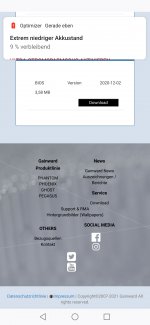
Cool. Ich habe das BIOS-Update einfach mal ausgeführt, wobei ich nicht weiß, ob das überhaupt eine neuere Version war als die, die ich schon hatte.

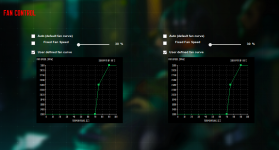
Aber dort habe ich auch gesehen, dass es von Gainward ein eigenes Tool für die Lüftersteuerung gibt. Das habe ich jetzt mal ausprobiert. (siehe Screenshot)
Damit ist das Verhalten auch seltsam. Wenn ich die Lüfterkurve aktiviere, bleibt es zunächst bei 0%. Aber wenn ich ein Spiel spiele und die Lüfter aufdrehen und ich danach wieder ins Idle gehe, bleiben die Lüfter dauerhauft bei 30%.
Erst wenn ich das Tool ganz beende, werden es wieder 0%. Das immerhin.
 

Anhänge

  • expertool.png
    expertool.png
    342,9 KB · Aufrufe: 504
  • Gefällt mir
Reaktionen: Dancefly
Andarkan schrieb:
Cool. Ich habe das BIOS-Update einfach mal ausgeführt, wobei ich nicht weiß, ob das überhaupt eine neuere Version war als die, die ich schon hatte.
Wenn das Update durchgelaufen ist,dann war noch ein älteres Bios drauf.
Andarkan schrieb:
Damit ist das Verhalten auch seltsam. Wenn ich die Lüfterkurve aktiviere, bleibt es zunächst bei 0%. Aber wenn ich ein Spiel spiele und die Lüfter aufdrehen und ich danach wieder ins Idle gehe, bleiben die Lüfter dauerhauft bei 30%.
Liegt wohl an dem Nvidia Treiber,vermute ich mal.
 
Zurück
Oben