Bluescreen Stop x0000000E1

sry habe nicht gesehen das es datum aufsteigend angeordnet war.

hier der richtige

KMODE_EXCEPTION_NOT_HANDLED (1e)
This is a very common bugcheck. Usually the exception address pinpoints
the driver/function that caused the problem. Always note this address
as well as the link date of the driver/image that contains this address.
Arguments:
Arg1: 0000000000000000, The exception code that was not handled
Arg2: 0000000000000000, The address that the exception occurred at
Arg3: 0000000000000000, Parameter 0 of the exception
Arg4: 0000000000000000, Parameter 1 of the exception

Debugging Details:
------------------


EXCEPTION_CODE: (Win32) 0 (0) - Der Vorgang wurde erfolgreich beendet.

FAULTING_IP:
+6438373333333834
00000000`00000000 ?? ???

EXCEPTION_PARAMETER1: 0000000000000000

EXCEPTION_PARAMETER2: 0000000000000000

ERROR_CODE: (NTSTATUS) 0 - STATUS_WAIT_0

BUGCHECK_STR: 0x1E_0

CUSTOMER_CRASH_COUNT: 1

DEFAULT_BUCKET_ID: VISTA_DRIVER_FAULT

PROCESS_NAME: svchost.exe

CURRENT_IRQL: 2

EXCEPTION_RECORD: fffff80000ba2c68 -- (.exr 0xfffff80000ba2c68)
ExceptionAddress: fffff88003c06558 (portcls!CServiceGroup::ServiceDpc+0x000000000000002c)
ExceptionCode: c0000005 (Access violation)
ExceptionFlags: 00000000
NumberParameters: 2
Parameter[0]: 0000000000000000
Parameter[1]: ffffffffffffffff
Attempt to read from address ffffffffffffffff

TRAP_FRAME: fffff80000ba2d10 -- (.trap 0xfffff80000ba2d10)
NOTE: The trap frame does not contain all registers.
Some register values may be zeroed or incorrect.
rax=fffff80000ba2ef8 rbx=0000000000000000 rcx=fffffa80078c2920
rdx=fffff80000ba2ee0 rsi=0000000000000000 rdi=0000000000000000
rip=fffff88003c06558 rsp=fffff80000ba2ea0 rbp=fffffa80078c2900
r8=0000000000000000 r9=0000000000000000 r10=0000000000000000
r11=0000000000000002 r12=0000000000000000 r13=0000000000000000
r14=0000000000000000 r15=0000000000000000
iopl=0 nv up ei pl zr na po nc
portcls!CServiceGroup::ServiceDpc+0x2c:
fffff880`03c06558 f30f7f40e8 movdqu xmmword ptr [rax-18h],xmm0 ds:fffff800`00ba2ee0=0000000000000001fffffa800731b060
Resetting default scope

LAST_CONTROL_TRANSFER: from fffff80002aca32e to fffff80002ad25d0

STACK_TEXT:
fffff800`00ba1d58 fffff800`02aca32e : fffffa80`00000002 fffffa80`075e2520 fffff800`00ba24d0 fffff800`02aff524 : nt!KeBugCheck
fffff800`00ba1d60 fffff800`02af82ed : fffff800`02ce0b88 fffff800`02c19a40 fffff800`02a62000 fffff800`00ba2c68 : nt!KiKernelCalloutExceptionHandler+0xe
fffff800`00ba1d90 fffff800`02aff950 : fffff800`02c21a50 fffff800`00ba1e08 fffff800`00ba2c68 fffff800`02a62000 : nt!RtlpExecuteHandlerForException+0xd
fffff800`00ba1dc0 fffff800`02b0c8df : fffff800`00ba2c68 fffff800`00ba24d0 fffff800`00000000 fffffa80`078c2900 : nt!RtlDispatchException+0x410
fffff800`00ba24a0 fffff800`02ad1c42 : fffff800`00ba2c68 fffff800`02c4ce80 fffff800`00ba2d10 fffffa80`078c2920 : nt!KiDispatchException+0x16f
fffff800`00ba2b30 fffff800`02ad054a : fffffa80`044068b8 fffffa80`04ec1480 fffffa80`06cd1750 fffffa80`04520b38 : nt!KiExceptionDispatch+0xc2
fffff800`00ba2d10 fffff880`03c06558 : fffffa80`05654010 00000000`00000000 fffffa80`0507b220 00000000`01e3bca0 : nt!KiGeneralProtectionFault+0x10a
fffff800`00ba2ea0 fffff800`02addcdc : fffff800`02c4ce80 fffffa80`078c2920 00000000`00000000 00000000`00000055 : portcls!CServiceGroup::ServiceDpc+0x2c
fffff800`00ba2f00 fffff800`02ad8765 : 00000000`00000000 fffffa80`0731b060 00000000`00000000 fffff880`03c0652c : nt!KiRetireDpcList+0x1bc
fffff800`00ba2fb0 fffff800`02ad857c : 00000000`00000000 00000000`00000000 00000000`00000000 00000000`00000000 : nt!KyRetireDpcList+0x5
fffff880`073d5ba0 00000000`00000000 : 00000000`00000000 00000000`00000000 00000000`00000000 00000000`00000000 : nt!KiDispatchInterruptContinue


STACK_COMMAND: kb

FOLLOWUP_IP:
portcls!CServiceGroup::ServiceDpc+2c
fffff880`03c06558 f30f7f40e8 movdqu xmmword ptr [rax-18h],xmm0

SYMBOL_STACK_INDEX: 7

SYMBOL_NAME: portcls!CServiceGroup::ServiceDpc+2c

FOLLOWUP_NAME: MachineOwner

MODULE_NAME: portcls

IMAGE_NAME: portcls.sys

DEBUG_FLR_IMAGE_TIMESTAMP: 4a5bcc03

FAILURE_BUCKET_ID: X64_0x1E_0_portcls!CServiceGroup::ServiceDpc+2c

BUCKET_ID: X64_0x1E_0_portcls!CServiceGroup::ServiceDpc+2c

Followup: MachineOwner
---------
 
KMODE_EXCEPTION_NOT_HANDLED (1e)
This is a very common bugcheck. Usually the exception address pinpoints
the driver/function that caused the problem. Always note this address
as well as the link date of the driver/image that contains this address.
Arguments:
Arg1: 0000000000000000, The exception code that was not handled
Arg2: 0000000000000000, The address that the exception occurred at
Arg3: 0000000000000000, Parameter 0 of the exception
Arg4: 0000000000000000, Parameter 1 of the exception

Debugging Details:
------------------


EXCEPTION_CODE: (Win32) 0 (0) - Der Vorgang wurde erfolgreich beendet.

FAULTING_IP:
+6438373333333834
00000000`00000000 ?? ???

EXCEPTION_PARAMETER1: 0000000000000000

EXCEPTION_PARAMETER2: 0000000000000000

ERROR_CODE: (NTSTATUS) 0 - STATUS_WAIT_0

BUGCHECK_STR: 0x1E_0

CUSTOMER_CRASH_COUNT: 1

DEFAULT_BUCKET_ID: VISTA_DRIVER_FAULT

PROCESS_NAME: svchost.exe

CURRENT_IRQL: 2

EXCEPTION_RECORD: fffff80000ba2c68 -- (.exr 0xfffff80000ba2c68)
ExceptionAddress: fffff88003c06558 (portcls!CServiceGroup::ServiceDpc+0x000000000000002c)
ExceptionCode: c0000005 (Access violation)
ExceptionFlags: 00000000
NumberParameters: 2
Parameter[0]: 0000000000000000
Parameter[1]: ffffffffffffffff
Attempt to read from address ffffffffffffffff

TRAP_FRAME: fffff80000ba2d10 -- (.trap 0xfffff80000ba2d10)
NOTE: The trap frame does not contain all registers.
Some register values may be zeroed or incorrect.
rax=fffff80000ba2ef8 rbx=0000000000000000 rcx=fffffa80078c2920
rdx=fffff80000ba2ee0 rsi=0000000000000000 rdi=0000000000000000
rip=fffff88003c06558 rsp=fffff80000ba2ea0 rbp=fffffa80078c2900
r8=0000000000000000 r9=0000000000000000 r10=0000000000000000
r11=0000000000000002 r12=0000000000000000 r13=0000000000000000
r14=0000000000000000 r15=0000000000000000
iopl=0 nv up ei pl zr na po nc
portcls!CServiceGroup::ServiceDpc+0x2c:
fffff880`03c06558 f30f7f40e8 movdqu xmmword ptr [rax-18h],xmm0 ds:fffff800`00ba2ee0=0000000000000001fffffa800731b060
Resetting default scope

LAST_CONTROL_TRANSFER: from fffff80002aca32e to fffff80002ad25d0

STACK_TEXT:
fffff800`00ba1d58 fffff800`02aca32e : fffffa80`00000002 fffffa80`075e2520 fffff800`00ba24d0 fffff800`02aff524 : nt!KeBugCheck
fffff800`00ba1d60 fffff800`02af82ed : fffff800`02ce0b88 fffff800`02c19a40 fffff800`02a62000 fffff800`00ba2c68 : nt!KiKernelCalloutExceptionHandler+0xe
fffff800`00ba1d90 fffff800`02aff950 : fffff800`02c21a50 fffff800`00ba1e08 fffff800`00ba2c68 fffff800`02a62000 : nt!RtlpExecuteHandlerForException+0xd
fffff800`00ba1dc0 fffff800`02b0c8df : fffff800`00ba2c68 fffff800`00ba24d0 fffff800`00000000 fffffa80`078c2900 : nt!RtlDispatchException+0x410
fffff800`00ba24a0 fffff800`02ad1c42 : fffff800`00ba2c68 fffff800`02c4ce80 fffff800`00ba2d10 fffffa80`078c2920 : nt!KiDispatchException+0x16f
fffff800`00ba2b30 fffff800`02ad054a : fffffa80`044068b8 fffffa80`04ec1480 fffffa80`06cd1750 fffffa80`04520b38 : nt!KiExceptionDispatch+0xc2
fffff800`00ba2d10 fffff880`03c06558 : fffffa80`05654010 00000000`00000000 fffffa80`0507b220 00000000`01e3bca0 : nt!KiGeneralProtectionFault+0x10a
fffff800`00ba2ea0 fffff800`02addcdc : fffff800`02c4ce80 fffffa80`078c2920 00000000`00000000 00000000`00000055 : portcls!CServiceGroup::ServiceDpc+0x2c
fffff800`00ba2f00 fffff800`02ad8765 : 00000000`00000000 fffffa80`0731b060 00000000`00000000 fffff880`03c0652c : nt!KiRetireDpcList+0x1bc
fffff800`00ba2fb0 fffff800`02ad857c : 00000000`00000000 00000000`00000000 00000000`00000000 00000000`00000000 : nt!KyRetireDpcList+0x5
fffff880`073d5ba0 00000000`00000000 : 00000000`00000000 00000000`00000000 00000000`00000000 00000000`00000000 : nt!KiDispatchInterruptContinue


STACK_COMMAND: kb

FOLLOWUP_IP:
portcls!CServiceGroup::ServiceDpc+2c
fffff880`03c06558 f30f7f40e8 movdqu xmmword ptr [rax-18h],xmm0

SYMBOL_STACK_INDEX: 7

SYMBOL_NAME: portcls!CServiceGroup::ServiceDpc+2c

FOLLOWUP_NAME: MachineOwner

MODULE_NAME: portcls

IMAGE_NAME: portcls.sys

DEBUG_FLR_IMAGE_TIMESTAMP: 4a5bcc03

FAILURE_BUCKET_ID: X64_0x1E_0_portcls!CServiceGroup::ServiceDpc+2c

BUCKET_ID: X64_0x1E_0_portcls!CServiceGroup::ServiceDpc+2c

Followup: MachineOwner
---------

Hier sehe ich nur den Unterschied Beim Prozess


ausserdem ist der exception code ein anderer:

beimdritten 1E ´er ist es ebenfalls dort unterschiedlich:

KMODE_EXCEPTION_NOT_HANDLED (1e)
This is a very common bugcheck. Usually the exception address pinpoints
the driver/function that caused the problem. Always note this address
as well as the link date of the driver/image that contains this address.
Arguments:
Arg1: 0000000000000000, The exception code that was not handled
Arg2: 0000000000000000, The address that the exception occurred at
Arg3: 0000000000000000, Parameter 0 of the exception
Arg4: 0000000000000000, Parameter 1 of the exception

Debugging Details:
------------------


EXCEPTION_CODE: (Win32) 0 (0) - Der Vorgang wurde erfolgreich beendet.

FAULTING_IP:
+6438373333333834
00000000`00000000 ?? ???

EXCEPTION_PARAMETER1: 0000000000000000

EXCEPTION_PARAMETER2: 0000000000000000

ERROR_CODE: (NTSTATUS) 0 - STATUS_WAIT_0

BUGCHECK_STR: 0x1E_0

CUSTOMER_CRASH_COUNT: 1

DEFAULT_BUCKET_ID: VISTA_DRIVER_FAULT

PROCESS_NAME: MSIAfterburner

CURRENT_IRQL: 2

EXCEPTION_RECORD: fffff80004033c68 -- (.exr 0xfffff80004033c68)
ExceptionAddress: fffff88003c06558 (portcls!CServiceGroup::ServiceDpc+0x000000000000002c)
ExceptionCode: c0000005 (Access violation)
ExceptionFlags: 00000000
NumberParameters: 2
Parameter[0]: 0000000000000000
Parameter[1]: ffffffffffffffff
Attempt to read from address ffffffffffffffff

TRAP_FRAME: fffff80004033d10 -- (.trap 0xfffff80004033d10)
NOTE: The trap frame does not contain all registers.
Some register values may be zeroed or incorrect.
rax=fffff80004033ef8 rbx=0000000000000000 rcx=fffffa8007eca7d0
rdx=fffff80004033ee0 rsi=0000000000000000 rdi=0000000000000000
rip=fffff88003c06558 rsp=fffff80004033ea0 rbp=fffffa8007eca7b0
r8=0000000000000000 r9=0000000000000000 r10=0000000000000000
r11=0000000000000000 r12=0000000000000000 r13=0000000000000000
r14=0000000000000000 r15=0000000000000000
iopl=0 nv up ei pl zr na po nc
portcls!CServiceGroup::ServiceDpc+0x2c:
fffff880`03c06558 f30f7f40e8 movdqu xmmword ptr [rax-18h],xmm0 ds:e080:fffff800`04033ee0=0000000000000001fffffa8008372b60
Resetting default scope

LAST_CONTROL_TRANSFER: from fffff80002a7932e to fffff80002a815d0

STACK_TEXT:
fffff800`04032d58 fffff800`02a7932e : fffffa80`06dda000 00000000`00000000 fffff800`040334d0 fffff800`02aae524 : nt!KeBugCheck
fffff800`04032d60 fffff800`02aa72ed : fffff800`02c8fb88 fffff800`02bc8a40 fffff800`02a11000 fffff800`04033c68 : nt!KiKernelCalloutExceptionHandler+0xe
fffff800`04032d90 fffff800`02aae950 : fffff800`02bd0a50 fffff800`04032e08 fffff800`04033c68 fffff800`02a11000 : nt!RtlpExecuteHandlerForException+0xd
fffff800`04032dc0 fffff800`02abb8df : fffff800`04033c68 fffff800`040334d0 fffff800`00000000 fffffa80`07eca7b0 : nt!RtlDispatchException+0x410
fffff800`040334a0 fffff800`02a80c42 : fffff800`04033c68 fffff800`02bfbe80 fffff800`04033d10 fffffa80`07eca7d0 : nt!KiDispatchException+0x16f
fffff800`04033b30 fffff800`02a7f54a : fffffa80`04c0d668 fffffa80`04c0d040 fffffa80`06d4a000 fffffa80`04d98b20 : nt!KiExceptionDispatch+0xc2
fffff800`04033d10 fffff880`03c06558 : fffffa80`04d98b20 fffff880`044225c1 fffffa80`07eca810 00000000`74d32450 : nt!KiGeneralProtectionFault+0x10a
fffff800`04033ea0 fffff800`02a8ccdc : fffff800`02bfbe80 fffffa80`07eca7d0 00000000`00000000 00000000`000000f6 : portcls!CServiceGroup::ServiceDpc+0x2c
fffff800`04033f00 fffff800`02a87765 : 00000000`00000000 fffffa80`08372b60 00000000`00000000 fffff880`03c0652c : nt!KiRetireDpcList+0x1bc
fffff800`04033fb0 fffff800`02a8757c : 00000000`00000000 00000000`00000000 00000000`00000000 00000000`00000000 : nt!KyRetireDpcList+0x5
fffff880`0856aba0 00000000`00000000 : 00000000`00000000 00000000`00000000 00000000`00000000 00000000`00000000 : nt!KiDispatchInterruptContinue


STACK_COMMAND: kb

FOLLOWUP_IP:
portcls!CServiceGroup::ServiceDpc+2c
fffff880`03c06558 f30f7f40e8 movdqu xmmword ptr [rax-18h],xmm0

SYMBOL_STACK_INDEX: 7

SYMBOL_NAME: portcls!CServiceGroup::ServiceDpc+2c

FOLLOWUP_NAME: MachineOwner

MODULE_NAME: portcls

IMAGE_NAME: portcls.sys

DEBUG_FLR_IMAGE_TIMESTAMP: 4a5bcc03

FAILURE_BUCKET_ID: X64_0x1E_0_portcls!CServiceGroup::ServiceDpc+2c

BUCKET_ID: X64_0x1E_0_portcls!CServiceGroup::ServiceDpc+2c

Followup: MachineOwner
---------

hoffe das gibt aufschluss:
 
Der Prozessname gibt nur an, welches Programm bzw. welcher Prozess gerade ausgeführt wurde, als der Absturz passierte.

Wichtig ist dieser Punkt: IMAGE_NAME: portcls.sys. Dieser Treiber hat beide Bluescreens ausgelöst! Ebenfalls gleich ist die Art, wie der Bluescreen durch den Treiber ausgelöst wurde: ExceptionCode: c0000005 (Access violation). Jedes mal eine Zugriffsverletzung eines bestimmten Speicherbereichs.

Das kann eigentlich kein Zufall sein. Aktualisiere die Soundtreiber. Für die X-Fi´s sind kürzlich aktuelle Treiber herausgekommen. Hilft das nicht, würde ich testweise die Treiber der X-Fi deinstallieren, X-Fi ausbauen und den Onbaord Sound nutzen. Tritt das Problem dann nicht mehr auf, haben wir den Schuldigen.
 
hab heute bereits von x.x.x.13 auf x.x.x.15 geupdated, vll hilft das ja.

kann man denn definitiv sagen das es nur ein treiber problem ist, oder ist es auch möglich das die soundkarte einen weg hat?
 
ok, werde ich notfalls mache ich die treiber nochmal komplett platt und zieh neue drauf.

ist ja noch nicht so lange her das creative trieber fuer ihre xfi karten auf w7 basis draussen hat.
 
ich danke dir jetzt schonmal, ich hoffe das alles klappt.

dein link war sehr nuetzlich, vll kannste das ja nochmal uebersichtlicher machen und in deine sig packen, denn das auswerten bzw auslesung von bluescreens ist bestimmt bei vielen leuten sehr hilfreich.
mir zumindest hat es ne nette option geöffnet in zukunft vll selber die fehler zu finden.

danke
 
Hallo,

ich klinke mich mal hier ein, denn ich habe auch probleme mit mehreren "STOP:" fehlern.
Ich habe alle fehler mit dem debugg-tool ausgelesen und habe folgendes heraus bekommen
Mein Betriebssystem ist Windows 7 Home Premium 64bit:
Als erster Stop fehler kamm diese Meldung 0x0000001E = amdppm.sys wurde angezeigt, da war Windows 7 ca.2 stunden im Betrieb habe gesurft.
Nach einem Neustart kam diese meldung 0x0000001E = ntkrnlmp.exe
Nagut mache ich halt wieder einen Neustart und das system lief ca. 2 stu stabil bis dann dieses angezeigt wurde 0x000000D1 = CLASSPNP.sys
Ich bin aber auch nicht schlauer daraus geworden.
Was sind das für fehler und wie kann ich die beheben, und kommt mir jetzt nicht damit
das ich alles wieder neuinstallieren muß :(


Hier auswertung ntkrnlmp.exe

Microsoft (R) Windows Debugger Version 6.11.0001.404 AMD64
Copyright (c) Microsoft Corporation. All rights reserved.


Loading Dump File [C:\Windows\Minidump\082610-25662-01.dmp]
Mini Kernel Dump File: Only registers and stack trace are available

WARNING: Whitespace at start of path element
Symbol search path is: SRV*C:\symbols*http://msdl.microsoft.com/download/symbols
Executable search path is: c:\windows\System32; c:\windows\system\System32
Windows 7 Kernel Version 7600 MP (4 procs) Free x64
Product: WinNt, suite: TerminalServer SingleUserTS Personal
Built by: 7600.16617.amd64fre.win7_gdr.100618-1621
Machine Name:
Kernel base = 0xfffff800`0284c000 PsLoadedModuleList = 0xfffff800`02a89e50
Debug session time: Thu Aug 26 12:19:59.031 2010 (GMT+2)
System Uptime: 0 days 1:41:27.982
Loading Kernel Symbols
...............................................................
................................................................
............................
Loading User Symbols
Loading unloaded module list
........
*******************************************************************************
* *
* Bugcheck Analysis *
* *
*******************************************************************************

Use !analyze -v to get detailed debugging information.

BugCheck 1E, {0, 0, 0, 0}

Probably caused by : ntkrnlmp.exe ( nt!KiKernelCalloutExceptionHandler+e )

Followup: MachineOwner
---------

2: kd> !analyze -v
*******************************************************************************
* *
* Bugcheck Analysis *
* *
*******************************************************************************

KMODE_EXCEPTION_NOT_HANDLED (1e)
This is a very common bugcheck. Usually the exception address pinpoints
the driver/function that caused the problem. Always note this address
as well as the link date of the driver/image that contains this address.
Arguments:
Arg1: 0000000000000000, The exception code that was not handled
Arg2: 0000000000000000, The address that the exception occurred at
Arg3: 0000000000000000, Parameter 0 of the exception
Arg4: 0000000000000000, Parameter 1 of the exception

Debugging Details:
------------------


EXCEPTION_CODE: (Win32) 0 (0) - Der Vorgang wurde erfolgreich beendet.

FAULTING_IP:
+0
00000000`00000000 ?? ???

EXCEPTION_PARAMETER1: 0000000000000000

EXCEPTION_PARAMETER2: 0000000000000000

CUSTOMER_CRASH_COUNT: 1

DEFAULT_BUCKET_ID: VISTA_DRIVER_FAULT

BUGCHECK_STR: 0x1E

PROCESS_NAME: System

CURRENT_IRQL: 2

EXCEPTION_RECORD: fffff88002f8b328 -- (.exr 0xfffff88002f8b328)
ExceptionAddress: fffff800028c613b (nt!KiTimerWaitTest+0x000000000000001b)
ExceptionCode: c0000005 (Access violation)
ExceptionFlags: 00000000
NumberParameters: 2
Parameter[0]: 0000000000000000
Parameter[1]: ffffffffffffffff
Attempt to read from address ffffffffffffffff

TRAP_FRAME: fffff88002f8b3d0 -- (.trap 0xfffff88002f8b3d0)
NOTE: The trap frame does not contain all registers.
Some register values may be zeroed or incorrect.
rax=da55e69405611a97 rbx=0000000000000000 rcx=fffff88002f63180
rdx=fffffa8004b5e230 rsi=0000000000000000 rdi=0000000000000000
rip=fffff800028c613b rsp=fffff88002f8b560 rbp=000000000005f46c
r8=fffff88002f65301 r9=0000000000000002 r10=000000000000006c
r11=0000000000000000 r12=0000000000000000 r13=0000000000000000
r14=0000000000000000 r15=0000000000000000
iopl=0 nv up ei pl nz na pe nc
nt!KiTimerWaitTest+0x1b:
fffff800`028c613b 8bc8 mov ecx,eax
Resetting default scope

LAST_CONTROL_TRANSFER: from fffff800028b446e to fffff800028bc710

STACK_TEXT:
fffff880`02f8a418 fffff800`028b446e : fffff880`02f8a778 00000000`00000011 fffff880`02f8ab90 fffff800`028e9668 : nt!KeBugCheck
fffff880`02f8a420 fffff800`028e240d : fffff800`02acab7c fffff800`02a04e84 fffff800`0284c000 fffff880`02f8b328 : nt!KiKernelCalloutExceptionHandler+0xe
fffff880`02f8a450 fffff800`028e9a90 : fffff800`02a0bb14 fffff880`02f8a4c8 fffff880`02f8b328 fffff800`0284c000 : nt!RtlpExecuteHandlerForException+0xd
fffff880`02f8a480 fffff800`028f69ef : fffff880`02f8b328 fffff880`02f8ab90 fffff880`00000000 fffff880`02f8b608 : nt!RtlDispatchException+0x410
fffff880`02f8ab60 fffff800`028bbd82 : fffff880`02f8b328 fffffa80`04b5e230 fffff880`02f8b3d0 71f4a3f4`bef73d15 : nt!KiDispatchException+0x16f
fffff880`02f8b1f0 fffff800`028ba68a : 00000000`00002080 fffff880`1005f66e fffffa80`05d63000 fffffa80`05d63000 : nt!KiExceptionDispatch+0xc2
fffff880`02f8b3d0 fffff800`028c613b : fffff800`02a36e80 fffffa80`04436b60 fffffa80`073a7300 fffff880`0fe0c095 : nt!KiGeneralProtectionFault+0x10a
fffff880`02f8b560 fffff800`028c7d7d : fffffa80`05021c20 fffffa80`05021c68 fffffa80`05021c68 00000000`00000000 : nt!KiTimerWaitTest+0x1b
fffff880`02f8b5e0 fffff800`028c84be : 0000000e`2cb86098 fffff880`02f8bc58 00000000`0005f46c fffff880`02f66308 : nt!KiProcessExpiredTimerList+0x6d
fffff880`02f8bc30 fffff800`028c7cb7 : 00000003`79fe23c1 00000003`0005f46c 00000003`79fe2312 00000000`0000006c : nt!KiTimerExpiration+0x1be
fffff880`02f8bcd0 fffff800`028c4eea : fffff880`02f63180 fffff880`02f6dfc0 00000000`00000000 fffff880`0fe85bdc : nt!KiRetireDpcList+0x277
fffff880`02f8bd80 00000000`00000000 : fffff880`02f8c000 fffff880`02f86000 fffff880`02f8bd40 00000000`00000000 : nt!KiIdleLoop+0x5a


STACK_COMMAND: kb

FOLLOWUP_IP:
nt!KiKernelCalloutExceptionHandler+e
fffff800`028b446e 90 nop

SYMBOL_STACK_INDEX: 1

SYMBOL_NAME: nt!KiKernelCalloutExceptionHandler+e

FOLLOWUP_NAME: MachineOwner

MODULE_NAME: nt

IMAGE_NAME: ntkrnlmp.exe

DEBUG_FLR_IMAGE_TIMESTAMP: 4c1c44a9

FAILURE_BUCKET_ID: X64_0x1E_nt!KiKernelCalloutExceptionHandler+e

BUCKET_ID: X64_0x1E_nt!KiKernelCalloutExceptionHandler+e

Followup: MachineOwner
-----------------------------------------------------------------------------------------------------------------------------
Hier auswertung amdppm.sys

Microsoft (R) Windows Debugger Version 6.11.0001.404 AMD64
Copyright (c) Microsoft Corporation. All rights reserved.


Loading Dump File [C:\Windows\Minidump\082610-17113-01.dmp]
Mini Kernel Dump File: Only registers and stack trace are available

WARNING: Whitespace at start of path element
Symbol search path is: SRV*C:\symbols*http://msdl.microsoft.com/download/symbols
Executable search path is: c:\windows\System32; c:\windows\system\System32
Windows 7 Kernel Version 7600 MP (4 procs) Free x64
Product: WinNt, suite: TerminalServer SingleUserTS Personal
Built by: 7600.16617.amd64fre.win7_gdr.100618-1621
Machine Name:
Kernel base = 0xfffff800`02860000 PsLoadedModuleList = 0xfffff800`02a9de50
Debug session time: Thu Aug 26 18:04:12.317 2010 (GMT+2)
System Uptime: 0 days 1:19:31.894
Loading Kernel Symbols
...............................................................
................................................................
..............................
Loading User Symbols
Loading unloaded module list
.....
*******************************************************************************
* *
* Bugcheck Analysis *
* *
*******************************************************************************

Use !analyze -v to get detailed debugging information.

BugCheck 1E, {0, 0, 0, 0}

Probably caused by : amdppm.sys ( amdppm!C1Halt+2 )

Followup: MachineOwner
---------

2: kd> !analyze -v
*******************************************************************************
* *
* Bugcheck Analysis *
* *
*******************************************************************************

KMODE_EXCEPTION_NOT_HANDLED (1e)
This is a very common bugcheck. Usually the exception address pinpoints
the driver/function that caused the problem. Always note this address
as well as the link date of the driver/image that contains this address.
Arguments:
Arg1: 0000000000000000, The exception code that was not handled
Arg2: 0000000000000000, The address that the exception occurred at
Arg3: 0000000000000000, Parameter 0 of the exception
Arg4: 0000000000000000, Parameter 1 of the exception

Debugging Details:
------------------


EXCEPTION_CODE: (Win32) 0 (0) - Der Vorgang wurde erfolgreich beendet.

FAULTING_IP:
+0
00000000`00000000 ?? ???

EXCEPTION_PARAMETER1: 0000000000000000

EXCEPTION_PARAMETER2: 0000000000000000

CUSTOMER_CRASH_COUNT: 1

DEFAULT_BUCKET_ID: VISTA_DRIVER_FAULT

BUGCHECK_STR: 0x1E

PROCESS_NAME: System

CURRENT_IRQL: d

EXCEPTION_RECORD: fffff88002f8b808 -- (.exr 0xfffff88002f8b808)
ExceptionAddress: fffff800028d7391 (nt!KeAccumulateTicks+0x0000000000000141)
ExceptionCode: c000001d (Illegal instruction)
ExceptionFlags: 00000000
NumberParameters: 0

TRAP_FRAME: fffff88002f8b8b0 -- (.trap 0xfffff88002f8b8b0)
NOTE: The trap frame does not contain all registers.
Some register values may be zeroed or incorrect.
rax=acaeb078b3307620 rbx=0000000000000000 rcx=0000000000000011
rdx=00000000000162d3 rsi=0000000000000000 rdi=0000000000000000
rip=fffff800028d7391 rsp=fffff88002f8ba40 rbp=0000000000000000
r8=000000000001a650 r9=0000000000000000 r10=0000000000007851
r11=fffffa800716e318 r12=0000000000000000 r13=0000000000000000
r14=0000000000000000 r15=0000000000000000
iopl=0 nv up ei pl zr na po nc
nt!KeAccumulateTicks+0x141:
fffff800`028d7391 408ac5 mov al,bpl
Resetting default scope

LAST_CONTROL_TRANSFER: from fffff800028c846e to fffff800028d0710

STACK_TEXT:
fffff880`02f8a8f8 fffff800`028c846e : 00000000`00000000 fffff800`02a755f8 fffff880`02f8b070 fffff800`028fd668 : nt!KeBugCheck
fffff880`02f8a900 fffff800`028f640d : fffff800`02adeedc fffff800`02a17dac fffff800`02860000 fffff880`02f8b808 : nt!KiKernelCalloutExceptionHandler+0xe
fffff880`02f8a930 fffff800`028fda90 : fffff800`02a1fb14 fffff880`02f8a9a8 fffff880`02f8b808 fffff800`02860000 : nt!RtlpExecuteHandlerForException+0xd
fffff880`02f8a960 fffff800`0290a9ef : fffff880`02f8b808 fffff880`02f8b070 fffff880`00000000 00000000`00000000 : nt!RtlDispatchException+0x410
fffff880`02f8b040 fffff800`028cfd82 : fffff880`02f8b808 fffff880`02f63180 fffff880`02f8b8b0 00000000`00002710 : nt!KiDispatchException+0x16f
fffff880`02f8b6d0 fffff800`028cdedf : fffff880`02f8b8b0 fffff880`1002e60d fffffa80`05ad7000 fffffa80`00000000 : nt!KiExceptionDispatch+0xc2
fffff880`02f8b8b0 fffff800`028d7391 : 00000000`00000000 fffff880`0ffdc6a3 00000000`00000001 00000000`00000001 : nt!KiInvalidOpcodeFault+0x11f
fffff880`02f8ba40 fffff800`028dd618 : fffffa80`05ad7000 fffff880`0ffc571c 00000000`00002710 fffffa80`05299500 : nt!KeAccumulateTicks+0x141
fffff880`02f8bad0 fffff800`028dd3a1 : 00000000`00000000 fffff880`02f8bb80 fffff880`02f63180 00000000`00000001 : nt!KeUpdateRunTime+0xb8
fffff880`02f8bb00 fffff880`03f1e7f2 : fffff800`028de24a 00000000`00256c4e fffffa80`05299598 fffff880`02f6dfc0 : nt!KiSecondaryClockInterrupt+0x131
fffff880`02f8bc98 fffff800`028de24a : 00000000`00256c4e fffffa80`05299598 fffff880`02f6dfc0 00000000`00000001 : amdppm!C1Halt+0x2
fffff880`02f8bca0 fffff800`028d8ebc : fffff880`02f63180 fffff880`00000000 00000000`00000000 fffff880`0fe54bdc : nt!PoIdle+0x53a
fffff880`02f8bd80 00000000`00000000 : fffff880`02f8c000 fffff880`02f86000 fffff880`02f8bd40 00000000`00000000 : nt!KiIdleLoop+0x2c


STACK_COMMAND: kb

FOLLOWUP_IP:
amdppm!C1Halt+2
fffff880`03f1e7f2 c3 ret

SYMBOL_STACK_INDEX: a

SYMBOL_NAME: amdppm!C1Halt+2

FOLLOWUP_NAME: MachineOwner

MODULE_NAME: amdppm

IMAGE_NAME: amdppm.sys

DEBUG_FLR_IMAGE_TIMESTAMP: 4a5bc0fd

FAILURE_BUCKET_ID: X64_0x1E_amdppm!C1Halt+2

BUCKET_ID: X64_0x1E_amdppm!C1Halt+2

Followup: MachineOwner
-----------------------------------------------------------------------------------------------------------------------------
Hier auswertung CLASSPNP.SYS

Microsoft (R) Windows Debugger Version 6.11.0001.404 AMD64
Copyright (c) Microsoft Corporation. All rights reserved.


Loading Dump File [C:\Windows\Minidump\082610-17924-01.dmp]
Mini Kernel Dump File: Only registers and stack trace are available

WARNING: Whitespace at start of path element
Symbol search path is: SRV*C:\symbols*http://msdl.microsoft.com/download/symbols
Executable search path is: c:\windows\System32; c:\windows\system\System32; http://www.alexander.com/SymServe
Windows 7 Kernel Version 7600 MP (4 procs) Free x64
Product: WinNt, suite: TerminalServer SingleUserTS Personal
Built by: 7600.16617.amd64fre.win7_gdr.100618-1621
Machine Name:
Kernel base = 0xfffff800`02810000 PsLoadedModuleList = 0xfffff800`02a4de50
Debug session time: Thu Aug 26 18:06:57.235 2010 (GMT+2)
System Uptime: 0 days 0:01:38.186
Loading Kernel Symbols
...............................................................
................................................................
............................
Loading User Symbols
Loading unloaded module list
....
*******************************************************************************
* *
* Bugcheck Analysis *
* *
*******************************************************************************

Use !analyze -v to get detailed debugging information.

BugCheck D1, {fffff8005f9d0007, e, 8, fffff8005f9d0007}

Probably caused by : CLASSPNP.SYS ( CLASSPNP!TransferPktComplete+227 )

Followup: MachineOwner
---------

2: kd> !analyze -v
*******************************************************************************
* *
* Bugcheck Analysis *
* *
*******************************************************************************

DRIVER_IRQL_NOT_LESS_OR_EQUAL (d1)
An attempt was made to access a pageable (or completely invalid) address at an
interrupt request level (IRQL) that is too high. This is usually
caused by drivers using improper addresses.
If kernel debugger is available get stack backtrace.
Arguments:
Arg1: fffff8005f9d0007, memory referenced
Arg2: 000000000000000e, IRQL
Arg3: 0000000000000008, value 0 = read operation, 1 = write operation
Arg4: fffff8005f9d0007, address which referenced memory

Debugging Details:
------------------


READ_ADDRESS: GetPointerFromAddress: unable to read from fffff80002ab80e0
fffff8005f9d0007

CURRENT_IRQL: e

FAULTING_IP:
+0
fffff800`5f9d0007 ?? ???

CUSTOMER_CRASH_COUNT: 1

DEFAULT_BUCKET_ID: VISTA_DRIVER_FAULT

BUGCHECK_STR: 0xD1

PROCESS_NAME: System

TRAP_FRAME: fffff88002f8b890 -- (.trap 0xfffff88002f8b890)
NOTE: The trap frame does not contain all registers.
Some register values may be zeroed or incorrect.
rax=fffff8005f9d0007 rbx=0000000000000000 rcx=fffff88002f63180
rdx=0000003900000000 rsi=0000000000000000 rdi=0000000000000000
rip=fffff8005f9d0007 rsp=fffff88002f8ba20 rbp=fffff880009e7180
r8=fffff88002f6dfc0 r9=000000000b855499 r10=fffff88002f67e40
r11=fffffa8004e219f4 r12=0000000000000000 r13=0000000000000000
r14=0000000000000000 r15=0000000000000000
iopl=0 nv up ei ng nz na pe nc
fffff800`5f9d0007 ?? ???
Resetting default scope

LAST_CONTROL_TRANSFER: from fffff8000287fca9 to fffff80002880740

FAILED_INSTRUCTION_ADDRESS:
+0
fffff800`5f9d0007 ?? ???

STACK_TEXT:
fffff880`02f8b748 fffff800`0287fca9 : 00000000`0000000a fffff800`5f9d0007 00000000`0000000e 00000000`00000008 : nt!KeBugCheckEx
fffff880`02f8b750 fffff800`0287e920 : 00000000`00000000 00000000`00000003 00000000`00000001 00000000`00000000 : nt!KiBugCheckDispatch+0x69
fffff880`02f8b890 fffff800`5f9d0007 : fffff880`018d9110 00000000`ffffffff fffffa80`04ade060 fffffa80`03e25e60 : nt!KiPageFault+0x260
fffff880`02f8ba20 fffff880`018d9110 : 00000000`ffffffff fffffa80`04ade060 fffffa80`03e25e60 fffff8a0`03784000 : 0xfffff800`5f9d0007
fffff880`02f8ba28 00000000`ffffffff : fffffa80`04ade060 fffffa80`03e25e60 fffff8a0`03784000 fffff880`018bf947 : CLASSPNP!WPP_GLOBAL_Control
fffff880`02f8ba30 fffffa80`04ade060 : fffffa80`03e25e60 fffff8a0`03784000 fffff880`018bf947 fffffa80`060ce010 : 0xffffffff
fffff880`02f8ba38 fffffa80`03e25e60 : fffff8a0`03784000 fffff880`018bf947 fffffa80`060ce010 00000000`00000003 : 0xfffffa80`04ade060
fffff880`02f8ba40 fffff8a0`03784000 : fffff880`018bf947 fffffa80`060ce010 00000000`00000003 00000000`ffffffff : 0xfffffa80`03e25e60
fffff880`02f8ba48 fffff880`018bf947 : fffffa80`060ce010 00000000`00000003 00000000`ffffffff 00000000`00000000 : 0xfffff8a0`03784000
fffff880`02f8ba50 fffff800`0288d618 : 00000000`00000000 fffffa80`04797960 fffffa80`05583400 fffffa80`05581b00 : CLASSPNP!TransferPktComplete+0x227
fffff880`02f8bad0 fffff800`0288cb1a : 00000000`00000000 fffff880`02f8bb80 00000000`00000001 fffffa80`05583490 : nt!KeUpdateRunTime+0xb8
fffff880`02f8bb00 fffff880`03e5c7f2 : fffff800`0288e24a 00000000`00256c4e fffffa80`05581bb8 fffff880`02f6dfc0 : nt!KiIpiInterrupt+0x12a
fffff880`02f8bc98 fffff800`0288e24a : 00000000`00256c4e fffffa80`05581bb8 fffff880`02f6dfc0 00000000`00000002 : amdppm!C1Halt+0x2
fffff880`02f8bca0 fffff800`02888ebc : fffff880`02f63180 fffff880`00000000 00000000`00000000 fffff880`01002880 : nt!PoIdle+0x53a
fffff880`02f8bd80 00000000`00000000 : fffff880`02f8c000 fffff880`02f86000 fffff880`02f8bd40 00000000`00000000 : nt!KiIdleLoop+0x2c


STACK_COMMAND: kb

FOLLOWUP_IP:
CLASSPNP!TransferPktComplete+227
fffff880`018bf947 488d9e30010000 lea rbx,[rsi+130h]

SYMBOL_STACK_INDEX: 9

SYMBOL_NAME: CLASSPNP!TransferPktComplete+227

FOLLOWUP_NAME: MachineOwner

MODULE_NAME: CLASSPNP

IMAGE_NAME: CLASSPNP.SYS

DEBUG_FLR_IMAGE_TIMESTAMP: 4a5bc11e

FAILURE_BUCKET_ID: X64_0xD1_CODE_AV_BAD_IP_CLASSPNP!TransferPktComplete+227

BUCKET_ID: X64_0xD1_CODE_AV_BAD_IP_CLASSPNP!TransferPktComplete+227

Followup: MachineOwner
---------
 
Zuletzt bearbeitet:
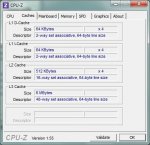
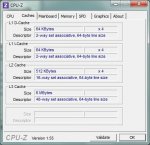
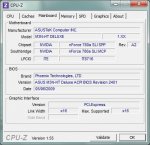
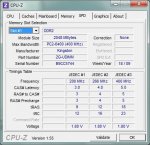
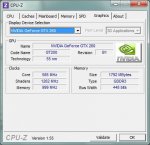
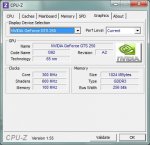
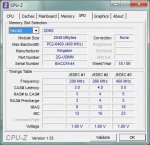
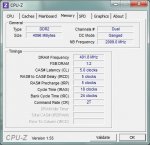
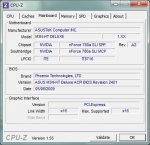
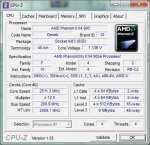
Hier die angeforderten Screenshoots;
Ergänzung ()

Hier noch Memory habe ich oben vergessen:rolleyes:
Ergänzung ()

Hier noch mehr screenshoots
 

Anhänge

  • cpu.jpg
    cpu.jpg
    61 KB · Aufrufe: 129
  • cache.jpg
    cache.jpg
    61 KB · Aufrufe: 123
  • mainboard.jpg
    mainboard.jpg
    62,4 KB · Aufrufe: 128
  • slot1-ram.jpg
    slot1-ram.jpg
    73,2 KB · Aufrufe: 120
  • hauptgrafikkarte.jpg
    hauptgrafikkarte.jpg
    58,3 KB · Aufrufe: 128
  • Phys-x.jpg
    Phys-x.jpg
    58 KB · Aufrufe: 138
  • slot2-ram.jpg
    slot2-ram.jpg
    73,3 KB · Aufrufe: 130
  • memory.jpg
    memory.jpg
    59,3 KB · Aufrufe: 125
  • mainboard.jpg
    mainboard.jpg
    62,4 KB · Aufrufe: 112
  • cpu.jpg
    cpu.jpg
    85,6 KB · Aufrufe: 122
... ist ein aktuelles Bios auf dem Board?
EDIT: ja ist aktuell. Dem Fehler 1E kann defekte Hardware, Dienste von Drittanbietern oder Virenschutzsoftware zugrunde liegen (soll aber auch die gleichen Ursachen haben wie IRQL_NOT_LESS_OR_EQUAL. In dem Fall die RAM Einstellungen kontrollieren). Beim Speicher ist nur der tRas, tRC Wert falsch eingestellt. Schau mal im Bios nach ob er mit 1,8V läuft.
 
Zuletzt bearbeitet:
Hallo,
die Fehler treten seit dem ich das System von grundauf neu zusammen gesetzt habe,
sprich die GTS 250,die HDD Western Digital 320 GB sind neu die übrigen komponenten
sind so ca. 1,5 jahre alt und liefen auf einem ASUS M3N-WS ohne je einen bluescreen
angezeigt zuhaben sehr stabil,da ich aber eine Phys-X Grafikkarte haben wollte habe
ich mich für das ASUS M3N-HT Deluxe entschieden und mit dem Board habe ich nur
bluescreen´s seit anfang an.Es sind auch immer andere Fehler Meldungen.
Als ich das M3N-HT Board verbaut habe, habe ich gleich das aktuelle Bios 3106 aufgespielt
danach das OS Windows 7 installiert und dann kamen auch schon die bluescreens.
Jetzt habe ich das 2401 Bios drauf das ist ein Biosversion für die Phenoms IIx4 und
ich habe momentan nur die drei angegebenen bluesreeens wie ich sie schon angegeben
habe. Alles recht merkwürdig:eek:

-Ich werde jetzt mal mit Memtest den Ram testen!
Obwohl wenn die doch auf dem (alten) mainboard gelaufen haben warum sollten die
jetzt aufeinmal nicht mehr funktionieren!
(Kingston Hyper-X 1066 DDR2 Ram laufen aber nur auf 800 da ich ein AM3 Prozessor
drauf habe!)
 
Dann wäre es interessant, ob die Probleme bleiben, wenn du jeweils nur eine Grafikkarte einbebaut hast.

Bei ständig wechselnden Fehlermeldungen, liegt das Problem meist beim Memory Management. Dies kann neben dem RAM auch am VRAM, CPU-Cache, HDD, oder natürlich am Motherboard selbst liegen.

Teste aber erst einmal den RAM mit Memtest86+. Nur weil sie bislang fehlerfrei liefen, heist das leider nicht, dass sie nicht (mittlerweile) defekt sein können. Sollten keine Fehler angezeigt werden, wäre es hilfreich, wenn du den Betrieb mit jeweils nur einer Grafikkarte testen könntest.
 
Hallo,

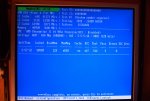
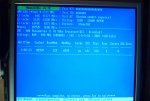
habe jetzt mal Memtest ausgeführt und per Anhang beigefügt. Die Ram Module
sind wohl in Ordnung es wurden keine errors angezeit!
Mich beschäftigt noch eine andere sache könnte es vieleicht sein das mein BQ NT
nicht genug Strom liefert für meine neu aufgebautes system, denn ich habe nur 2 PCIx16
GK anschlüsse am Netzteil und die sind für die GTX 260. Da das NT zwei seperate 12V
Leitungen hat habe ich daran per 2x5,25>6pol adapter die GTS 250 angeschlossen.
Ich habe mich mal bei ASUS erkundigt und es wird dort angegeben das mindestens ein
600Watt NT benutzt werden sollte!
werden deshalb diese bluescreens angezeigt oder liege ich falsch!
Mir ist noch etwas aufgefallen, beim system start wird angezeigt welche Geräte welche
IRQ zugewiesen ist und da teilen sich 4 Geräte einen IRQ.
Ich habe es per Anhang beigefügt, vieleicht hängt es auch damit zusammen?
Wie gesagt habe ich noch nie so hartnäckige bluescreens gehabt, wie diese hier:(

-Ich werde jetzt mal nur eine GK benutzen (GTX 260) mal sehen ob es stabiler läuft.
Ich werde mich dann noch mal melden.

mfg
 

Anhänge

  • Memtest_2-57.jpg
    Memtest_2-57.jpg
    251,4 KB · Aufrufe: 127
  • memtest_4-02.jpg
    memtest_4-02.jpg
    298,4 KB · Aufrufe: 119
  • IM001122.jpg
    IM001122.jpg
    306,2 KB · Aufrufe: 121
So habe jetzt nur eine Grafikkarte (GTX 260) in meinem system verbaut und ca. 8 stu.
ohne probleme probiert, bis wieder ein bluescreen auftauchte.
Es ist wieder " amdppm.sys "

Hier ein kleiner auszug des Anhangs!

STACK_COMMAND: kb

FOLLOWUP_IP:
amdppm!C1Halt+2
fffff880`03ea47f2 c3 ret

SYMBOL_STACK_INDEX: a
SYMBOL_NAME: amdppm!C1Halt+2
FOLLOWUP_NAME: MachineOwner
MODULE_NAME: amdppm
IMAGE_NAME: amdppm.sys
DEBUG_FLR_IMAGE_TIMESTAMP: 4a5bc0fd
FAILURE_BUCKET_ID: X64_0x1E_amdppm!C1Halt+2
BUCKET_ID: X64_0x1E_amdppm!C1Halt+2
Followup: MachineOwner
---------

-Was ist amdppm.sys für eine Datei! langsam nervt es gewaltig! :mad:
 

Anhänge

Zurück
Oben